ONEPLUS
How to allow installing apps from unknown sources on a OnePlus

In short
On OxygenOS 16 it is called Installation sources: Settings, Security and privacy, More security and privacy, Installation sources. Switch on only the app you will install from, such as Chrome. Search Settings for install, not unknown.
4 of 4 steps show a real screenshot from our Nord 5. Each step was checked against the maker's own instructions, linked at the end.
Steps
- 1
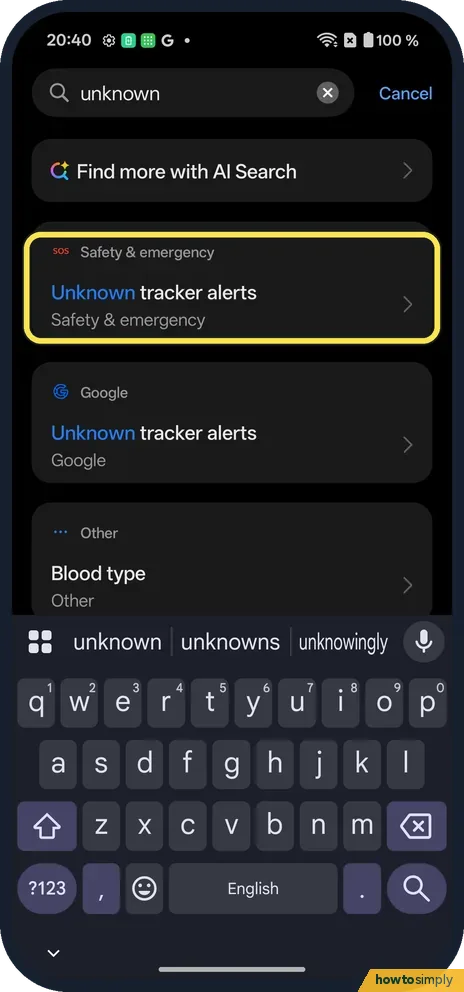
Searching unknown won't find it
On ours, unknown found only Unknown tracker alerts and Blood type.
- 2
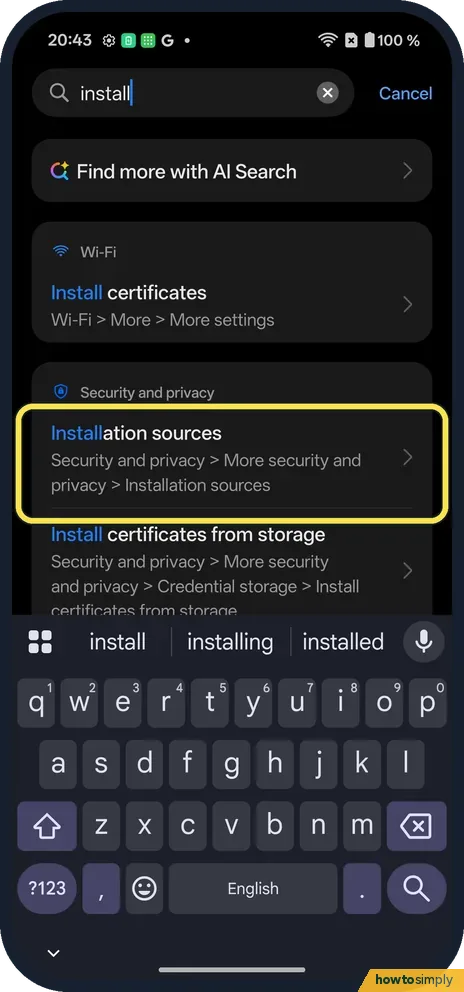
Search install instead
Installation sources is under Security and privacy, More security and privacy. Tap it.
- 3
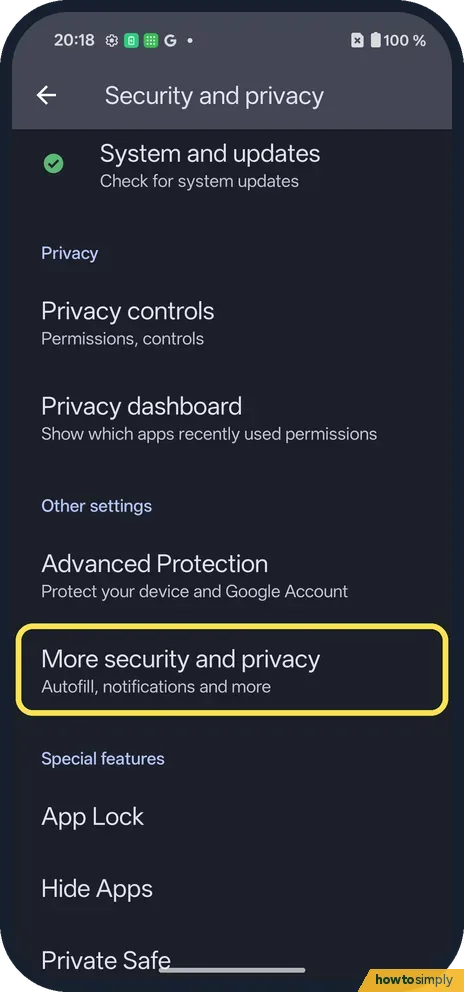
Or open More security and privacy
Open Settings, Security and privacy, More security and privacy.
- 4
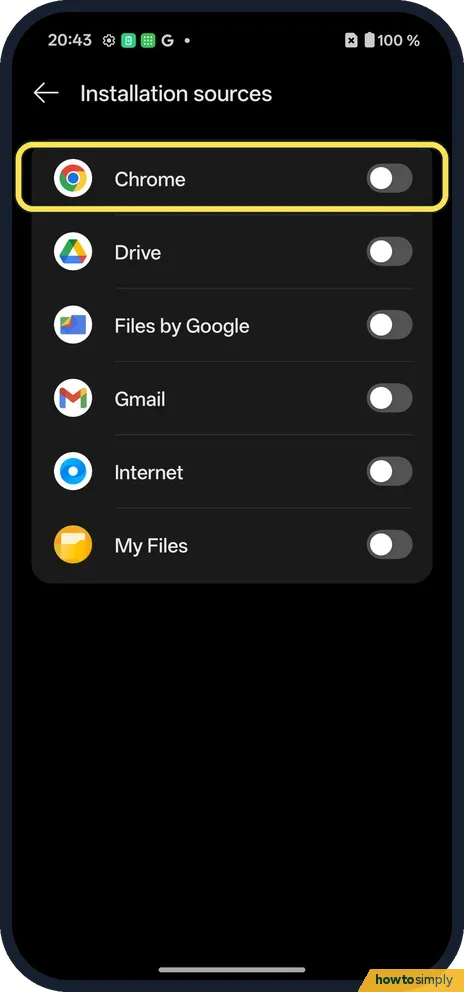
Switch on one app
Installation sources lists apps that can install others: Chrome, Drive, Files by Google, Gmail, Internet, My Files. All were off.
If you do not see this option
- Not in Special app access? On ours, Apps, Special app access lists Modify system settings, All files access, Wi-Fi control and more, but no install option.
- Older OxygenOS? Older Android versions call it Install unknown apps. Source: Download apps to your Android device
If this does not work
- Play Protect warns? It checks apps from any source.
- Switch greyed out? Advanced Protection, on the Security and privacy page, can block installs from outside Play.
- Done installing? Switch the app off again.
- Not sure which app to switch on? Allow the app that opens the file, not the website it came from. If you tap the download in Chrome, allow Chrome; if you open the file later in Files by Google, allow that instead.
- Install still blocked with the switch on? Google says Play Protect may block unverified apps that request sensitive permissions often used in financial scams. Treat that as a strong reason not to install the app.
- File will not open or install? A download that stopped part-way cannot be installed. Delete it, download it again from the developer's official site, and wait until it has finished before you tap it.
- Work or school phone? An organisation that manages the phone can block installs from outside Google Play. If the switches cannot be changed, ask whoever manages the device.
Good to know
Scan for harmful apps with Play Protect on a OnePlus.
Once an app is allowed, it can open the installer, and you still confirm each install. Google warns that apps from unknown sources can put your phone and personal information at risk, and that apps installed outside Google Play can send Google information such as log data, device ID, Android version and IP address so it can guard against harmful apps. Back up first if you are installing something that will change how the phone works.
Apps you install this way get their updates from where you got them, so check the developer's site from time to time. Switching the source app off again stops new installs but leaves existing apps in place. After installing, you can scan with Play Protect and review the new app's permissions.
About this guide
- Device
- Android
- Shown on
- OnePlus Nord 5 (CPH2709), OxygenOS 16.0.5.1201, Android 16
- App
- Settings
- Path
- Settings › Security and privacy › More security and privacy › Installation sources
- Real screenshots
- 4 of 4 steps
- Checked
- October 2026
- Sources
- 2 official, linked below
Sources
Links checked October 2026. Menus and features can change with updates.Spotted a mistake? Menus change with updates, and we want every step to match your screen. Email us about this page or use the contact form. We read every report, and fixes are listed on What changed.
Liked this guide?
Follow us for new guides and short how-to videos.
Did this guide work for you?
Sorry about that. What happened?