XIAOMI REDMI
How to back up a Xiaomi phone (HyperOS 3)
For a Google backup, go to Settings, Google services, All services, Backup, and tap Turn on. For Xiaomi Cloud, go to Settings, Xiaomi Account, Xiaomi Cloud, Backups, and allow the permissions. Xiaomi Cloud sync may need a paid SMS to activate.

7 of 7 steps show a real screenshot from our Redmi Note 15 Pro 5G. Each step was checked against the maker's own instructions, linked at the end.
Steps
- 1
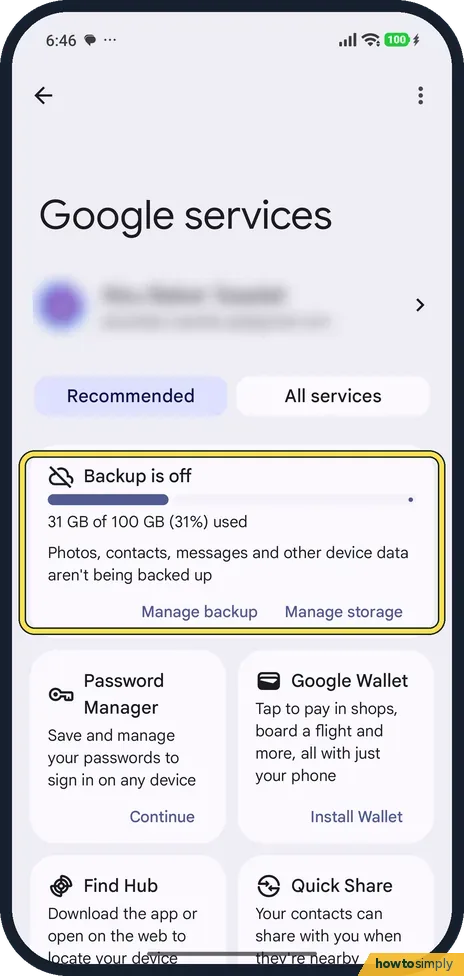
Open Google services
Go to Settings, Google services. Ours showed Backup is off at the top.
- 2
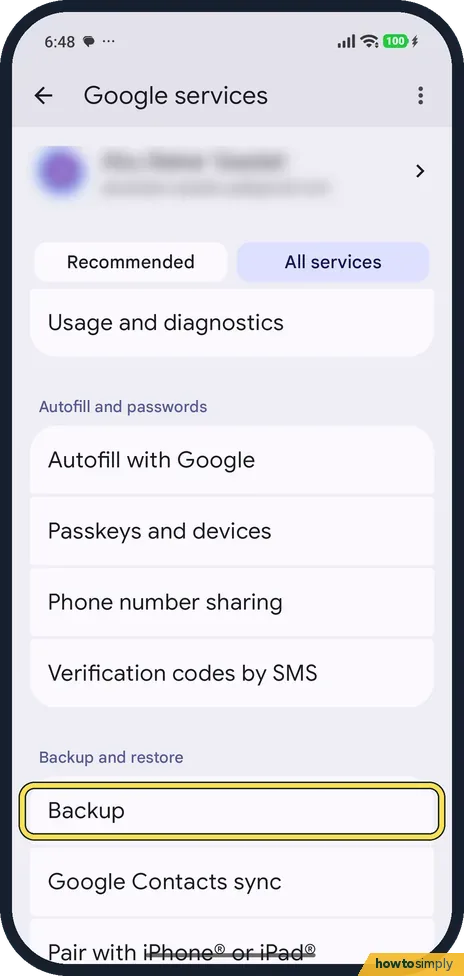
Tap All services, then Backup
Tap the All services tab. Under Backup and restore, tap Backup.
- 3
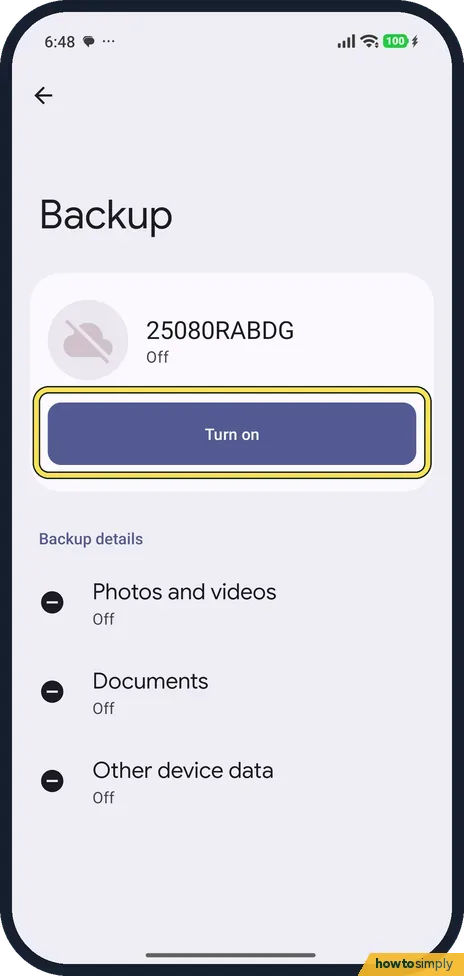
Tap Turn on
The Backup page showed our phone, 25080RABDG, as Off, with Photos and videos, Documents and Other device data all Off. Tap Turn on.
- 4
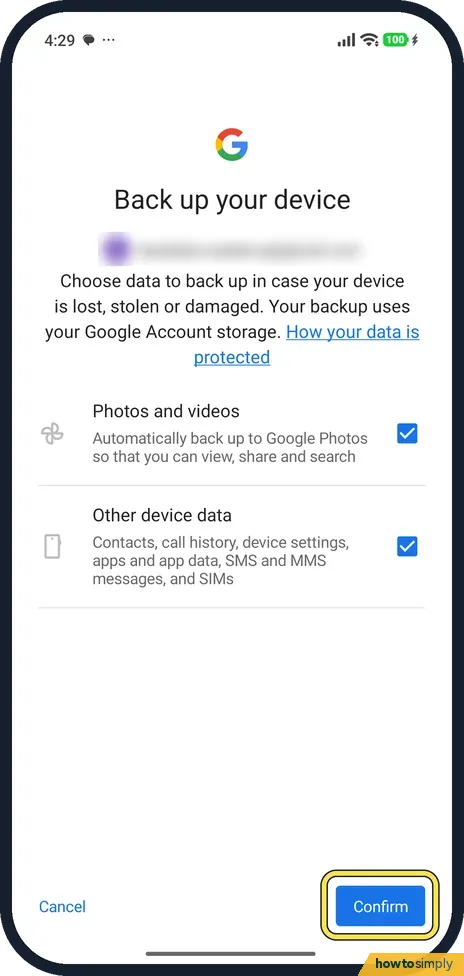
Choose what Google backs up
Back up your device lets you choose Photos and videos and Other device data (call history, settings, apps, SMS). Tap Confirm to start. We tapped Cancel.
- 5
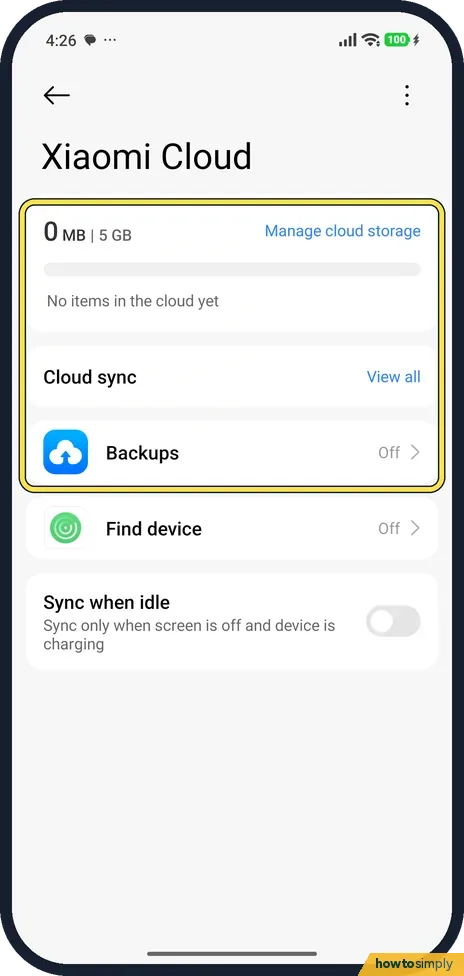
Or open Xiaomi Cloud
Go to Settings, Xiaomi Account, Xiaomi Cloud. Ours showed 0 MB of 5 GB, Backups Off.
- 6
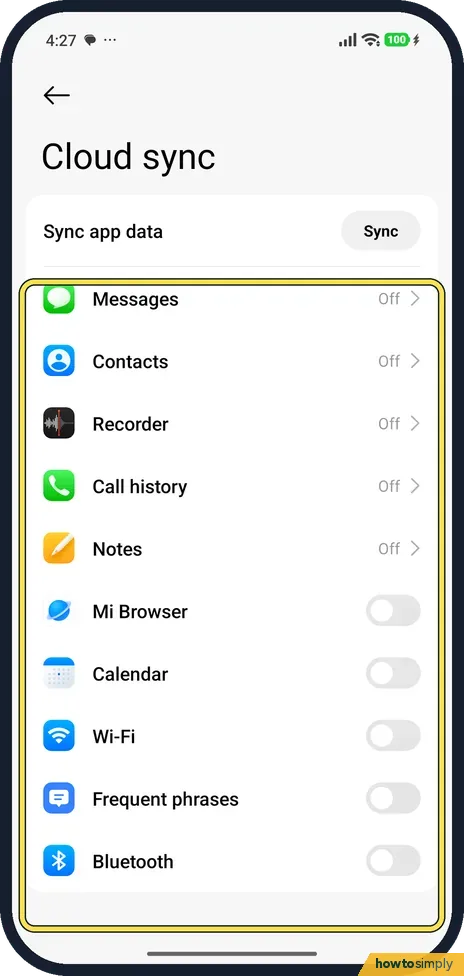
Choose what syncs
Tap View all next to Cloud sync. It lists Messages, Contacts, Recorder, Call history, Notes and more. All were off on ours.
- 7
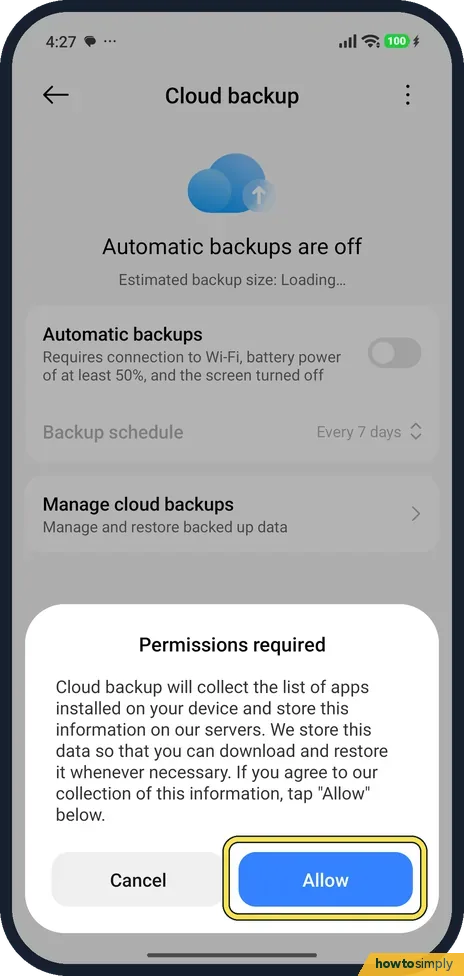
Turn on Xiaomi Cloud backups
Tap Backups. Automatic backups need Wi-Fi, at least 50% battery, and the screen off. Turning it on asks for permissions; tap Allow.
If you do not see this option
- No Backup on the Google services page? Recommended shows only a Backup is off card. The Backup row itself is under All services, in Backup and restore.
- No Xiaomi Cloud? Xiaomi Cloud sits under your Xiaomi Account in Settings. Our phone was signed in to one.
If this does not work
- Asked to send a paid SMS? Xiaomi says sending a text is needed to activate Xiaomi Cloud sync, to check your SIM.
- Xiaomi backup did not run? Automatic backups wait for Wi-Fi, 50% battery and the screen off.
- Not enough space? Xiaomi's HyperOS guide says every Google account has 15 GB of free space. Xiaomi Cloud showed 5 GB on ours.
- Backup missing on a work phone? Google says backup is not available on personal devices set up with a work profile, on devices set up for work only, or on company-owned devices. Ask your IT team how they want data kept.
- Want a backup right now? Google's help says that once backup is on, the Backup page under Backup and restore has a Back up now button. Use it before a reset or a repair.
Good to know
Find a lost phone: how to turn on Find device on a Xiaomi phone.
Once backup is on, it runs in the background and uses some storage in your account. Google says data is encrypted as it travels between your phone and its services. Turning it off later stops new backups. Before a factory reset, Xiaomi's guide says to back up all important items, including accounts, contacts, photos and videos, apps and SD card data. The reset steps are in how to factory reset a Xiaomi phone.
About this guide
- Device
- Android
- Shown on
- Xiaomi Redmi Note 15 Pro 5G (25080RABDG), HyperOS 3.0.308.0, Android 16
- App
- Settings
- Path
- Settings › Google services › All services › Backup
- Real screenshots
- 7 of 7 steps
- Checked
- October 2026
- Sources
- 3 official, linked below
Sources
Links checked October 2026. Menus and features can change with updates.Spotted a mistake? Menus change with updates, and we want every step to match your screen. Email us about this page or use the contact form. We read every report, and fixes are listed on What changed.
Liked this guide?
Follow us for new guides and short how-to videos.
Did this guide work for you?
Sorry about that. What happened?