ONEPLUS
How to set up Bedtime mode on a OnePlus (OxygenOS 16)

In short
Go to Settings, Digital Wellbeing & parental controls, Bedtime mode. The setup turns on Do Not Disturb for bedtime, then sets Start and End (23:00 to 07:00 by default) and the days. Tap Done. Customise adds greyscale, a dimmed wallpaper and more.
6 of 6 steps show a real screenshot from our Nord 5. Each step was checked against the maker's own instructions, linked at the end.
Steps
- 1
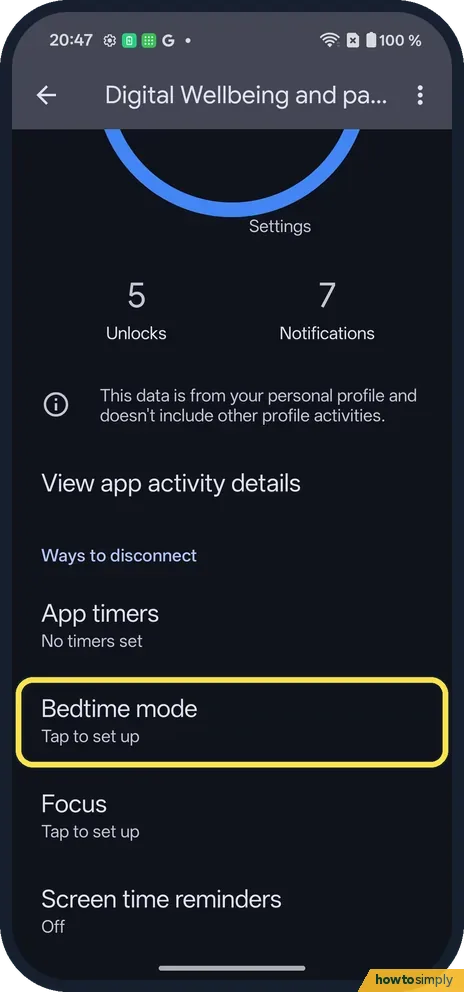
Open Bedtime mode
Under Ways to disconnect, tap Bedtime mode.
- 2
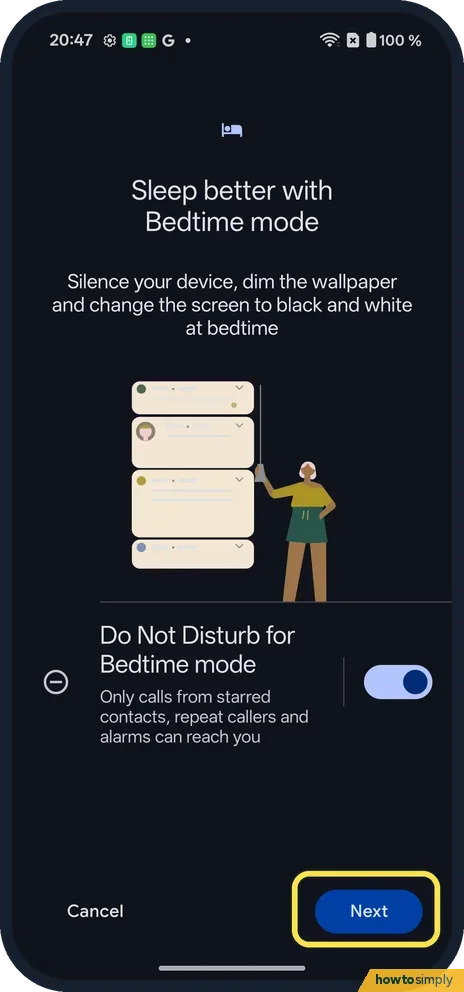
Do Not Disturb for Bedtime
Only calls from starred contacts, repeat callers and alarms can reach you. Tap Next.
- 3
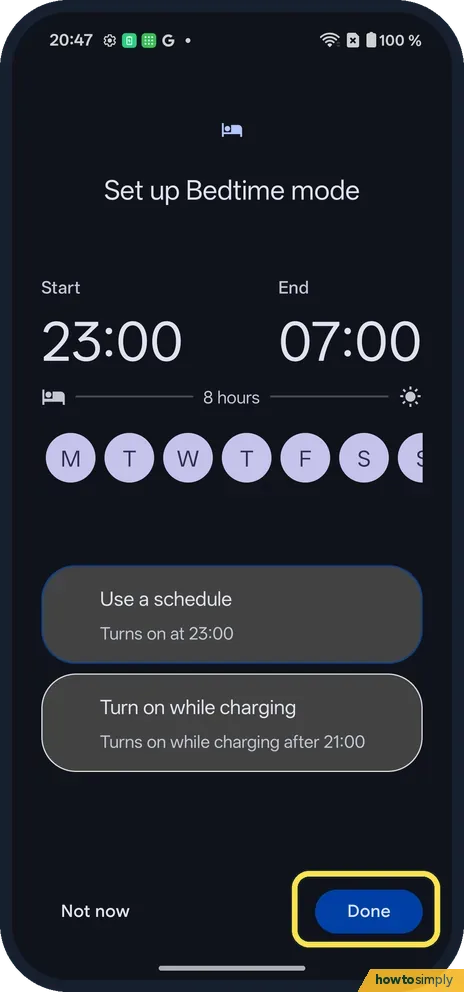
Set the times
Start 23:00, End 07:00 and the days. Use a schedule or Turn on while charging. Tap Done.
- 4
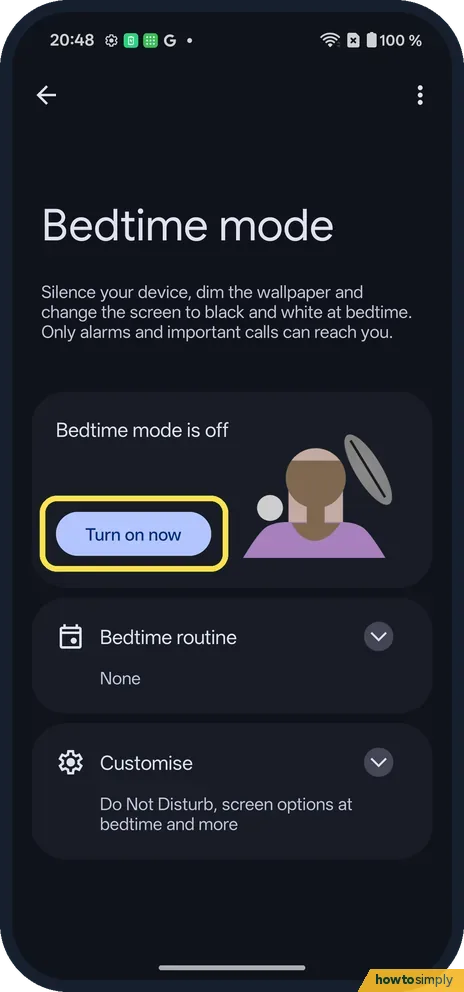
Turn it on now, or later
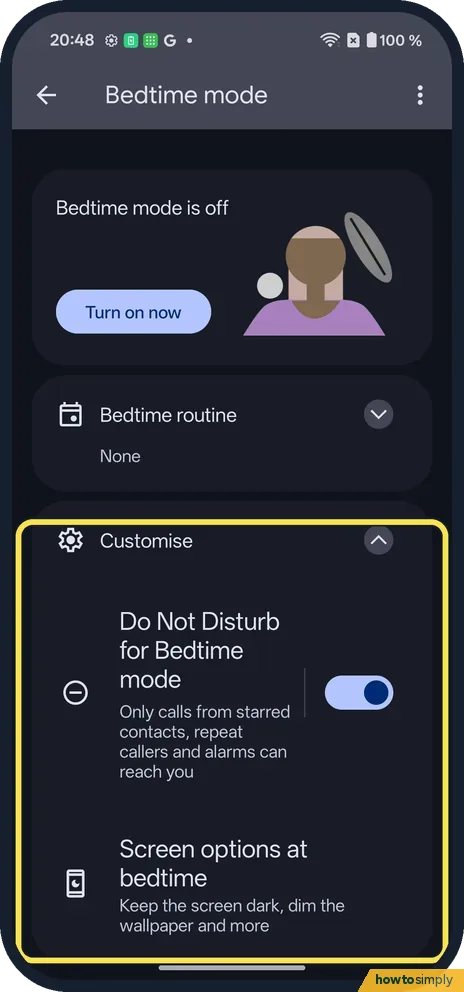
The Bedtime mode page shows Bedtime mode is off, with a Turn on now button.
- 5
Open Customise
Tap Customise. It lists Do Not Disturb for Bedtime mode and Screen options at bedtime. Tap Screen options at bedtime.
- 6
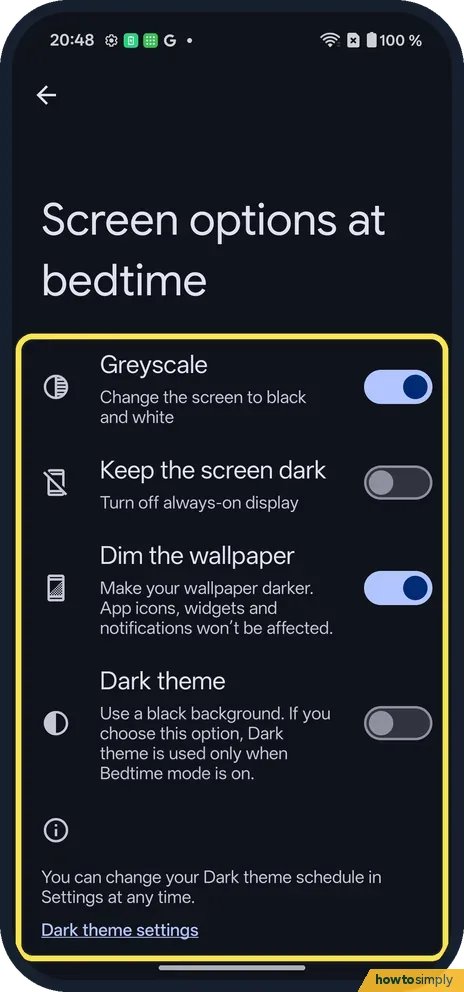
Pick the screen options
Greyscale and Dim the wallpaper were on; Keep the screen dark and Dark theme were off.
If you do not see this option
- Bedtime routine? Also on the Bedtime mode page; ours said None.
- Not under Digital Wellbeing? Search Settings for bedtime: on ours, Screen options at bedtime shows under Digital Wellbeing & parental controls.
If this does not work
- Missed a call? Only starred contacts and repeat callers get through.
- Did not start? Check the days are picked and Use schedule is chosen, not only Turn on while charging.
- Screen grey in the morning? Check End time, or turn Greyscale off in Screen options at bedtime.
- Alarm still rang? Alarms can reach you in Bedtime mode by design.
- Bedtime ends too late in the morning? Google describes an option to turn Bedtime off at your next alarm, so it ends when you wake rather than at a fixed time. Without an alarm, it ends at the scheduled time or when charging stops.
- Starts when you charge in the afternoon? Turn on while charging links Bedtime to a charging window, according to Google. If you also charge during the day, Use a schedule is the safer choice.
- Family member cannot get through at night? Bedtime's Do Not Disturb lets starred contacts through. Star that person in your contacts app, and they can call you even during Bedtime.
Good to know
See screen time and set app timers on a OnePlus.
While Bedtime runs, the phone is quieter and the screen less appealing, which is the point. Google says the screen options, such as greyscale and a dark theme, apply only while Bedtime mode is on, so your phone looks normal again in the morning. Calls and notifications that were held back are still on the phone when Bedtime ends; nothing is deleted.
To stop Bedtime for good, open Bedtime mode and turn off the schedule or the charging option. Google also says you can switch Bedtime on and off from Quick Settings, which is handy for one late night. On our Nord 5 there was no Bedtime tile on the two Quick Settings pages; we did not look through the tiles you can add. For daytime distractions, Focus mode pauses chosen apps instead: see Focus mode on a OnePlus.
About this guide
- Device
- Android
- Shown on
- OnePlus Nord 5 (CPH2709), OxygenOS 16.0.5.1201, Android 16
- App
- Settings
- Path
- Settings › Digital Wellbeing and parental controls › Bedtime mode
- Real screenshots
- 6 of 6 steps
- Checked
- October 2026
- Sources
- 1 official, linked below
Sources
Links checked October 2026. Menus and features can change with updates.Spotted a mistake? Menus change with updates, and we want every step to match your screen. Email us about this page or use the contact form. We read every report, and fixes are listed on What changed.
Liked this guide?
Follow us for new guides and short how-to videos.
Did this guide work for you?
Sorry about that. What happened?