ONEPLUS
How to see Wi-Fi data usage by app on a OnePlus (OxygenOS 16)

In short
Open Settings, Wi-Fi, tap the three dots at the top right, then Wi-Fi data usage on the More settings page. It shows this month's total; tap Data usage by app for each app. Tap an app for Disable mobile data, Disable Wi-Fi and Background data.
6 of 6 steps show a real screenshot from our Nord 5. Each step was checked against the maker's own instructions, linked at the end.
Steps
- 1
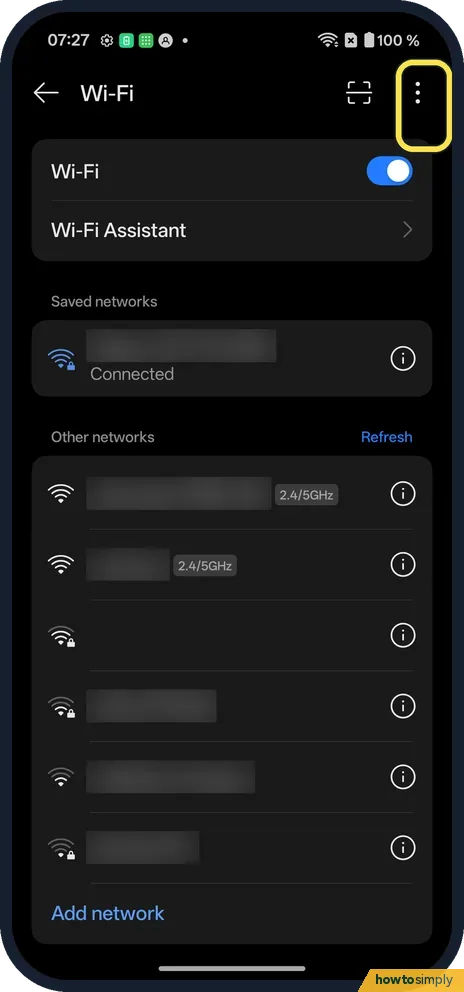
Tap the three dots
Open Settings, Wi-Fi. The three dots are at the top right.
- 2
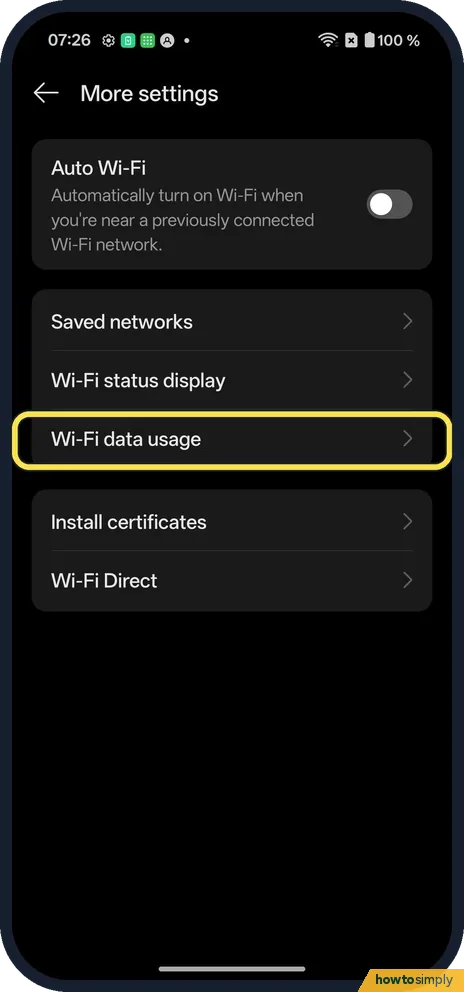
Tap Wi-Fi data usage
A More settings page opens, not a menu.
- 3
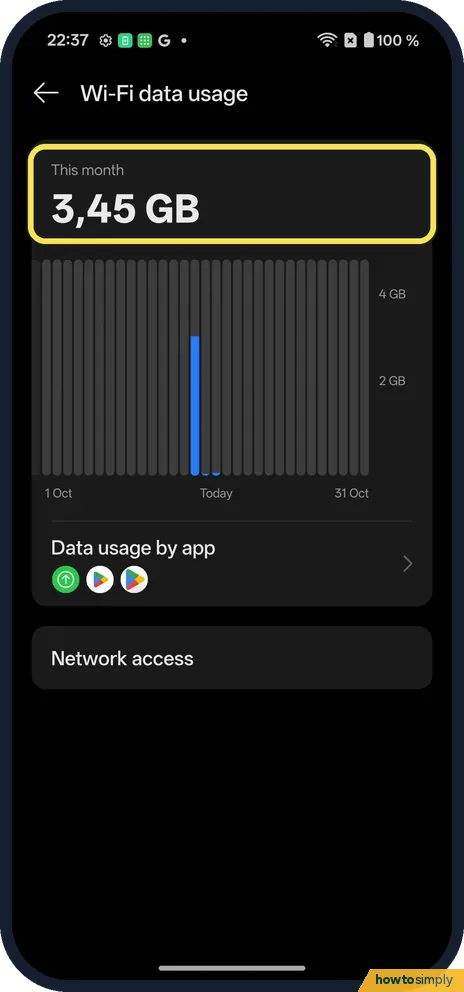
See the total
This month: 3.45 GB on ours, with a chart by day.
- 4
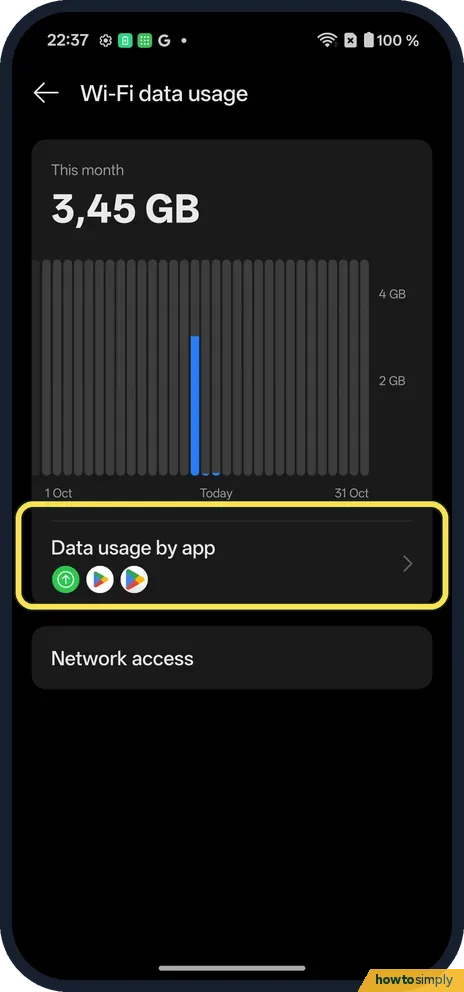
Tap Data usage by app
It is under the chart.
- 5
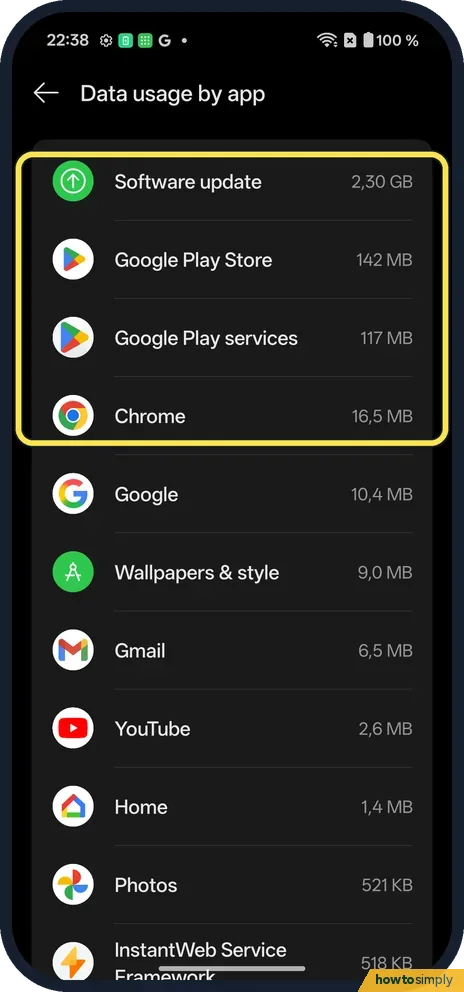
Find the biggest apps
The list is sorted by use. Ours: Software update 2.30 GB, Google Play Store 142 MB.
- 6
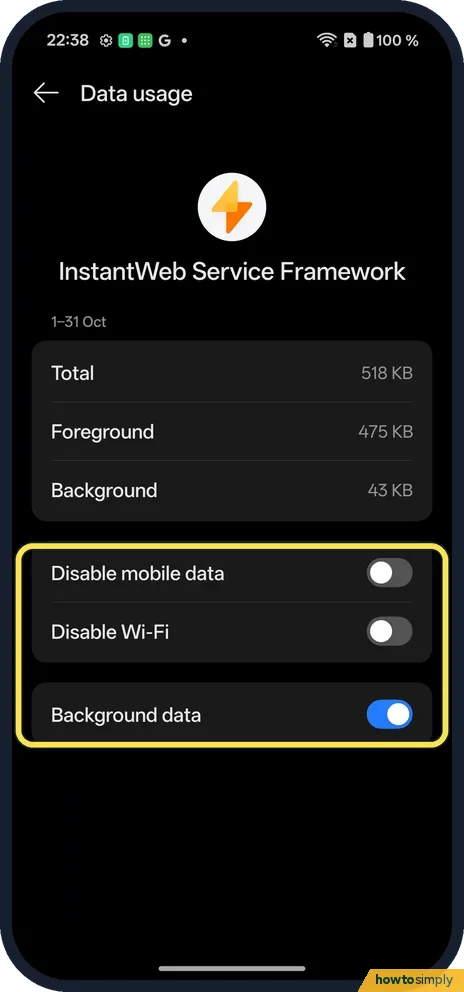
Limit one app
Tap it. Disable mobile data, Disable Wi-Fi and Background data are at the bottom.
If you do not see this option
- Mobile data instead? The OnePlus manual puts it under Settings, Mobile network, Data usage, with Data usage by app and a daily or monthly limit. Ours has no SIM, so we could not check it. Source: OxygenOS 14.0 User Manual
- On OxygenOS 14? The manual calls the switches Disable mobile network and Allow in the background. Ours says Disable mobile data and Background data. Source: OxygenOS 14.0 User Manual
If this does not work
- An app uses too much? Turn off Background data for it.
- Keep an app off Wi-Fi? Tap it in Data usage by app and switch on Disable Wi-Fi.
- Figures differ from your provider's bill? Google notes that the phone measures its own usage and some operators measure it differently. For mobile data, go by your provider's figures and plan limits.
- Software update at the top of the list? System updates are large downloads, so a big figure there is expected in a month with an update. It is not an app misbehaving.
- App stopped syncing after a change? Turning off Background data means the app only uses data while it is open. Turn Background data back on for that app if you need its messages or uploads to arrive in the background.
- Home Wi-Fi has a data cap? Google's help describes marking a Wi-Fi network as metered when it has a data limit, which gives you more control over downloads by apps. A Settings search for metered on our Nord 5 found no results.
Good to know
Use the Privacy dashboard on a OnePlus.
Looking at the figures changes nothing. Switches you change on an app's page apply straight away and stay until you change them back on the same page. Blocking an app's data saves data and can save a little battery, but notifications and updates for that app may stop arriving until you allow it again.
The manual also describes Data saving for mobile networks, which stops background apps using mobile data and turns off the hotspot while it is on, with Unrestricted apps as exceptions. See turn on data saving, or stop an app using mobile data or Wi-Fi for one app only.
About this guide
- Device
- Android
- Shown on
- OnePlus Nord 5 (CPH2709), OxygenOS 16.0.5.1201, Android 16
- App
- Settings
- Path
- Settings › Wi-Fi › Wi-Fi data usage
- Real screenshots
- 6 of 6 steps
- Checked
- October 2026
- Sources
- 2 official, linked below
Sources
Links checked October 2026. Menus and features can change with updates.Spotted a mistake? Menus change with updates, and we want every step to match your screen. Email us about this page or use the contact form. We read every report, and fixes are listed on What changed.
Liked this guide?
Follow us for new guides and short how-to videos.
Did this guide work for you?
Sorry about that. What happened?