GOOGLE PIXEL
Pixel Wi-Fi keeps disconnecting? What to check (Android 17)
Go to Settings, Network and internet, Internet. Tap the gear next to your network to see its signal and to Forget it and join again. Check Privacy (randomised MAC), and Network preferences. As a last step, go to Settings, System, Reset options, Reset Bluetooth and Wi-Fi.

5 of 5 steps show a real screenshot from our Pixel 10a. Each step was checked against the maker's own instructions, linked at the end.
Steps
- 1
Open your network
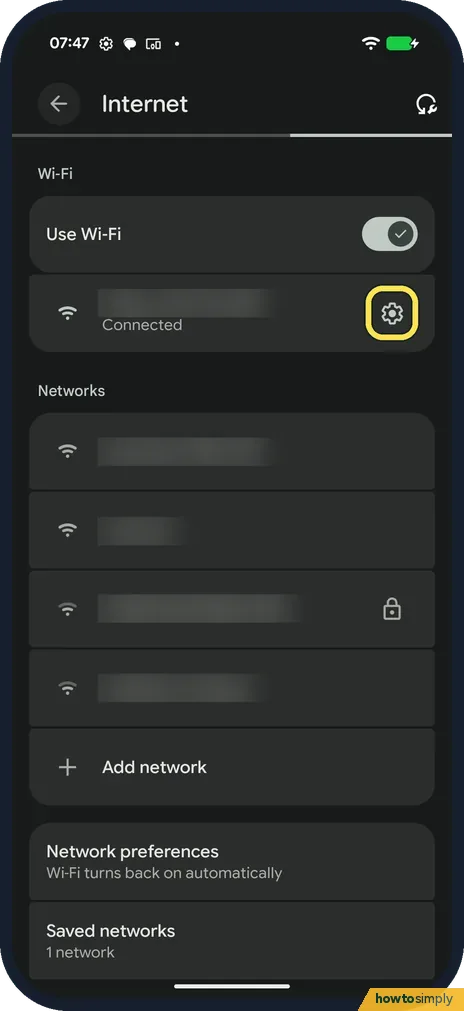
Go to Settings, Network and internet, Internet. Tap the gear next to the network you are connected to.
- 2
Check the signal, or forget the network
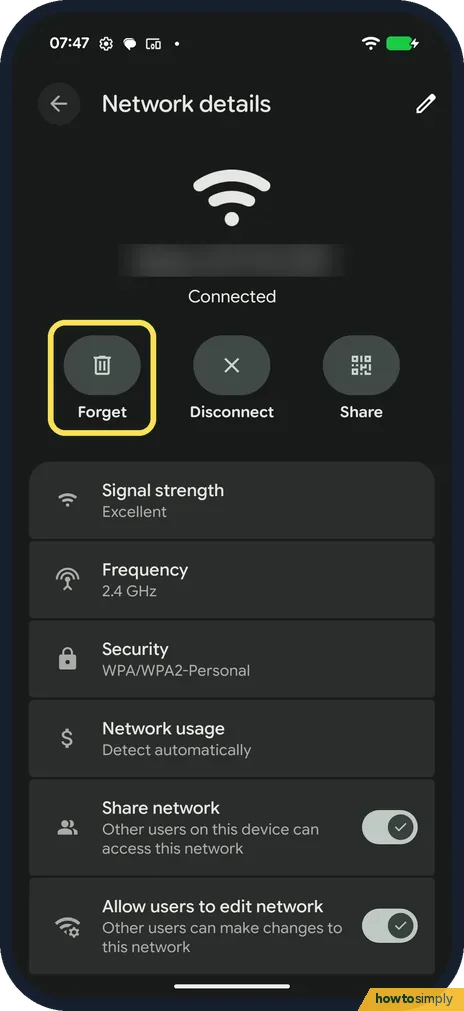
Network details shows Signal strength (Excellent on ours), Frequency and Security. Forget removes the saved password; join again with the password.
- 3
Check Privacy (MAC address)
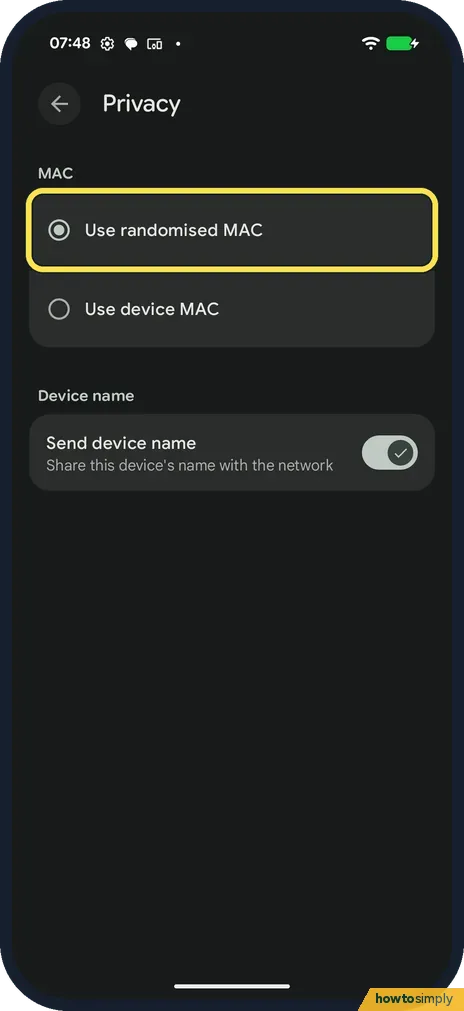
Scroll down and tap Privacy. Use randomised MAC was selected on ours. Choose Use device MAC if your router only lets in known devices.
- 4
Check Network preferences
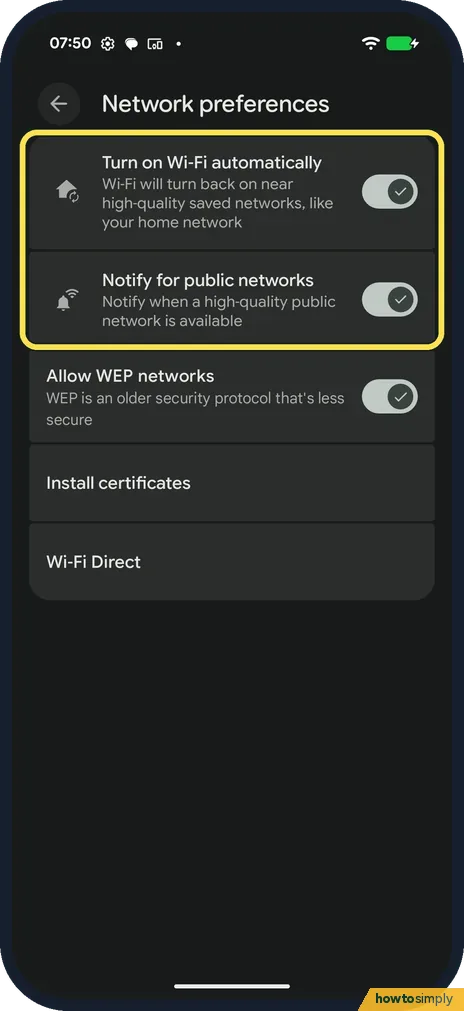
Back on Internet, tap Network preferences. Turn on Wi-Fi automatically and Notify for public networks were on on ours.
- 5
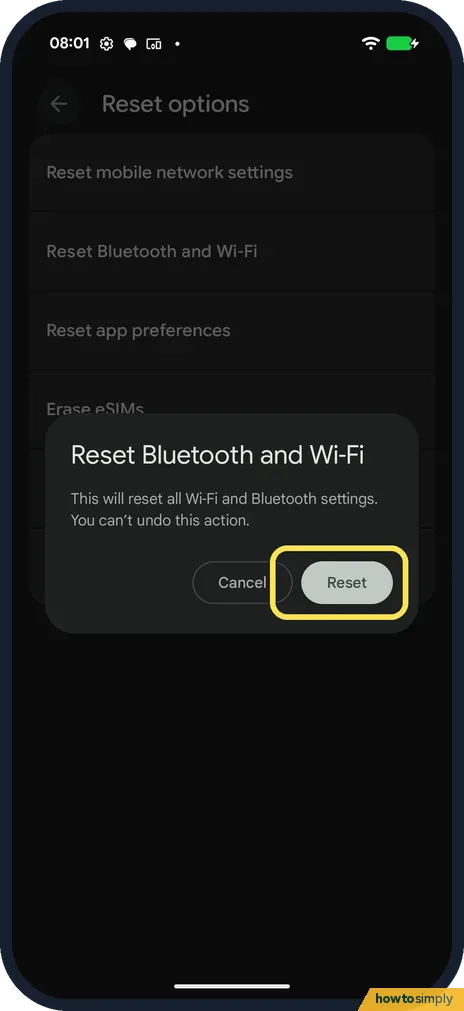
Reset Bluetooth and Wi-Fi as a last step
Go to Settings, System, Reset options, Reset Bluetooth and Wi-Fi. The dialog says it resets all Wi-Fi and Bluetooth settings and can't be undone. Tap Reset only if nothing else helped.
If you do not see this option
- No gear next to the network? Tap the network name itself to open its details.
- Old router not listed? Allow WEP networks, in Network preferences, was on on ours. WEP is an older, less secure protocol.
If this does not work
- Router blocks the phone? A randomised MAC looks like a new device. Use device MAC for that network.
- Mobile data instead of Wi-Fi? See Pixel mobile data not working.
- Still dropping? Google suggests restarting the phone and the router, and moving closer to the router.
- Is it the phone or the network? Google suggests a simple test. If other devices stay on the same Wi-Fi, the phone is likely the problem. If the phone works on another Wi-Fi network, the first network is likely the problem.
- Connected but no internet? Google says that points to the internet connection rather than the phone. Unplug the router and modem for 15 seconds, check the cables, and wait until the lights show normal operation.
- Drops on a café or hotel network? Public networks often need you to accept terms on a sign-in page. Google says to look for the sign-in notification; if none appears, forget the network, turn Wi-Fi off and on, reconnect, and tap the notification.
- Started after installing an app? Google suggests testing Wi-Fi in safe mode. If it holds there, a downloaded app is likely the cause; restart and uninstall recent apps one at a time. Airplane mode is on in safe mode, so turn it off first: how to start a Pixel in safe mode.
- Wrong date or time on the phone? Google says an incorrect date or time can cause Wi-Fi problems. Go to Settings, System, Date & time, and turn on Set time automatically.
Good to know
Share the phone's connection: how to turn on the Wi-Fi hotspot.
If you forget a network, the phone no longer joins it on its own until you enter the password again. Google suggests checking for the latest system update once you are reconnected, since updates can fix issues. If none of this helps, Google says to contact your internet provider or the network administrator.
About this guide
- Device
- Android
- Shown on
- Google Pixel 10a, Android 17 (build CP3A.260905.009)
- App
- Settings
- Path
- Settings › Network and internet › Internet
- Real screenshots
- 5 of 5 steps
- Checked
- October 2026
- Sources
- 3 official, linked below
Sources
Links checked October 2026. Menus and features can change with updates.Spotted a mistake? Menus change with updates, and we want every step to match your screen. Email us about this page or use the contact form. We read every report, and fixes are listed on What changed.
Liked this guide?
Follow us for new guides and short how-to videos.
Did this guide work for you?
Sorry about that. What happened?