
howtosimply.com/guides/how-to-make-google-play-update-apps-only-on-wi-fi/ · Checked October 2026 · Samsung Galaxy A57 5G (SM-A576B), One UI 8.5, Android 16
In this guide
Open the Play Store, tap your profile picture, Settings, Network preferences, Auto-update apps and choose Update over Wi-Fi only. App download preference on the same list decides whether downloads you start yourself may use mobile data.
If you do not see this option
- There is no Update with limited amount of mobile data Google says that option is available only to a limited group, so your list may have three choices instead of four. Source: How to update the Play Store and apps on Android
- You want only some apps on auto-update Google says to open Manage apps & device, Manage, tap the app, then More on its Details page and turn Enable auto update on or off. Source: How to update the Play Store and apps on Android
5 of 6 steps with real screenshots · 1 official source below
- Device
- Android
- Shown on
- Samsung Galaxy A57 5G (SM-A576B), One UI 8.5, Android 16
- App
- Google Play
- Real screenshots
- 5 of 6 steps
- What we did
- Observed: looked at each screen, changed nothing
- Our phone
- Shown on Galaxy A57, One UI 8.5
- Checked
- October 2026
- Sources
- 1 official, linked below
Step by step
Open Play Store settings
In the Play Store, tap your profile picture at the top right, then Settings.
Watch these steps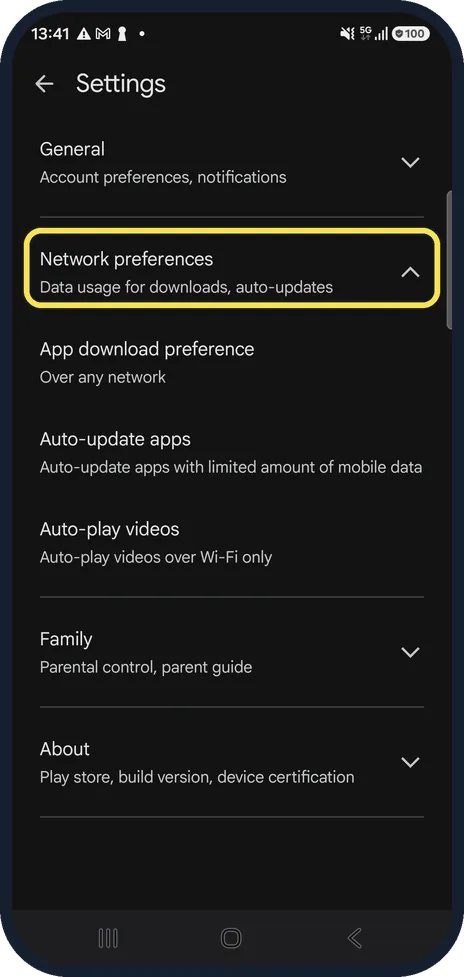
Open Network preferences
Tap Network preferences to expand it. It covers data use for downloads and auto-updates.
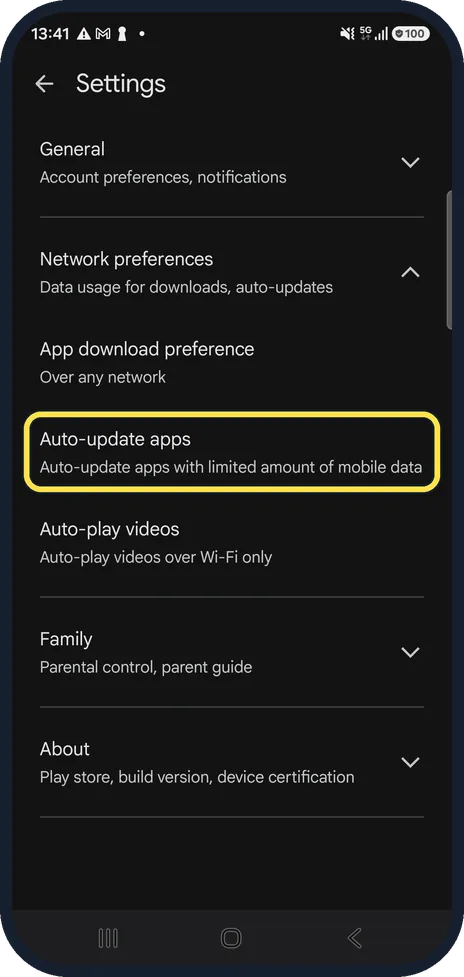
Tap Auto-update apps
The line below shows the current choice. Ours was set to update with a limited amount of mobile data.
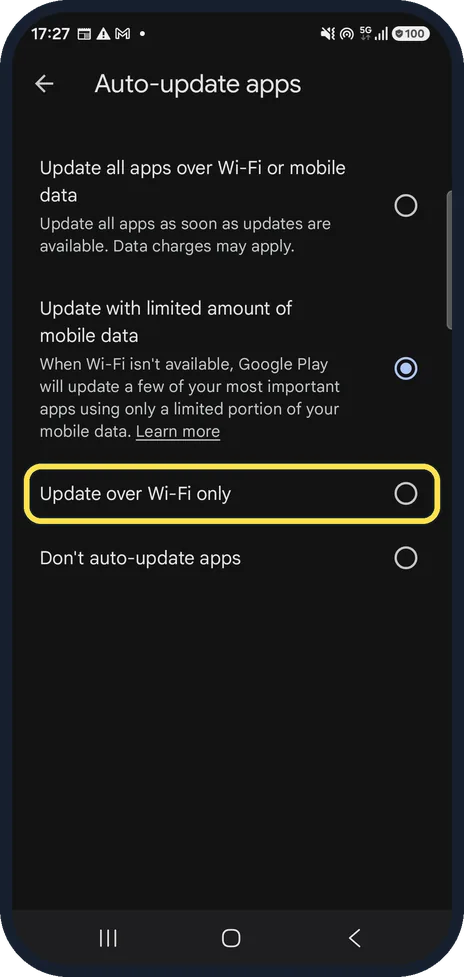
Choose Update over Wi-Fi only
There are four choices: update over Wi-Fi or mobile data, with limited mobile data, over Wi-Fi only, or not at all. Pick Update over Wi-Fi only.
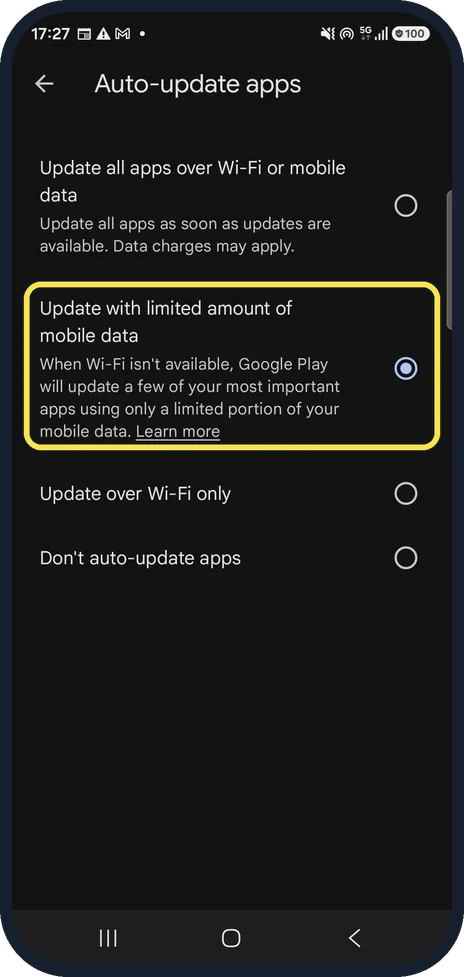
What limited mobile data means
With limited mobile data, Play updates a few of your most important apps over mobile data when there is no Wi-Fi. That was the option chosen on our phone.
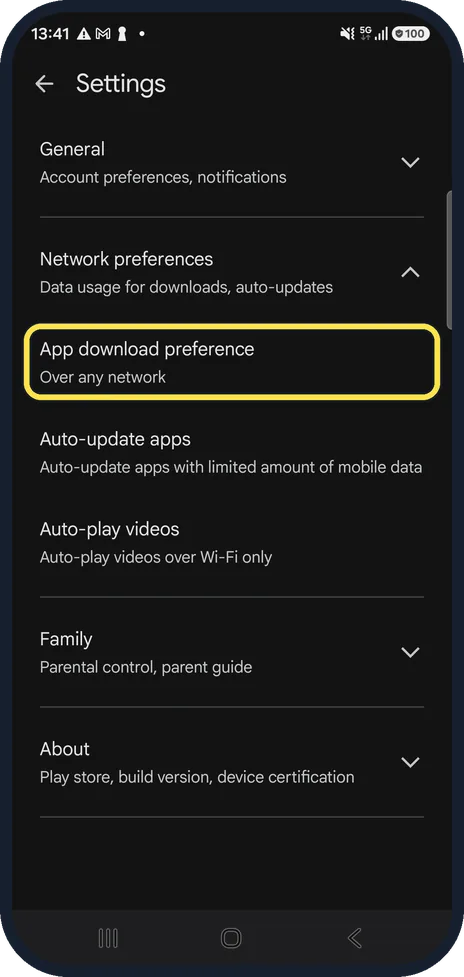
Check App download preference
Back on Network preferences, App download preference sets which network may be used for apps you install yourself. Ours said Over any network.
Watch these steps
If this does not work
- Apps still do not update by themselves Google says apps may not update automatically if an account on the phone has a sign-in error. Check the accounts in the phone's Settings. Source: How to update the Play Store and apps on Android
- An app updated over mobile data anyway Google says it may push an update that fixes a critical security problem regardless of your update settings. Source: How to update the Play Store and apps on Android
About this guide
By default Google Play may update some apps over mobile data. If your data is limited, set it to Wi-Fi only. The menu is the same on every Android phone with Google Play.
Good to know
Mobile data not working at all? Samsung Galaxy mobile data not working? 7 fixes.
In short: Play Store, profile picture, Settings, Network preferences, Auto-update apps, Update over Wi-Fi only.
Links checked in October 2026. Menus and features can change after software updates. These steps match the version named at the top.
📷 See real photos from the Galaxy A57 in our Camera Lab, next to 10 other phones.
Did this guide work for you?
Sorry about that. What happened?