
howtosimply.com/guides/connected-no-internet-on-a-samsung-galaxy-6-fixes/ · Checked October 2026 · Samsung Galaxy A57 5G (SM-A576B), One UI 8.5, Android 16
In this guide
Restart the phone, then forget the network and join it again. In Settings, Connections, More connection settings, Private DNS, choose Automatic (recommended): a custom provider that is down blocks all internet. Still stuck? Reset Wi-Fi and Bluetooth settings.
6 of 6 steps with real screenshots · 1 official source below
- Device
- Android
- Shown on
- Samsung Galaxy A57 5G (SM-A576B), One UI 8.5, Android 16
- Starts in
- Quick Settings
- Real screenshots
- 6 of 6 steps
- Our phone
- Shown on Galaxy A57, One UI 8.5
- Checked
- October 2026
- Sources
- 1 official, linked below
Step by step
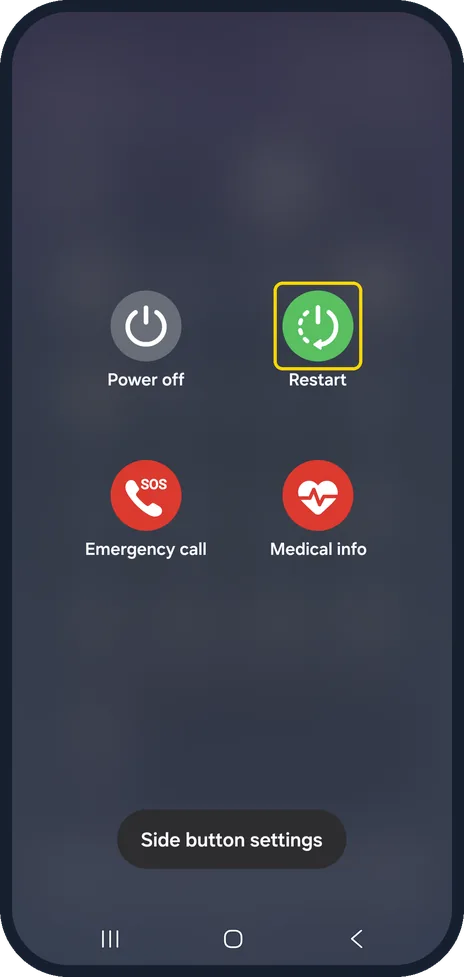
Restart the phone
Swipe down to open the quick panel, tap the power icon at the top, then tap Restart.
On our Galaxy the power menu shows Power off, Restart, Emergency call, Medical info and Side button settings.
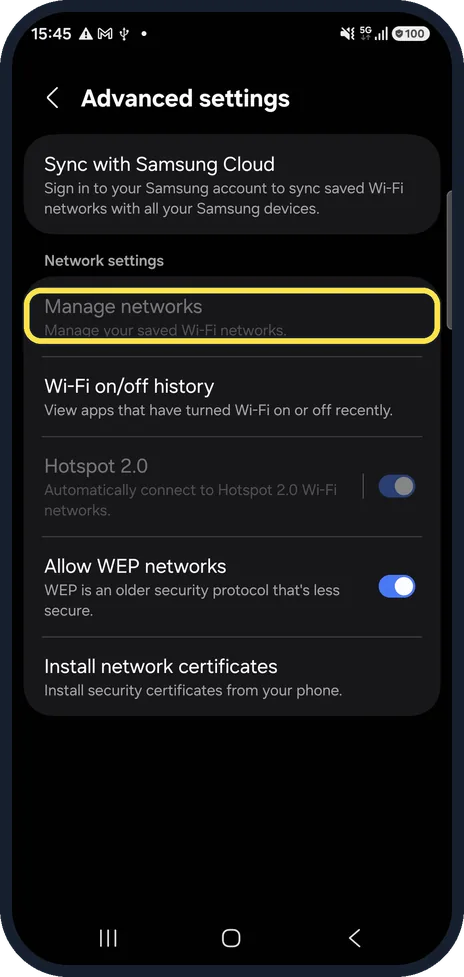
Forget the network and join again
Samsung advises forgetting the network and joining it again with the password. Saved networks are listed under Settings, Connections, Wi-Fi, three dots, Advanced settings, Manage networks.
On our Galaxy the Manage networks row was greyed out because Wi-Fi was off; it opens once Wi-Fi is on.
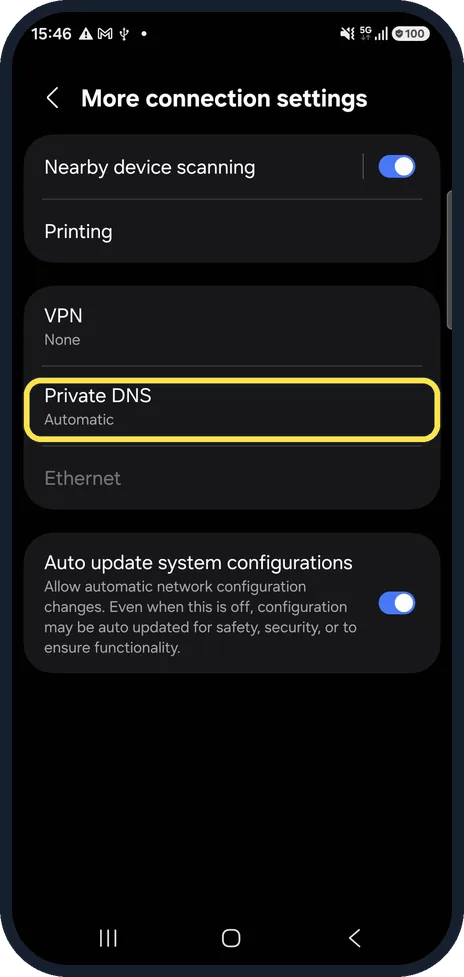
Open Private DNS
Go to Settings, Connections, More connection settings, Private DNS.
On our Galaxy it sits below VPN and showed Automatic.
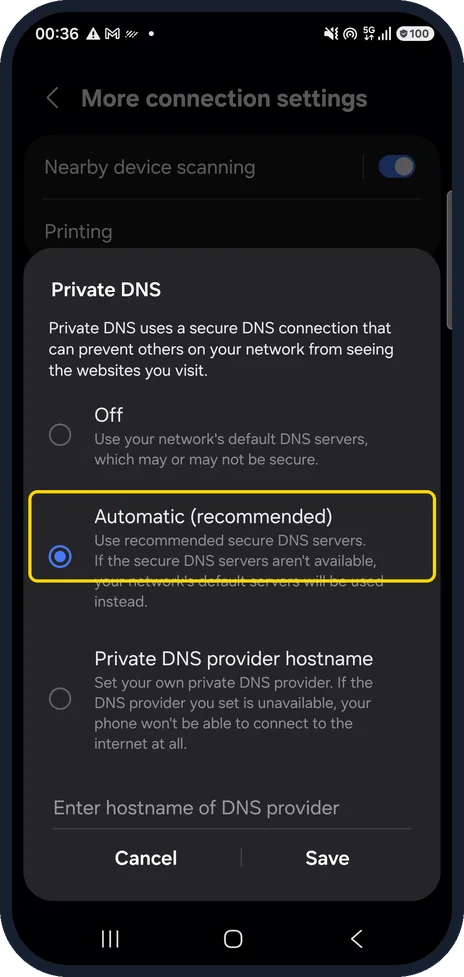
Choose Automatic (recommended)
Select Automatic (recommended) and tap Save.
The screen warns that with Private DNS provider hostname, if the provider you set is unavailable, your phone won't be able to connect to the internet at all. Automatic falls back to your network's default servers.
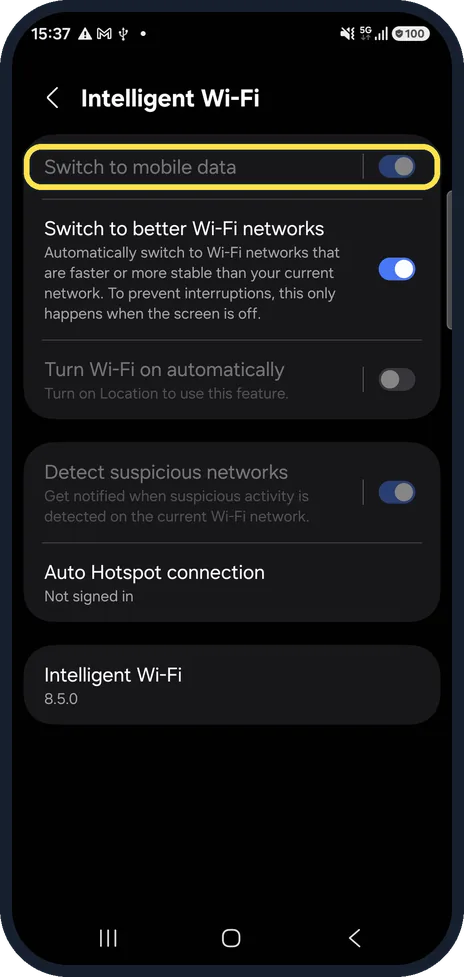
Check Switch to mobile data
Go to Wi-Fi, three dots, Intelligent Wi-Fi. With Switch to mobile data on, the phone may quietly use mobile data on a weak Wi-Fi, which can hide the real problem while you test.
It is greyed out in our picture because Wi-Fi was off on our phone.
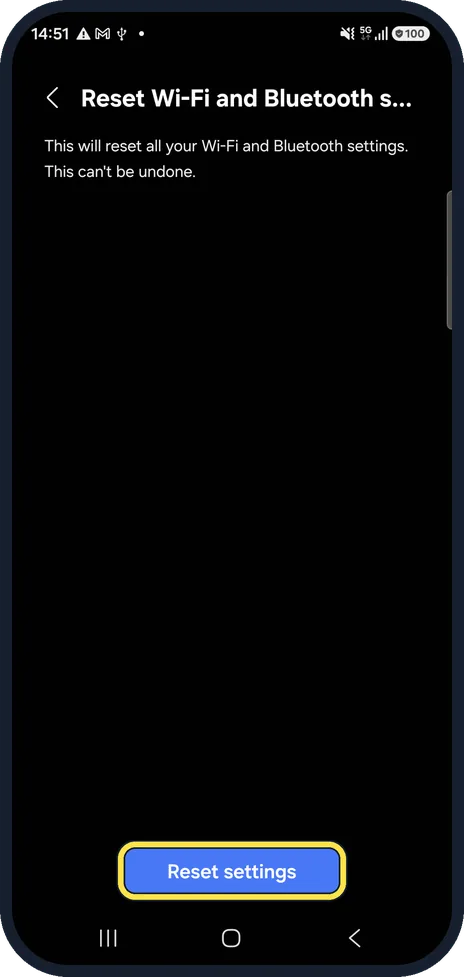
Reset Wi-Fi and Bluetooth settings
Go to Settings, General management, Reset, Reset Wi-Fi and Bluetooth settings, then tap Reset settings. On our Galaxy the screen warns "This can't be undone."
Samsung says a network settings reset returns network settings to their defaults and keeps your apps and data; saved Wi-Fi networks and paired devices are removed. Steps: how to reset network settings on a Samsung Galaxy phone.
If you do not see this option
- Manage networks is greyed out Turn Wi-Fi on first. On our Galaxy, with Wi-Fi off, the row under Advanced settings was greyed out.
- Switch to mobile data is greyed out This also needs Wi-Fi on. On our Galaxy the switch in Intelligent Wi-Fi could not be changed while Wi-Fi was off.
- Private DNS is not under Connections Open More connection settings at the bottom of Connections. On our Galaxy Private DNS sits there below VPN.
If this does not work
- Update the software Samsung recommends installing the latest software update, then testing the Wi-Fi again. Source: Wi-Fi connection issues on a Samsung Galaxy device
- Test in Safe mode Samsung suggests starting the phone in Safe mode. If the internet works there, a downloaded app is likely causing the problem. Source: Wi-Fi connection issues on a Samsung Galaxy device
- Other devices are offline too The router or your broadband is at fault, not the phone. Restart the router or contact your internet provider.
About this guide
The Wi-Fi symbol is there, but nothing loads. Either the router has lost its own connection, or the phone cannot use it. Check the router first: if other devices are offline too, the phone is not the problem. Unplug the router, wait a moment, plug it back in and wait until its lights settle before testing again.
The screenshots are from a Samsung Galaxy A57 with One UI 8.5.
Good to know
Public Wi-Fi in hotels and trains often needs a sign-in page first. Open a browser and visit any website to make it appear.
Samsung says the Samsung Members app has a Wi-Fi check under Support > Get started > Wi-Fi.
If the Wi-Fi keeps dropping rather than having no internet: Samsung Galaxy Wi-Fi keeps disconnecting? 6 things to check.
In short: Restart the phone, forget and rejoin the network, set Private DNS to Automatic (recommended), check Switch to mobile data, reset Wi-Fi and Bluetooth settings.
Links checked in October 2026. Menus and features can change after software updates. These steps match the version named at the top.
📷 See real photos from the Galaxy A57 in our Camera Lab, next to 10 other phones.
Did this guide work for you?
Sorry about that. What happened?