
howtosimply.com/guides/how-to-make-the-screen-more-sensitive-for-a-screen-protector-on-a-google-pixel/ · Checked October 2026 · build CP3A.260905.009 · Google Pixel 10a, Android 17
In this guide
Go to Settings, Display and touch, Touch sensitivity. On Android 17 there is no Screen protector mode switch: Adaptive touch adjusts for your screen protector automatically, and Increased sensitivity makes the screen respond to lighter touches.
2 of 3 steps with real screenshots · 2 official sources below
- Device
- Android
- Shown on
- Google Pixel 10a, Android 17 (build CP3A.260905.009)
- App
- Settings
- Path
- Settings › Display and touch
- Real screenshots
- 2 of 3 steps
- Checked
- October 2026
- Sources
- 2 official, linked below
Step by step
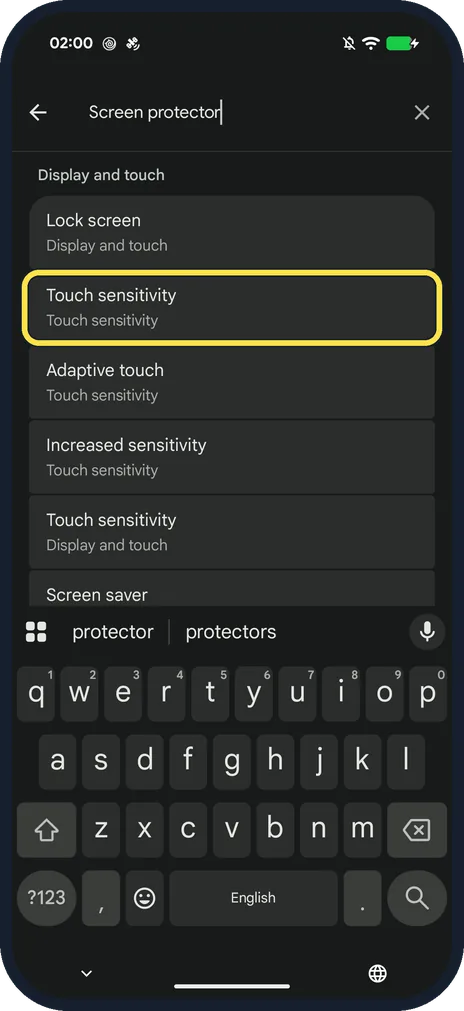
Search Settings for screen protector
Open Settings and type screen protector. Ours listed Touch sensitivity under Display and touch. Tap that Touch sensitivity result (or go to Settings, Display and touch, Touch sensitivity).
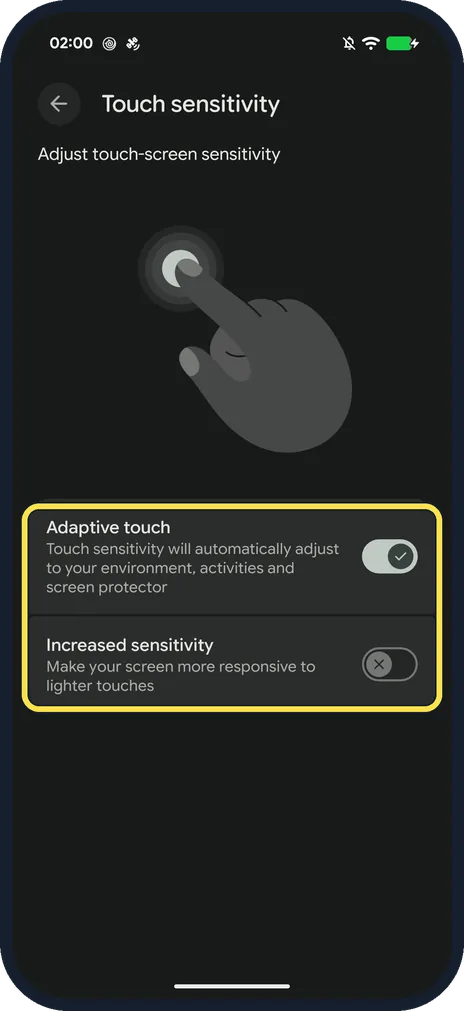
Choose your touch settings
Adaptive touch says touch sensitivity will automatically adjust to your environment, activities and screen protector; leave it on. Turn on Increased sensitivity if taps still don't register through a thick protector.
Turn it off again if taps misfire
If the screen reacts to touches you did not mean, go back to the same page and turn Increased sensitivity off. Adaptive touch can stay on.
If you do not see this option
- You have a Pixel 8a or older? Google's touch help says Pixel 8a and earlier models, including Fold, have a Screen protector mode switch under Settings, Display & touch, Touch sensitivity. Turn it on there instead of Adaptive touch. Source: Fix touch & response issues on your Pixel screen
- No Increased sensitivity switch? Google's touch help for newer Pixels only names Adaptive touch under Touch sensitivity. Increased sensitivity is what our Pixel 10a on Android 17 shows below it (step 2), so other models or versions may show only Adaptive touch. Source: Fix touch & response issues on your Pixel screen
If this does not work
- Taps still don't register? Google suggests taking off the case or screen protector to see if touch improves, and turning Adaptive touch off and on to see if it helps. Source: Fix touch & response issues on your Pixel screen
- Fingerprint unlock stopped working after a protector? Google says screen protectors can interfere with the fingerprint sensor. Use a Made for Google certified one, and if you set up your fingerprint before applying it, delete it and add it again. Source: Use screen protectors with Fingerprint Unlock on your Pixel phone
- Taps register by themselves? Turn Increased sensitivity back off; it reacts to lighter touches.
- Fingerprint slow for the first days? Google says the sensor needs to recalibrate after a new protector and should improve over the first few hours or days. Source: Use screen protectors with Fingerprint Unlock on your Pixel phone
About this guide
There is no switch called Screen protector mode on our Pixel 10a with Android 17. Searching Settings for screen protector leads to Touch sensitivity, which has two switches.
The screenshots are from our Google Pixel 10a with Android 17, in Dark mode, taken on 24 October 2026. Adaptive touch was on and Increased sensitivity off; we changed nothing.
Good to know
Turn on the smoother 120 Hz display: how to turn on 120 Hz on a Google Pixel.
In short: Settings, Display and touch, Touch sensitivity: Adaptive touch on, Increased sensitivity for thick protectors.
- Pixel Phone Help: Use screen protectors with Fingerprint Unlock on your Pixel phone
- Pixel Phone Help: Fix touch & response issues on your Pixel screen
Links checked in October 2026. Menus and features can change after software updates. These steps match the version named at the top.
Did this guide work for you?
Sorry about that. What happened?