GOOGLE PIXEL
How to turn on 120 Hz Smooth display on a Google Pixel 10a
Open Settings, tap Display and touch, scroll to Other display controls and turn on Smooth display. It was off on our Pixel 10a. It raises the refresh rate up to 120 Hz for some content and uses more battery.

3 of 3 steps show a real screenshot from our Pixel 10a. Each step was checked against the maker's own instructions, linked at the end.
Steps
- 1
Find Smooth display
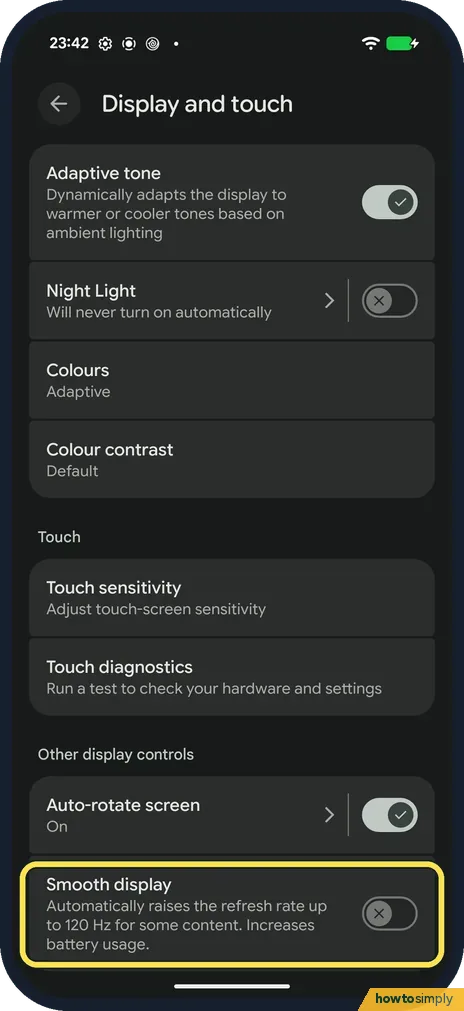
Open Settings and tap Display and touch. Scroll to the bottom, past Adaptive tone, Night Light, Colours and Touch, to Other display controls. Smooth display says it automatically raises the refresh rate up to 120 Hz for some content. Ours was off.
- 2
Turn it on
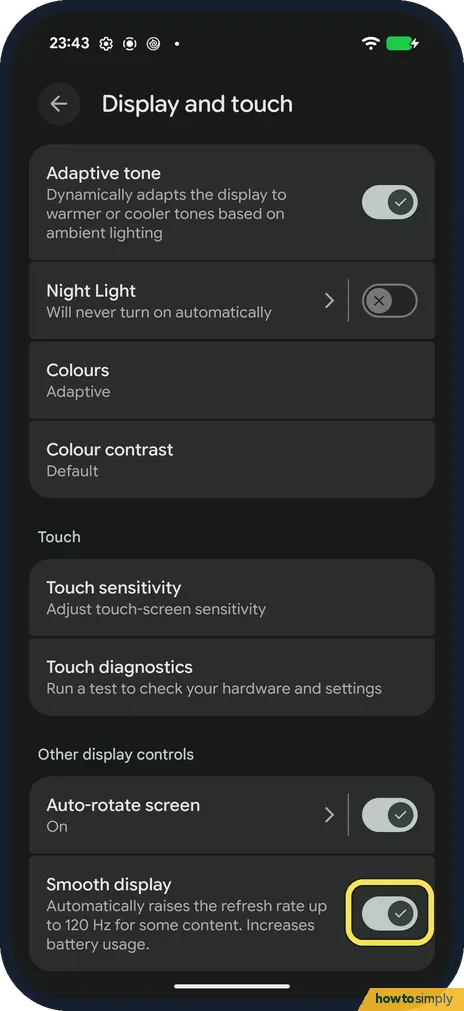
Tap the switch. Scrolling and animations now run at up to 120 Hz when the content allows it.
- 3
Turn it off again to save battery
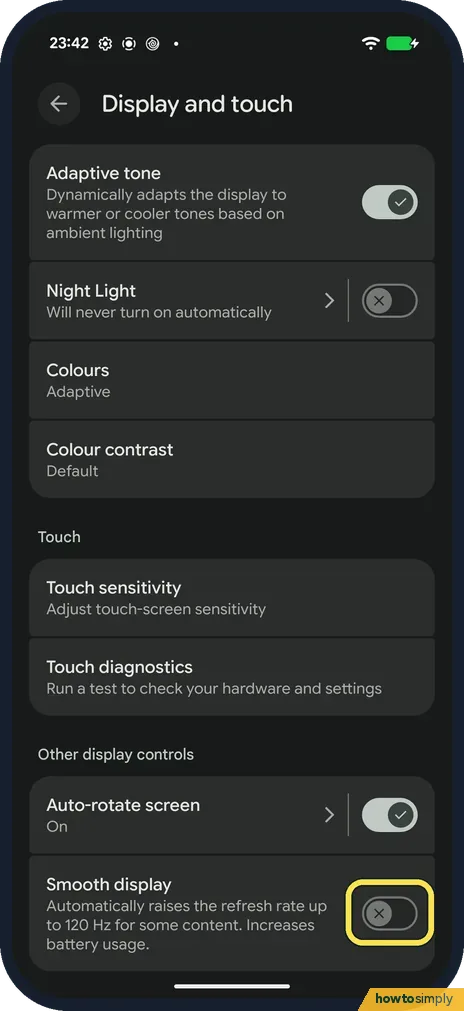
Smooth display uses more battery. If battery life matters more than smooth scrolling, tap the switch again. It is off when it is grey with a cross, as ours was before we turned it on.
If you do not see this option
- Smooth display greyed out? Check whether Battery Saver is on under Settings, Battery. Google says Battery Saver disables Smooth display. Source: Manage screen & display settings on a Pixel phone
- Which Pixels go up to 120 Hz? Google's tech specs list Smooth Display at 60 to 120 Hz for the Pixel 10a. Google's display page lists the Pixel 7 and 7a at up to 90 Hz, so on those the same switch stops at 90 Hz. Sources: Pixel phone hardware tech specs, Manage screen & display settings on a Pixel phone
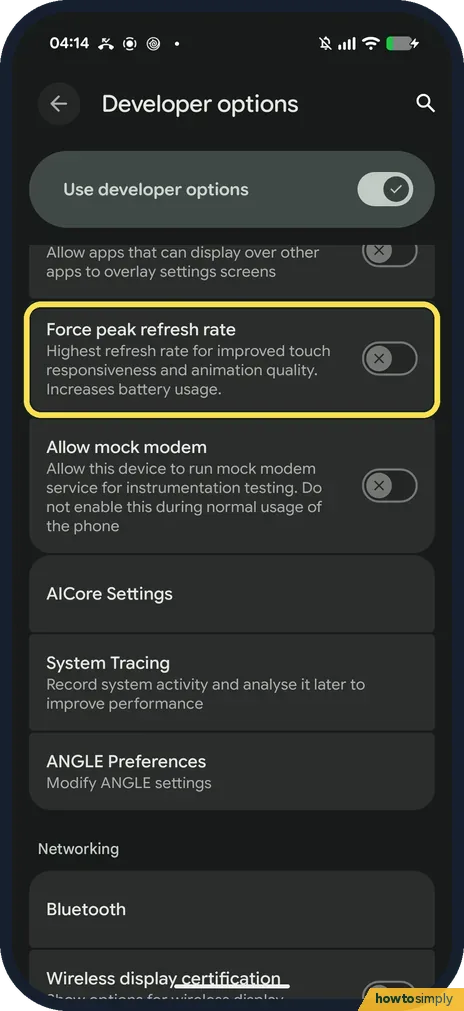
- Want the top rate all the time? Developer options has a separate switch for that. On ours (1 November 2026, build CP3A.261005.005) it is called Force peak refresh rate: Highest refresh rate for improved touch responsiveness and animation quality. Increases battery usage. It was off. Developer options only appears once you turn it on: how to turn on Developer options on a Google Pixel.
If this does not work
- Doesn't look any smoother? It raises the rate only for some content, such as scrolling. A still screen stays at the lower rate to save battery.
- Battery draining faster? Turn Smooth display off again. Google says it increases battery usage.
- Smooth display switched itself off? Google says that when Battery Saver is on, Smooth Display is disabled. If you use a Battery Saver schedule, it can turn on at a set battery level and take Smooth display with it. It comes back when Battery Saver turns off.
- Smooth in Settings but not in one app? The phone raises the rate only when the content allows it. A game or app that draws at a lower frame rate stays at that rate, whatever the switch says.
- Video looks no different? Films and most online videos are made at far fewer frames per second than 120, so they look the same with Smooth display on or off. The difference shows in scrolling and moving between screens.
Good to know
With Smooth display on, the screen redraws more often while it moves, so scrolling through web pages, lists and the home screen looks less jerky. Google describes it as raising the refresh rate automatically for some content, so the phone drops back to a lower rate when nothing on screen is moving. That is how it limits the extra battery use. Nothing else changes: brightness, colours and screen timeout stay as they were, and turning it off simply returns scrolling to the lower rate.
If battery life matters more, other display settings help as well. A shorter screen timeout is one: how to change the screen timeout.
About this guide
- Device
- Android
- Shown on
- Google Pixel 10a, Android 17 (build CP3A.260905.009)
- App
- Settings
- Path
- Settings › Display and touch › Other display controls
- Real screenshots
- 3 of 3 steps
- What we did
- Performed: we made the change on our device and show the result
- Checked
- October 2026
- Sources
- 3 official, linked below
Sources
Links checked October 2026. Menus and features can change with updates.Spotted a mistake? Menus change with updates, and we want every step to match your screen. Email us about this page or use the contact form. We read every report, and fixes are listed on What changed.
Liked this guide?
Follow us for new guides and short how-to videos.
Did this guide work for you?
Sorry about that. What happened?