
howtosimply.com/guides/how-to-factory-reset-an-honor-phone/ · Checked October 2026 · BRP-NX1M, EEA), MagicOS 10.0, Android 16 (build 10.0.0.169(C430E7R2P1) · HONOR Magic7 Lite
In this guide
Back up first, then open Settings, System & updates, Reset, Reset phone and tap Reset phone at the bottom. It erases accounts, apps, photos, files and settings. We did not tap the final button.
4 of 4 steps with real screenshots · 5 official sources below
- Device
- Android
- Shown on
- HONOR Magic7 Lite (BRP-NX1M, EEA), MagicOS 10.0, Android 16 (build 10.0.0.169(C430E7R2P1))
- App
- Settings
- Path
- Settings › System & updates › Reset › Reset phone
- Real screenshots
- 4 of 4 steps
- Checked
- October 2026
- Sources
- 5 official, linked below
Step by step
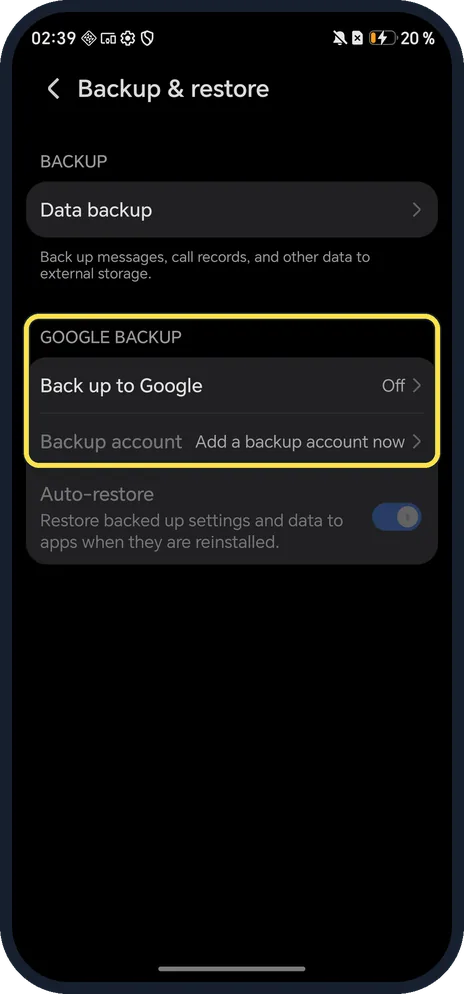
Back up first
Open Settings, System & updates, Backup & restore. Ours had Data backup to external storage and Back up to Google (off).
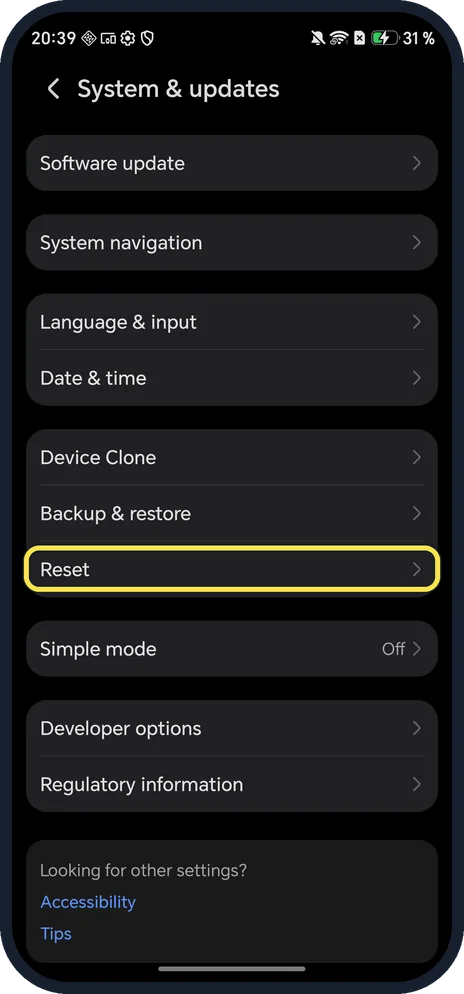
Open System & updates, Reset
Open Settings, System & updates, and tap Reset.
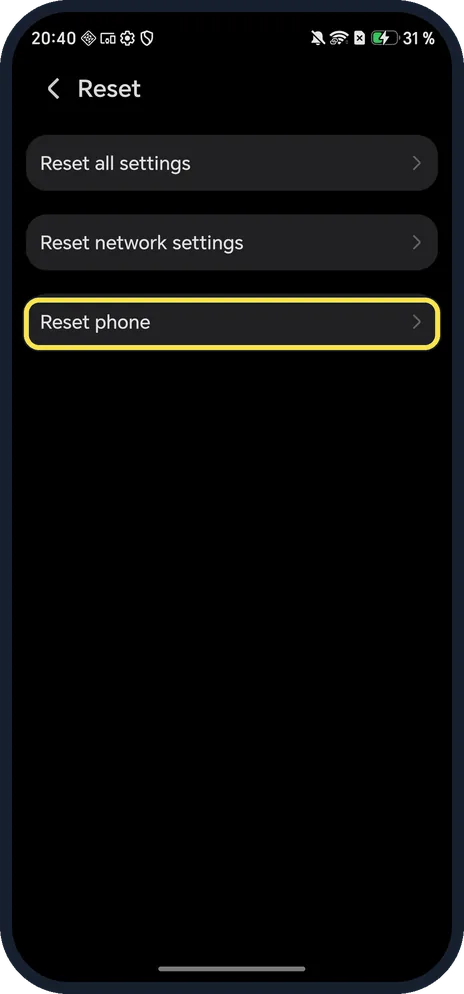
Tap Reset phone
Reset all settings and Reset network settings keep your data.
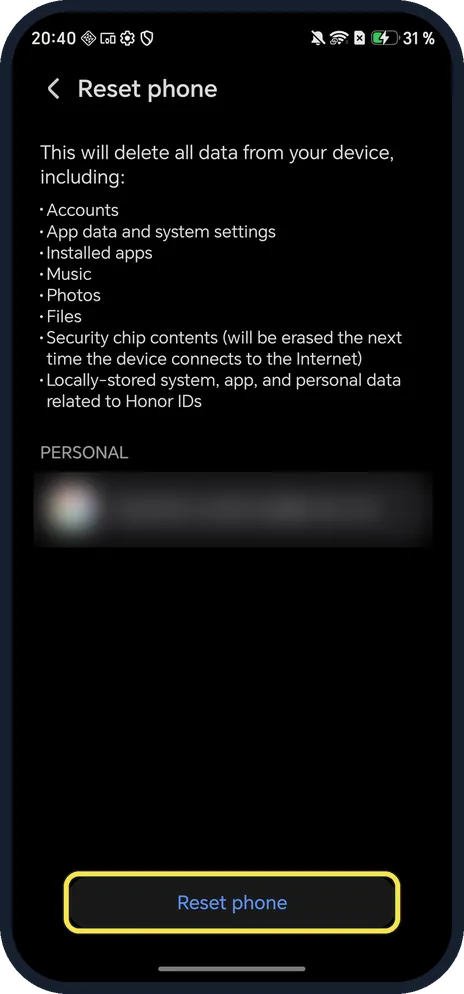
Read the list, then tap Reset phone
It deletes accounts, app data and system settings, installed apps, music, photos, files, security chip contents and data related to Honor IDs. Your account shows under PERSONAL (blurred here). Then tap Reset phone; you may be asked for your screen lock and account password.
If you do not see this option
- No Reset row under System & updates? HONOR's troubleshooting pages say to search Settings for Factory data reset and follow the steps. Source: Phone indicated to not have sufficient storage space · Source: The notification panel does not open when I swipe down from the status bar
- Only Wi-Fi or Bluetooth broken? HONOR says Reset network settings resets Wi-Fi, mobile data and Bluetooth without deleting data. Source: Restore Your Phone to Default Settings or Factory Settings
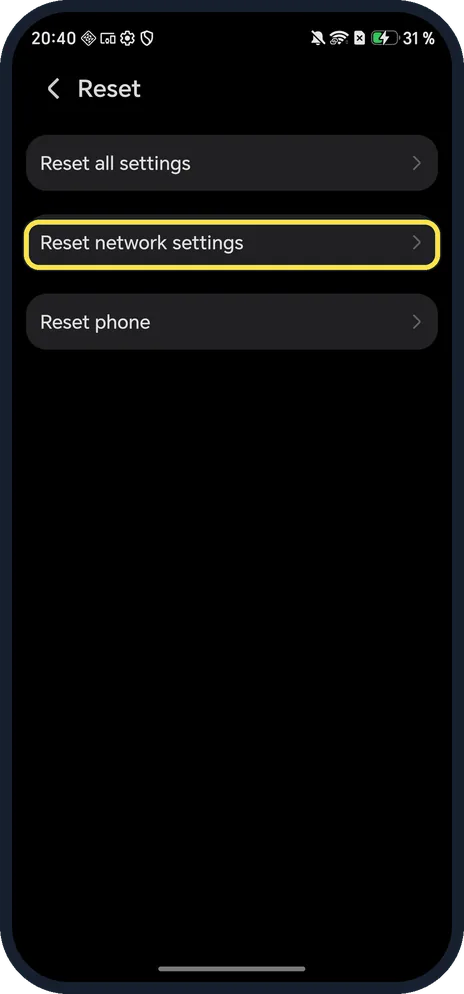
- Want settings back to normal but keep files? HONOR says Reset all settings resets network settings, the lock screen password, the home screen layout and fingerprints or face data, but deletes no files. Source: Restore Your Phone to Default Settings or Factory Settings
If this does not work
- Phone won't start, so you can't reach Settings? HONOR says to turn it off, hold Power and Volume Up until the HONOR logo, and choose Wipe data/factory reset. We did not try this on ours. Source: Fixing Boot Problems on HONOR Devices
- Stuck on the logo after a reset? HONOR says to hold Power for 10 to 15 seconds, or use Wipe cache partition in recovery. Source: Fixing Boot Problems on HONOR Devices
- Asked for a Google account after the reset? Google says to know your Google Account and password before resetting, and to wait 24 hours after changing the password. Source: Reset your Android device to factory settings
About this guide
Reset has three choices on MagicOS; only Reset phone wipes the phone.
The screenshots are from our HONOR Magic7 Lite, the European model BRP-NX1M, with MagicOS 10.0 and Android 16 (build 10.0.0.169(C430E7R2P1)), in Dark mode. We opened the page and pressed Back.
Good to know
To check the exact build after setup, find your HONOR model and MagicOS version.
To get the latest fixes after the reset, update an HONOR phone.
In short: Settings, System & updates, Reset, Reset phone.
- HONOR Support (MY): Restore Your Phone to Default Settings or Factory Settings
- HONOR Support: Fixing Boot Problems on HONOR Devices
- HONOR Support (MEA): Phone indicated to not have sufficient storage space
- HONOR Support: The notification panel does not open when I swipe down from the status bar
- Google Android Help: Reset your Android device to factory settings
Links checked in October 2026. Back up anything you want to keep before you reset or delete. Menus can change after software updates.
Did this guide work for you?
Sorry about that. What happened?