
howtosimply.com/guides/how-to-find-your-oppo-model-and-coloros-version/ · Checked October 2026 · CPH2689, EEA), ColorOS 16.0.5, Android 16 (build CPH2689_16.0.5.1001(EX01) · OPPO Reno13 5G
In this guide
Open Settings, About device. The card at the top shows the ColorOS version (16.0.5 on our Reno13 5G); scroll down for Model (CPH2689) and Software Version.
4 of 4 steps with real screenshots · 4 official sources below
- Device
- Android
- Shown on
- OPPO Reno13 5G (CPH2689, EEA), ColorOS 16.0.5, Android 16 (build CPH2689_16.0.5.1001(EX01))
- App
- Settings
- Real screenshots
- 4 of 4 steps
- Checked
- October 2026
- Sources
- 4 official, linked below
Step by step
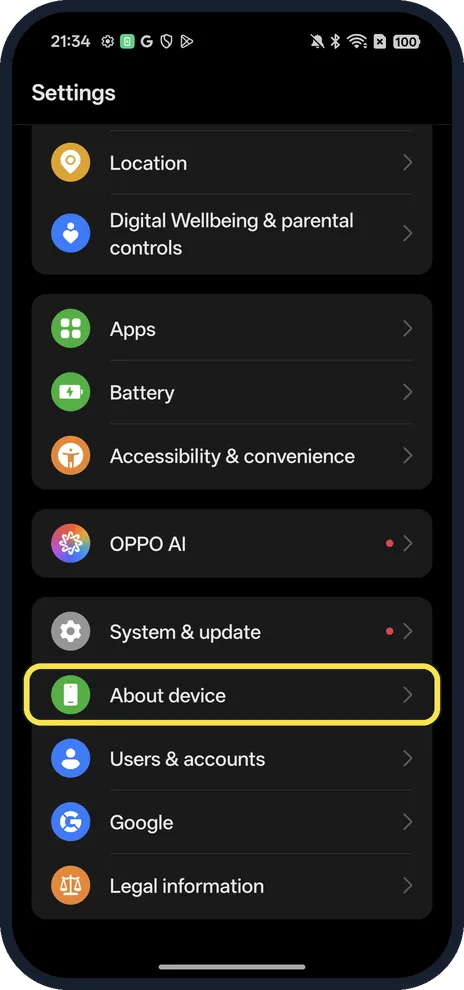
Open About device
Open Settings and scroll near the bottom.
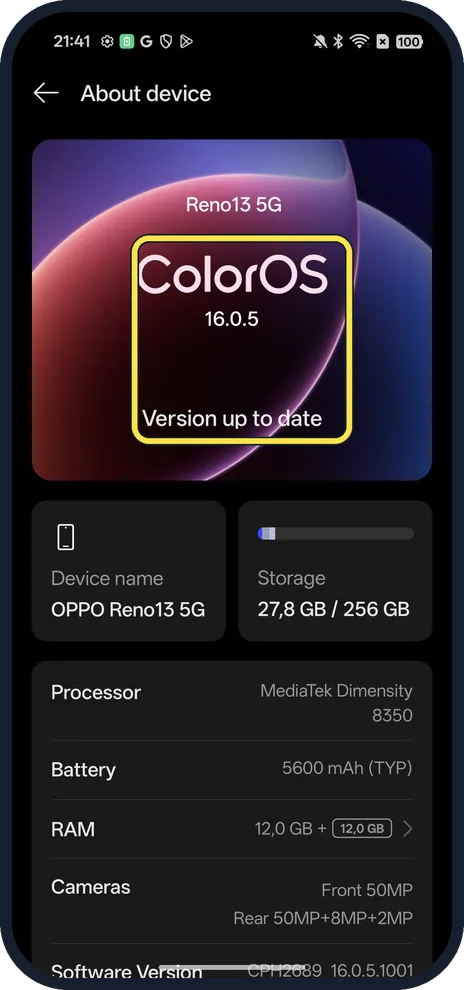
Read the ColorOS version
The top card; ours said 16.0.5 and Version up to date.
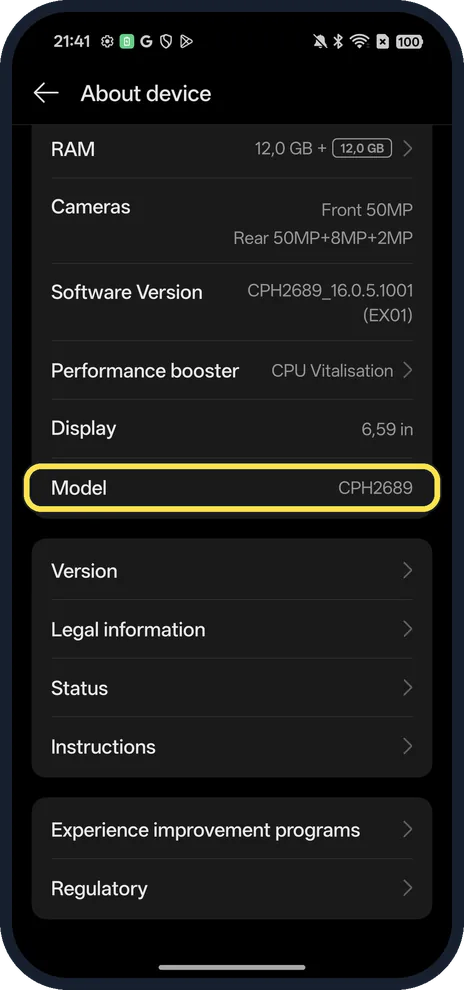
Scroll to Model
Ours: CPH2689. Software Version gives the full build.
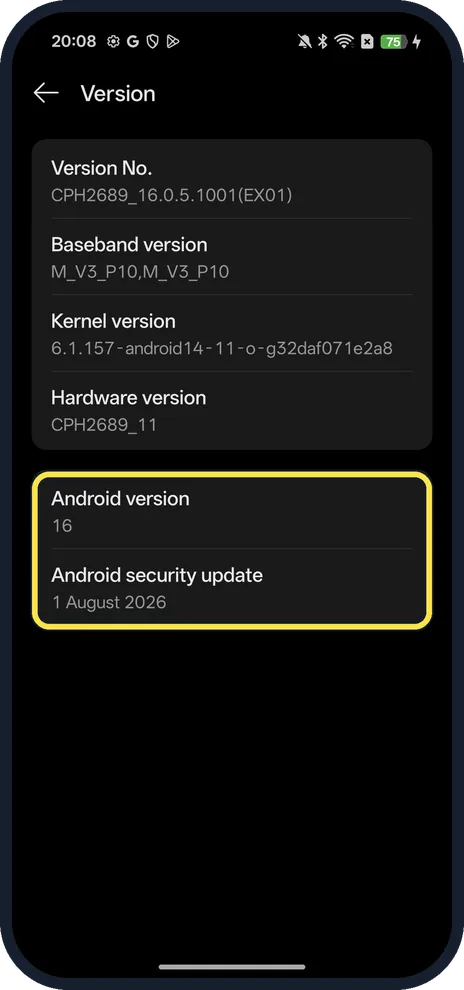
Tap Version for the Android version
Ours: Android version 16 and Android security update 1 August 2026.
If you do not see this option
- No About device in Settings? OPPO gives Settings, About Phone or About Device on its phones; on ours it was About device, near the bottom of Settings. Source: How to Check the Android Version of Your OPPO Phone
- No ColorOS card at the top? OPPO says the ColorOS version opens from Settings, About device, ColorOS on ColorOS 13 and later, from About device itself on ColorOS 12, and from Software Updates or System Update on ColorOS 11 and earlier. Source: How to Know When Software Update is Available
- Need the IMEI? OPPO says: Settings, About Phone or About Device, Status, IMEI. On ours Status is near the bottom of About device. Source: How to Find IMEI and Serial Number (SN) of OPPO Products
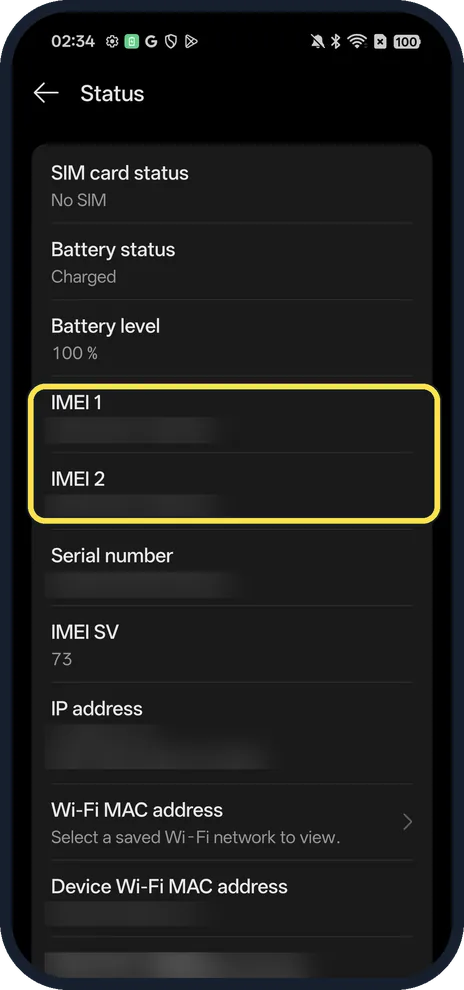
- Need the code to match a spec sheet? OPPO's Reno13 specification page lists CPH2689 among its model codes, so the Model row tells you which phone page applies. Source: Reno13 Series specifications
If this does not work
- Can't open Settings to find the IMEI? OPPO says to dial *#06# in the Phone app; if that does not work, try *#66#. The IMEI is also on the box. Source: How to Find IMEI and Serial Number (SN) of OPPO Products
- No update shown on the ColorOS card? OPPO says updates reach phones at different times by model and region, so wait for the notification or check the ColorOS card again later. Source: How to Know When Software Update is Available
About this guide
The model code (CPH...) is what OPPO lists on its specification pages; CPH2689 is a Reno13 5G.
The screenshots are from our OPPO Reno13 5G, the European model CPH2689, with ColorOS 16.0.5 and Android 16 (build CPH2689_16.0.5.1001(EX01)), in Dark mode.
Good to know
To install a newer version, update your OPPO phone.
To unlock hidden settings, turn on developer options from the same Version page.
In short: Settings, About device: ColorOS on top, Model below, Version for Android.
- OPPO Support: How to Check the Android Version of Your OPPO Phone
- OPPO Support: How to Know When Software Update is Available
- OPPO: Reno13 Series specifications
- OPPO Support: How to Find IMEI and Serial Number (SN) of OPPO Products
Links checked in October 2026. Menus and features can change after software updates. These steps match the version named at the top.
Did this guide work for you?
Sorry about that. What happened?