XIAOMI REDMI
Xiaomi phone not ringing or vibrating? What to check (HyperOS 3)
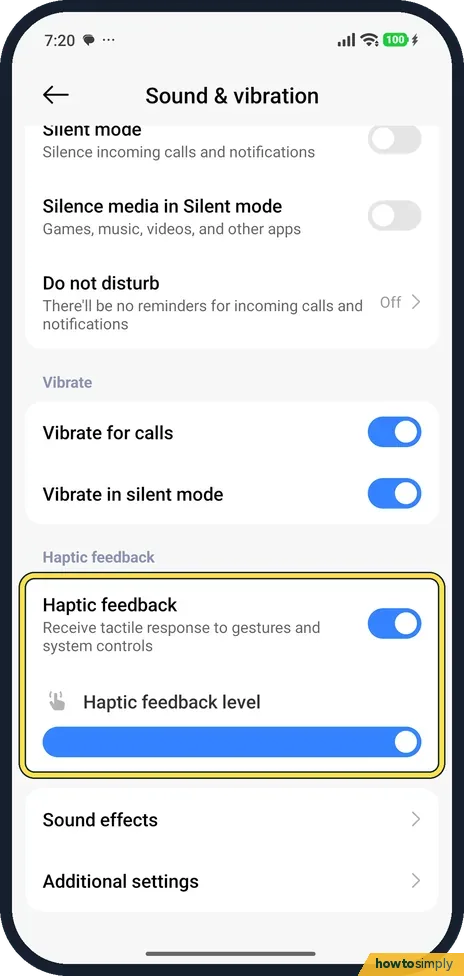
In Settings, Sound & vibration, check that the Ringtone slider is up, Silent mode is off and Do not disturb is off. For vibration, turn on Vibrate for calls and Vibrate in silent mode. Haptic feedback and its level are on the same page.

5 of 5 steps show a real screenshot from our Redmi Note 15 Pro 5G. Each step was checked against the maker's own instructions, linked at the end.
Steps
- 1
Check the ringtone volume
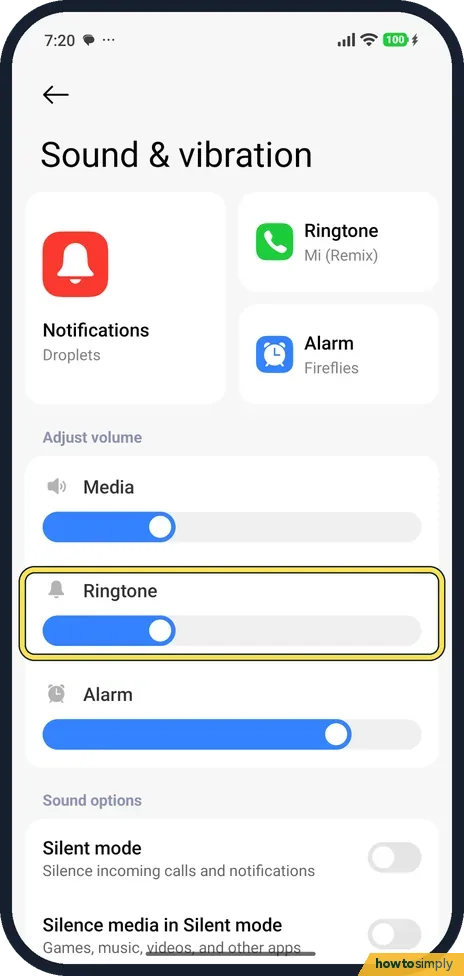
Go to Settings, Sound & vibration. Under Adjust volume, drag Ringtone to the right. On ours Media and Ringtone were low and Alarm high.
- 2
Turn off Silent mode
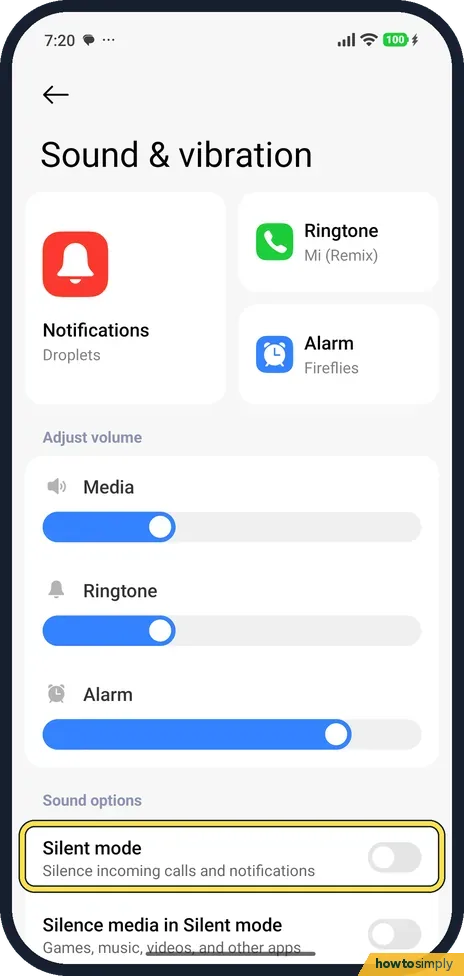
Further down, Silent mode silences incoming calls and notifications. It was off on ours.
- 3
Check Do not disturb
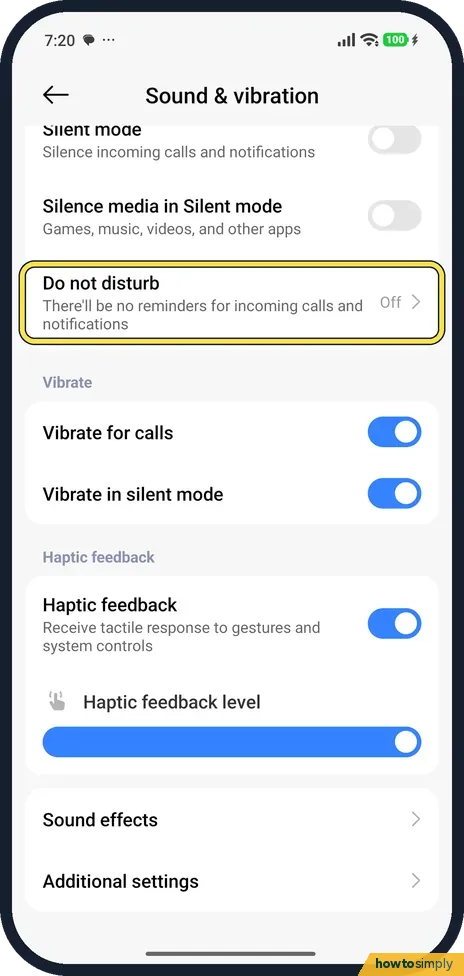
Scroll down. Do not disturb said Off on ours. If it says On, tap it and turn it off.
- 4
Turn on vibration for calls
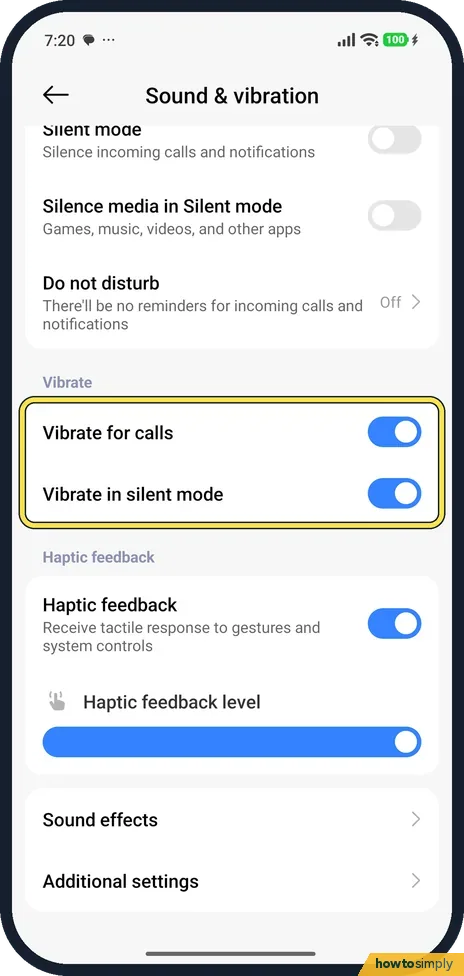
Under Vibrate, Vibrate for calls and Vibrate in silent mode were both on. Turn them on if the phone doesn't vibrate.
- 5
Check Haptic feedback
Haptic feedback is the vibration when you touch the screen. Drag Haptic feedback level to change its strength. There is no separate vibration-strength page on our phone.
If you do not see this option
- Want to change the ringtone? The Ringtone tile at the top (Mi (Remix) on ours) opens the Themes app. On our phone Themes first asked for consent to use personal data for advertising and other purposes, so we did not get to the ringtone list.
- No vibration strength setting? Our phone has only the Haptic feedback level slider, which is for touches, not calls. Source: Generic User Guide for HyperOS 3.0
If this does not work
- Rings for some people only? Do not disturb can let some callers through. See how to use Do not disturb on a Xiaomi phone.
- No sound with Bluetooth earphones? The call may be ringing in the earphones. Allow in-band ringtones, in Bluetooth, Additional settings, plays ringtones through them.
- Silent during games or videos? Silence media in Silent mode only affects media, not calls.
- Calls go quiet when the phone is face down? Xiaomi's user guide lists Flip To Silence in the Phone app's settings: placing the phone face down on a flat surface silences an incoming call. On our Redmi it was in the Phone app's settings under Advanced, as Flip to silence. Turn it off there if this catches you out.
- One caller never gets through? Their number may be blocked. Xiaomi's guide says you do not receive calls or texts from blocked numbers, and Security, Blocklist can also block calls from strangers or hidden numbers. Check both lists.
- Phone never rings and calls go to voicemail? Check call forwarding with your carrier. Xiaomi's guide places call forwarding under Calling accounts in the Phone app's settings.
Good to know
Key and touch sounds: how to turn off keyboard and touch sounds.
None of these checks changes your contacts, call history or messages. If you turned off a block, a Do not disturb schedule or Flip To Silence, remember that it may have been set on purpose. Turn it back on with a narrower rule if needed, for example allowing your contacts through Do not disturb.
If the phone still rings silently after every check, restart it and test with a call. A speaker fault shows up in other sounds too, such as music played without earphones; if those are silent as well, contact Xiaomi support. To check hardware yourself, see open the CIT hardware test on a Xiaomi phone.
Do not disturb is not a reason for a missed alarm on our phone: its Do not disturb rule allowed alarms and media when we checked on 1 November 2026 (HyperOS 3.0.309.0), even though the Do not disturb page itself has no Alarms row.
About this guide
- Device
- Android
- Shown on
- Xiaomi Redmi Note 15 Pro 5G (25080RABDG), HyperOS 3.0.308.0, Android 16
- App
- Settings
- Path
- Settings › Sound & vibration › Ringtone volume up
- Real screenshots
- 5 of 5 steps
- Checked
- October 2026
- Sources
- 2 official, linked below
Sources
Links checked October 2026. Menus and features can change with updates.Spotted a mistake? Menus change with updates, and we want every step to match your screen. Email us about this page or use the contact form. We read every report, and fixes are listed on What changed.
Liked this guide?
Follow us for new guides and short how-to videos.
Did this guide work for you?
Sorry about that. What happened?