
howtosimply.com/guides/how-to-find-your-nothing-phone-model-imei-and-nothing-os-version/ · Checked October 2026 · 4a) Pro (A069P, EEA), Nothing OS 4.1, Android 16 (build FroggerPro-B4.1-260424-1447-EEA · Nothing Phone
In this guide
Open Settings, About phone. The top cards show the phone name and the Nothing OS version; scroll to Device details for the model number and IMEI. Tap the NOTHING OS card for the full build number.
4 of 4 steps with real screenshots · 2 official sources below
- Device
- Android
- Shown on
- Nothing Phone (4a) Pro (A069P, EEA), Nothing OS 4.1, Android 16 (build FroggerPro-B4.1-260424-1447-EEA), Nothing Phone (4a) Pro (A069P, EEA), Nothing OS 4.1, Android 16 (build FroggerPro-B4.1-260907-1153-EEA)
- App
- Phone
- Real screenshots
- 4 of 4 steps
- Checked
- October 2026
- Sources
- 2 official, linked below
Step by step
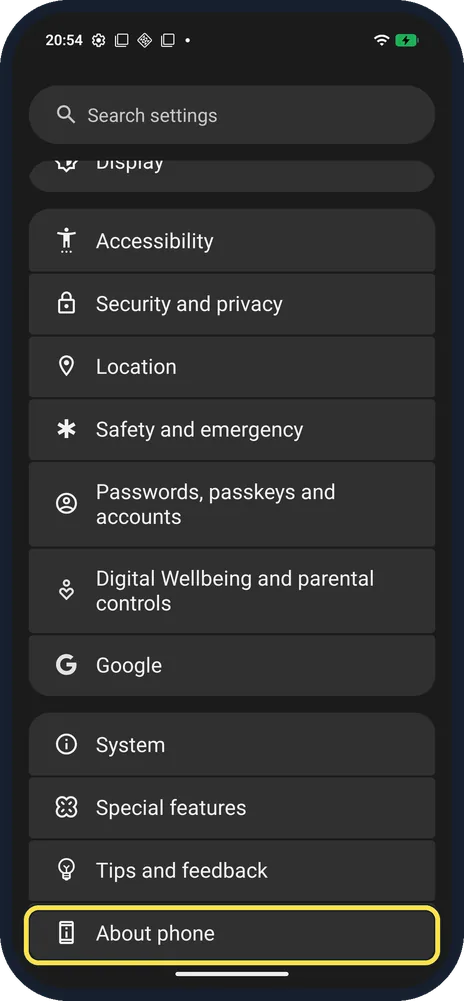
Open About phone
Open Settings and scroll to the bottom.
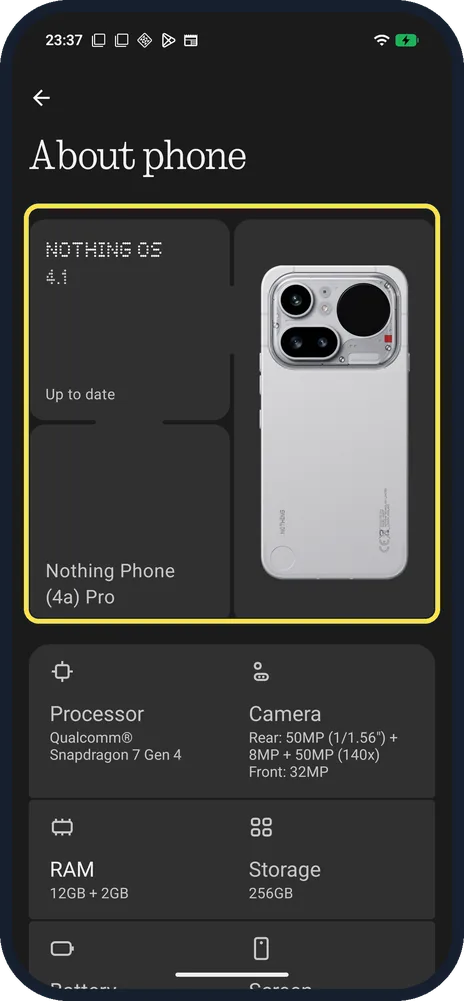
Read the name and Nothing OS version
The NOTHING OS card (ours: 4.1, Up to date) and the phone name card (ours: Nothing Phone (4a) Pro) are at the top.
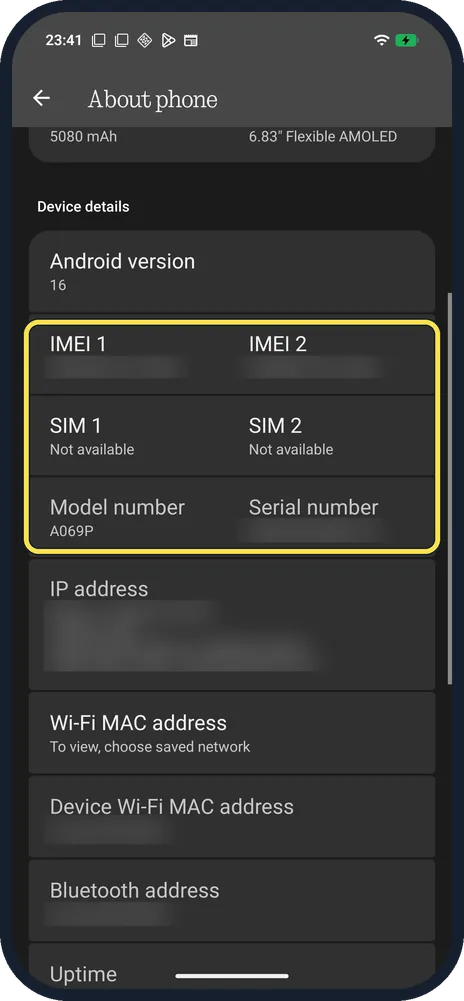
Scroll to Device details
IMEI 1 and IMEI 2, SIM status, Model number (ours: A069P) and Serial number are listed here.
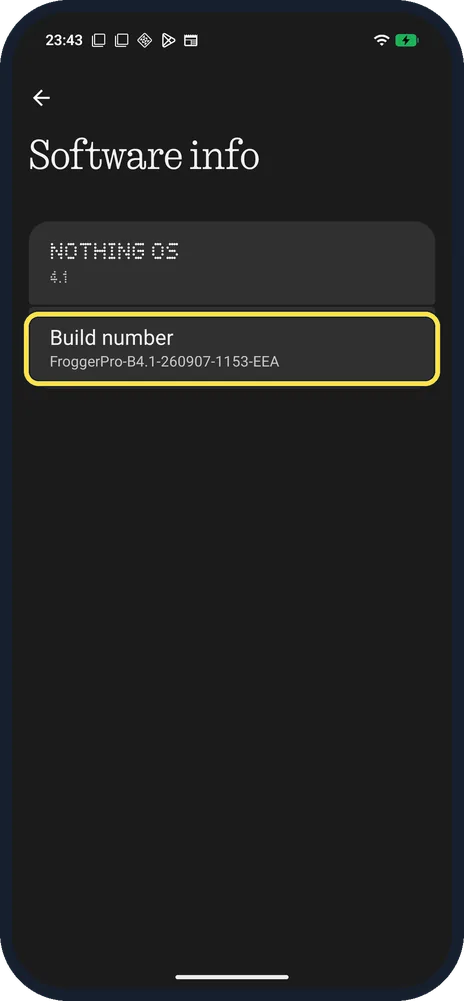
Tap the NOTHING OS card for the build number
Software info shows the Build number. Ours: FroggerPro-B4.1-260907-1153-EEA.
If you do not see this option
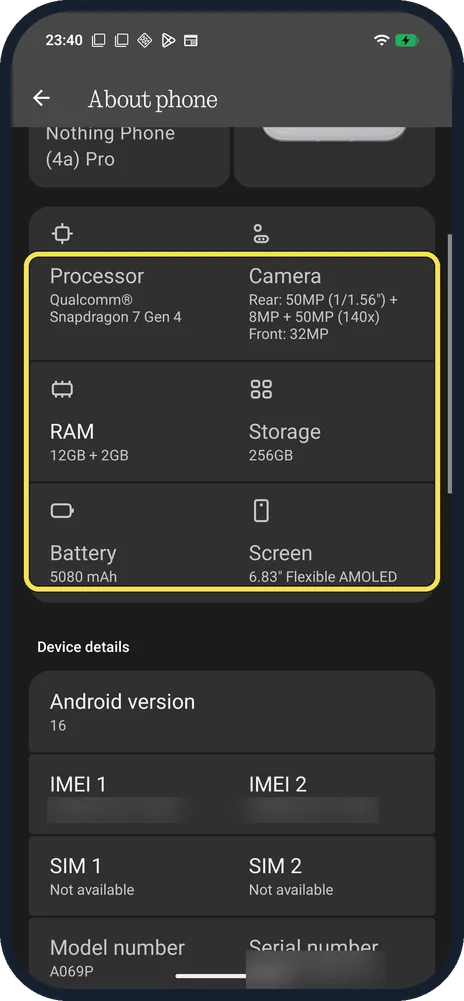
- Need the RAM, storage or battery size? Cards under the phone name list them. Ours: Snapdragon 7 Gen 4, RAM 12GB + 2GB, storage 256GB, battery 5080 mAh, 6.83" Flexible AMOLED screen.
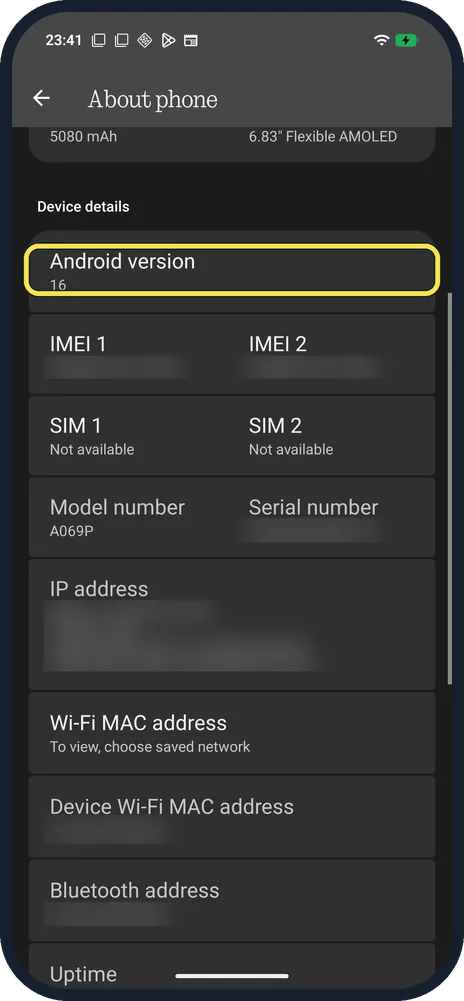
- Need the Android version? It is the first row under Device details. Ours: 16. Source: What operating system does Phone (4a) Pro use?
If this does not work
- SIM 1 and SIM 2 say Not available? That is the SIM status, not the IMEI. Ours had no SIM inserted.
- Your build number is different? Ours ends in EEA, the European build. Check for updates to get the newest one; see update a Nothing Phone.
About this guide
The screenshots are from our Nothing Phone (4a) Pro, the European model A069P, with Nothing OS 4.1 and Android 16 (build FroggerPro-B4.1-260907-1153-EEA, security update 1 September 2026), in Dark theme. The IMEI, serial number and IP address are blurred in our screenshots.
The step 1 screenshot was taken earlier, on build FroggerPro-B4.1-260424-1447-EEA.
Good to know
To install the latest version, update a Nothing Phone.
To unlock hidden settings, turn on Developer options.
In short: Settings, About phone: name and Nothing OS at the top, model number and IMEI under Device details.
- Nothing Support: What operating system does Phone (4a) Pro use?
- Pixel Phone Help: Find your IMEI and other Pixel phone ID numbers
Links checked in October 2026. Menus and features can change after software updates. These steps match the version named at the top.
Did this guide work for you?
Sorry about that. What happened?