
howtosimply.com/guides/how-to-turn-off-autocorrect-on-a-samsung-galaxy/ · Checked October 2026 · Samsung Galaxy A57 5G (SM-A576B), One UI 8.5, Android 16
In this guide
Open Settings, General management, Samsung Keyboard settings and tap Auto replace. Switch it off. The keyboard then stops changing words by itself. Turn off Predictive text as well to remove the suggestion bar.
5 of 5 steps with real screenshots · 1 official source below
- Device
- Android
- Shown on
- Samsung Galaxy A57 5G (SM-A576B), One UI 8.5, Android 16
- App
- Settings
- Path
- Settings › General management › Samsung Keyboard settings
- Real screenshots
- 5 of 5 steps
- What we did
- Observed: looked at each screen, changed nothing
- Our phone
- Shown on Galaxy A57, One UI 8.5
- Checked
- October 2026
- Sources
- 1 official, linked below
Step by step
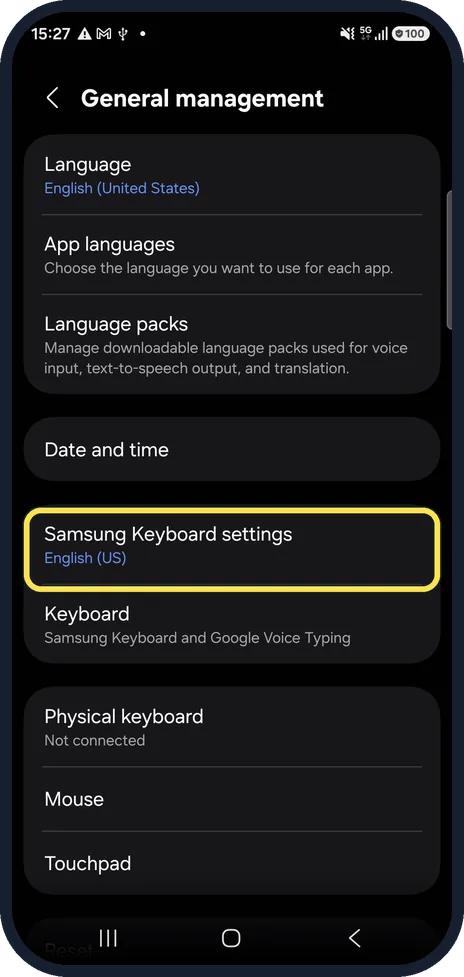
Open Samsung Keyboard settings
Open Settings, tap General management, then Samsung Keyboard settings. Or tap the gear on the keyboard toolbar.
Watch these steps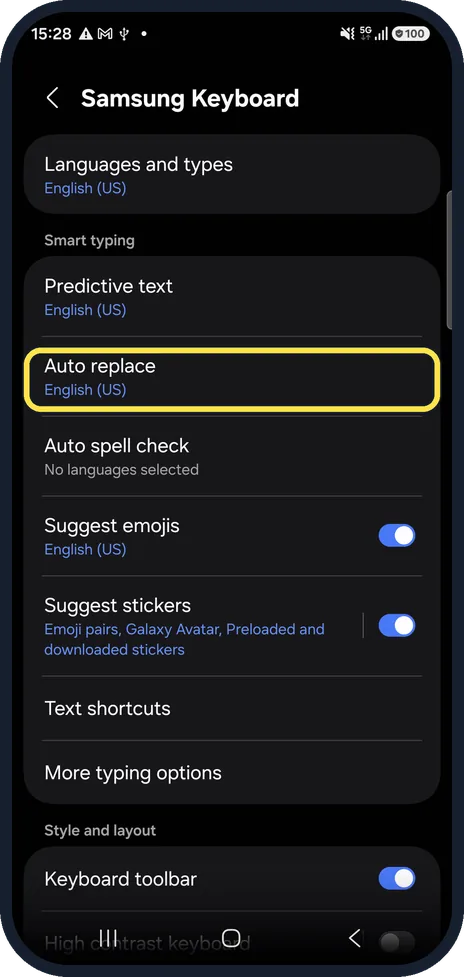
Tap Auto replace
In the Smart typing group. Below it you see the language it works for, English (US) on our phone.
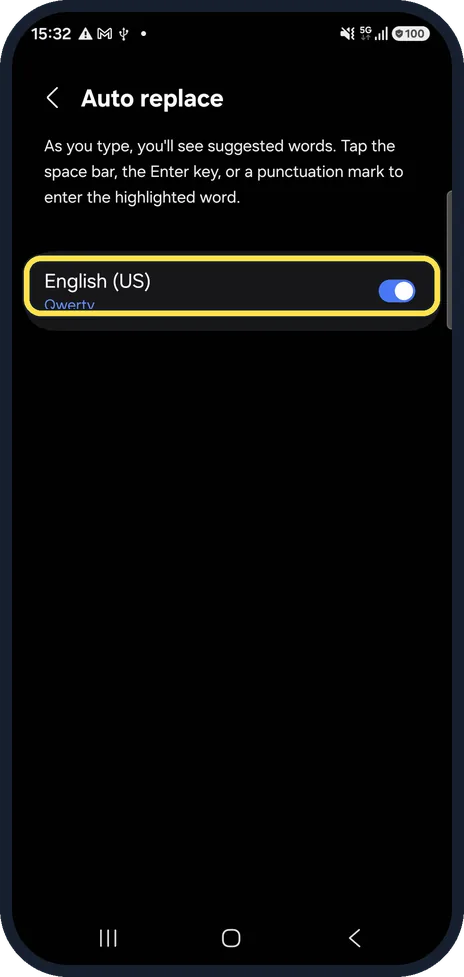
Switch it off
On the Auto replace page, switch off the language you type in (English (US) on our phone). Words you type are then left as they are.
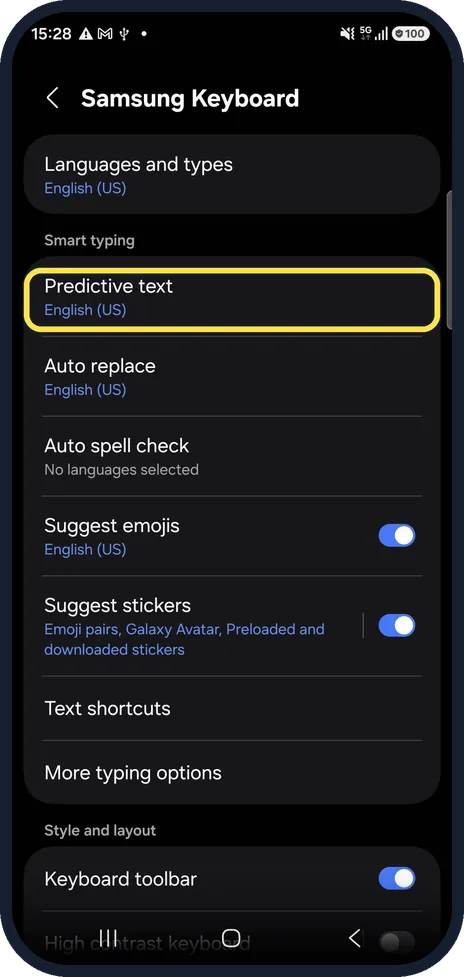
Optional: turn off Predictive text
Predictive text shows word suggestions above the keyboard. Switch it off too if you want no suggestions at all.
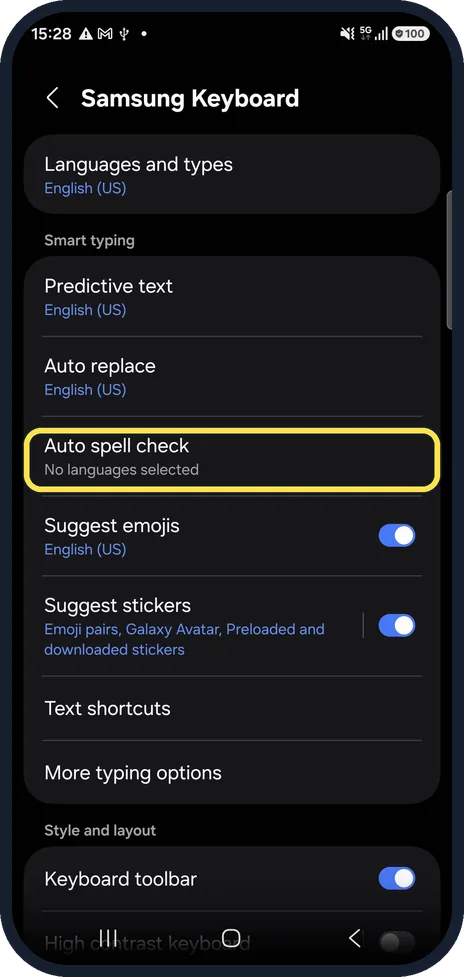
Keep the spell check underline
Auto spell check marks misspelled words with a red line without changing them. Choose a language for it if you still want a hint.
Watch these steps
If you do not see this option
- You use a different keyboard Samsung says these settings only apply to Samsung Keyboard. To check which keyboard you use, open Settings, General management, Keyboard list and default, Default keyboard. Source: Adjust keyboard settings on your Galaxy phone or tablet
- Samsung Keyboard settings is not under General management Samsung says to search Settings for Samsung Keyboard, or tap the settings icon on the keyboard toolbar. Source: Adjust keyboard settings on your Galaxy phone or tablet
If this does not work
- Phrases still get corrected Samsung says Suggest text corrections fixes grammar and phrases and marks them with green underlines. Switch it off, or tap Manage apps to choose which apps get corrections. Source: Adjust keyboard settings on your Galaxy phone or tablet
- Capitals and spaces still change Samsung says Auto capitalize and Auto spacing are under More typing options in the same settings. Source: Adjust keyboard settings on your Galaxy phone or tablet
About this guide
The Samsung Keyboard does not have a setting called autocorrect. The feature that swaps your word for its own guess is called Auto replace.
Good to know
Using Gboard instead? Its setting is called Auto-correction, under Gboard settings, Text correction.
In short: Settings, General management, Samsung Keyboard settings, Auto replace off.
Links checked in October 2026. Menus and features can change after software updates. These steps match the version named at the top.
📷 See real photos from the Galaxy A57 in our Camera Lab, next to 10 other phones.
Did this guide work for you?
Sorry about that. What happened?