
howtosimply.com/guides/how-to-show-battery-percentage-on-a-nothing-phone/ · Checked October 2026 · 4a) Pro (A069P, EEA), Nothing OS 4.1, Android 16 (build FroggerPro-B4.1-260424-1447-EEA · Nothing Phone
In this guide
Open Settings, Battery and turn on Battery percentage ("Show battery percentage in status bar"). It was off on our (4a) Pro out of the box.
3 of 3 steps with real screenshots · 3 official sources below
- Device
- Android
- Shown on
- Nothing Phone (4a) Pro (A069P, EEA), Nothing OS 4.1, Android 16 (build FroggerPro-B4.1-260424-1447-EEA)
- App
- Settings
- Path
- Settings › Battery
- Real screenshots
- 3 of 3 steps
- Checked
- October 2026
- Sources
- 3 official, linked below
Step by step
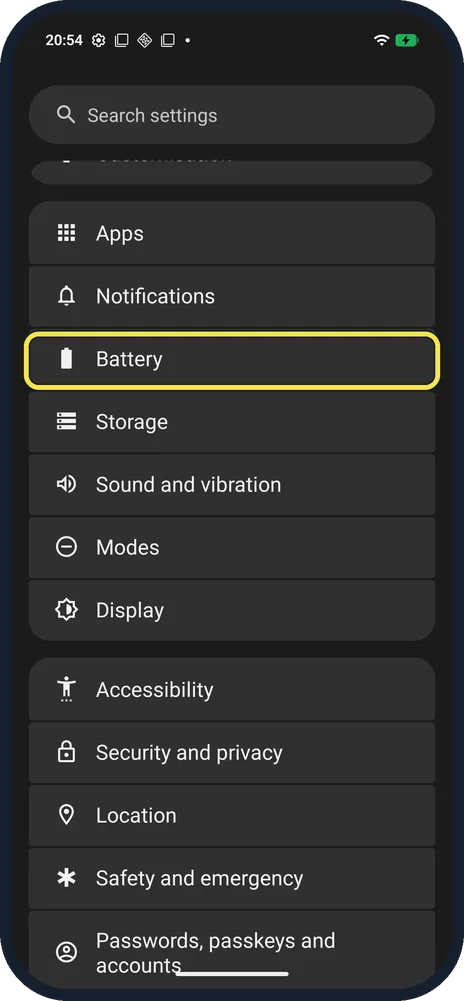
Open Battery
Open Settings and tap Battery.
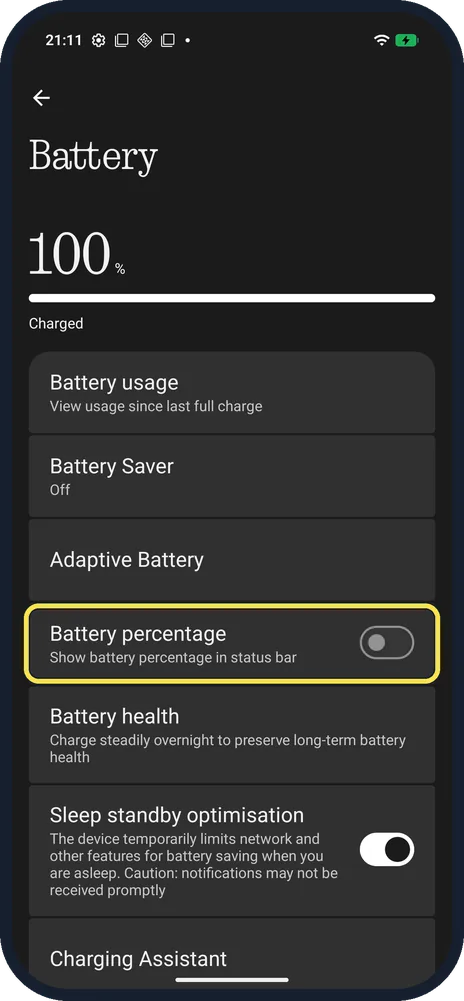
Turn on Battery percentage
Tap the switch next to Show battery percentage in status bar.
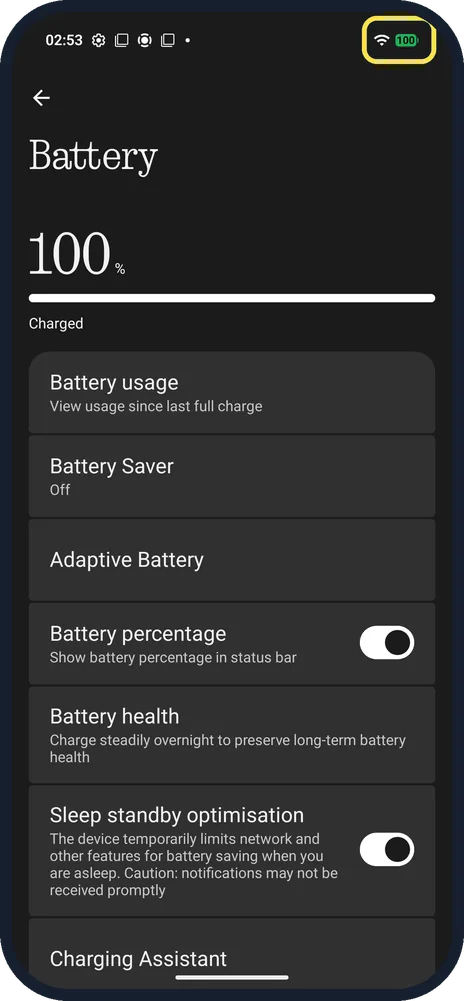
Check the status bar
The number appears inside the battery icon at the top right. Ours showed 100.
If you do not see this option
- Number inside the icon, not beside it? That is how ours showed it: inside the battery icon at the top right, as in step 3.
- Where else can you see it? Nothing says the status bar shows the time and battery percentage; swipe down once for quick access and twice for the control centre. Source: What is the status bar?
If this does not work
- Percentage disappears? Some full-screen apps hide the status bar. Swipe down once from the very top to see it. Source: What is the status bar?
- Battery running low? Nothing says you get a prompt to turn on Battery Saver below 20%, and you can add a Battery Saver tile with the pencil in Quick Settings. Battery Saver was Off on ours. Source: How do I enable battery saver on my Phone?
- Battery life worse than it was? Nothing recommends not running the battery flat, charging between 15°C and 35°C, and unplugging when it is full. Source: How can I extend my phone's battery life?
About this guide
The screenshots are from our Nothing Phone (4a) Pro, the European model A069P, with Nothing OS 4.1 and Android 16 (build FroggerPro-B4.1-260424-1447-EEA), in Dark theme.
Good to know
To see capacity and charge cycles, see check battery health.
In short: Settings, Battery, Battery percentage on.
- Nothing Support: What is the status bar?
- Nothing Support: How do I enable battery saver on my Phone?
- Nothing Support: How can I extend my phone's battery life?
Links checked in October 2026. Menus and features can change after software updates. These steps match the version named at the top.
Did this guide work for you?
Sorry about that. What happened?