
howtosimply.com/guides/how-to-find-app-lock-and-hidden-apps-on-an-honor-phone/ · Checked October 2026 · BRP-NX1M, EEA), MagicOS 10.0, Android 16 (build 10.0.0.169(C430E7R2P1) · HONOR Magic7 Lite
In this guide
Open Settings, Security & privacy, scroll to Device & data protection. App Lock, Hidden apps and Parallel Space are there.
4 of 4 steps with real screenshots · 3 official sources below
- Device
- Android
- Shown on
- HONOR Magic7 Lite (BRP-NX1M, EEA), MagicOS 10.0, Android 16 (build 10.0.0.169(C430E7R2P1))
- App
- Settings
- Path
- Settings › Security & privacy
- Real screenshots
- 4 of 4 steps
- Checked
- October 2026
- Sources
- 3 official, linked below
Step by step
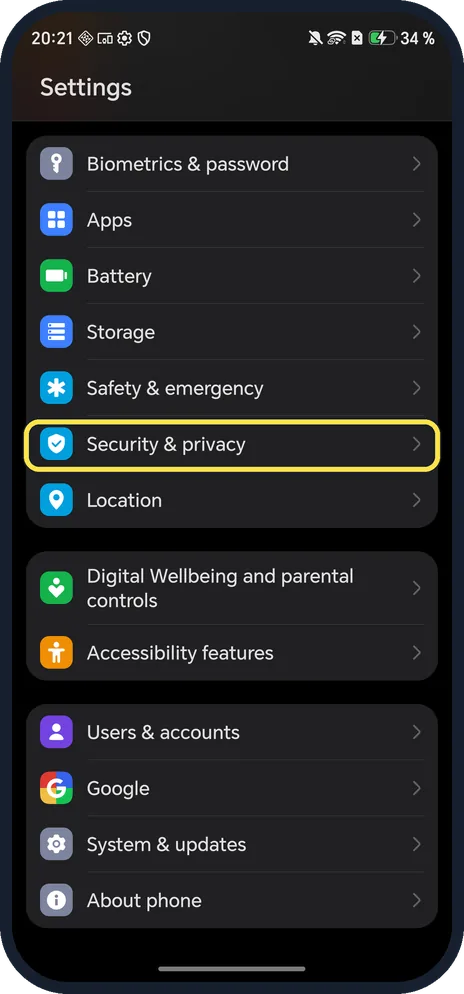
Open Security & privacy
Open Settings and tap Security & privacy.
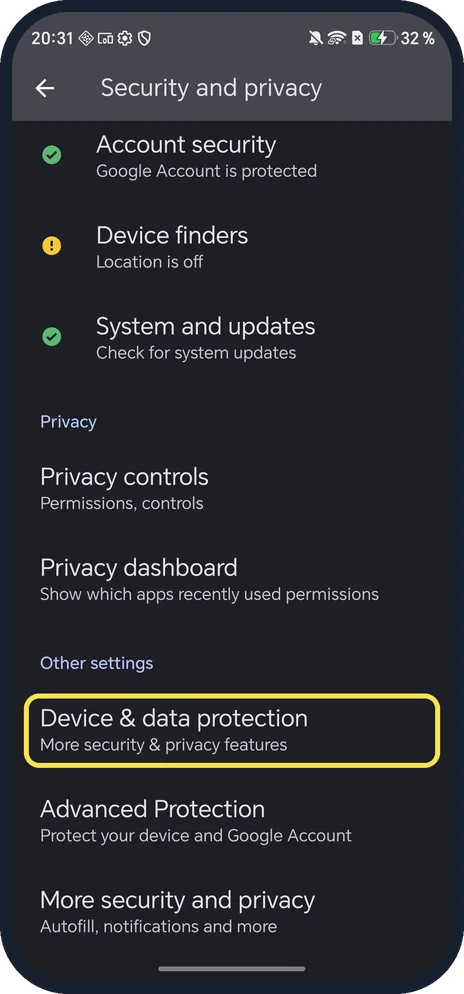
Tap Device & data protection
Scroll down to Other settings.
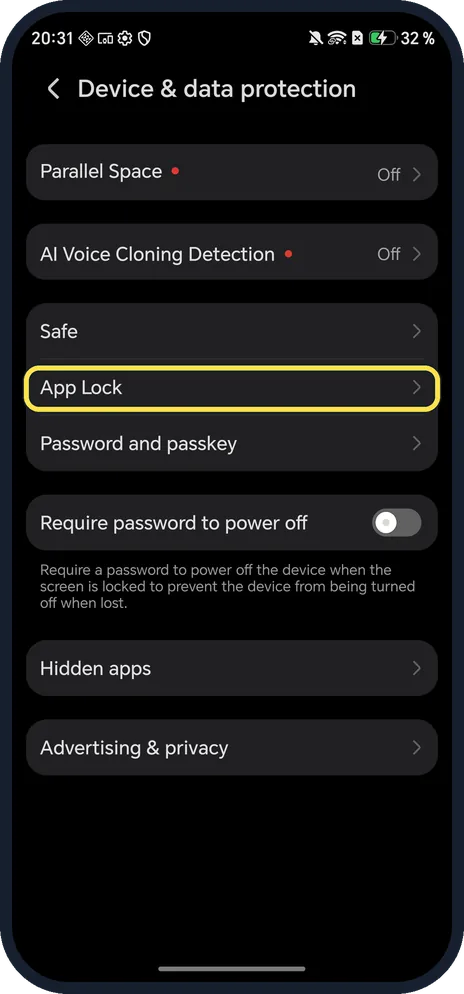
Tap App Lock
The list also has Parallel Space, Safe and Hidden apps.
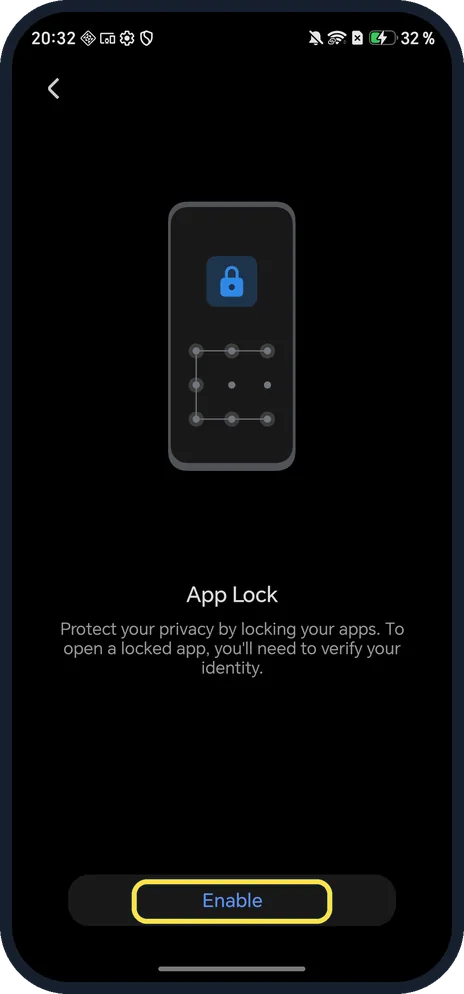
Tap Enable
App Lock asks you to verify your identity to open a locked app, so it needs a password.
If you do not see this option
- No Device & data protection? HONOR's App Lock guide gives Settings, Security & privacy, Device & data protection, App Lock, ENABLE, and says the feature may vary by device. Source: Use App Lock to Protect Your Privacy
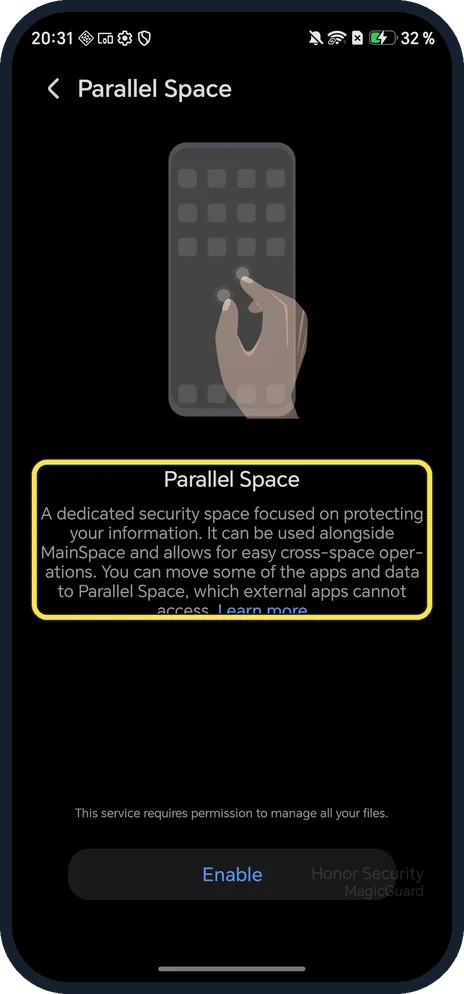
- Looking for PrivateSpace? HONOR's guide gives Settings, Privacy, PrivateSpace, Enable on other versions; it opens from the lock screen with its own password or fingerprint. Ours had Parallel Space instead, off. Source: Create a PrivateSpace for your private data
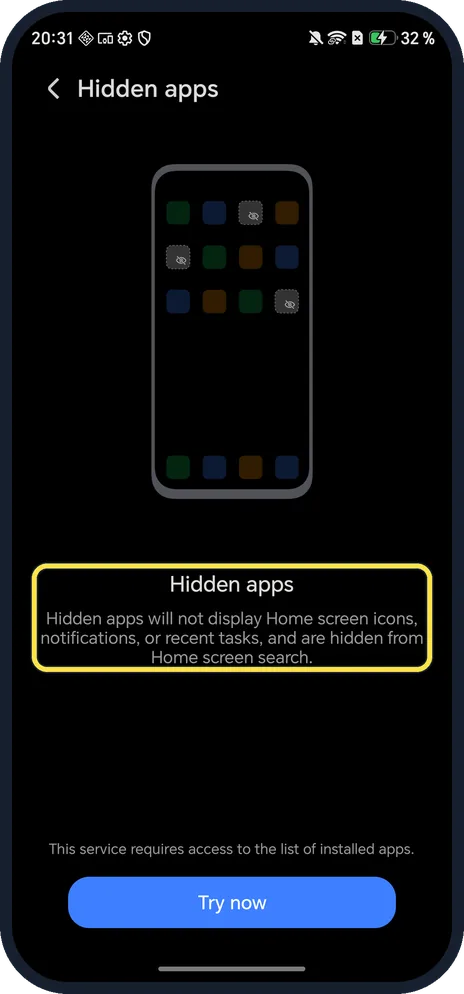
- Hide an app completely? Hidden apps (same list) removes Home screen icons, notifications and recent tasks, and hides apps from Home screen search.
If this does not work
- Forgot the App Lock password? HONOR says to choose Custom PIN in App Lock settings to set security questions in advance; Lock screen password reuses your screen lock. Source: Use App Lock to Protect Your Privacy
- Want all locks gone? HONOR says to tap the menu in App Lock settings, then DISABLE APP LOCK, DISABLE; this clears every lock and setting. Source: Use App Lock to Protect Your Privacy
- An app icon vanished and you don't know why? HONOR says to check whether you are in PrivateSpace, a sub-user or Guest mode, or Drawer mode, and to search for the app by swiping down from the middle of the Home screen. Source: Some app icons are missing from the home screen
- Searching for Private Space lands on the security centre? That happened on ours, which has no screen lock. Set a screen lock first.
About this guide
On MagicOS 10, Security & privacy opens Google's security centre, so HONOR's own privacy tools are one level down.
The screenshots are from our HONOR Magic7 Lite, the European model BRP-NX1M, with MagicOS 10.0 and Android 16 (build 10.0.0.169(C430E7R2P1)), in Dark mode. It has no screen lock, so we stopped at each intro page and did not turn anything on.
Good to know
To run two accounts of one app, use App Twin on an HONOR phone.
To keep apps from closing in the background, check Power saving mode.
In short: Settings, Security & privacy, Device & data protection: App Lock, Hidden apps, Parallel Space.
- HONOR Support (ZA): Use App Lock to Protect Your Privacy
- HONOR Support (MY): Create a PrivateSpace for your private data
- HONOR Support: Some app icons are missing from the home screen
Links checked in October 2026. Menus and features can change after software updates. These steps match the version named at the top.
Did this guide work for you?
Sorry about that. What happened?