
howtosimply.com/guides/how-to-disable-preinstalled-apps-on-a-samsung-galaxy/ · Checked October 2026 · Samsung Galaxy A57 5G (One UI 8.5, Android 16) and Samsung Galaxy A57 (One UI 9, Android 17 (build A576BXXU6BZIE))
In this guide
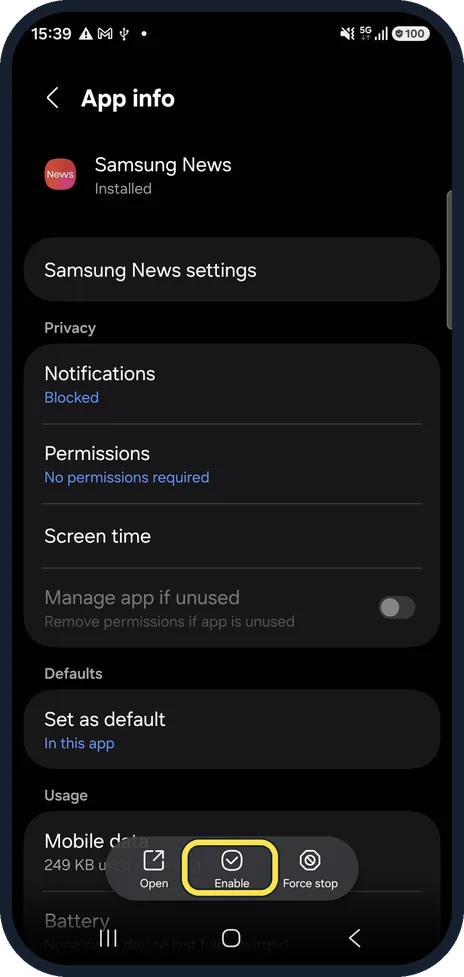
Open Settings, Apps and tap the app. If the bottom bar shows Uninstall, you can remove it. If it shows Disable, tap it and confirm: the app stops running and disappears from your screens. A disabled app shows Enable instead, to bring it back.
7 of 7 steps with real screenshots · 2 official sources below
- Device
- Android
- Shown on
- Samsung Galaxy A57 5G (SM-A576B), One UI 8.5, Android 16, Samsung Galaxy A57 (SM-A576B), One UI 9, Android 17 (build A576BXXU6BZIE)
- App
- Settings
- Path
- Settings › Apps
- Real screenshots
- 7 of 7 steps
- Our phone
- Shown on Galaxy A57, One UI 8.5
- Checked
- October 2026
- Sources
- 2 official, linked below
Step by step
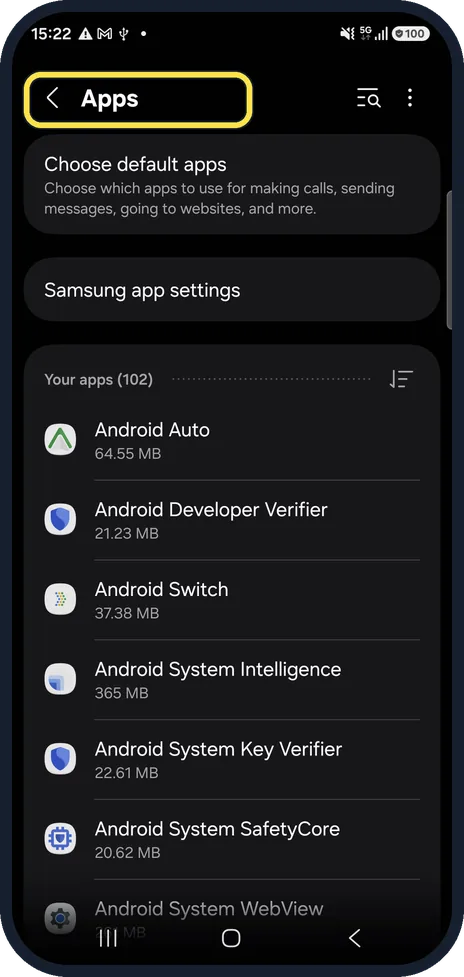
Open Apps
Open Settings and tap Apps. Your apps are listed by name.
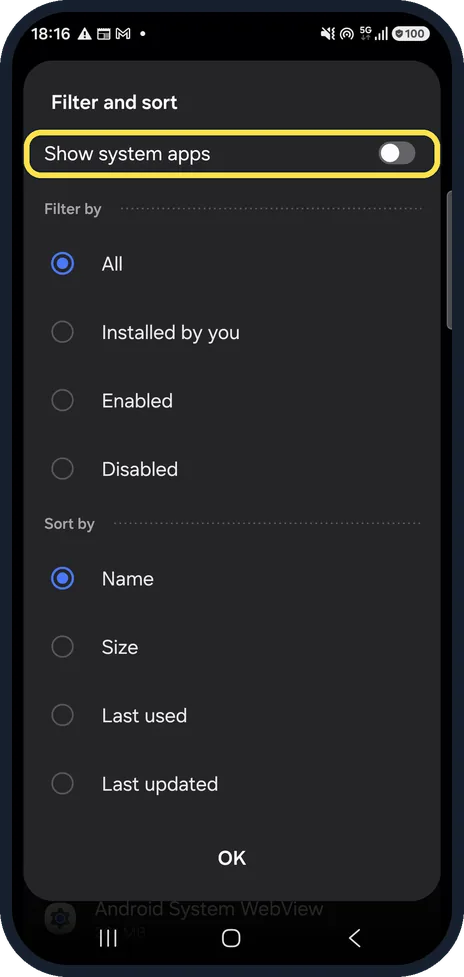
Show the system apps if you need them
Tap the filter and sort button at the top right. Show system apps adds Samsung's and Google's background apps to the list. Leave it off for normal apps.
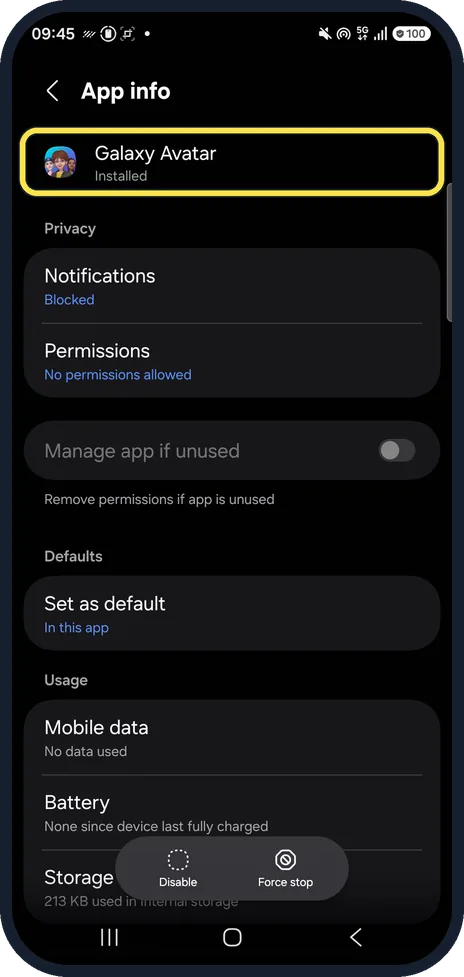
Open the app
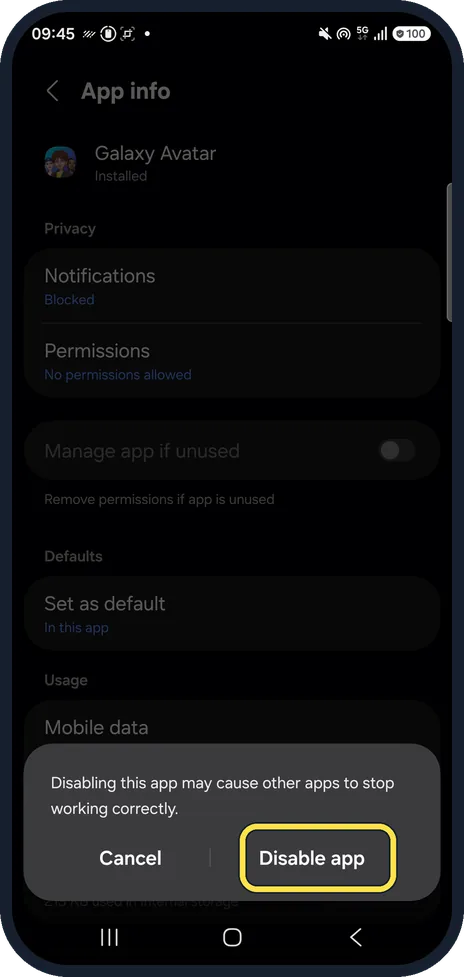
Tap the app you no longer want. Its App info page opens; ours was Galaxy Avatar.
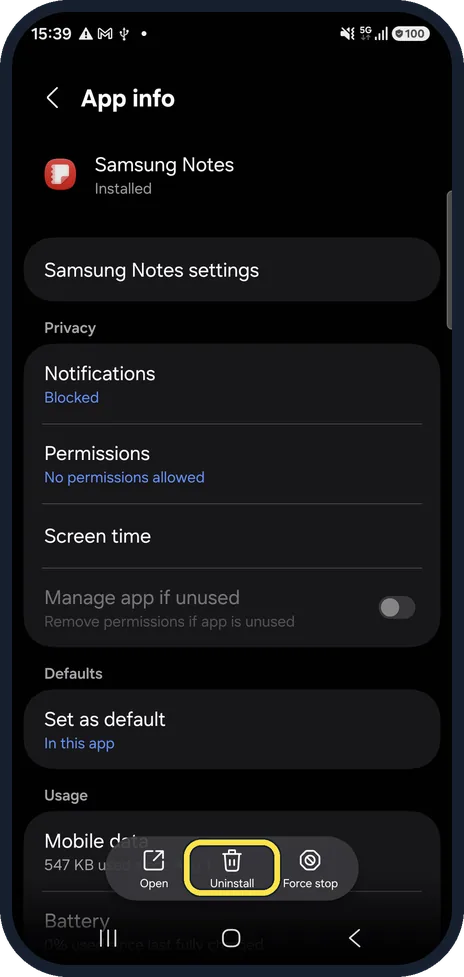
Uninstall shown? Remove it
Samsung Notes showed Uninstall on our phone, so it can be removed completely and installed again from the Galaxy Store.
Disable shown? Turn it off
Apps that cannot be removed show Disable in the same place, as Galaxy Avatar did on ours. Tap it. A warning says Disabling this app may cause other apps to stop working correctly; confirm with Disable app. We tapped Cancel.
Bring a disabled app back
A disabled app shows Enable. Samsung News was disabled on our phone, so its page offered Enable.
Find everything you disabled
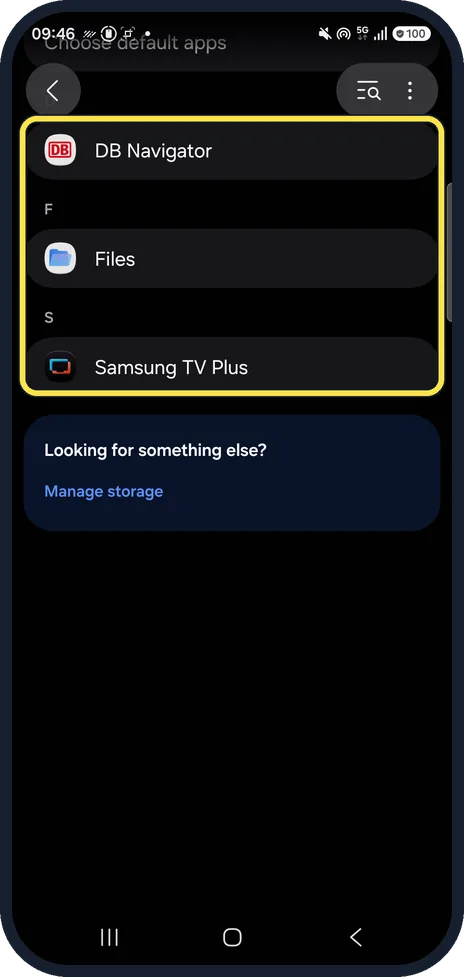
In Filter and sort, choose Disabled to list only the apps that are switched off. Ours listed DB Navigator, Files and Samsung TV Plus.
If you do not see this option
- There is no Disable button Samsung says only some pre-installed apps can be disabled. Core apps such as Phone, Messages, Contacts, Gallery and My Files can neither be deleted nor disabled. You can still hide them under Home screen settings, Hide apps on Home and Apps screens. Source: How to delete pre-installed apps on your Samsung Galaxy device
- You would rather not open Settings Samsung says you can also touch and hold the app on the Apps screen and tap Disable (or Uninstall) from its menu. Sources: How to delete pre-installed apps on your Samsung Galaxy device, Manage apps on your Galaxy phone or tablet
If this does not work
- You cannot find a disabled app to turn it back on A disabled app is gone from the Home and Apps screens, so Samsung says to go through Settings, Apps, select the app and tap Enable. Choose Disabled in Filter and sort to find it quickly. Source: How to delete pre-installed apps on your Samsung Galaxy device
- Uninstalled the wrong app Samsung says apps you got from the Play Store or the Galaxy Store can be installed again with the same account, from the Play Store under Manage apps & device, Not installed, or from the Galaxy Store under My apps. Source: Manage apps on your Galaxy phone or tablet
About this guide
Galaxy phones come with apps you may never use. Some can be uninstalled, others can only be disabled, and a few core apps such as Phone, Messages, Contacts, Gallery and My Files can do neither.
We opened these pages and tapped Cancel on the Disable warning; nothing was disabled. Steps 3, 5 and 7 are from the same phone after its One UI 9 update (Android 17).
Good to know
Disabling stops and hides the app but keeps it on the phone, so it frees little storage.
Only hiding an app is also possible: how to hide apps on a Samsung Galaxy phone.
In short: Settings, Apps, the app: Uninstall if offered, otherwise Disable. Enable brings it back.
- Samsung UK: How to delete pre-installed apps on your Samsung Galaxy device
- Samsung US: Manage apps on your Galaxy phone or tablet
Links checked in October 2026. Menus and features can change after software updates. These steps match the version named at the top.
📷 See real photos from the Galaxy A57 in our Camera Lab, next to 10 other phones.
Did this guide work for you?
Sorry about that. What happened?