
howtosimply.com/guides/can-you-make-gmail-filters-in-the-android-app-what-to-do-instead/ · Checked October 2026 · Samsung Galaxy A57 5G (SM-A576B), One UI 8.5, Android 16
In this guide
No. The Gmail app on Android has no option to create filters: its account settings offer Inbox type, Inbox categories, notifications and labels, and its menu offers your accounts and help, but no Filters. Create the filter on the Gmail website on a computer and it then applies to mail on your phone too.
2 of 3 steps with real screenshots · 1 official source below
- Device
- Android
- Shown on
- Samsung Galaxy A57 5G (SM-A576B), One UI 8.5, Android 16
- App
- Gmail
- Real screenshots
- 2 of 3 steps
- Checked
- October 2026
- Sources
- 1 official, linked below
Step by step
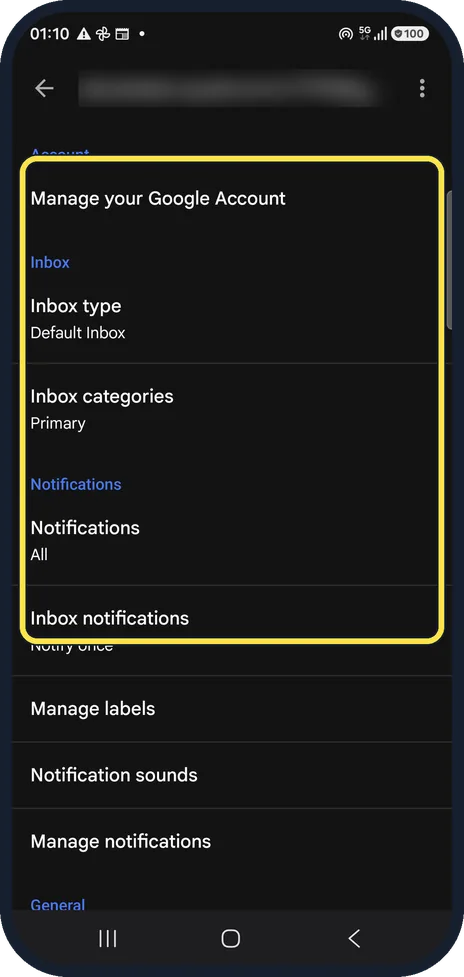
Look in the account settings
Gmail, menu, Settings, your account: there are Inbox type, Notifications, Manage labels and more, but no Filters.
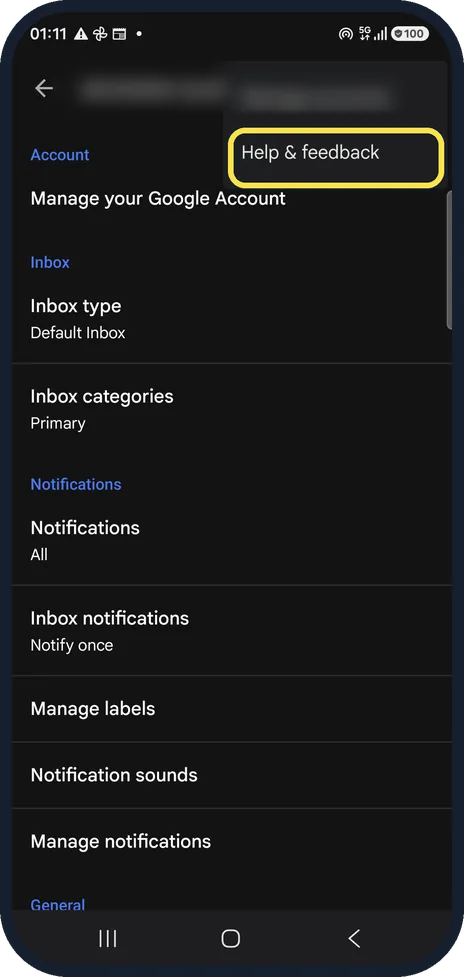
Check the menu
The three dots at the top right offer only Manage accounts and Help & feedback (Manage accounts is hidden by our blur).
Make the filter on a computer
Open mail.google.com in a browser on a computer, click the options icon in the search box, fill in the sender or words and click Create filter. The filter then works for all mail, including what the app shows.
If you do not see this option
- You want to change or delete a filter Google says to do it on a computer: Settings, See all settings, Filters and Blocked Addresses, then Edit or Delete. Source: Create rules to filter your emails
- You want a filter like an email you already have On a computer, tick the email, click More, then Filter messages like these, Google says. Source: Create rules to filter your emails
If this does not work
- Old mail was not filtered Google says a forwarding filter only affects new messages, and a reply to a filtered email is only filtered if it matches the same search. Source: Create rules to filter your emails
- You want your filters on another account Google says you can export filters as an .xml file from Filters and Blocked Addresses, and import them with Import filters. Source: Create rules to filter your emails
About this guide
Filters sort, label or delete incoming mail automatically. We looked through every settings screen in the Android app on our phone. Our Gmail account is a real one, so addresses, senders and subjects are blurred; the only mail we touched was a test message we sent to ourselves.
The screenshots are from the Gmail app on a Samsung Galaxy A57 5G with Android 16 and One UI 8.5, in dark mode. The app looks the same on other Android phones; only the phone's own settings screens differ by brand.
Good to know
Manage labels in the app shows the labels a filter files mail under, and sets notifications per label.
If mail goes missing, an old filter is a common cause: Gmail not getting new emails on Android.
In short: No filters in the Android app. Use mail.google.com on a computer, Create filter; it applies everywhere.
Links checked in October 2026. Menus and features can change after software updates. These steps match the version named at the top.
📷 See real photos from the Galaxy A57 in our Camera Lab, next to 10 other phones.
Did this guide work for you?
Sorry about that. What happened?