XIAOMI REDMI
How to uninstall or disable preinstalled apps on a Xiaomi phone (HyperOS 3)
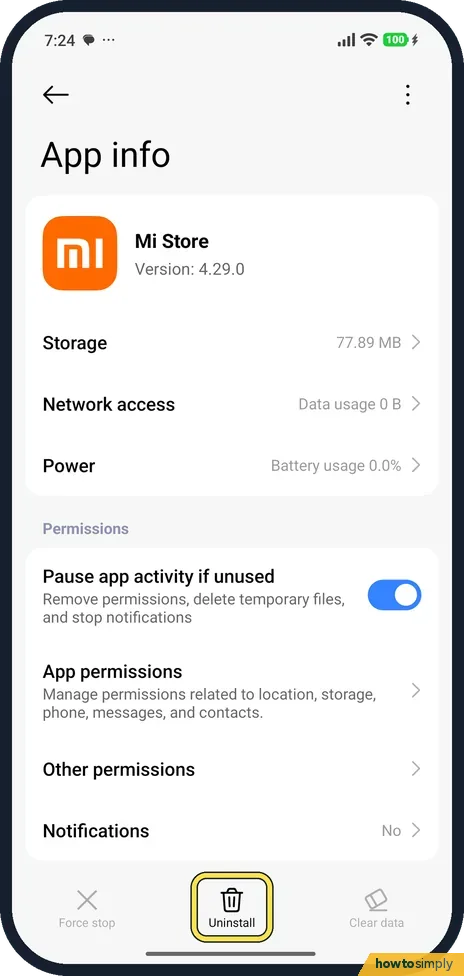
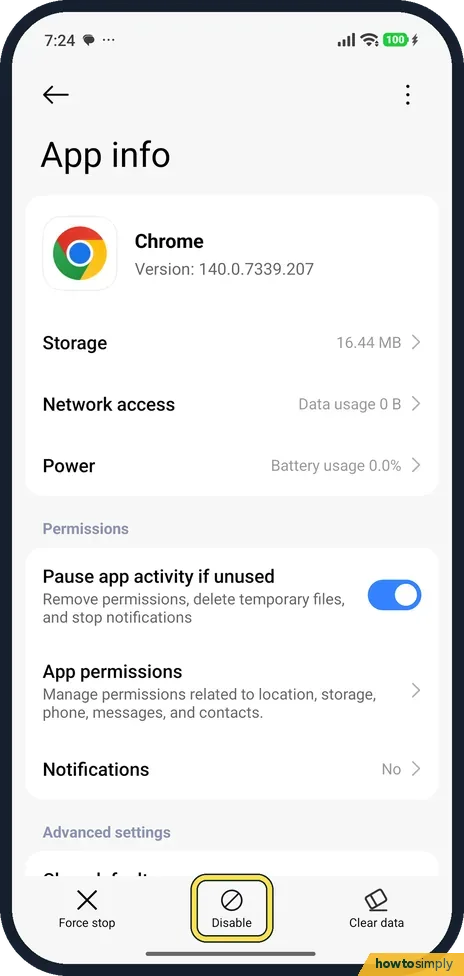
Go to Settings, Apps and tap the app. If the bar at the bottom of App info shows Uninstall, tap it to remove the app. If it shows Disable instead, the app can't be removed: Disable switches it off and hides it. On our Redmi, Mi Store had Uninstall and Chrome had Disable.

3 of 3 steps show a real screenshot from our Redmi Note 15 Pro 5G. Each step was checked against the maker's own instructions, linked at the end.
Steps
- 1
Open Apps
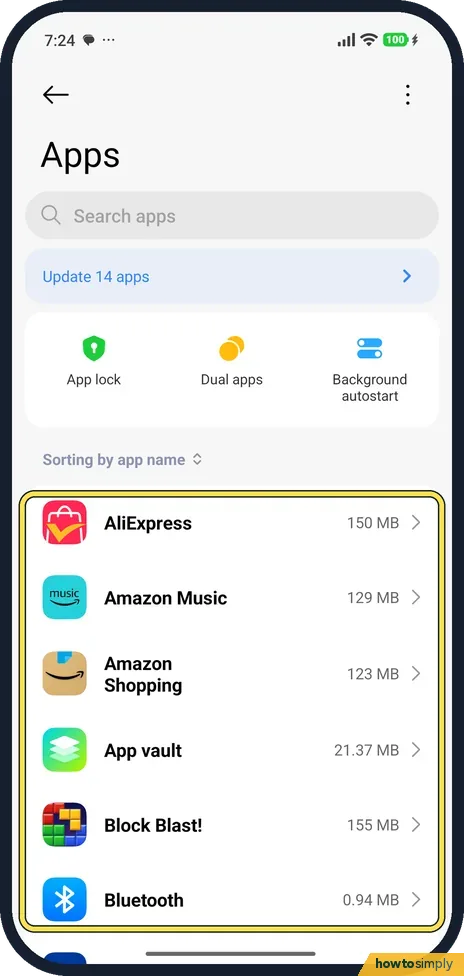
Go to Settings, Apps. The list shows every app with its size, sorted by name.
- 2
Uninstall a removable app
Tap the app. For Mi Store (version 4.29.0) the bar at the bottom had Force stop, Uninstall and Clear data. Tap Uninstall.
- 3
Disable an app you can't remove
For Chrome the middle button was Disable instead of Uninstall. Tap Disable to switch it off and hide it. You can turn it back on from the same page.
If you do not see this option
- No Uninstall or Disable? Some system apps show neither. They can't be removed or switched off from App info.
- App not in the list? Use Search apps at the top of Apps.
If this does not work
- App came back after an update? Updates can turn a disabled app back on. Disable it again.
- Only want it quiet? Turn off its notifications on the same App info page. Notifications said No for both apps on ours.
- Free up space too? See Xiaomi storage full.
- Want an uninstalled app back? Open the Google Play app, tap your profile icon and go to Manage apps and devices, then Manage. Filter for apps not installed on this device, pick the app and install it again. Paid apps can be reinstalled without buying them again.
- No Uninstall when you hold the icon? Xiaomi's user guide lets you touch and hold an app icon and tap Uninstall in the pop-up, but only removable apps offer it there. For the rest, open the app's page in Settings, Apps, and use Disable if it is shown.
- Another app stopped working? Some apps hand tasks to others, such as opening web pages in Chrome. Turn the disabled app back on from its App info page, or set a different default app first and then disable it again.
Good to know
Set which browser opens links: how to change default apps.
An uninstalled app disappears from the Home screen and stops using storage, battery and data. A disabled app stays on the phone but is hidden from the app list and can no longer run or send notifications. To reverse a disable, open the app in Settings, Apps and turn it back on, or use the enable option in Google Play. If you want to clear out several rarely used apps at once, the Security app's Deep clean includes an Uninstall apps section. For apps you only want out of sight, see how to hide apps on a Xiaomi phone.
About this guide
- Device
- Android
- Shown on
- Xiaomi Redmi Note 15 Pro 5G (25080RABDG), HyperOS 3.0.308.0, Android 16
- App
- Settings
- Path
- Settings › Apps
- Real screenshots
- 3 of 3 steps
- Checked
- October 2026
- Sources
- 3 official, linked below
Sources
Links checked October 2026. Menus and features can change with updates.Spotted a mistake? Menus change with updates, and we want every step to match your screen. Email us about this page or use the contact form. We read every report, and fixes are listed on What changed.
Liked this guide?
Follow us for new guides and short how-to videos.
Did this guide work for you?
Sorry about that. What happened?