XIAOMI REDMI
How to clear an app's defaults on a Xiaomi phone (HyperOS 3)

In short
Open Settings, Apps and tap the app. Under Advanced settings, tap Clear defaults. On our Redmi it acted at once, with no confirm step: the row then read No defaults set, and Chrome was no longer the default browser. Set a default again in Default apps.
3 of 3 steps show a real screenshot from our Redmi Note 15 Pro 5G. Each step was checked against the maker's own instructions, linked at the end.
Steps
- 1
Find the app
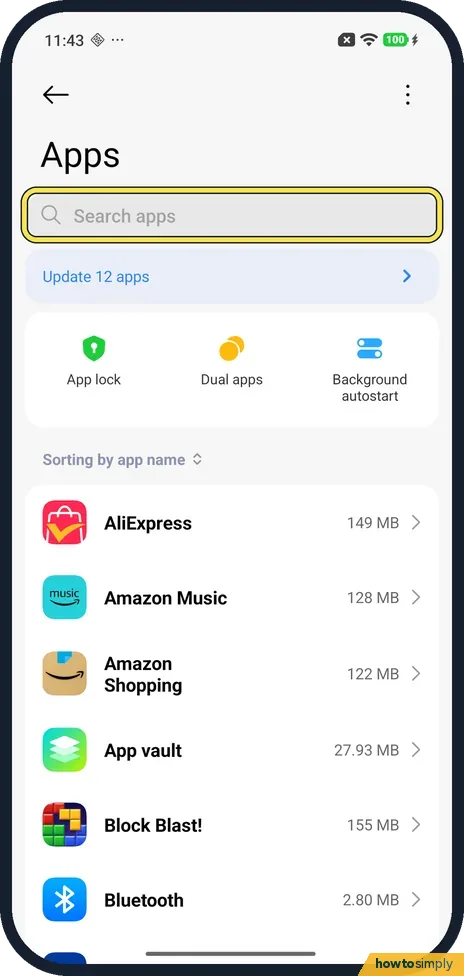
Open Settings and tap Apps. Type the app's name in Search apps, or scroll down the list on the same page, and tap it.
- 2
Scroll to Advanced settings
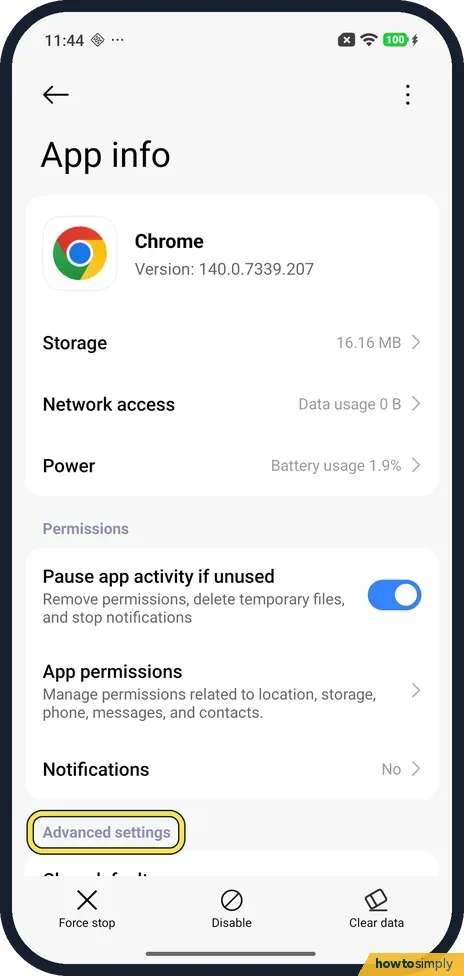
App info opens. Scroll down past Permissions and Notifications to Advanced settings.
- 3
Tap Clear defaults
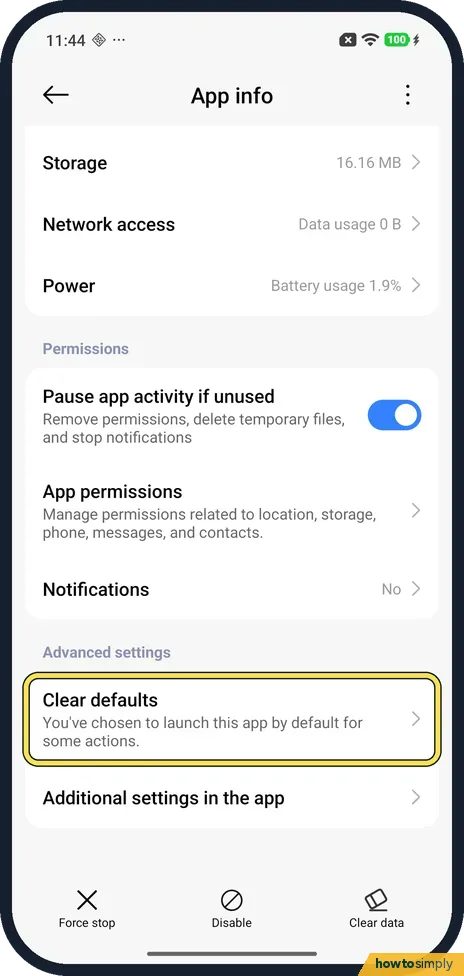
Clear defaults is the first row under Advanced settings. Ours read: You've chosen to launch this app by default for some actions. Warning: tapping it clears them straight away, with no question. On ours the row then read No defaults set.
If you do not see this option
- No Open by default row? On our Redmi, App info had no Open by default or Set as default row, only Clear defaults under Advanced settings.
- No defaults set already? Then the app isn't a default for anything and there is nothing to clear. On ours that is what the row said after we tapped it.
- Not in Xiaomi's guide? Xiaomi's HyperOS 3 guide gives Settings, Apps for managing apps and a separate Default apps page, but no steps for Clear defaults. Source: Generic User Guide for HyperOS 3.0
If this does not work
- Cleared the wrong app? There was no undo on ours. Set it back in Default apps: how to change default apps. Xiaomi gives Settings, Apps, the menu at the top right, Other settings, Default apps.
- Browser gone after clearing? On ours, clearing Chrome left no default browser. Pick one again under Default apps, Browser.
- Wanted to clear the app's data? That is Clear data, at the bottom of App info, a different button. For stored files only: clear an app's cache.
- Phone keeps asking which app to use? That is expected after clearing. The next time you open a file or link of that kind, choose the app you want and pick the option to use it every time, if your phone offers one.
Good to know
To choose which app opens links, calls or messages without clearing anything, use Default apps instead: how to change default apps on a Xiaomi phone.
Also on App info: Force stop, Disable and Clear data at the bottom.
Clearing defaults does not delete the app, its data, its sign-in or its settings. It only forgets that this app should open certain things automatically. Nothing changes for battery, storage or permissions. If the app was your default browser, phone, messages or camera, that slot may be empty until you pick again. Xiaomi's guide lists Browser as one of the functions in Default apps, with Chrome or Mi Browser as examples, so a quick visit there sets things right. If you want to stop an app opening at all rather than just by default, look at uninstalling or disabling it.
About this guide
- Device
- Android
- Shown on
- Xiaomi Redmi Note 15 Pro 5G (25080RABDG), HyperOS 3.0.308.0, Android 16
- App
- Settings
- Path
- Settings › Apps › Clear defaults
- Real screenshots
- 3 of 3 steps
- Checked
- October 2026
- Sources
- 1 official, linked below
Sources
Links checked October 2026. Menus and features can change with updates.Spotted a mistake? Menus change with updates, and we want every step to match your screen. Email us about this page or use the contact form. We read every report, and fixes are listed on What changed.
Liked this guide?
Follow us for new guides and short how-to videos.
Did this guide work for you?
Sorry about that. What happened?