XIAOMI REDMI
How to see screen time and set app timers on a Xiaomi phone (HyperOS 3)
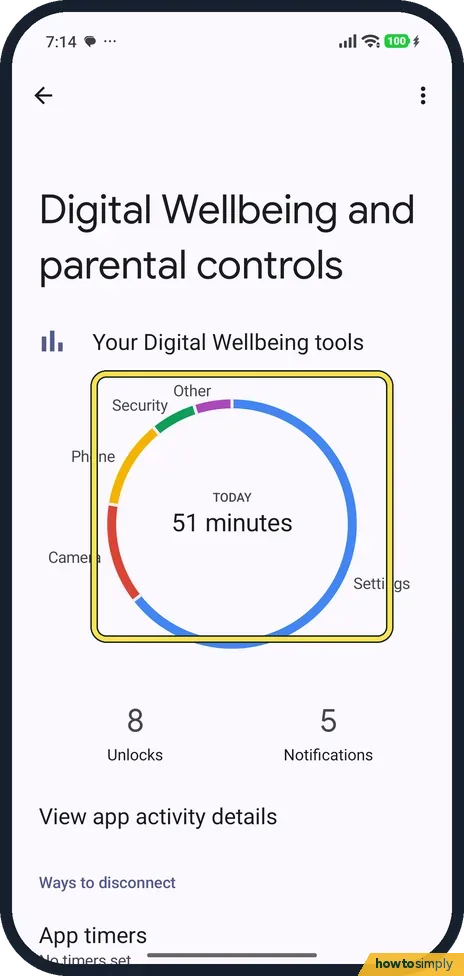
Go to Settings, Digital Wellbeing and parental controls. The circle shows today's screen time by app. Tap App timers, tap the hourglass next to an app, pick a time and tap OK. The timer resets at midnight.

3 of 3 steps show a real screenshot from our Redmi Note 15 Pro 5G. Each step was checked against the maker's own instructions, linked at the end.
Steps
- 1
Open Digital Wellbeing
Go to Settings, Digital Wellbeing and parental controls. The circle shows today's total and splits it by app: Settings, Camera, Phone, Security and Other on ours.
- 2
Open App timers
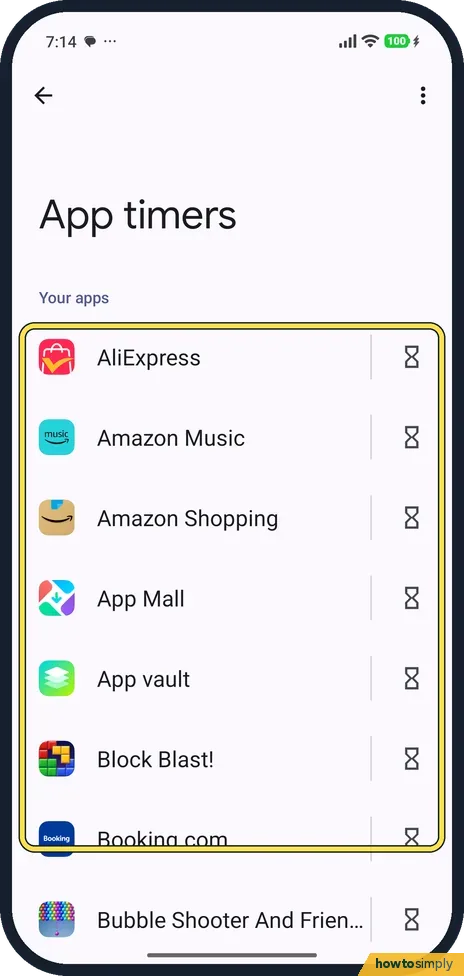
Scroll down and tap App timers. Your apps are listed, each with an hourglass on the right.
- 3
Set the time
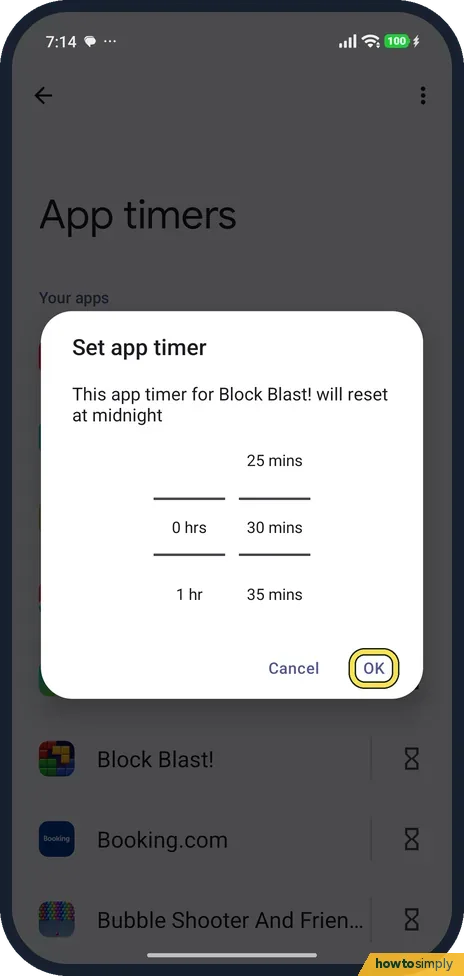
Tap the hourglass next to an app. Set app timer opens with hours and minutes. It says the timer will reset at midnight. Pick a time and tap OK.
If you do not see this option
- No Digital Wellbeing row? Search Settings for Digital Wellbeing. Xiaomi's guide lists it as Digital Wellbeing & parental controls; our screen read Digital Wellbeing and parental controls. Source: Generic User Guide for HyperOS 3.0
- No App timers on the first screen? It is below the circle and Ways to disconnect; scroll down. On ours it said No timers set.
If this does not work
- Timer ran out but you need the app? Google says the app icon turns grey when its timer runs out. Change or delete the timer in App timers.
- Apps still distracting? Xiaomi says Focus, in Digital Wellbeing, pauses the apps you choose and hides their notifications until you turn it off.
- Timer seems to restart? The sheet says the timer resets at midnight, so it counts again from zero each day.
- Want more detail than today's circle? Tap the circle. Xiaomi's user guide says the dashboard circle opens the full screen time view, and Google says the chart gives more detail, such as times opened and notifications received for each app.
- Setting limits for a child? App timers on the child's own phone are easy for the child to delete. Xiaomi points parents to Set up parental controls on the same page, which leads to Google Family Link; it has to be installed on both your phone and your child's.
- Can't find Digital Wellbeing as an app? Google describes an option in its settings to show an icon in the app list. Turn it on if you want to open screen time from the Home screen.
Good to know
Silence the phone at night instead: how to use Do not disturb on a Xiaomi phone.
Timers and screen time only change how long you can use an app; they do not delete it or its data. For evenings, Xiaomi's user guide describes Bedtime mode on the same page: it silences the phone and turns the screen black and white, with only alarms and important calls getting through. Focus mode and Bedtime mode can also appear as tiles in the Control centre, so you can switch them on quickly. To arrange those tiles, see how to edit the Control centre on a Xiaomi phone.
About this guide
- Device
- Android
- Shown on
- Xiaomi Redmi Note 15 Pro 5G (25080RABDG), HyperOS 3.0.308.0, Android 16
- App
- Settings
- Path
- Settings › Digital Wellbeing and parental controls › App timers
- Real screenshots
- 3 of 3 steps
- Checked
- October 2026
- Sources
- 2 official, linked below
Sources
Links checked October 2026. Menus and features can change with updates.Spotted a mistake? Menus change with updates, and we want every step to match your screen. Email us about this page or use the contact form. We read every report, and fixes are listed on What changed.
Liked this guide?
Follow us for new guides and short how-to videos.
Did this guide work for you?
Sorry about that. What happened?