
howtosimply.com/guides/how-to-change-what-the-side-button-does-on-a-samsung-galaxy/ · Checked October 2026 · Samsung Galaxy A57 5G (One UI 8.5, Android 16) and Samsung Galaxy A57 (One UI 9, Android 17 (build A576BXXU6BZIE))
In this guide
Open Settings, Advanced features, Side button. Under Double press, choose what it opens, for example Camera. Under Long press, choose the digital assistant, Bixby or the Power off menu. Choosing Power off menu makes a long press show the power off menu again.
5 of 5 steps with real screenshots · 1 official source below
- Device
- Android
- Shown on
- Samsung Galaxy A57 5G (SM-A576B), One UI 8.5, Android 16, Samsung Galaxy A57 (SM-A576B), One UI 9, Android 17 (build A576BXXU6BZIE)
- App
- Settings
- Path
- Settings › Advanced features
- Real screenshots
- 5 of 5 steps
- What we did
- Observed: looked at each screen, changed nothing
- Our phone
- Shown on Galaxy A57, One UI 8.5
- Checked
- October 2026
- Sources
- 1 official, linked below
Step by step
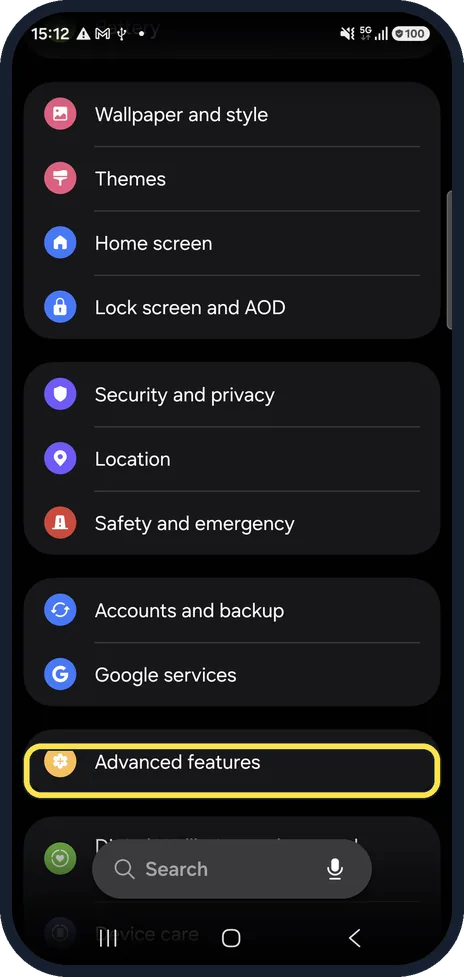
Open Advanced features
Open Settings and tap Advanced features.
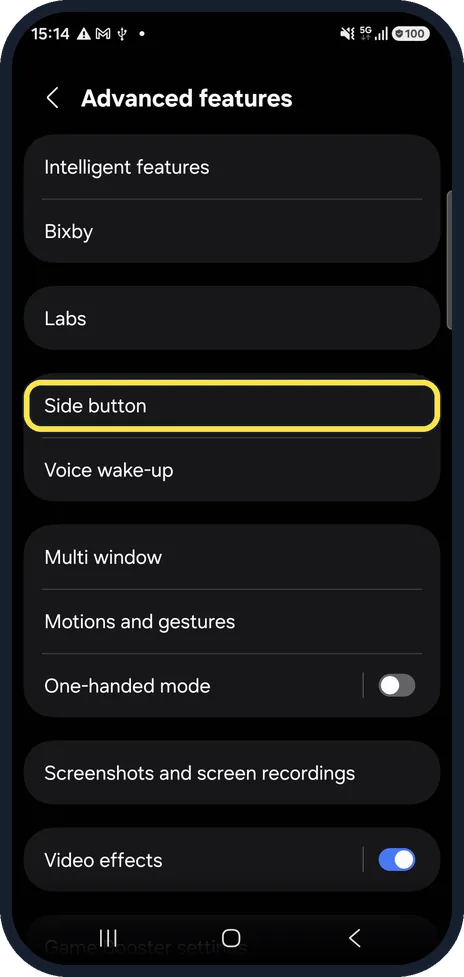
Tap Side button
It is in the third group, above Voice wake-up.
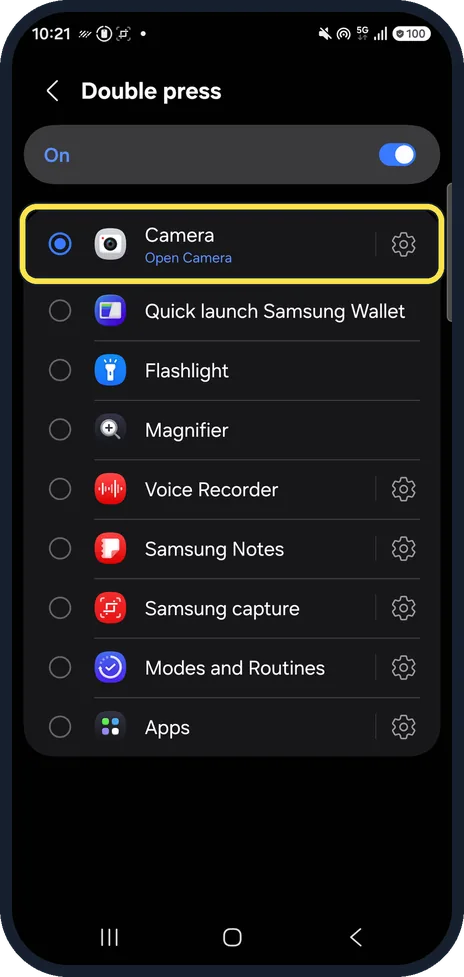
Choose the double press
Tap Double press. Switch it on and pick what it opens. Ours was switched on and set to Camera.
The list on ours also offered Quick launch Samsung Wallet, Flashlight, Magnifier, Voice Recorder, Samsung Notes, Samsung capture, Modes and Routines and Apps.
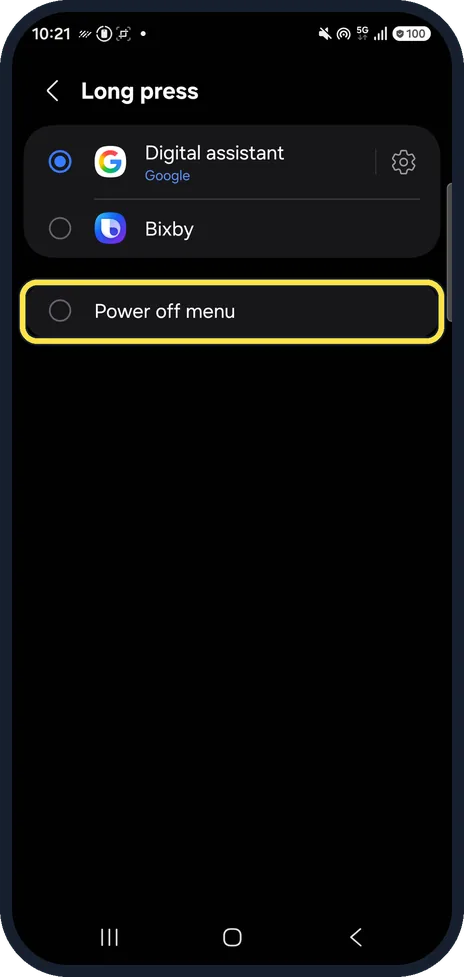
Choose the long press
Tap Long press. Ours was set to Digital assistant (Google). Choose Power off menu to get the familiar switch-off and restart buttons back.
Ours listed Digital assistant, Bixby and Power off menu.
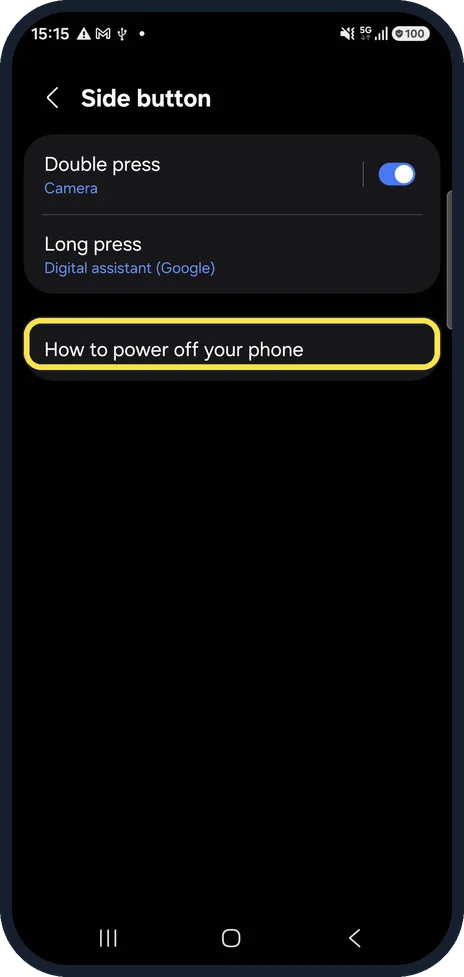
Forgot how to switch off?
How to power off your phone, on the same page, explains the other ways to switch off.
If you do not see this option
- Your phone has a separate Bixby key Samsung says older models, such as the Galaxy S8 and S10 series and the Galaxy Note9, have a Bixby key on the left side. Pressing and holding it always starts Bixby Voice. Source: Set up the Side button or Bixby key on your Galaxy phone
- You have a Galaxy Z Flip Samsung says to keep the phone open when you use these shortcuts, because they may work differently when it is closed. Source: Set up the Side button or Bixby key on your Galaxy phone
If this does not work
- You need to switch off right now Samsung says you can also swipe down with two fingers, tap the Power icon in the quick settings panel, then Power off. Source: Set up the Side button or Bixby key on your Galaxy phone
- The double press opens the wrong app Samsung lists Camera, Flashlight, Magnifier, Voice Recorder, Samsung Notes, Samsung Capture, Modes and Routines, and any app for Double press. Open it again and pick another. Source: Set up the Side button or Bixby key on your Galaxy phone
About this guide
On a new Galaxy, holding the side button wakes an assistant instead of showing the power menu, which surprises many people. Both presses can be changed in a minute.
Steps 3 and 4 are from the same phone after its One UI 9 update (Android 17).
Good to know
On some phones the long press offers Bixby instead of a digital assistant. Bixby has to be set up with a Samsung account.
In short: Settings, Advanced features, Side button: set Double press and Long press. Power off menu for a normal switch-off.
Links checked in October 2026. Menus and features can change after software updates. These steps match the version named at the top.
📷 See real photos from the Galaxy A57 in our Camera Lab, next to 10 other phones.
Did this guide work for you?
Sorry about that. What happened?