GOOGLE PIXEL
How to scan for harmful apps with Play Protect on a Google Pixel

In short
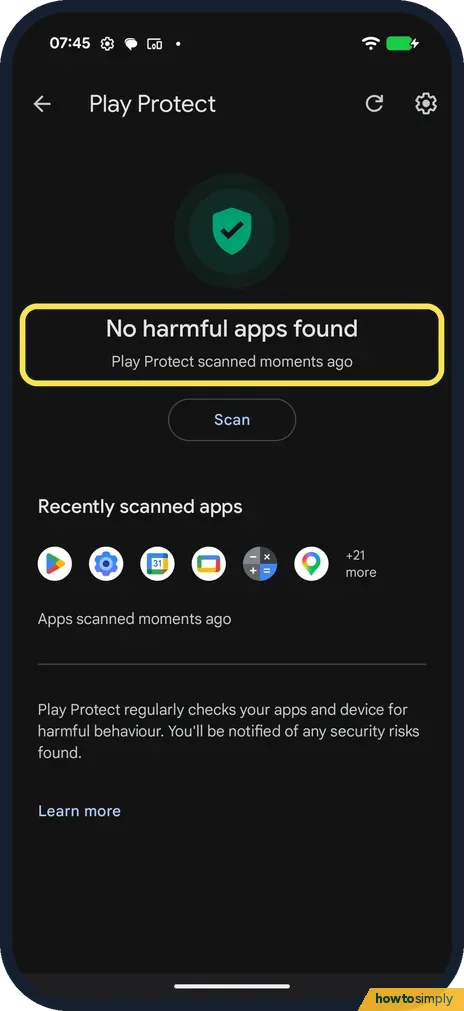
Open the Play Store, tap your profile picture, then Play Protect, and tap Scan. It checks your apps; ours said No harmful apps found, Play Protect scanned moments ago.
4 of 4 steps show a real screenshot from our Pixel 10a. Each step was checked against the maker's own instructions, linked at the end.
Steps
- 1
Open Play Protect
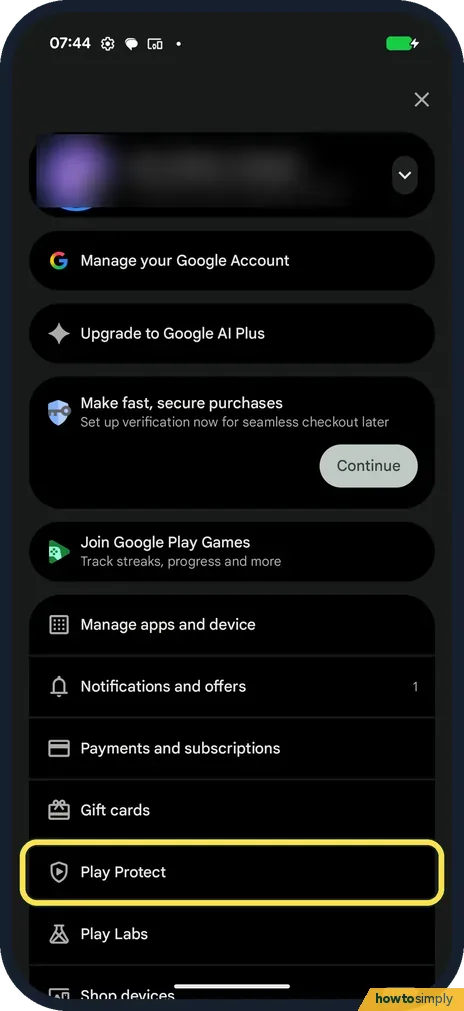
Open the Play Store and tap your profile picture. Tap Play Protect.
- 2
Tap Scan
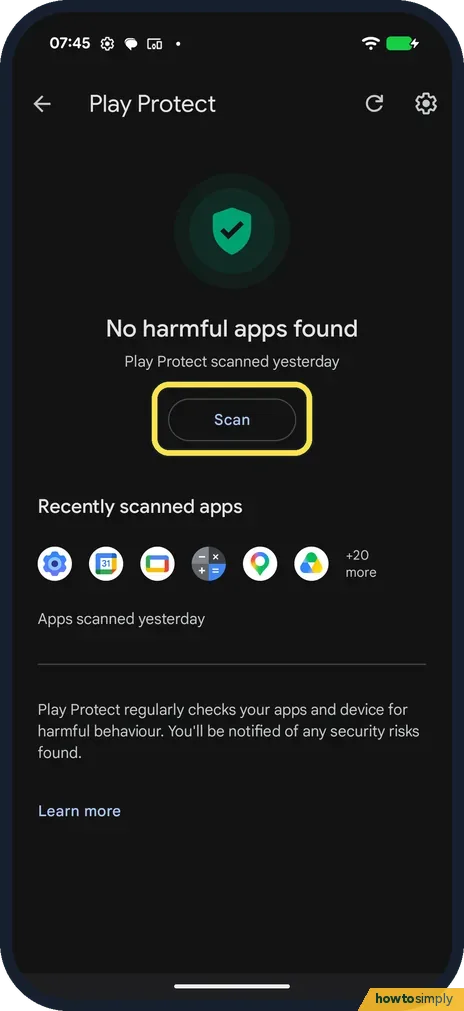
Ours said No harmful apps found, Play Protect scanned yesterday. Tap Scan.
- 3
Read the result
After the scan: No harmful apps found, scanned moments ago. Recently scanned apps lists what it checked (Apps scanned moments ago).
- 4
Check scanning is on
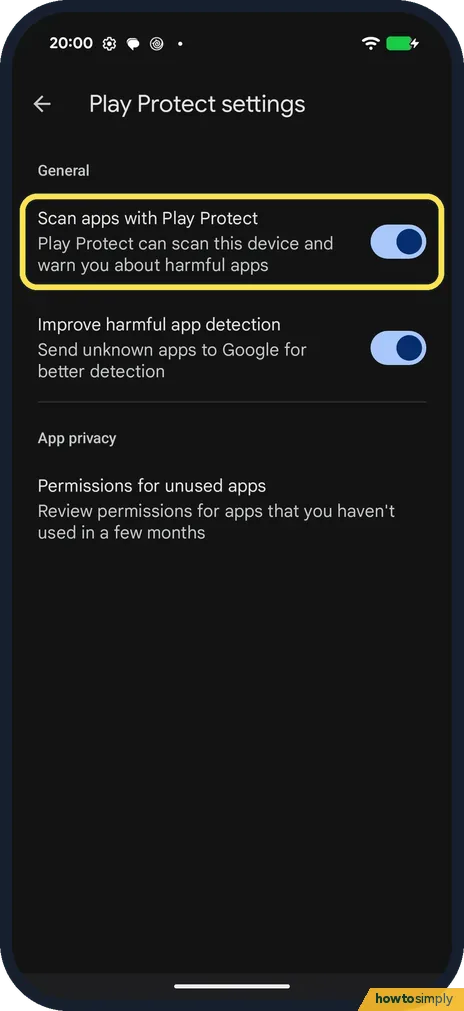
Tap the gear at the top right. Play Protect settings has Scan apps with Play Protect and Improve harmful app detection. Both were on on ours.
If you do not see this option
- No Play Protect in the menu? It is in the Play Store profile menu, not in Settings.
- Want it to scan on its own? Scan apps with Play Protect, in the gear settings, does that. It was on on ours. Source: Use Google Play Protect to help keep your apps safe & your data private
If this does not work
- Play Protect not scanning? Open the gear settings and check Scan apps with Play Protect is on.
- Play Protect found a harmful app? Google says Play Protect may remove or deactivate it and will tell you.
- App removed by Play Protect? Google says you will usually get a notification that it was removed.
- Asked to send an app to Google? Google says that if you install an app from outside Google Play, Play Protect may ask you to send it for a code-level check. You then get a result saying whether the app appears safe.
- Device is not certified message? Google says not to troubleshoot Play Protect itself, and to use the Fix device issue button instead.
- App disabled but still on the phone? Google says Play Protect may disable a harmful app until you uninstall it. Uninstall it to remove it from the phone.
Good to know
Update your apps too: how to update a Pixel and its apps.
Play Protect works in the background as well as when you tap Scan. Google says it checks apps when you install them and scans the phone from time to time. The scan itself only reads app details, so it does not delete anything unless it finds a harmful app.
Improve harmful app detection lets Play Protect send unknown apps to Google automatically; it is a separate switch from Scan apps with Play Protect. On Android 6.0 to 10, Google says it may also reset permissions for apps you haven't used in three months, leaving out essential apps.
If you installed an app from outside the Play Store, see how to allow installing apps from unknown sources to check which apps are allowed to do that.
About this guide
- Device
- Android
- Shown on
- Google Pixel 10a, Android 17 (build CP3A.260905.009)
- App
- Play Store
- Path
- Play Store › Profile picture › Play Protect
- Real screenshots
- 4 of 4 steps
- Checked
- October 2026
- Sources
- 1 official, linked below
Sources
Links checked October 2026. Menus and features can change with updates.Spotted a mistake? Menus change with updates, and we want every step to match your screen. Email us about this page or use the contact form. We read every report, and fixes are listed on What changed.
Liked this guide?
Follow us for new guides and short how-to videos.
Did this guide work for you?
Sorry about that. What happened?