ONEPLUS
How to change the wallpaper on a OnePlus (OxygenOS 16)

In short
Go to Settings, Home screen, Lock screen & style and tap Wallpapers. Pick one, or Choose from album for your own photo, tap Apply to and choose Lock screen, Home screen, or Lock screen and Home screen.
4 of 4 steps show a real screenshot from our Nord 5. Each step was checked against the maker's own instructions, linked at the end.
Steps
- 1
Open Wallpapers
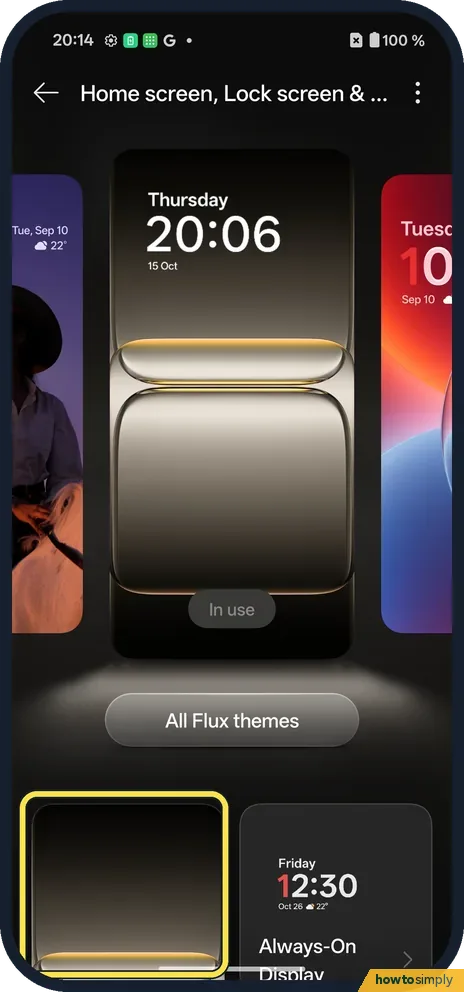
Open Settings, Home screen, Lock screen & style and scroll down. Tap the first tile below All Flux themes; its Wallpapers label sits just below our screenshot.
- 2
Pick a wallpaper
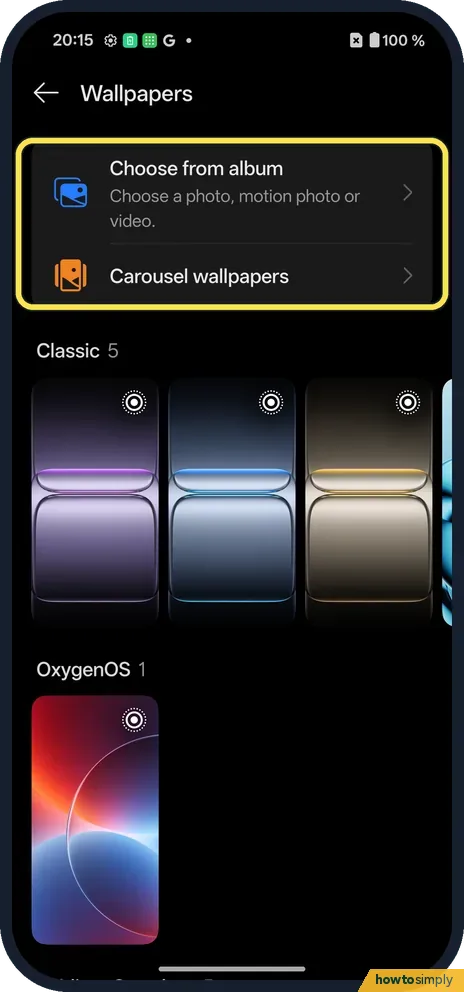
Choose from album uses your photos. Carousel wallpapers change by themselves. Below are sets: Classic, OxygenOS and more.
- 3
Tap Apply to
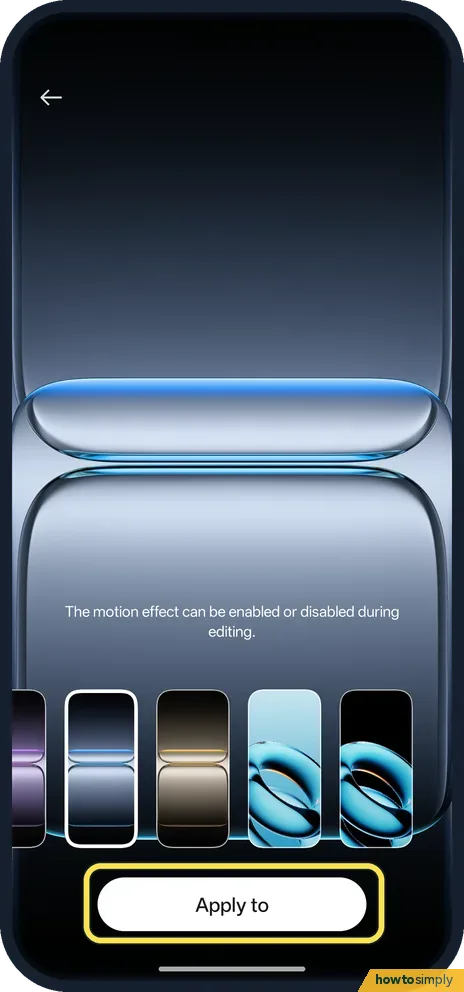
The wallpaper opens full screen. Tap Apply to.
- 4
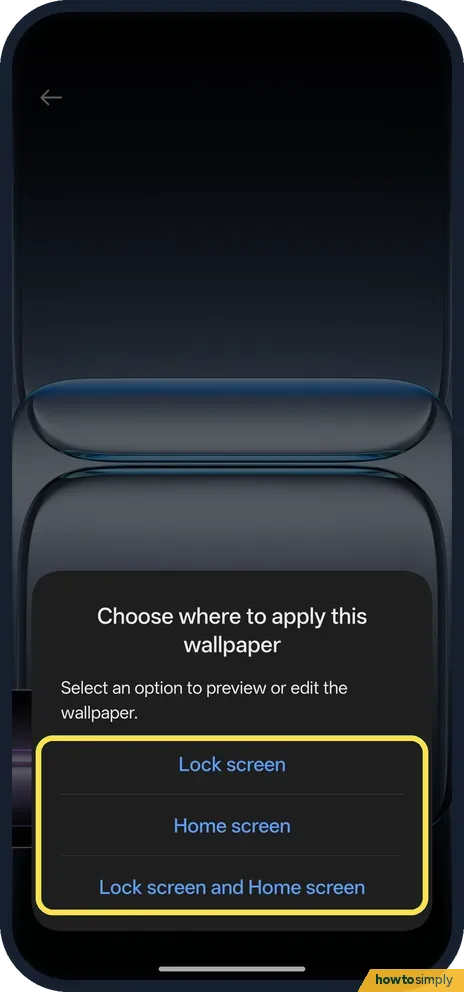
Choose where
Lock screen, Home screen, or Lock screen and Home screen.
If you do not see this option
- Older OxygenOS? OnePlus's OxygenOS 14 manual uses Settings, Wallpapers & style, Wallpapers, or pinch in on the home screen. On our OxygenOS 16 phone it is Home screen, Lock screen & style. Source: OxygenOS 14.0 User Manual
- From the home screen? Touch and hold an empty spot and tap Wallpapers & style.
- Starting from a photo? OnePlus's manual also lets you open a picture in Photos, tap the icon at the lower right and follow the prompts to set it as your wallpaper. Source: OxygenOS 14.0 User Manual
If this does not work
- Moves when you tilt? The preview notes that the motion effect can be turned on or off while editing.
- Theme changed it back? Applying a Flux theme, also on Home screen, Lock screen & style, can change the wallpaper too.
- Photo looks cropped or zoomed? Phone screens are tall and narrow, so a wide landscape photo is cut at the sides. Portrait photos fit best. Choose a picture where the part you care about sits in the middle, and check the full-screen preview before you tap Apply to.
- Lock screen keeps changing picture? That is Carousel wallpapers. OnePlus's manual says it makes the lock screen switch between pictures by itself. Pick a single wallpaper instead, and the lock screen stays on it.
- System colours changed too? The phone can pick accent colours from your wallpaper. OnePlus's manual says this only works with a static wallpaper, not a live one. Change them separately if you want to keep the old colours.
- Clock or icons hard to read now? A busy or very bright photo makes white text hard to see. Try a darker or plainer picture, or keep your photo for the lock screen only.
Good to know
Change the home screen layout on a OnePlus.
Only the background changes. Your apps, folders and widgets stay where they are. To undo, open Wallpapers again and pick the one you had before; the built-in sets such as Classic and OxygenOS are always there to go back to. If you used your own photo, it stays in your album, so you can set it again at any time.
OnePlus's manual says carousel wallpapers can be chosen with Add to my selection, so you can build a small set of favourite wallpapers for the lock screen. If your new wallpaper makes the home screen look cluttered, see change icon shape and system colours on a OnePlus.
About this guide
- Device
- Android
- Shown on
- OnePlus Nord 5 (CPH2709), OxygenOS 16.0.5.1201, Android 16
- App
- Settings
- Path
- Settings › Home screen, Lock screen & style › Wallpapers
- Real screenshots
- 4 of 4 steps
- Checked
- October 2026
- Sources
- 1 official, linked below
Sources
Links checked October 2026. Menus and features can change with updates.Spotted a mistake? Menus change with updates, and we want every step to match your screen. Email us about this page or use the contact form. We read every report, and fixes are listed on What changed.
Liked this guide?
Follow us for new guides and short how-to videos.
Did this guide work for you?
Sorry about that. What happened?