
howtosimply.com/guides/how-to-change-the-private-wi-fi-address-on-an-iphone/ · Checked October 2026 · iPhone 17e · iOS 27.0.1
In this guide
Open Settings, Wi-Fi and tap the i next to your network. Tap Private Wi-Fi Address and choose Off, Fixed or Rotating. Ours was Fixed. Rotating changes the address over time; Off uses the real address, for networks that need it.
- Device
- iPhone
- Shown on
- iOS 27.0.1 (iPhone 17e)
- App
- Settings
- Path
- Settings › Wi-Fi › i › Private Wi-Fi Address
- Real screenshots
- 3 of 3 steps
- Checked
- October 2026
- Sources
- 1 official, linked below
Step by step
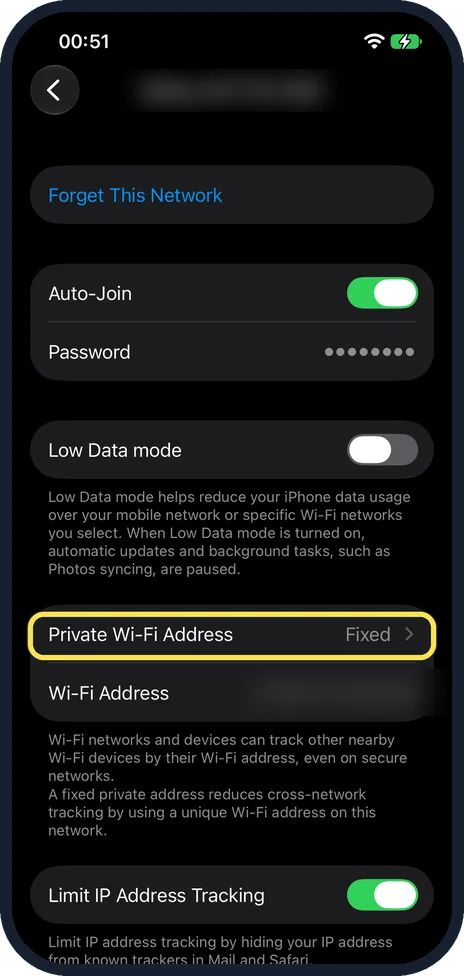
Open your network details
In Settings, Wi-Fi, tap the i next to the network. Private Wi-Fi Address is in the middle of the page, under Low Data Mode.
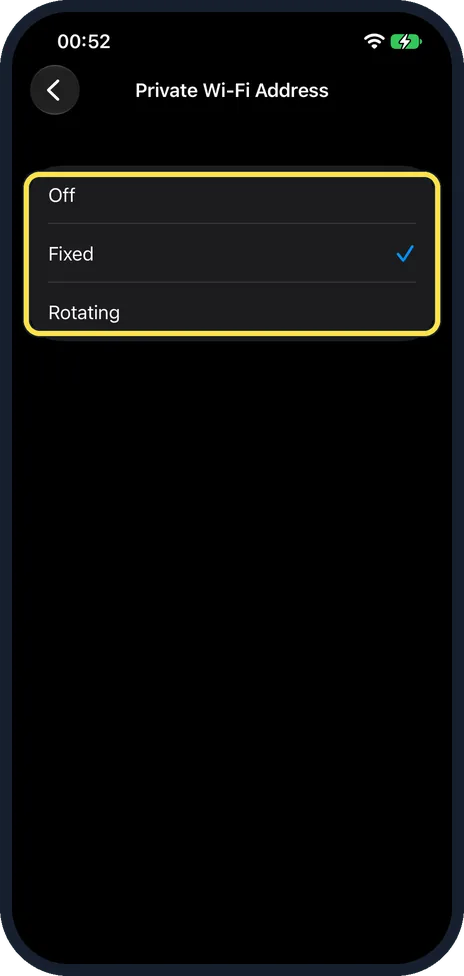
Choose Off, Fixed or Rotating
Fixed was ticked on ours. The note on the network page in step 1 says a fixed private address reduces tracking across networks.
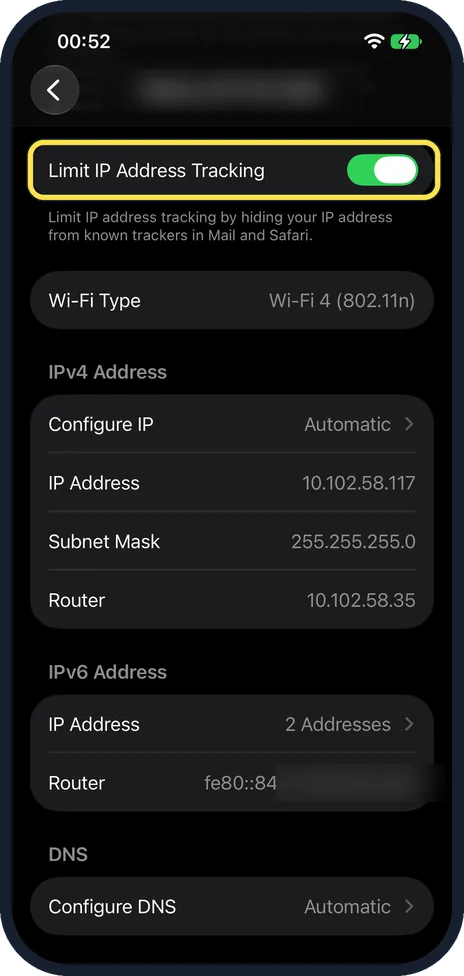
Check Limit IP Address Tracking
Further down the same page, it was on. It hides your IP address from known trackers in Mail and Safari.
If you do not see this option
- Apple's page says Private Address on or off? On ours, in iOS 27, it was a list with three choices instead of a switch. Source: Use a private network address on iPhone
- iCloud Private Relay? There was no Private Relay page on ours: the iCloud page listed it under Get More with iCloud+, so it needs a paid plan.
If this does not work
- Network asks you to sign in again? Changing the address can make a network treat the phone as new. Pick Fixed again.
- Parental controls or a router block? Apple says to turn the private address off for that network only. Source: Use a private network address on iPhone
About this guide
Your iPhone uses a made-up Wi-Fi (MAC) address on each network so it is harder to track. Some networks, such as ones with parental controls, need the real one.
The screenshots are from our iPhone 17e with iOS 27.0.1, in Dark mode. The network name and the Wi-Fi address are blurred. We changed nothing.
Good to know
For Safari tracking, see how to hide your IP address from trackers in Safari on an iPhone.
In short: Settings, Wi-Fi, i next to the network, Private Wi-Fi Address, Off, Fixed or Rotating.
Links checked in October 2026. Menus and features can change after software updates. These steps match the version named at the top.
Did this guide work for you?
Sorry about that. What happened?