ONEPLUS
How to change the lock screen clock and shortcuts on a OnePlus (OxygenOS 16)

In short
Open the lock screen editor (Settings, Lock screen settings, Lock screen shortcuts on ours). Tap the clock for Clock & colour, the corner icons for shortcuts, and Style for the wallpaper effect. Tap Apply, or Cancel to keep it.
5 of 5 steps show a real screenshot from our Nord 5. Each step was checked against the maker's own instructions, linked at the end.
Steps
- 1
Open the editor
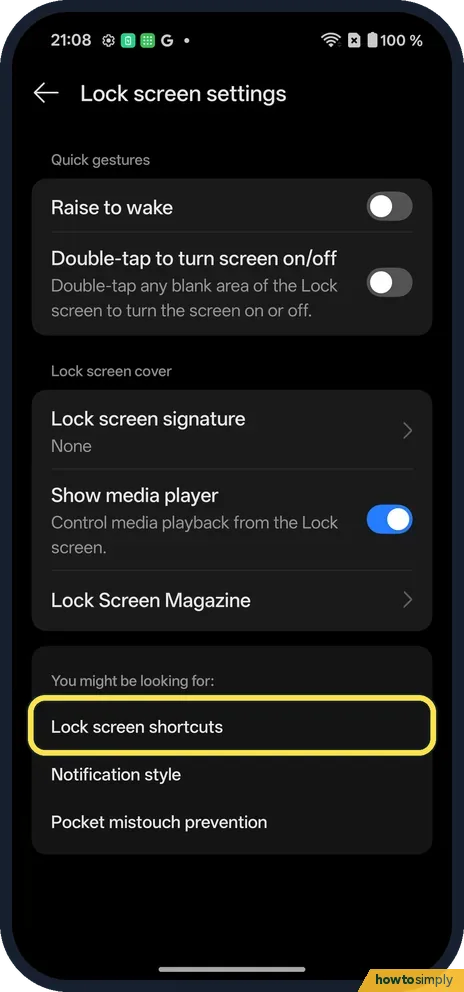
Lock screen settings lists Lock screen shortcuts under You might be looking for. Tap it.
- 2
Shortcuts
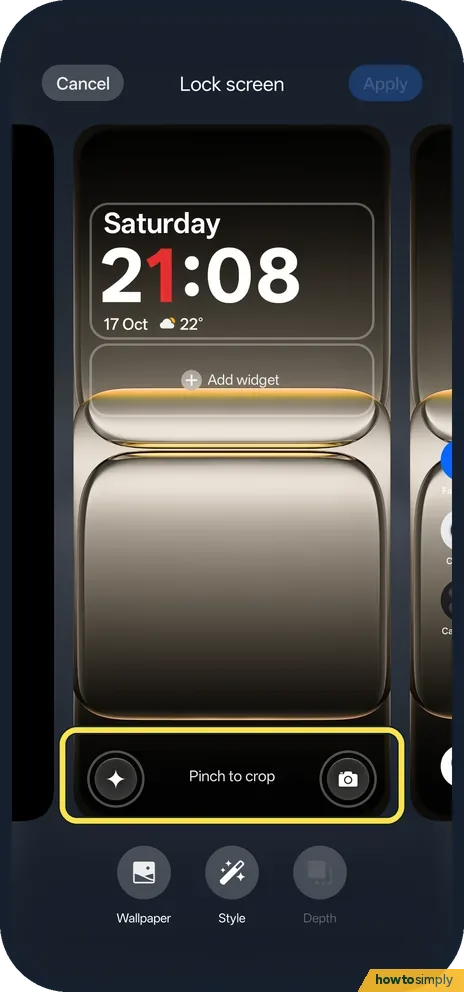
The two bottom corners are shortcuts: an assistant icon and Camera on ours. Tap one to change it. Pinch to crop sits between them.
- 3
Clock & colour
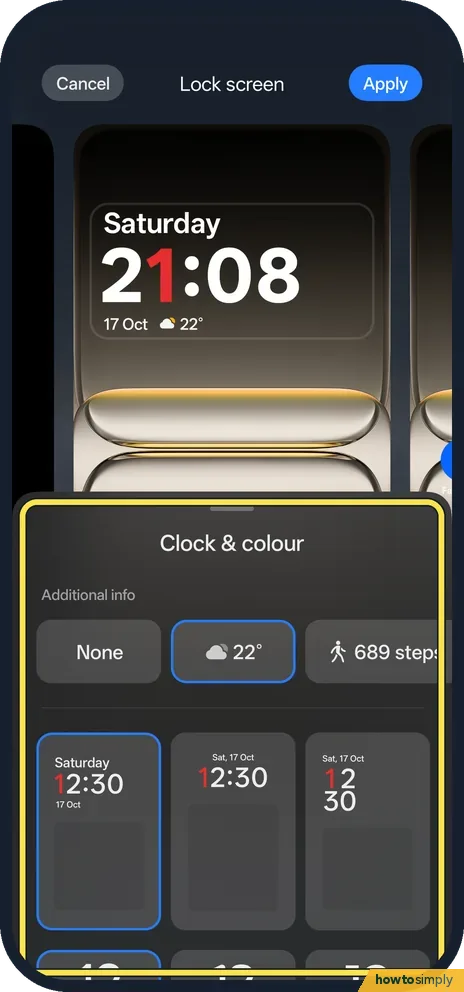
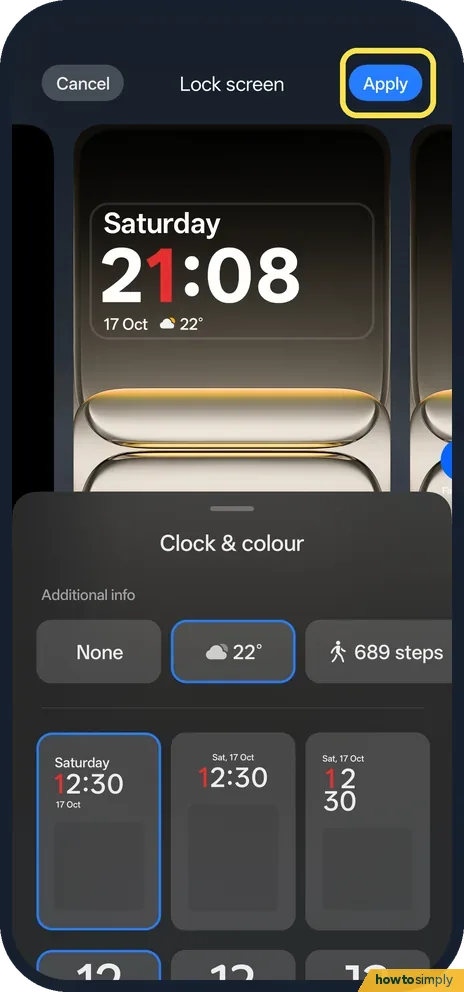
Tap the clock. Additional info (None, weather or steps) and clock layouts appear.
- 4
Style
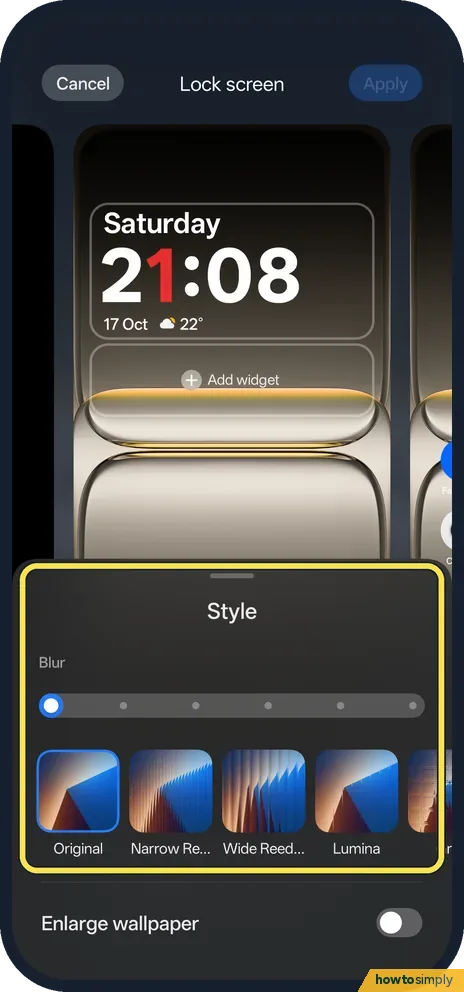
Style changes the wallpaper effect: Original, Narrow Reeded, Wide Reeded, Lumina and more, with a Blur slider.
- 5
Apply or Cancel
Tap Apply to keep it, or Cancel at the top left.
If you do not see this option
- Lock screen signature? Also in Lock screen settings; None on ours.
- Older OxygenOS? OnePlus's OxygenOS 14 manual uses Home screen & Lock screen, Lock screen shortcuts. Source: OxygenOS 14.0 User Manual
If this does not work
- Changes gone? Tap Apply before leaving.
- Shortcut does nothing? Swipe it from the corner rather than tapping it.
- Shortcut asks you to unlock first? That is a security feature. Most apps need the phone unlocked before they open from the lock screen. Camera is the usual exception, and even then you normally cannot browse older photos without unlocking.
- Weather or steps not showing in the clock? Additional info shows data from another app, such as the weather forecast. If it stays blank, open that app once so it can fetch fresh data, then look at the lock screen again.
- Clock text hard to read? A busy or bright wallpaper can swallow the clock. Pick a different colour in Clock & colour, or raise the Blur slider in Style so the background is calmer.
Good to know
Change the wallpaper on a OnePlus.
Turn on Always-On Display on a OnePlus.
Lock screen changes only affect what you see before unlocking. They do not change your PIN, fingerprint or face unlock, and they have no real effect on battery. If you also use Always-On Display, its clock can look different from the lock screen clock, because they are set separately. The OxygenOS 14 manual describes assigning a lock screen shortcut to features other than apps, such as Flashlight, which is handy in the dark because you do not need to unlock first.
To undo a change, open the editor again and pick the previous clock, colour, shortcut or Style, then tap Apply. Taking a screenshot of the lock screen before you start makes it easy to rebuild the old look later. If you show the time for two places, the dual clock setting in Clock can also appear on the lock screen: see add a world clock on a OnePlus.
About this guide
- Device
- Android
- Shown on
- OnePlus Nord 5 (CPH2709), OxygenOS 16.0.5.1201, Android 16
- App
- Settings
- Path
- Settings › Lock screen settings › Lock screen shortcuts
- Real screenshots
- 5 of 5 steps
- Checked
- October 2026
- Sources
- 1 official, linked below
Sources
Links checked October 2026. Menus and features can change with updates.Spotted a mistake? Menus change with updates, and we want every step to match your screen. Email us about this page or use the contact form. We read every report, and fixes are listed on What changed.
Liked this guide?
Follow us for new guides and short how-to videos.
Did this guide work for you?
Sorry about that. What happened?