XIAOMI REDMI
How to change the language on a Xiaomi phone (HyperOS 3)

In short
Go to Settings, Additional settings, Languages and input, and tap Languages. Find your language in the list or search for it at the top, and tap it. Each language is written in its own language, for example Deutsch for German.
4 of 4 steps show a real screenshot from our Redmi Note 15 Pro 5G. Each step was checked against the maker's own instructions, linked at the end.
Steps
- 1
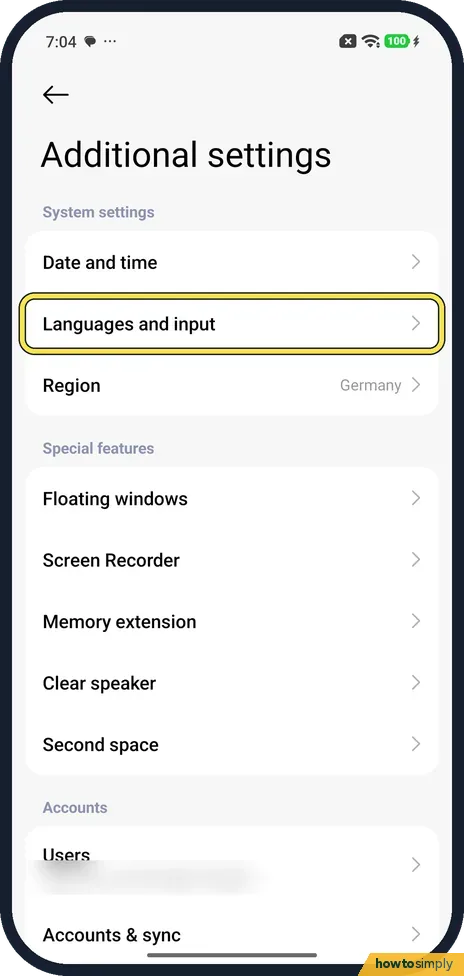
Tap Languages and input
Open Settings, tap Additional settings, then Languages and input, below Date and time.
- 2
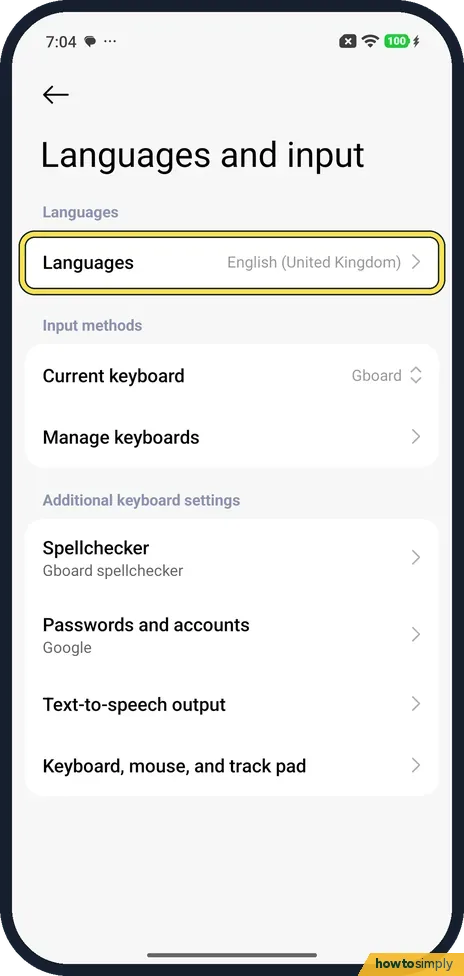
Tap Languages
The first row shows the current language. Ours said English (United Kingdom).
- 3
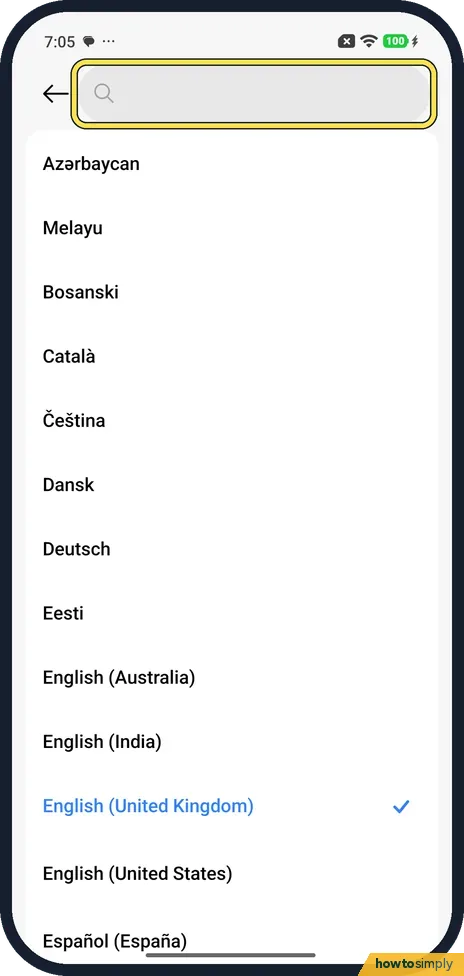
Search the list
The list is long. Tap the search bar at the top and type the name of your language.
- 4
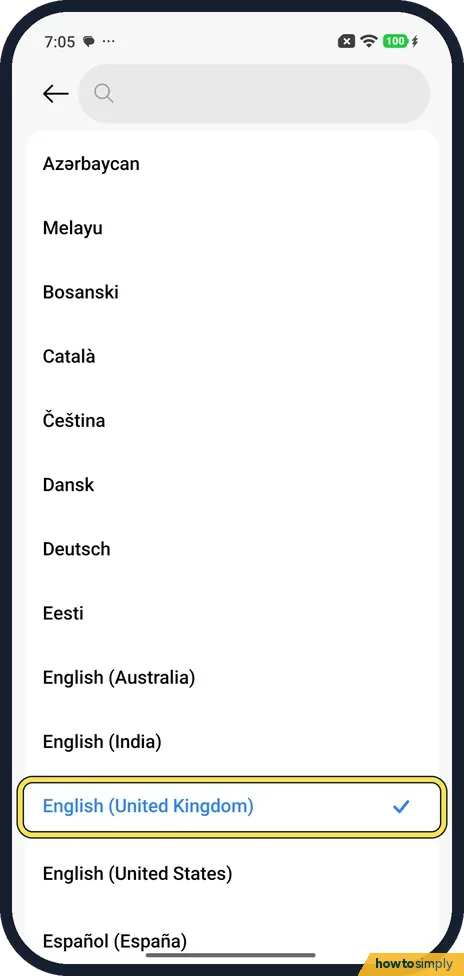
Tap your language
Each language is shown in its own words, such as Deutsch or Melayu. The current one is blue with a tick; ours was English (United Kingdom). Tap the one you want.
If you do not see this option
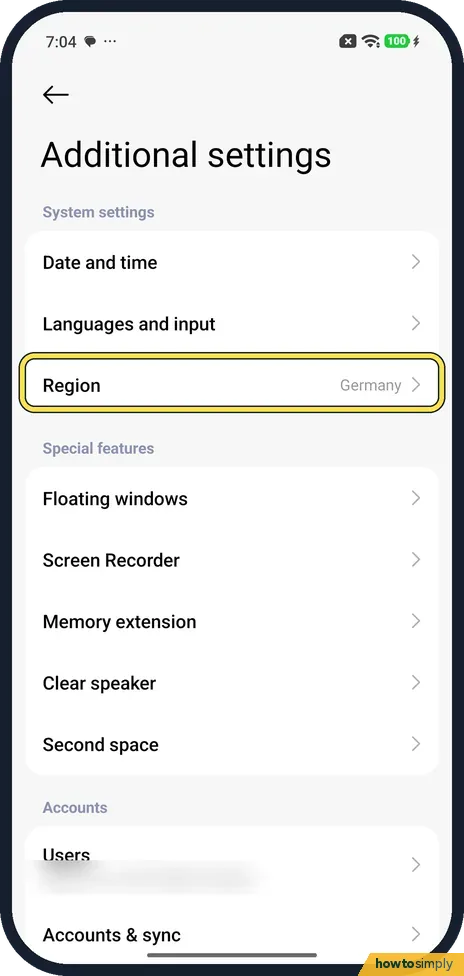
- Want to change the region too? Region is a separate row just below Languages and input. Ours said Germany. Xiaomi's HyperOS 3 guide says to pick it from the region list. Source: Generic User Guide for HyperOS 3.0
- Called Languages & input in the manual? Xiaomi's guide writes Languages & input. On our phone the row says Languages and input. Source: Generic User Guide for HyperOS 3.0
If this does not work
- Phone is in a language you can't read? Settings, Additional settings, Languages and input, Languages is the route. The first row on that page shows the current language, and the list names each language in its own words.
- Keyboard still types in the old language? The keyboard is set separately, under Input methods on the same page: Current keyboard (Gboard on ours) and Manage keyboards. See also keyboard sounds.
- An app stays in the old language? Close the app fully and open it again. Google also suggests checking your network connection and updating the app. Some apps only let you change the language inside the app's own settings.
- Want one app in a different language? Android 14 and later can set a language for a single app, but only for apps whose developers support it. Search Settings for app languages to find the option.
- Need to type in two languages? Add the second language to Gboard: open Gboard's settings from the top of the keyboard, go to the languages section and choose Add keyboard. Then press and hold the space bar to switch between them while typing.
Good to know
Bigger text instead: how to change the text size and font on a Xiaomi phone.
The new language applies straight away across the system and in every app that supports it. Nothing is deleted: your apps, messages and photos stay as they were, and only labels and menus change. Apps that do not include your language keep using English or their own default. Your Google Account, the voice assistant and the keyboard each have their own language settings, so set those separately if needed. To go back, open the same list and tap your old language; the one in use is shown in blue with a tick.
On our Redmi with HyperOS 3.0.309.0, on 1 November 2026, searching Settings for App language pointed to System, Language and region. The same page held the regional preferences: Measurement system, Temperature and First day of week.
About this guide
- Device
- Android
- Shown on
- Xiaomi Redmi Note 15 Pro 5G (25080RABDG), HyperOS 3.0.308.0, Android 16
- App
- Settings
- Path
- Settings › Additional settings › Languages and input › Languages
- Real screenshots
- 4 of 4 steps
- Checked
- October 2026
- Sources
- 3 official, linked below
Sources
Links checked October 2026. Menus and features can change with updates.Spotted a mistake? Menus change with updates, and we want every step to match your screen. Email us about this page or use the contact form. We read every report, and fixes are listed on What changed.
Liked this guide?
Follow us for new guides and short how-to videos.
Did this guide work for you?
Sorry about that. What happened?