
What changed: every step re-shot on our own Galaxy S26 (Korean model SM-S942N) on One UI 9, dark mode, with the steps rewritten for the One UI 9 screens.
howtosimply.com/guides/samsung-galaxy-not-vibrating-6-things-to-check/ · Checked October 2026 · SM-S942N, Korean model), One UI 9, Android 17 (build S942NKSS4BZIG · Samsung Galaxy S26
In this guide
Open Settings, Sounds and vibration. Choose Sound or Vibrate, not Mute, and switch on Vibrate while ringing if calls should vibrate as well as ring. Then raise the sliders under Vibration intensity and check that Do not disturb is off.
7 of 7 steps with real screenshots · 2 official sources below
- Device
- Android
- Shown on
- Samsung Galaxy S26 (SM-S942N, Korean model), One UI 9, Android 17 (build S942NKSS4BZIG)
- App
- Settings
- Real screenshots
- 7 of 7 steps
- What we did
- Observed: looked at each screen, changed nothing
- Checked
- October 2026
- Sources
- 2 official, linked below
Step by step
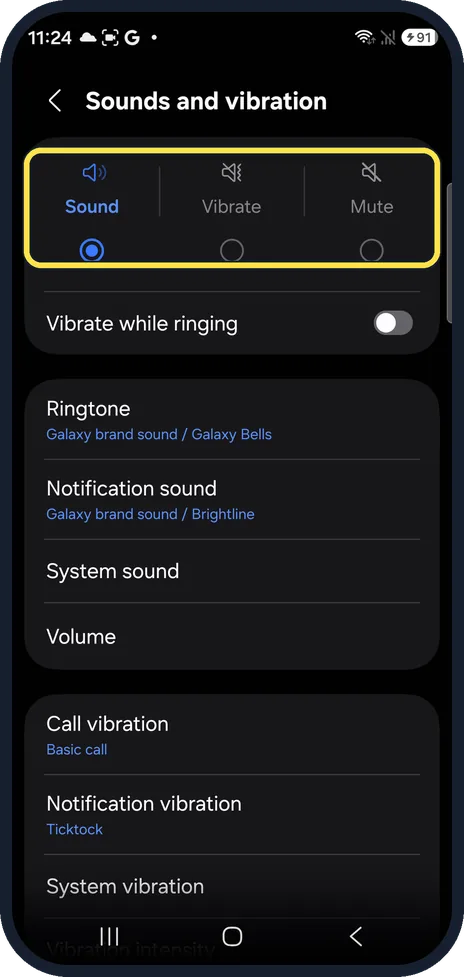
Check the sound mode
Settings, Sounds and vibration. The three choices at the top are Sound, Vibrate and Mute. Mute silences the phone completely. Ours was on Sound.
Watch these steps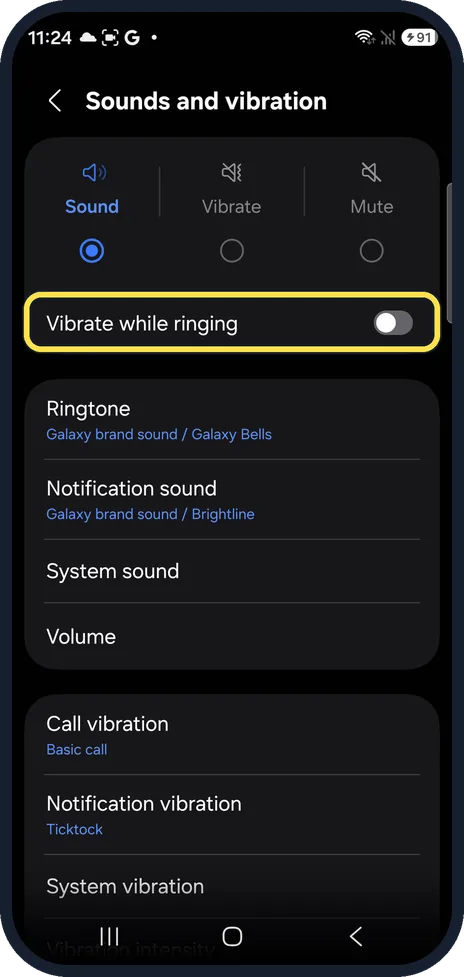
Switch on Vibrate while ringing
With Sound selected, incoming calls ring; this switch makes them vibrate at the same time. It was off on ours.
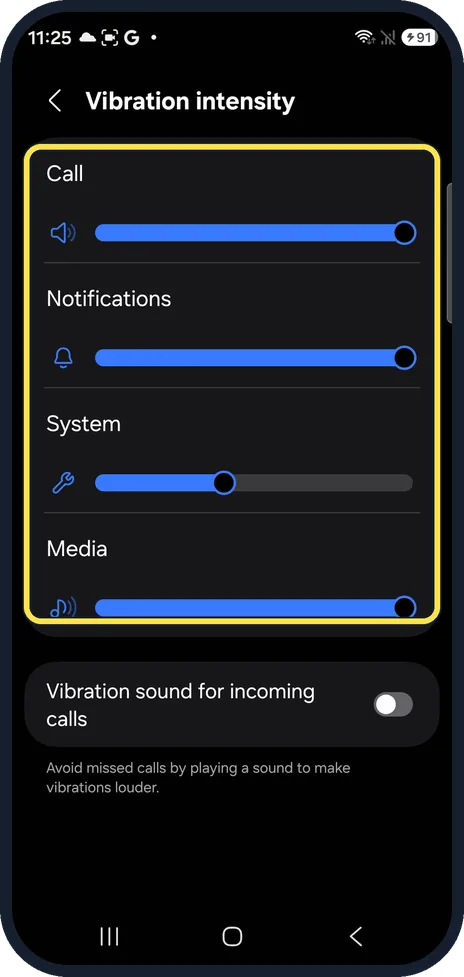
Raise the vibration intensity
Vibration intensity, lower on the same page, has separate sliders for Call, Notifications, System and Media. Drag the one for the missing vibration to the right. On ours, System was lower than the others.
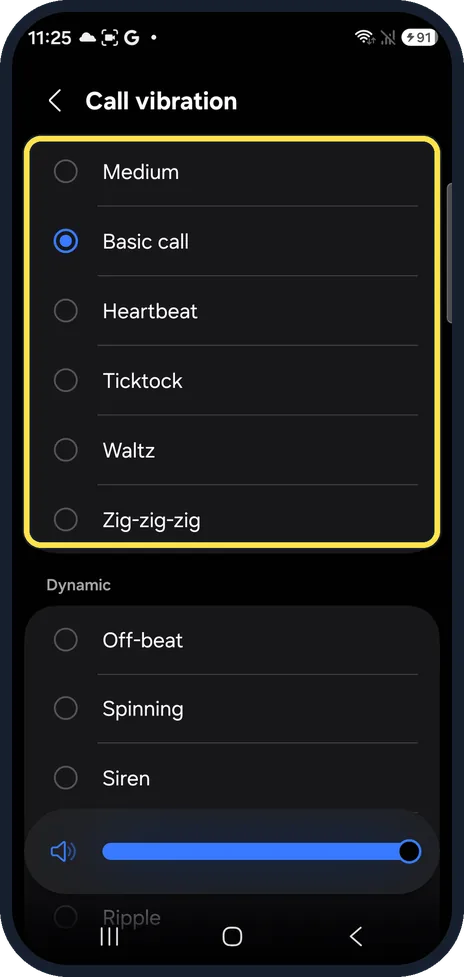
Pick a stronger pattern
Call vibration and Notification vibration set the pattern. A short, soft pattern is easy to miss; try another. Ours were Basic call and Ticktock.
Turn off Do not disturb
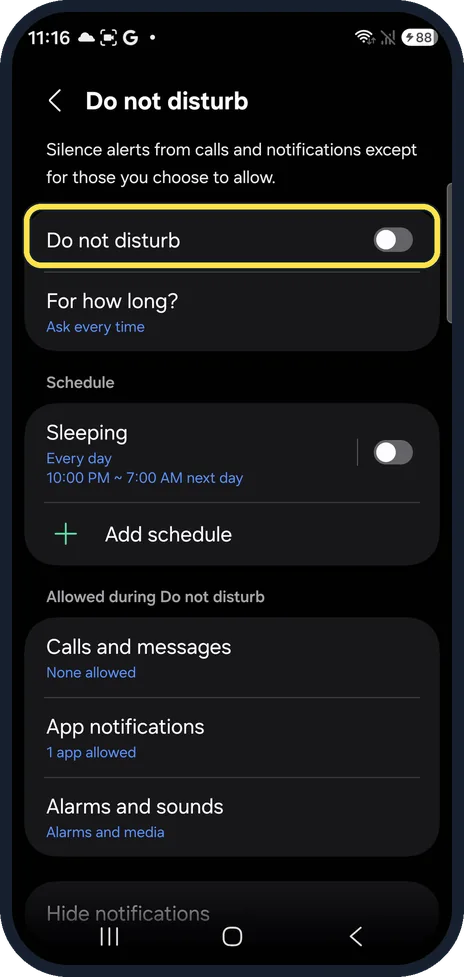
Do not disturb silences calls and alerts, vibration included, apart from what you allow. Settings, Notifications, Do not disturb; it was off on ours.
Test the motor in Samsung Members
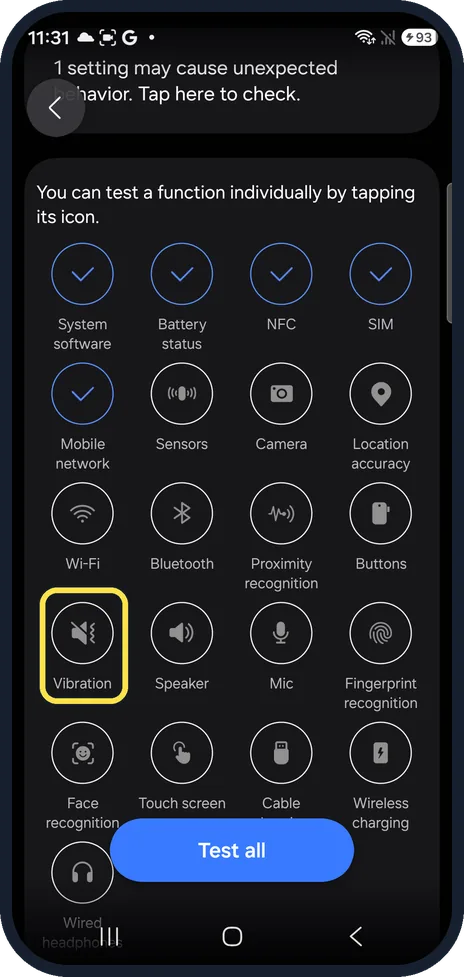
Open Samsung Members, Support, Phone diagnostics and tap the Vibration icon. If the vibration check fails, the motor needs a repair.
If diagnostics will not start
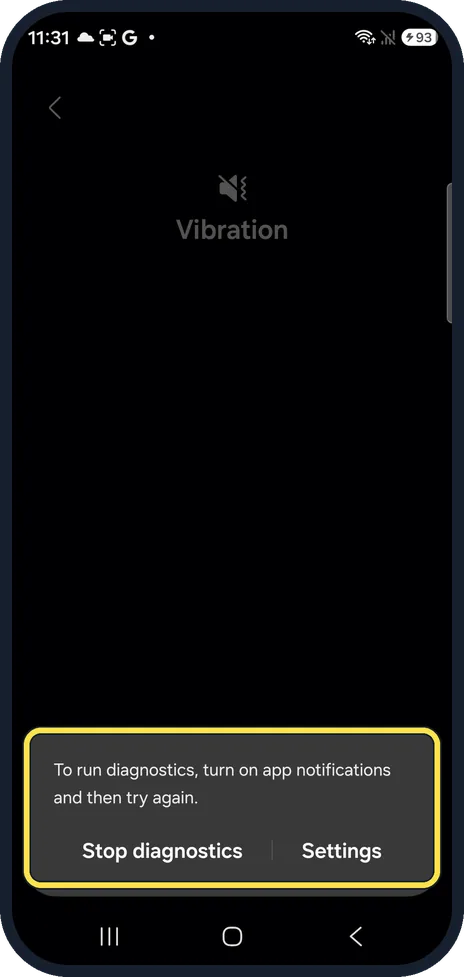
On ours a box said To run diagnostics, turn on app notifications and then try again. Tap Settings, allow notifications for Samsung Members, and run the Vibration check again.
What changed: every step re-shot on our own Galaxy S26 (Korean model SM-S942N) on One UI 9, dark mode, with the steps rewritten for the One UI 9 screens.
Watch these steps
If you do not see this option
- No Vibrate while ringing switch On our Galaxy A57 it was listed only while Sound was selected, not with Vibrate. Select Sound to see it.
- Your phone shows Call vibration and Notification vibration Samsung's guide names the rows Call vibration and Notification vibration. Open each and make sure Silent is not selected. Source: Galaxy phone vibration not working when receiving calls or notifications
If this does not work
- Only calls do not vibrate Check Vibrate while ringing and the Call slider under Vibration intensity. Sources: Galaxy phone vibration not working when receiving calls or notifications, Galaxy Phone Not Vibrating for Calls or Alerts
- Only notifications do not vibrate Check the Notifications slider under Vibration intensity and the Notification vibration pattern. Source: Galaxy phone vibration not working when receiving calls or notifications
- Do not disturb is on Samsung says vibrations and notifications may not work while Do not disturb is on: Settings, Notifications, Do not disturb, and switch it off. Source: Galaxy phone vibration not working when receiving calls or notifications
- A mode keeps it quiet Samsung says modes such as Sleep, Theatre or Relax can stop notifications. Open Settings, Modes and Routines, tap each mode you set and check its Do not disturb times. Source: Galaxy phone vibration not working when receiving calls or notifications
About this guide
When a Galaxy stops vibrating, the cause is almost always a setting: the sound mode, a switch that only covers ringing, or a slider turned down. Most of them are on one page.
The screenshots are from our Samsung Galaxy S26, the Korean model SM-S942N, with One UI 9 and Android 17 (build S942NKSS4BZIG), in Dark mode. Menus can differ on models sold in other regions. We only looked at these screens and changed nothing.
Good to know
If the phone vibrates but makes no sound: no sound on a Samsung Galaxy phone.
Calls only, not alerts? Samsung Galaxy not ringing? 7 things to check.
More on the quiet mode: how to use Do not disturb on a Samsung Galaxy phone.
In short: Settings, Sounds and vibration: Sound or Vibrate, Vibrate while ringing on, Vibration intensity up, Do not disturb off; Samsung Members, Vibration test.
- Samsung UK: Galaxy phone vibration not working when receiving calls or notifications
- Samsung AE: Galaxy Phone Not Vibrating for Calls or Alerts
Links checked in October 2026. Menus and features can change after software updates. These steps match the version named at the top.
📷 See real photos from the Galaxy S26 in our Camera Lab, next to 10 other phones.
Did this guide work for you?
Sorry about that. What happened?