
howtosimply.com/guides/how-to-turn-on-disappearing-messages-by-default-on-whatsapp/ · Checked October 2026 · Google Pixel 10a, Android 17 (build CP3A.261005.005), WhatsApp 2.26.41.77
In this guide
Open WhatsApp Settings, Privacy, Default message timer, tap OK on the intro and choose 24 hours, 7 days or 90 days. New one-to-one chats then start with disappearing messages; existing chats stay as they are. WhatsApp 2.26.41.77 on our Pixel 10a.
4 of 4 steps with real screenshots · 2 official sources below
- Device
- Android
- Shown on
- Google Pixel 10a, Android 17 (build CP3A.261005.005), WhatsApp 2.26.41.77
- App
- Settings
- Path
- Settings › Privacy › Default message timer › OK
- Real screenshots
- 4 of 4 steps
- Checked
- October 2026
- Sources
- 2 official, linked below
Step by step
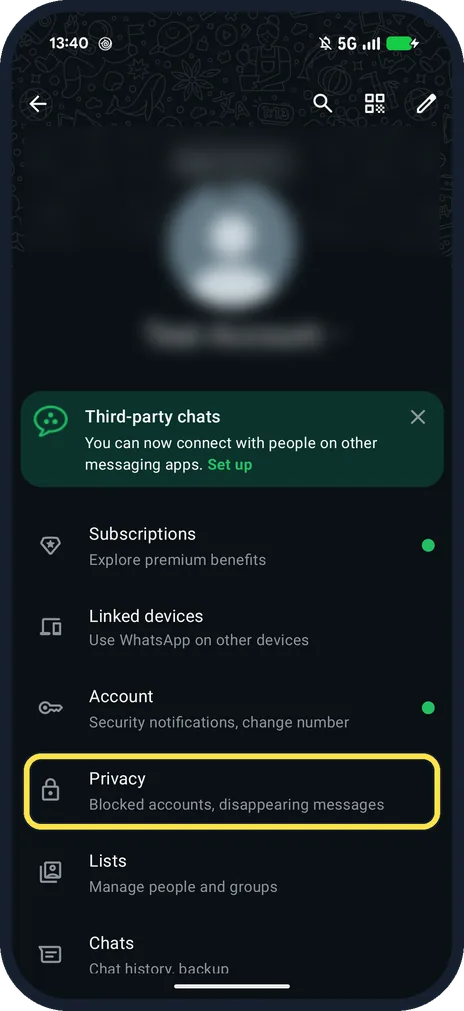
Open Settings, then Privacy
Tap the three dots at the top right, then Settings. Privacy is below Account: Blocked accounts, disappearing messages.
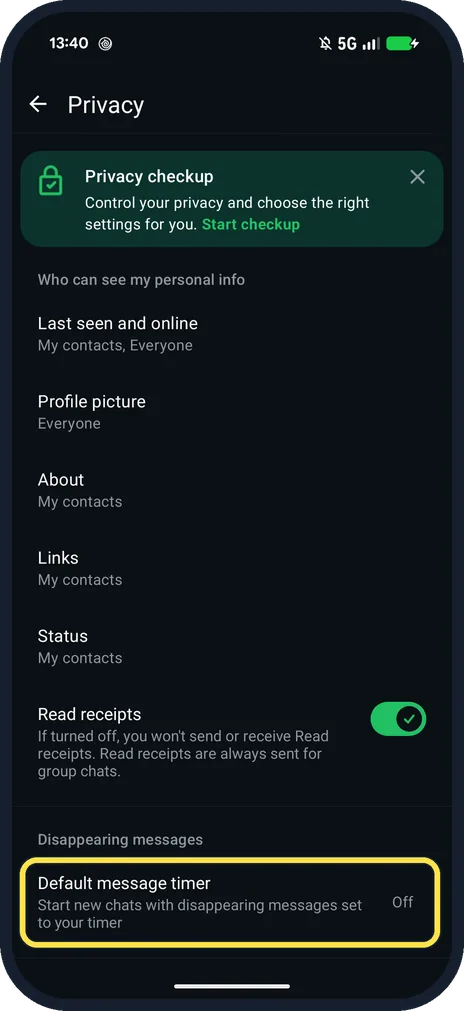
Tap Default message timer
Near the bottom, under Disappearing messages: Start new chats with disappearing messages set to your timer.
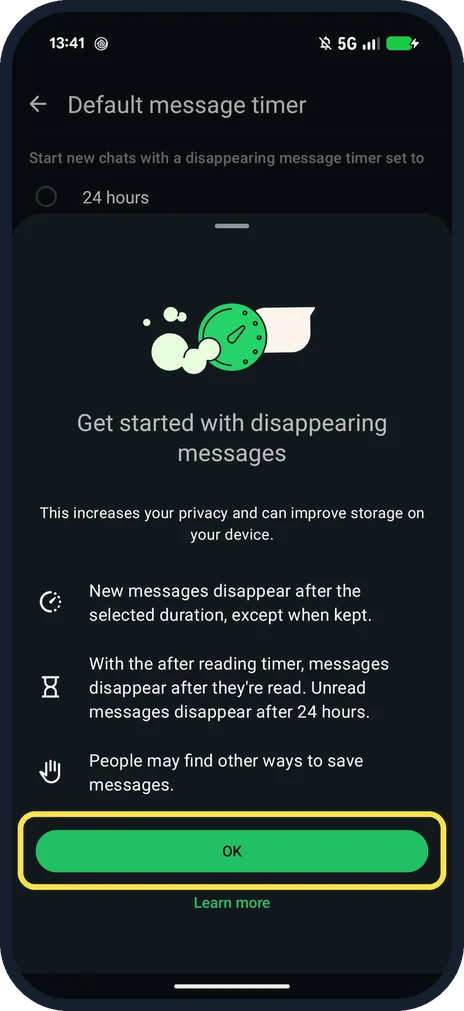
Read the intro and tap OK
The first time, Get started with disappearing messages explains: New messages disappear after the selected duration, except when kept.
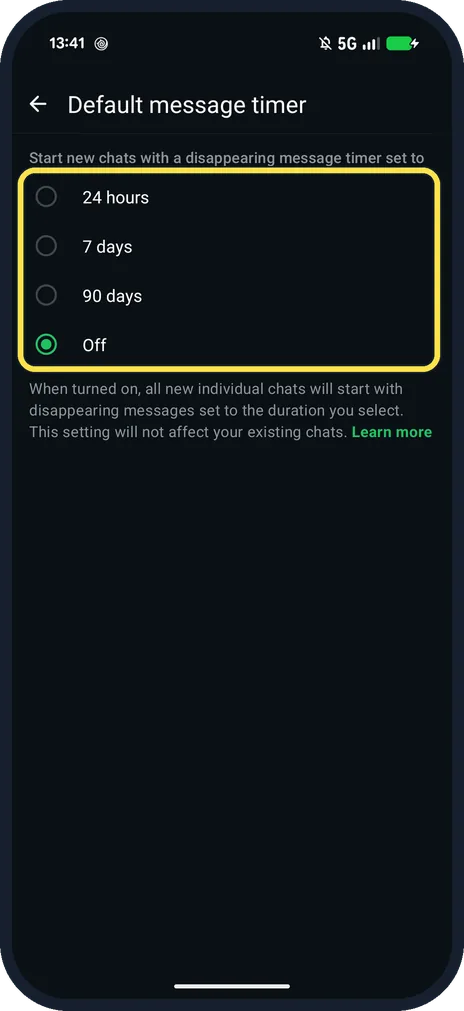
Choose 24 hours, 7 days or 90 days
Ours was Off. The page says the setting will not affect your existing chats.
If you do not see this option
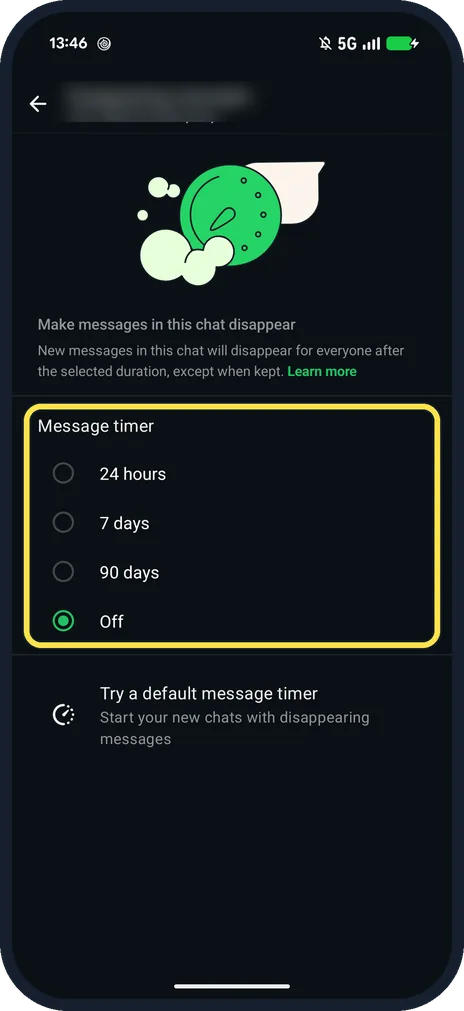
- Only for one chat? Open the chat, tap the three dots, then Disappearing messages. Ours showed Message timer: 24 hours, 7 days, 90 days, Off. Source: How to turn disappearing messages on or off
- Existing chats too? WhatsApp says you can tap the existing chats you want when you set the default, then confirm. Source: How to turn disappearing messages on or off
If this does not work
- Old messages did not disappear? WhatsApp says the timer applies to new messages only, not to earlier ones. Source: How to turn disappearing messages on or off
- Want to save one message? WhatsApp says you can keep a message so it does not disappear, while its time has not run out. Source: How to turn disappearing messages on or off
About this guide
The default timer only affects new individual chats. For one chat, use Disappearing messages in that chat's menu.
The screenshots are from our Google Pixel 10a with Android 17 and WhatsApp 2.26.41.77, in Dark mode, taken on 25 October 2026. Ours was Off and we left it off.
Good to know
For a self chat that keeps notes forever, see message yourself on WhatsApp.
In short: Settings, Privacy, Default message timer, OK, choose.
- WhatsApp Help Center: How to turn disappearing messages on or off
- WhatsApp Help Center: How to change your privacy settings
Links checked in October 2026. Menus and features can change after software updates. These steps match the version named at the top.
📷 See real photos from the Pixel 10a in our Camera Lab, next to 10 other phones.
Did this guide work for you?
Sorry about that. What happened?