
howtosimply.com/guides/how-to-silence-unknown-callers-on-whatsapp-on-android/ · Checked October 2026 · Google Pixel 10a, Android 17 (build CP3A.261005.005), WhatsApp 2.26.41.77
In this guide
Open WhatsApp Settings, Privacy, Calls and switch on Silence unknown callers. Calls from numbers you have not saved stop ringing but still show in the Calls tab and in notifications.
5 of 5 steps with real screenshots · 4 official sources below
- Device
- Android
- Shown on
- Google Pixel 10a, Android 17 (build CP3A.261005.005), WhatsApp 2.26.41.77
- App
- Real screenshots
- 5 of 5 steps
- Checked
- October 2026
- Sources
- 4 official, linked below
Step by step
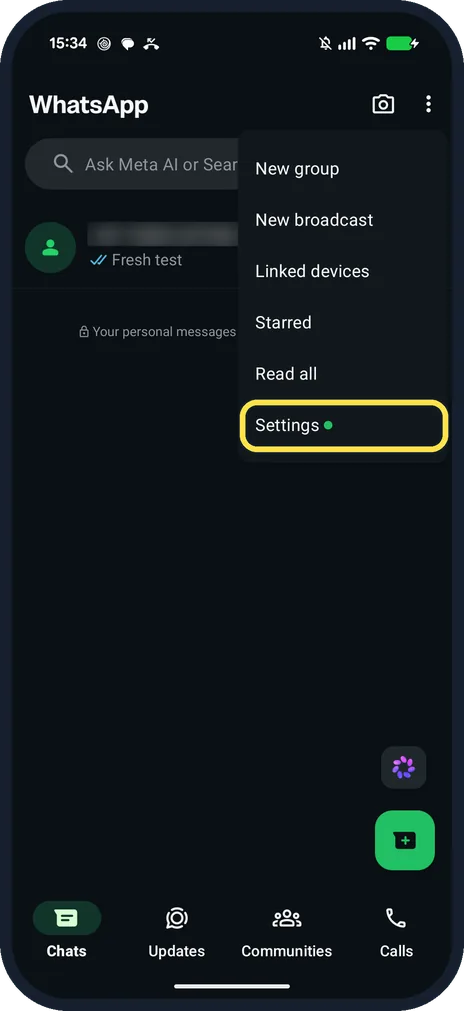
Open WhatsApp Settings
On the Chats tab, tap the three dots at the top right, then Settings.
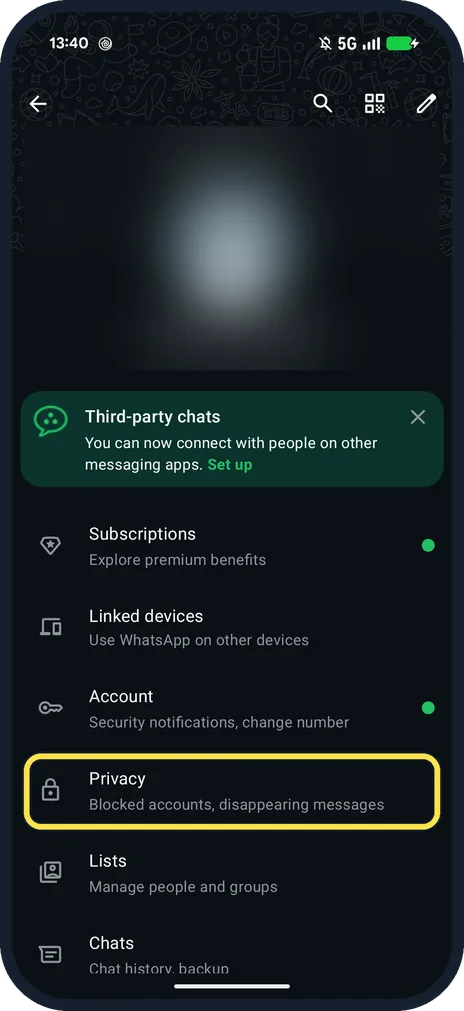
Tap Privacy
It is below Account: Blocked accounts, disappearing messages.
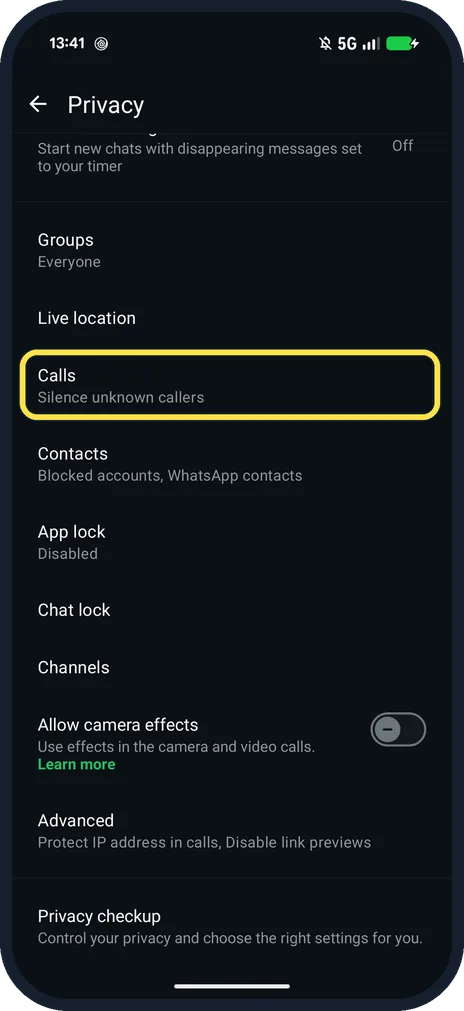
Tap Calls
Scroll down the Privacy page. Ours said Silence unknown callers under Calls.
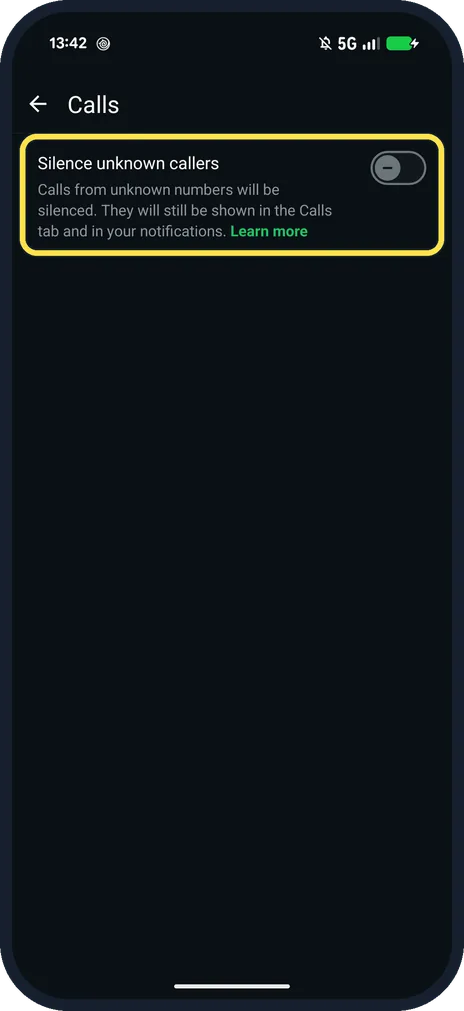
Tap the Silence unknown callers switch
Ours was off. The page says: Calls from unknown numbers will be silenced. They will still be shown in the Calls tab and in your notifications.
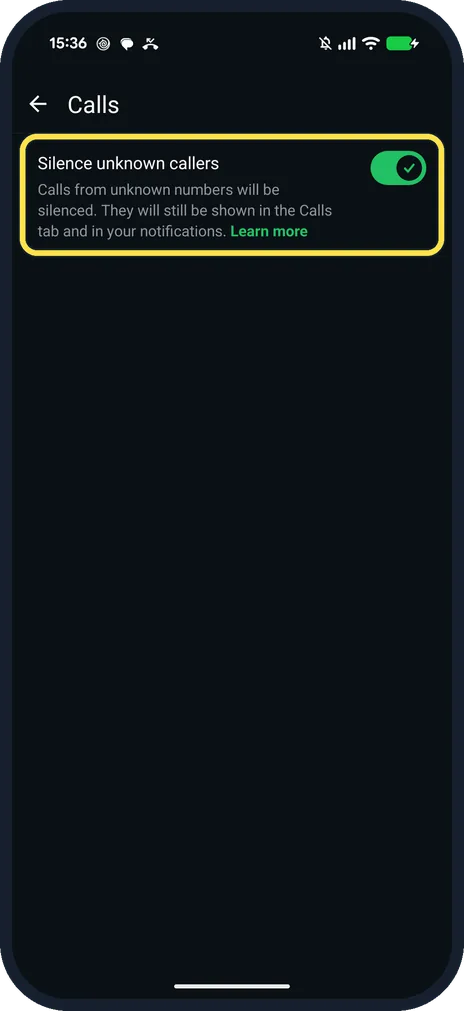
Check that it is green
Ours with the switch on.
If you do not see this option
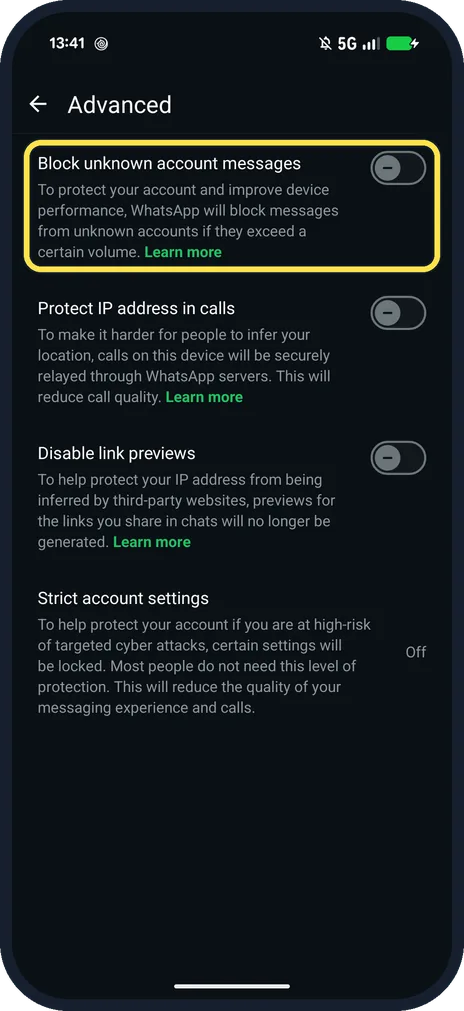
- Unknown messages too? Privacy, Advanced, Block unknown account messages blocks messages from unknown accounts when they exceed a certain volume. Source: How to block high volumes of unknown messages
- No Calls row on the Privacy page? Use Privacy checkup on the same page (ours listed it at the bottom, step 3): WhatsApp says its Choose who can contact you section has silence unknown callers. Source: About privacy checkup
If this does not work
- Missed a call from a new number? WhatsApp says silenced calls still show in the Calls tab and in notifications; you can call back from the Calls tab, or tap the Silenced unknown caller message in the chat. Source: How to silence unknown callers
- One caller still rings? WhatsApp says that if you call or message a silenced caller, you won't be able to silence their calls in future. Block the number instead. Source: How to silence unknown callers
- Still getting spam messages? This switch only covers calls. WhatsApp says Block unknown account messages blocks only high volumes of unknown messages. Source: How to block high volumes of unknown messages
About this guide
WhatsApp says anyone who has your phone number can call you on WhatsApp. Silencing unknown callers does not block them.
The screenshots are from our Google Pixel 10a with Android 17 and WhatsApp 2.26.41.77, in Dark mode, taken on 25 October 2026. The switch was off; we switched it on for the last shot, then off again.
Good to know
To limit who sees your activity, see hide your last seen on WhatsApp.
In short: WhatsApp, three dots, Settings, Privacy, Calls, Silence unknown callers on.
- WhatsApp Help Center: How to silence unknown callers
- WhatsApp Help Center: How to change your privacy settings
- WhatsApp Help Center: About privacy checkup
- WhatsApp Help Center: How to block high volumes of unknown messages
Links checked in October 2026. Menus and features can change after software updates. These steps match the version named at the top.
📷 See real photos from the Pixel 10a in our Camera Lab, next to 10 other phones.
Did this guide work for you?
Sorry about that. What happened?