
howtosimply.com/guides/how-to-change-font-size-on-an-oppo-phone/ · Checked October 2026 · CPH2689, EEA), ColorOS 16.0.5, Android 16 (build CPH2689_16.0.5.1001(EX01) · OPPO Reno13 5G
In this guide
Open Settings, Display & brightness, Font and drag the Font size slider. Tap Apply. Fonts (OPPO Sans, OPPO Serif, Roboto, One Sans and more) are on the same page. For bigger icons too, tap Display size: Large, Standard or Small.
3 of 3 steps with real screenshots · 1 official source below
- Device
- Android
- Shown on
- OPPO Reno13 5G (CPH2689, EEA), ColorOS 16.0.5, Android 16 (build CPH2689_16.0.5.1001(EX01))
- App
- Settings
- Path
- Settings › Display & brightness
- Real screenshots
- 3 of 3 steps
- Checked
- October 2026
- Sources
- 1 official, linked below
Step by step
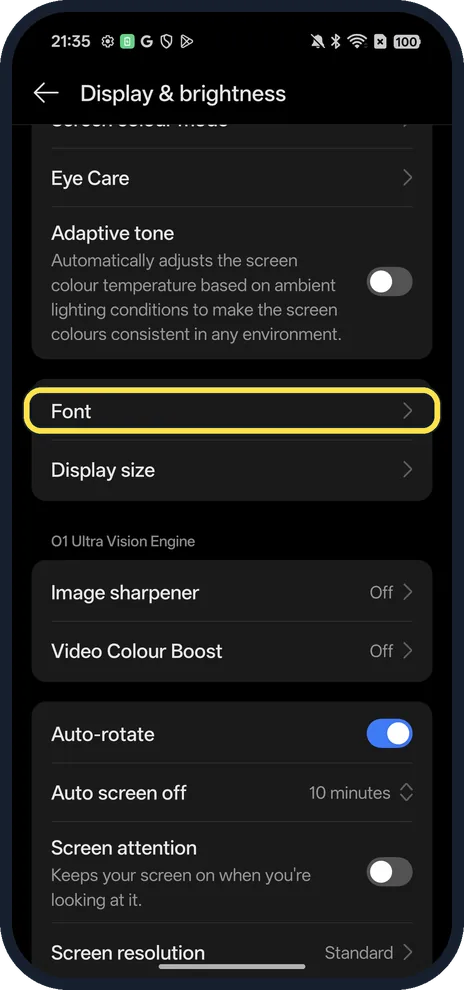
Tap Font
Open Settings, Display & brightness and scroll to Font.
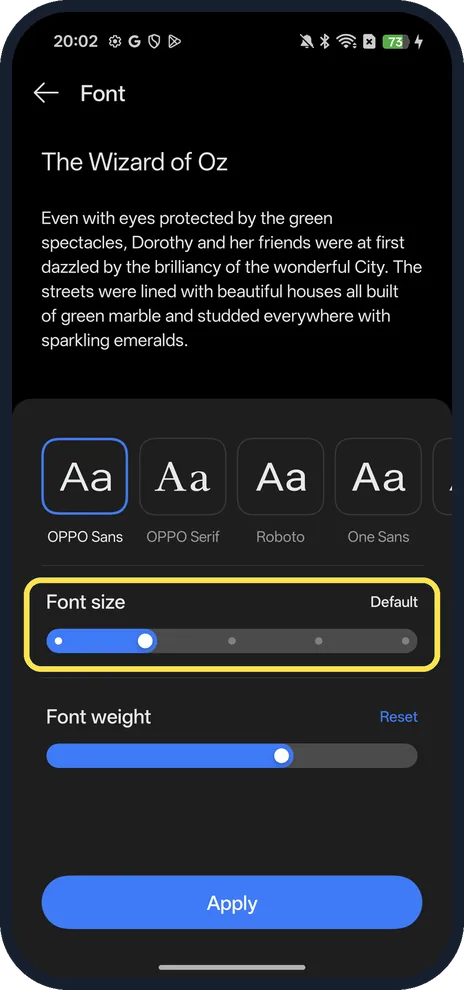
Drag Font size, then tap Apply
The sample text at the top changes as you drag. Apply is at the bottom of the page.
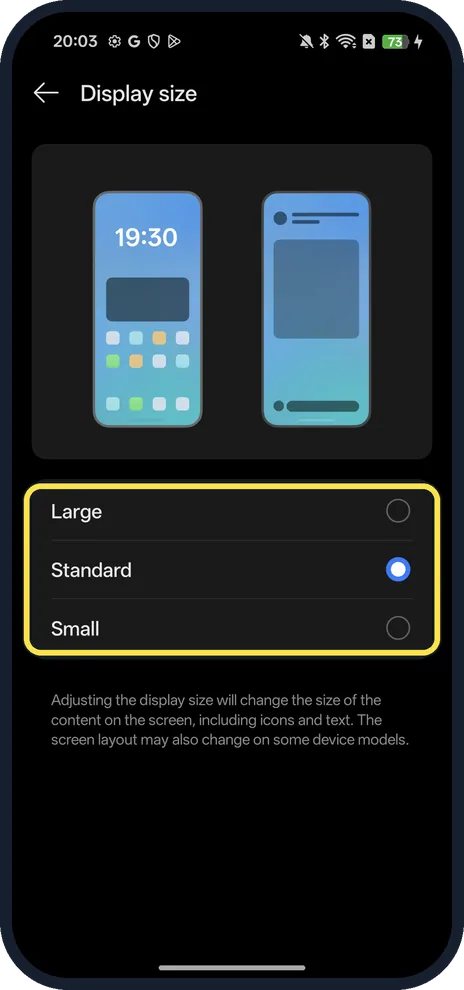
Change Display size for everything
Back on Display & brightness, tap Display size and pick Large, Standard or Small.
If you do not see this option
- Not under Display & brightness? OPPO's help puts Fonts under Settings, Desktop, Lock Screen and Personalization on ColorOS 16. On our ColorOS 16.0.5 it was Display & brightness, Font, which is the path OPPO gives for ColorOS 13 to 15. Search Settings for font if neither matches. Source: How to Change the Font Style and Size on OPPO Phones
- Older ColorOS? OPPO gives Settings, Personalizations, Font & display size on ColorOS 11 and 12, and Display & brightness, Font size on ColorOS 5.2 to 7. Source: How to Change the Font Style and Size on OPPO Phones
- Want more font styles? OPPO says Theme Store version 6.4 and later has a Fonts category; some fonts must be bought, and the Theme Store isn't offered in every country. Source: How to Change the Font Style and Size on OPPO Phones
If this does not work
- Icons and layout changed too? That is Display size, not Font size. Our phone says it changes the size of icons and text, and the layout on some models. Set it back to Standard.
- Text still too small or too bold? Drag Font size further, or tap Reset next to Font weight on the same page; both sit under the font choices on ours.
About this guide
The screenshots are from our OPPO Reno13 5G, the European model CPH2689, with ColorOS 16.0.5 and Android 16 (build CPH2689_16.0.5.1001(EX01)), in Dark mode. Ours was on Default font size and Standard display size.
Good to know
Make bold text easier to read: Font weight sits just under Font size on the same page.
Turn on darker colours for night reading: Dark mode on an OPPO phone.
In short: Settings, Display & brightness, Font (text) or Display size (everything).
Links checked in October 2026. Menus and features can change after software updates. These steps match the version named at the top.
Did this guide work for you?
Sorry about that. What happened?