
howtosimply.com/guides/how-to-change-the-app-grid-on-a-nothing-phone/ · Checked October 2026 · 4a) Pro (A069P, EEA), Nothing OS 4.1, Android 16 (build FroggerPro-B4.1-260424-1447-EEA · Nothing Phone
In this guide
Open Settings, Customisation and tap Layout. Tap App Grid to choose 4 or 5 columns, and switch App label to show or hide app names on the Home screen. Search bar sets the Home screen search.
3 of 3 steps with real screenshots · 2 official sources below
- Device
- Android
- Shown on
- Nothing Phone (4a) Pro (A069P, EEA), Nothing OS 4.1, Android 16 (build FroggerPro-B4.1-260424-1447-EEA), Nothing Phone (4a) Pro (A069P, EEA), Nothing OS 4.1, Android 16 (build FroggerPro-B4.1-260907-1153-EEA)
- App
- Settings
- Path
- Settings › Customisation › Layout
- Real screenshots
- 3 of 3 steps
- Checked
- October 2026
- Sources
- 2 official, linked below
Step by step
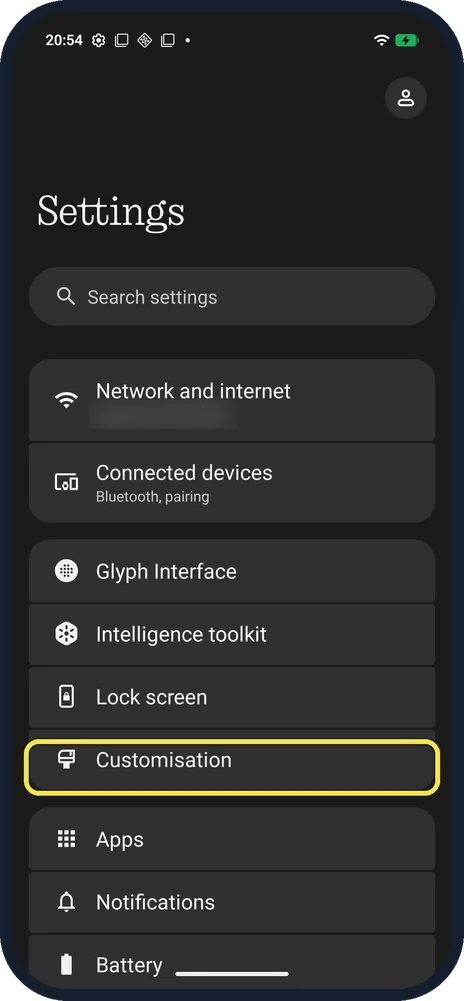
Open Customisation
Open Settings; it is below Lock screen.
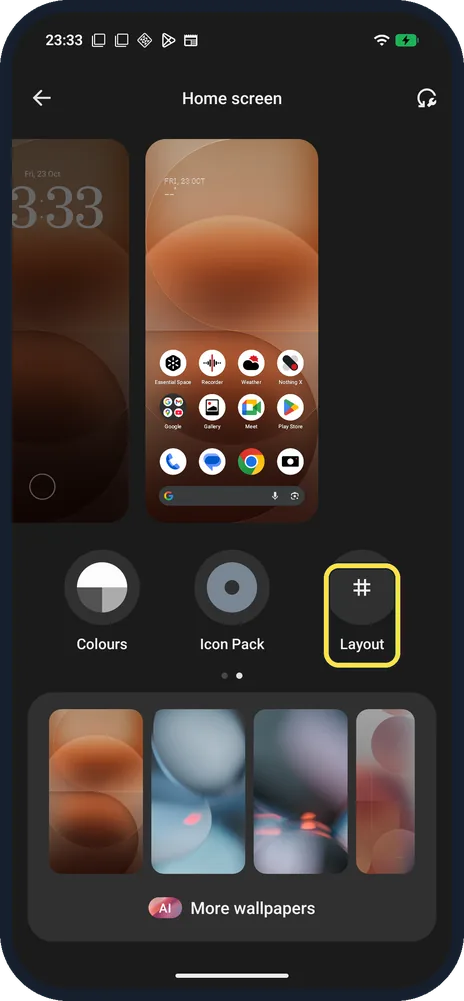
Tap Layout
One of three buttons under the previews: Colours, Icon Pack, Layout.
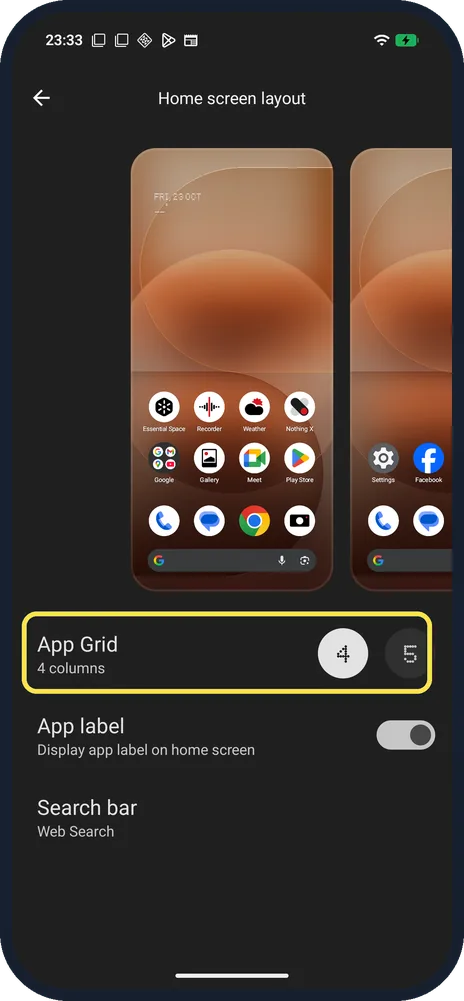
Tap App Grid
Choose 4 or 5 columns; the preview at the top shows the result.
If you do not see this option
- Hide the app names? Turn off App label: Display app label on home screen.
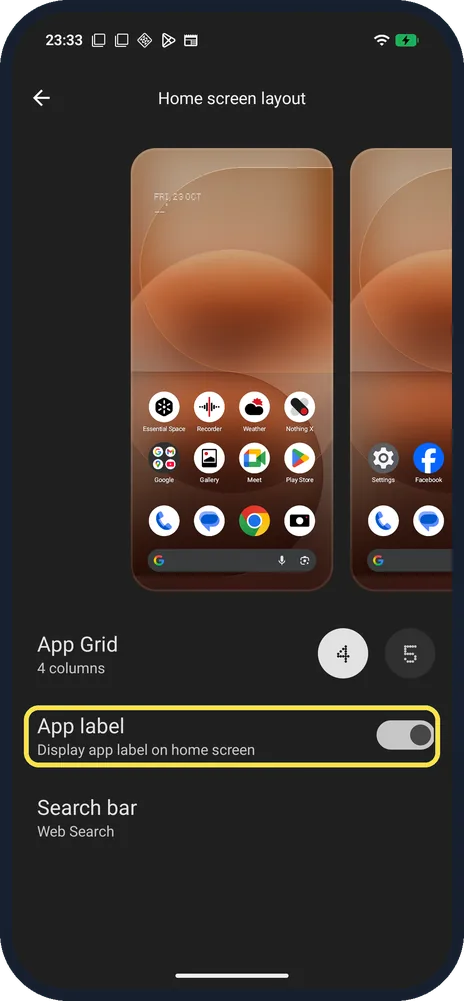
- Bigger icons? There was no icon size setting on ours; 4 columns gives the biggest icons.
- Another way in? Nothing says to long-press an empty part of the Home screen and go to Customisation. Source: How do I change the wallpaper and accent colours on my Phone?
- Change the icon style? Icon Pack, next to Layout, has Default and Nothing. See change the icon pack.
If this does not work
- Icons moved after changing the grid? Going from 4 to 5 columns rearranges the Home screen; switch back to 4 to restore the spacing, then move any icons by hand.
- An app icon vanished from the Home screen? Nothing says to swipe up to the App drawer, long-press the app and drag it back. To stop icons and widgets moving, long-press the Home screen, open Home settings and turn on Freeze home screen layout. Source: An app icon has disappeared from the home screen. What can I do?
About this guide
The screenshots are from our Nothing Phone (4a) Pro, the European model A069P, with Nothing OS 4.1 and Android 16 (build FroggerPro-B4.1-260907-1153-EEA, security update 1 September 2026), in Dark theme. Ours was on 4 columns with labels on; we changed nothing. The step 1 screenshot was taken earlier, on build FroggerPro-B4.1-260424-1447-EEA.
Good to know
To tidy the app list, use the Smart App Drawer.
For widgets, add a Nothing widget.
In short: Settings, Customisation, Layout, App Grid 4 or 5; App label on or off.
- Nothing Support: How do I change the wallpaper and accent colours on my Phone?
- Nothing Support: An app icon has disappeared from the home screen. What can I do?
Links checked in October 2026. Menus and features can change after software updates. These steps match the version named at the top.
Did this guide work for you?
Sorry about that. What happened?