
howtosimply.com/guides/how-to-change-the-ringtone-on-an-oppo-phone/ · Checked October 2026 · CPH2689, EEA), ColorOS 16.0.5, Android 16 (build CPH2689_16.0.5.1001(EX01) · OPPO Reno13 5G
In this guide
Open Settings, Sound & vibration, scroll to Ringtone & alert sounds and tap Ringtone. Pick a tone from Classic or Nature, or tap On this device to use your own sound file. The selected circle shows the ringtone in use; ours was Calm.
5 of 5 steps with real screenshots · 1 official source below
- Device
- Android
- Shown on
- OPPO Reno13 5G (CPH2689, EEA), ColorOS 16.0.5, Android 16 (build CPH2689_16.0.5.1001(EX01))
- App
- Settings
- Path
- Settings › Sound & vibration › Ringtone: pick a tone
- Real screenshots
- 5 of 5 steps
- Checked
- October 2026
- Sources
- 1 official, linked below
Step by step
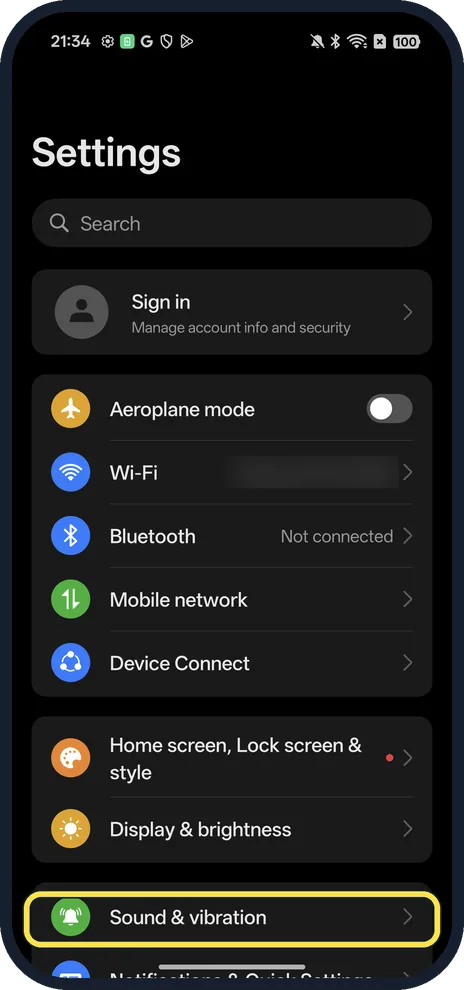
Open Sound & vibration
Open Settings. Sound & vibration is below Display & brightness.
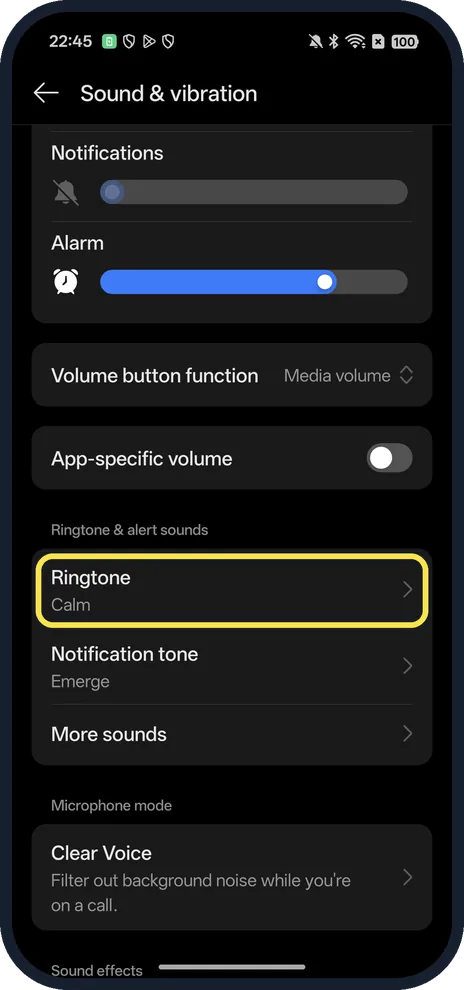
Tap Ringtone
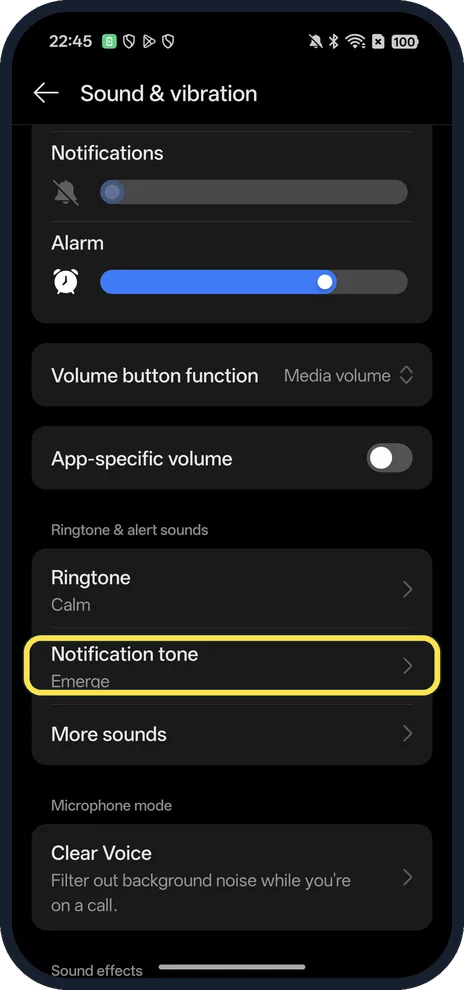
Scroll down to Ringtone & alert sounds. Ringtone shows the current tone under its name.
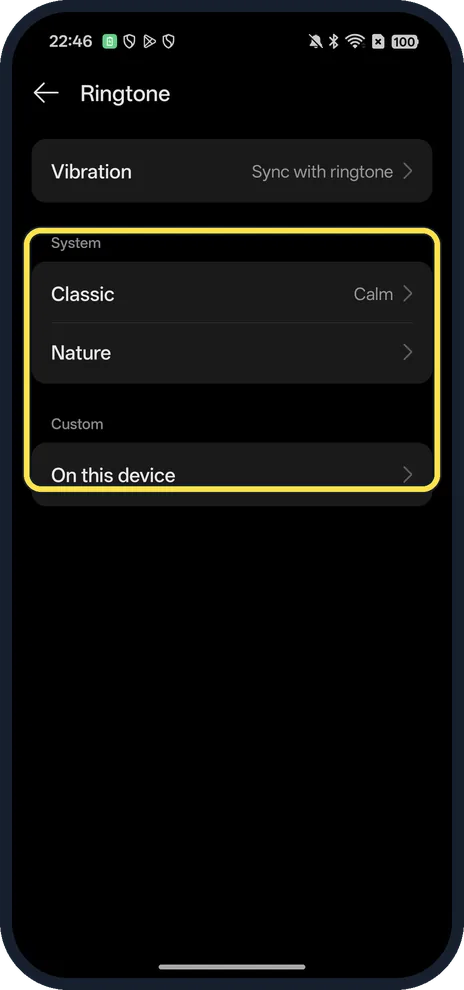
Choose a group
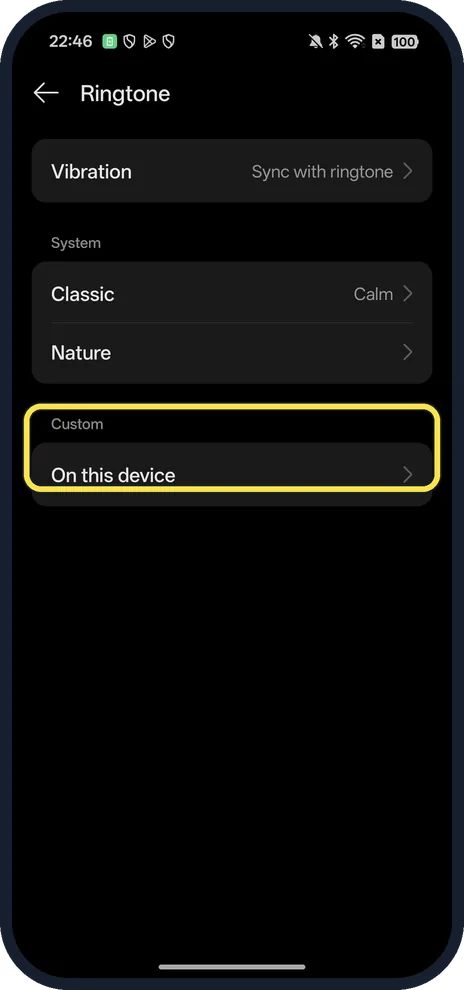
System has Classic and Nature. Custom has On this device, for a sound file on your phone.
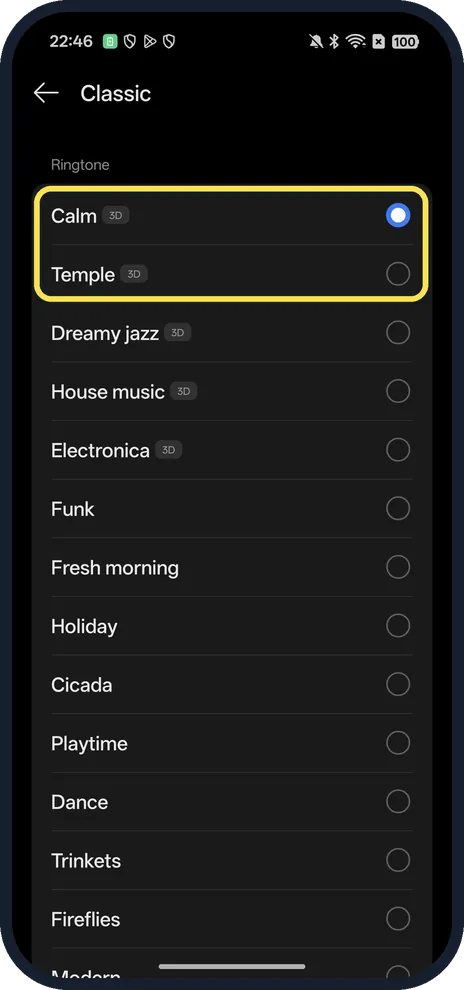
Tap a tone
The Classic list starts with Calm, which was selected on ours, followed by Temple, Dreamy jazz and more.
Set the vibration
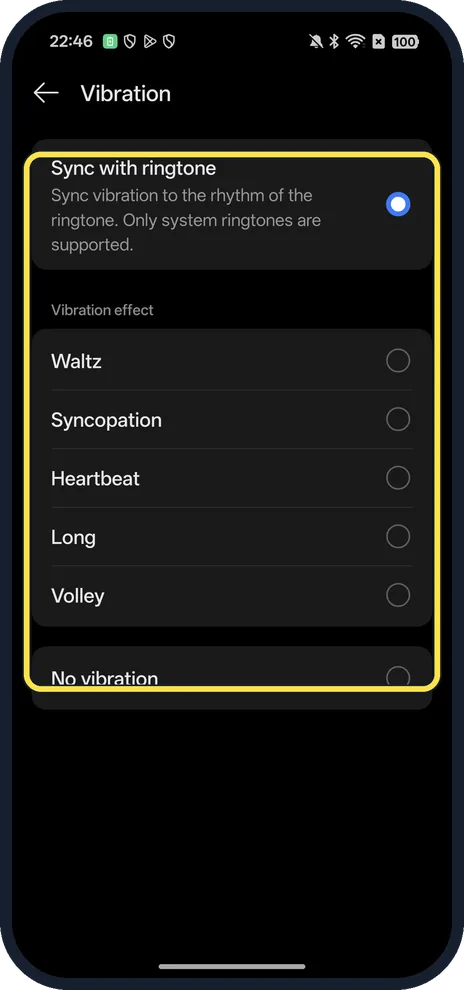
Tap Vibration at the top of the Ringtone page. Sync with ringtone matches the vibration to the tune; below it are effects such as Waltz, Heartbeat and No vibration.
If you do not see this option
- Want a ringtone for one person? OPPO says that with the Google Phone dialer you open the Contacts app, tap the contact, tap the three dots at the top right and tap Set ringtone. With OPPO's own dialer (ColorOS 7 and later) it is Phone, Contacts, the contact, the two-dot icon, Edit, Ringtone. Source: How to Set/Change Ringtone for a Contact on OPPO Phone
- Want your own song? Tap On this device under Custom and choose the file. OPPO's guide calls the same choice Select from files on some phones. Source: How to Set/Change Ringtone for a Contact on OPPO Phone
- Looking for the message sound? Notification tone sits just below Ringtone; ours was Emerge.
- Want one ringtone for a whole group? OPPO says to open Contacts, My Groups, tap the group, then Ringtone at the bottom; every contact in that group gets it. Source: How to Set/Change Ringtone for a Contact on OPPO Phone
If this does not work
- Vibration doesn't follow the tune? The Vibration page on ours says Sync with ringtone supports only system ringtones, so it won't work with a sound from On this device.
- Phone doesn't ring at all? Check the top of Sound & vibration: Ring, Vibrate and Silent are there, with Do Not Disturb and the Ringtone volume slider below. Ours was on Silent here.
About this guide
The screenshots are from our OPPO Reno13 5G, the European model CPH2689, with ColorOS 16.0.5 and Android 16 (build CPH2689_16.0.5.1001(EX01)), in Dark mode. We opened the lists and did not change the ringtone.
Good to know
To stop calls from one number, block a number on an OPPO phone.
On a OnePlus, see change the ringtone and vibration on a OnePlus.
In short: Settings, Sound & vibration, Ringtone: pick a tone, or On this device for your own.
Links checked in October 2026. Menus and features can change after software updates. These steps match the version named at the top.
Did this guide work for you?
Sorry about that. What happened?