
howtosimply.com/guides/how-to-add-a-recovery-contact-on-an-iphone/ · Checked October 2026 · iPhone 17e · iOS 27.0.1
In this guide
Open Settings, tap your name, then Sign-In & Security and Recovery Contacts. Tap Add Recovery Contact, then Choose a Recovery Contact and pick someone you trust. They must be at least 13 and have an Apple device. If you forget your password or passcode, they can give you a code.
3 of 3 steps with real screenshots · 1 official source below
- Device
- iPhone
- Shown on
- iOS 27.0.1 (iPhone 17e)
- App
- Settings
- Path
- Settings › Your name › Sign-In & Security › Recovery Contacts
- Real screenshots
- 3 of 3 steps
- Checked
- October 2026
- Sources
- 1 official, linked below
Step by step
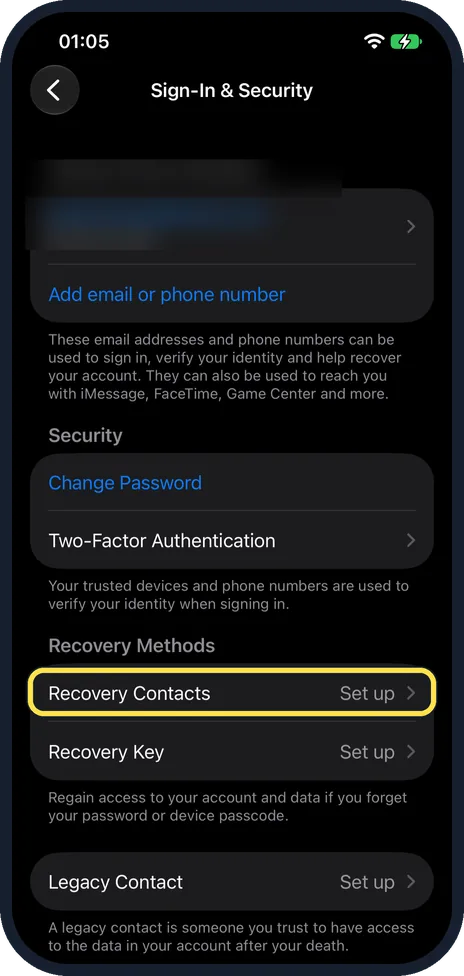
Tap Recovery Contacts
In Settings, tap your name, then Sign-In & Security. Recovery Contacts is under Recovery Methods, above Recovery Key; both said Set up on ours.
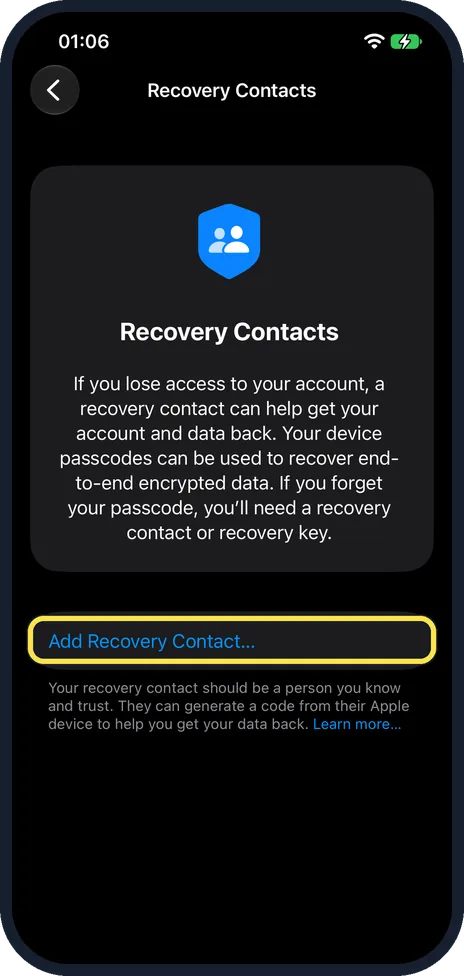
Tap Add Recovery Contact
The page says a recovery contact can help get your account and data back, and that if you forget your passcode you need a recovery contact or a recovery key.
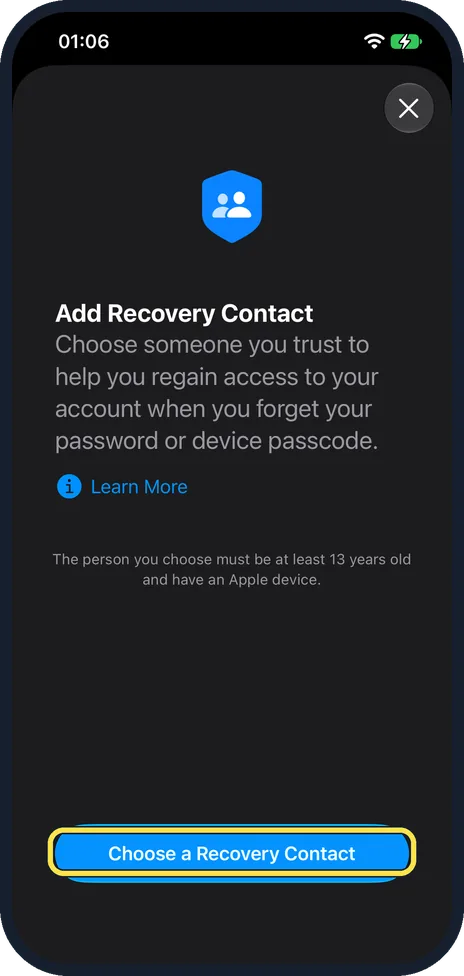
Tap Choose a Recovery Contact
The note says the person must be at least 13 years old and have an Apple device.
If you do not see this option
- Asked to turn on two-factor authentication? Apple says to turn it on if prompted. On ours it was already on: Two-Factor Authentication sits under Security on the same Sign-In & Security page. Source: Set up a recovery contact for your Apple Account
- Asked to update or remove a device? Apple says all your Apple devices must run iOS 15, iPadOS 15 or macOS Monterey 12 or later, and you may be asked to remove older devices you no longer use. Source: Set up a recovery contact for your Apple Account
- Too young to add one? Apple says you and your contact must be over 13, and that the age varies by country or region. Our screen said at least 13. Source: Set up a recovery contact for your Apple Account
If this does not work
- The person you want is not offered? Apple says they need an Apple device on iOS 15, iPadOS 15 or macOS Monterey 12 or later, and both of you need iMessage turned on. Tap Choose Someone Else to pick a different person. Source: Set up a recovery contact for your Apple Account
- They declined or removed themselves? Apple says you get a notification and can pick someone else. Source: Set up a recovery contact for your Apple Account
About this guide
A recovery contact cannot see your account: Apple says they can only give you a code to get back in.
The screenshots are from our iPhone 17e with iOS 27.0.1, in Dark mode. Our account details are blurred. We stopped before choosing anyone.
Good to know
Apple says people in your Family Sharing group are added straight away. Anyone else gets an invitation in Messages and must accept it. You can add up to five.
While you are there, keep your password strong: how to change your Apple Account password on an iPhone.
In short: Settings, your name, Sign-In & Security, Recovery Contacts, Add Recovery Contact, Choose a Recovery Contact.
Links checked in October 2026. Menus and features can change after software updates. These steps match the version named at the top.
Did this guide work for you?
Sorry about that. What happened?