
howtosimply.com/guides/how-to-make-a-contact-list-on-an-iphone/ · Checked October 2026 · iPhone 17e · iOS 27.2
In this guide
In Contacts, go to the Lists screen and tap Add List. Type a name and tap the check mark. The list appears under your account, such as iCloud. To rename or delete it, touch and hold the list, then tap Rename or Delete.
6 of 6 steps with real screenshots · 2 official sources below
- Device
- iPhone
- Shown on
- iOS 27.2 (iPhone 17e)
- App
- Contacts
- Path
- Contacts › Lists › Add List
- Real screenshots
- 6 of 6 steps
- Checked
- October 2026
- Sources
- 2 official, linked below
Step by step
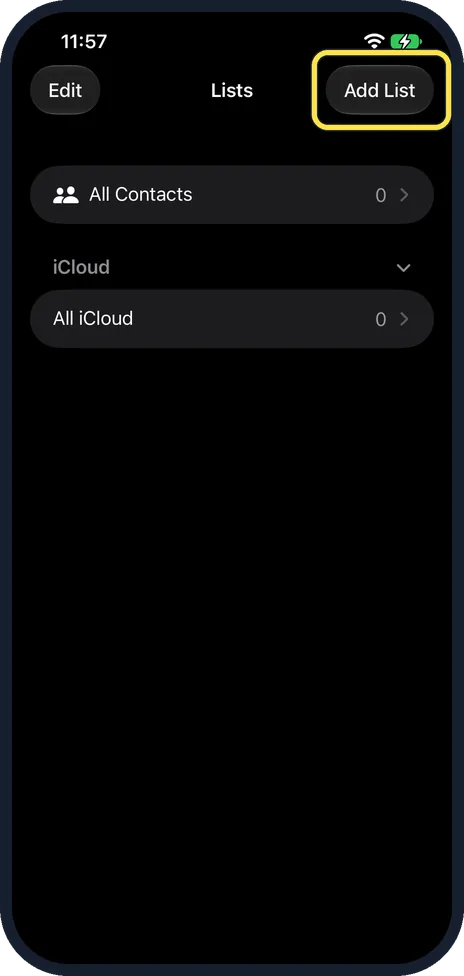
Open Lists and tap Add List
Open Contacts and go to the Lists screen. Ours showed All Contacts and, under iCloud, All iCloud. Tap Add List at the top right.
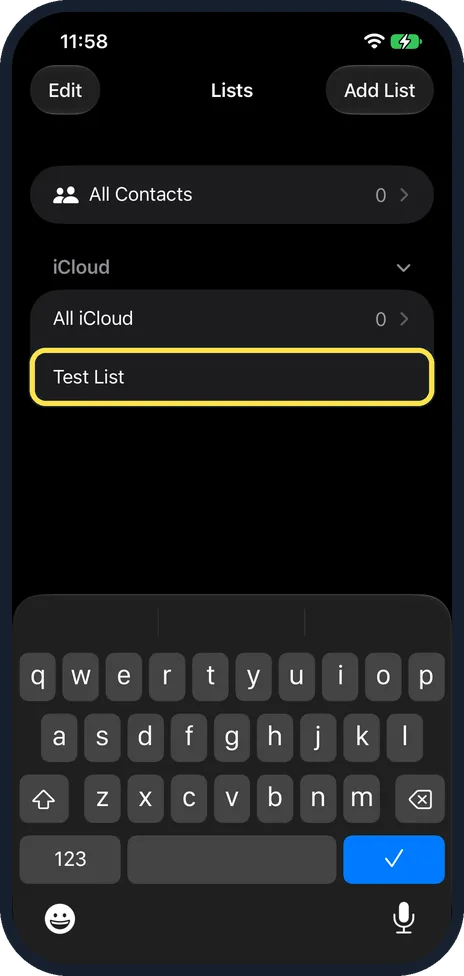
Type a name and tap the check mark
A new row appears under iCloud with the keyboard open. We typed Test List, then tapped the blue check mark key.
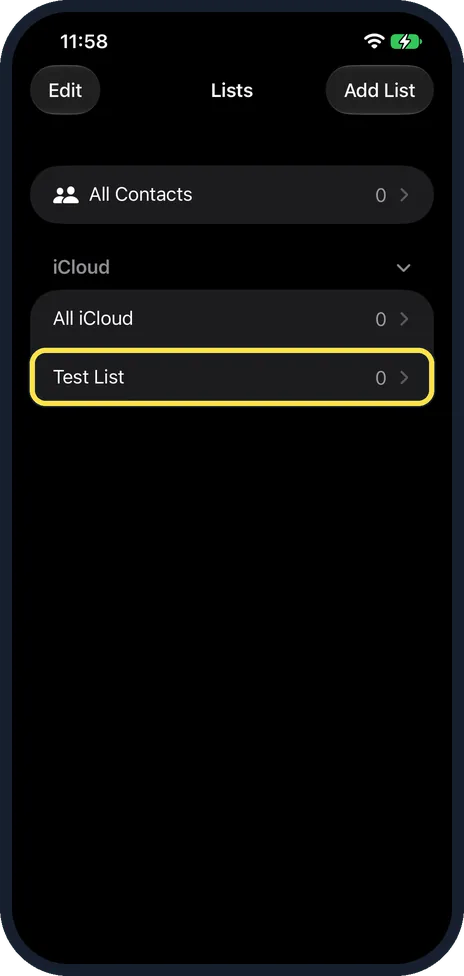
Your list is ready
Test List now shows under All iCloud, with 0 next to it because it is empty.
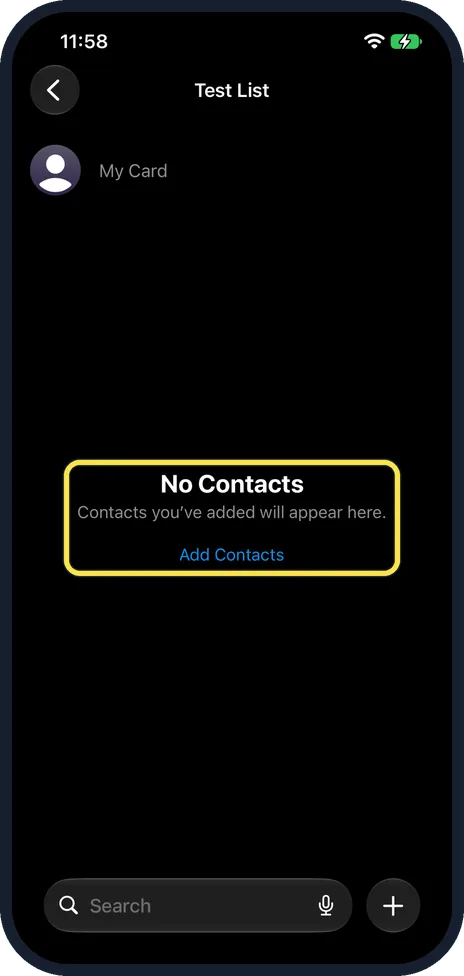
Open the list and add contacts
Tap the list. An empty list says No Contacts, Contacts you've added will appear here, with an Add Contacts link. Ours showed My Card above it.
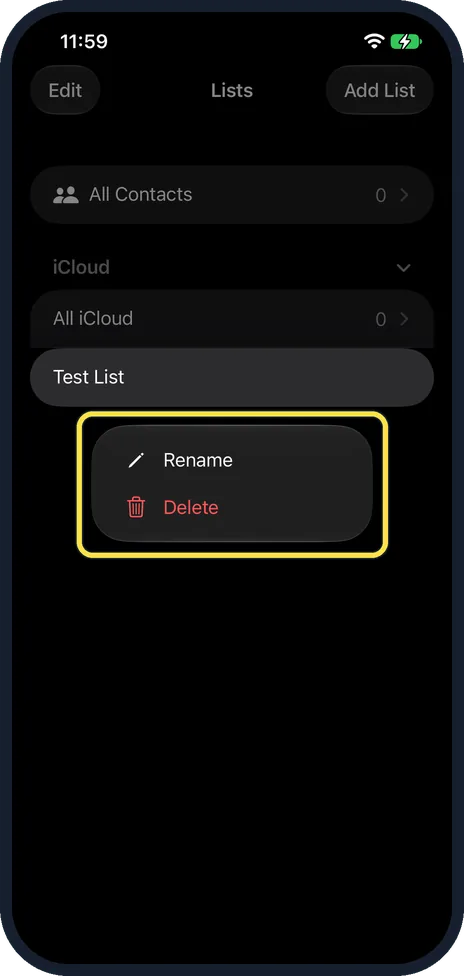
Touch and hold to rename or delete
Back on Lists, touch and hold the list. A menu offers Rename and Delete.
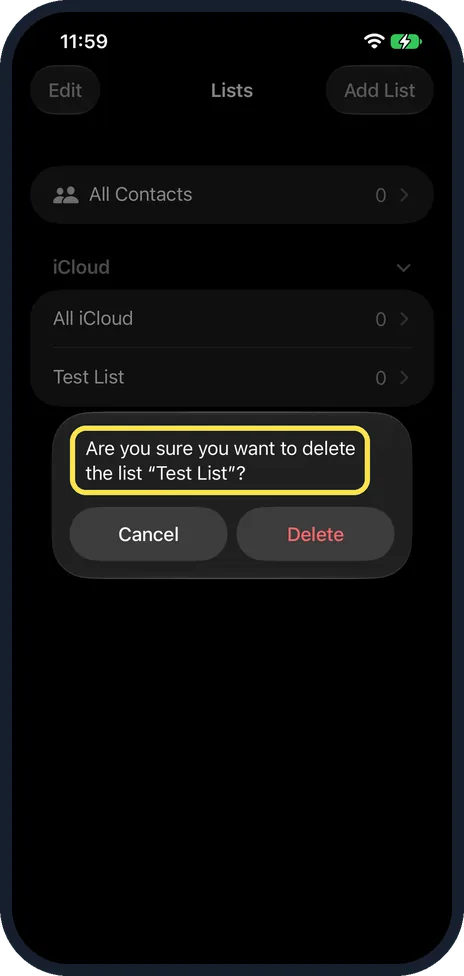
Confirm the delete
Ours asked: Are you sure you want to delete the list "Test List"? Tap Delete, or Cancel to keep it. We tapped Delete.
If you do not see this option
- No iCloud heading on the Lists screen? Our list went under iCloud. Apple says to add your iCloud contacts in Settings: tap your name, then iCloud, tap See All next to Saved to iCloud, and turn on Contacts. Source: Add or remove accounts in Contacts on iPhone
- Contacts in Google or Exchange? Apple says Contacts can hold several accounts, such as iCloud, Microsoft Exchange, Google and Yahoo, added in Settings, Apps, Contacts, Contacts Accounts. Our iPhone had only iCloud, so we cannot say whether those accounts offer Add List. Source: Add or remove accounts in Contacts on iPhone
- Using iCloud.com instead? Apple's iCloud.com guide makes and deletes lists there with an Actions button: Rename List and Delete List. Apple says you need a tablet or computer to use Contacts on iCloud.com. Source: Create and manage lists of contacts on iCloud.com
If this does not work
- Worried that deleting a list deletes people? Apple's iCloud.com guide says the contacts in a deleted list stay in All Contacts. Deleting a contact from All Contacts deletes it from every device with Contacts turned on in iCloud. Source: Create and manage lists of contacts on iCloud.com
- Deleted a list by mistake? Apple says you can restore an archived version of your contacts on iCloud.com. Source: Create and manage lists of contacts on iCloud.com
About this guide
The screenshots are from our iPhone 17e with iOS 27.2, in Dark mode, taken on 27 October 2026. We made a list called Test List in our iCloud account and then deleted it.
Our iPhone has no contacts, so All Contacts showed 0 and the new list showed only My Card. We cannot show contacts being added to a list.
Apple's page on lists is for iCloud.com, where you use an Actions button and pick Rename List or Delete List. Apple's iPhone User Guide has no page on lists. On our iPhone you touch and hold the list instead, and the menu says Rename and Delete.
Good to know
Apple's iCloud.com guide says one contact can be in more than one list. Moving a contact to a new list keeps it in the old one unless you remove it.
To back up your contacts first, see how to export contacts from an iPhone.
To bring contacts in from a file, see how to import contacts from a VCF file on an iPhone.
In short: Contacts, Lists, Add List, type a name, check mark. Touch and hold a list to rename or delete it.
- Apple iCloud User Guide: Create and manage lists of contacts on iCloud.com
- Apple iPhone User Guide: Add or remove accounts in Contacts on iPhone
Links checked in October 2026. Back up anything you want to keep before you reset or delete. Menus can change after software updates.
📷 See real photos from the iPhone 17e in our Camera Lab, next to 10 other phones.
Did this guide work for you?
Sorry about that. What happened?