
What changed: the screenshots are now our own iPhone 17e on iOS 27.0.1, dark mode, and the wording is checked against those screens and Apple's iOS 27 guide.
howtosimply.com/guides/how-to-change-your-apple-account-password-on-an-iphone/ · Checked October 2026 · iPhone 17e · iOS 27.0.1
In this guide
Open Settings, tap your name, tap Sign-In & Security and tap Change Password. Then follow the onscreen instructions. On our iPhone 17e with iOS 27, Change Password was the first row under Security.
3 of 3 steps with real screenshots · 2 official sources below
- Device
- iPhone
- Shown on
- iOS 27.0.1 (iPhone 17e)
- App
- Settings
- Real screenshots
- 3 of 3 steps
- Checked
- October 2026
- Sources
- 2 official, linked below
Step by step
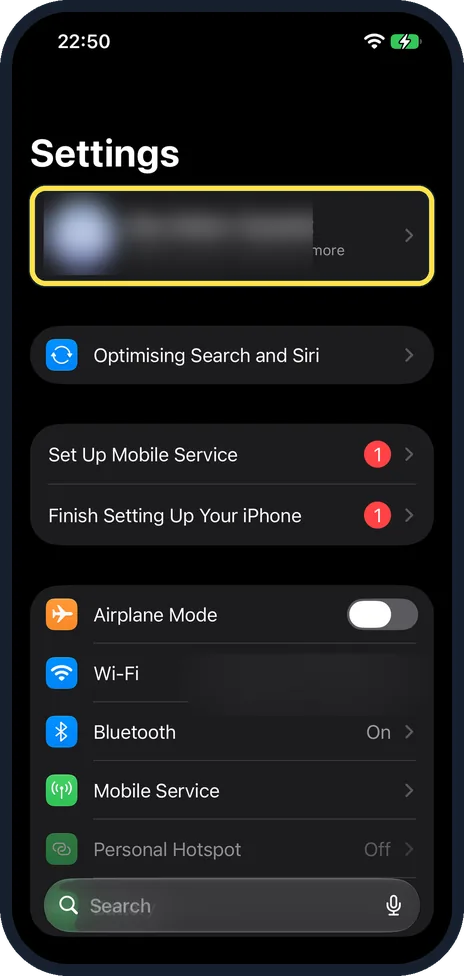
Open Settings and tap your name
Your name is the first row at the top of the Settings list, with your picture. On our iPhone 17e with iOS 27 we blurred both.
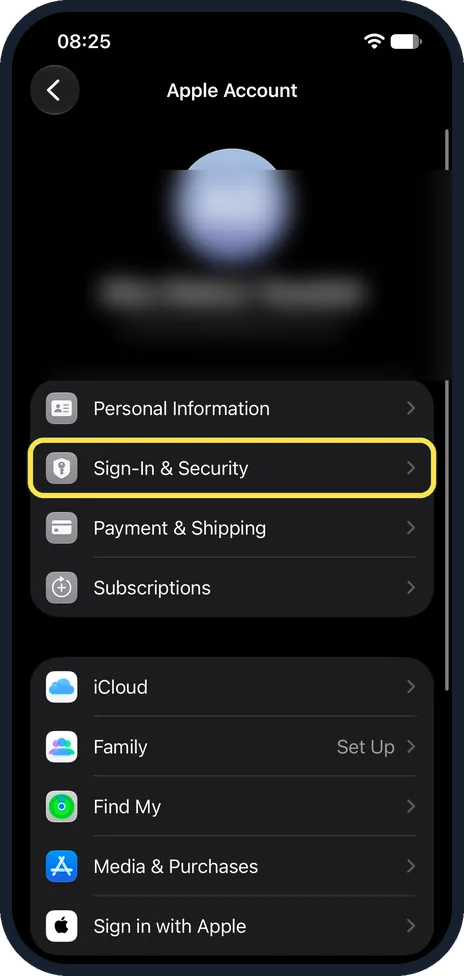
Tap Sign-In & Security
On our iPhone 17e the Apple Account page had Personal Information, Sign-In & Security, Payment & Shipping and Subscriptions in its first group. The Sign-In & Security page also lists your email addresses, phone numbers and two-factor authentication.
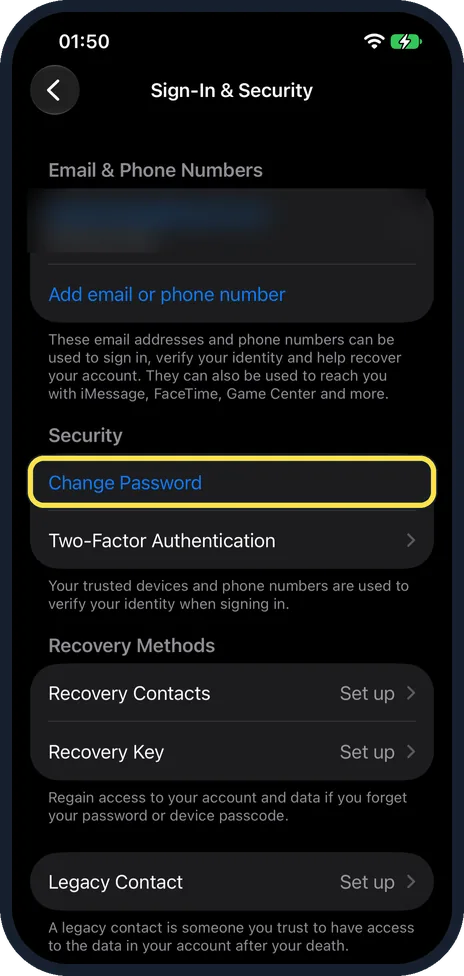
Tap Change Password
Tap it, then follow the onscreen instructions, as Apple's iOS 27 guide says. On our iPhone 17e Change Password was under Security, above Two-Factor Authentication, with Recovery Contacts, Recovery Key and Legacy Contact further down.
What changed: the screenshots are now our own iPhone 17e on iOS 27.0.1, dark mode, and the wording is checked against those screens and Apple's iOS 27 guide.
If you do not see this option
- Your name is not at the top of Settings The iPhone is not signed in. Apple says to open Settings, tap Apple Account and sign in first. Source: Sign in and manage your Apple Account on iPhone
- Sign-In & Security does not open straight away On our iPhone 17e the Sign-In & Security row first showed a loading symbol on the Apple Account page. Once it had loaded, the page opened with Change Password under Security.
If this does not work
- You do not know the old password Apple says to use the Reset your password website if you forgot your Apple Account password. Source: Sign in and manage your Apple Account on iPhone
- You are worried about forgetting the new password On our iPhone 17e the Sign-In & Security page had Recovery Contacts and Recovery Key under Recovery Methods, both showing Set up, with the note: Regain access to your account and data if you forget your password or device passcode.
About this guide
The Apple Account (formerly Apple ID) password protects your photos, backups, purchases and Find My. On an iPhone that is already signed in, you can change it in Settings.
Screenshots: iPhone 17e, iOS 27.0.1, dark mode.
Good to know
With Stolen Device Protection switched on, the iPhone may make you wait one hour before the change when you are away from familiar places such as home or work.
Apple's iOS 27 guide says Sign-In & Security is also where you turn on two-factor authentication, add or remove the phone numbers and email addresses you sign in with, and set up Account Recovery or Legacy Contact.
If you have forgotten the password and have no signed-in device, Apple's guide points to its Reset your password website.
A good password and a second factor: how to make strong passwords you can actually remember and how to turn on two-factor authentication for your Apple Account on an iPhone.
In short: Settings, your name, Sign-In & Security, Change Password, passcode, new password twice, choose what happens to other devices.
- Apple Support: Change your Apple Account password
- Apple iPhone User Guide: Sign in and manage your Apple Account on iPhone
Links checked in October 2026. Menus and features can change after software updates. These steps match the version named at the top.
Did this guide work for you?
Sorry about that. What happened?