
howtosimply.com/guides/samsung-internet-is-now-samsung-browser-where-things-moved/ · Checked October 2026 · Samsung Galaxy A57 5G (One UI 8.5, Android 16) and Samsung Galaxy A57 (One UI 9, Android 17 (build A576BXXU6BZIE))
In this guide
On One UI 8.5, Samsung Internet is called Samsung Browser. Find it under Settings, Apps, Samsung Browser. In the browser's settings, Personal browsing data has Delete browsing data at the top.
6 of 6 steps with real screenshots · 1 official source below
- Device
- Android
- Shown on
- Samsung Galaxy A57 5G (SM-A576B), One UI 8.5, Android 16, Samsung Galaxy A57 (SM-A576B), One UI 9, Android 17 (build A576BXXU6BZIE)
- App
- Samsung Internet
- Real screenshots
- 6 of 6 steps
- What we did
- Observed: looked at each screen, changed nothing
- Checked
- October 2026
- Sources
- 1 official, 1 other, linked below
Step by step
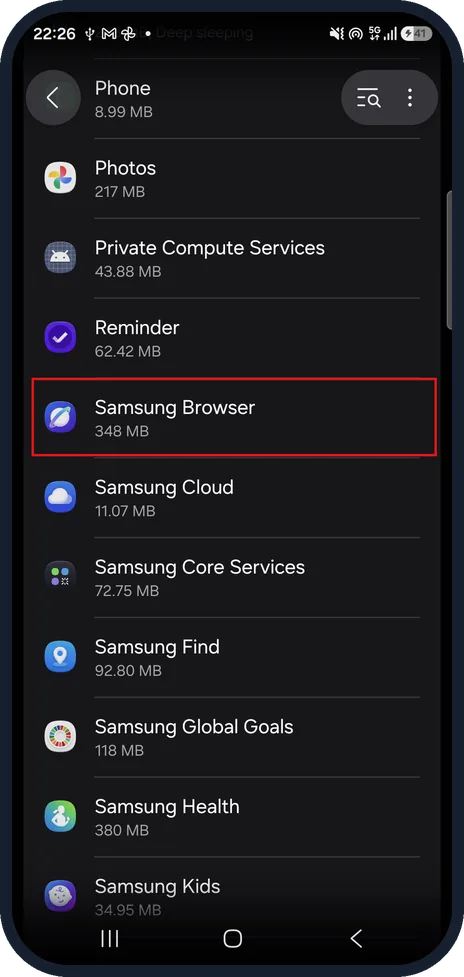
Find Samsung Browser in Apps
Open Settings, then Apps, and tap Samsung Browser.
On our Galaxy it was listed as Samsung Browser, 348 MB, between Reminder and Samsung Cloud.
Watch these steps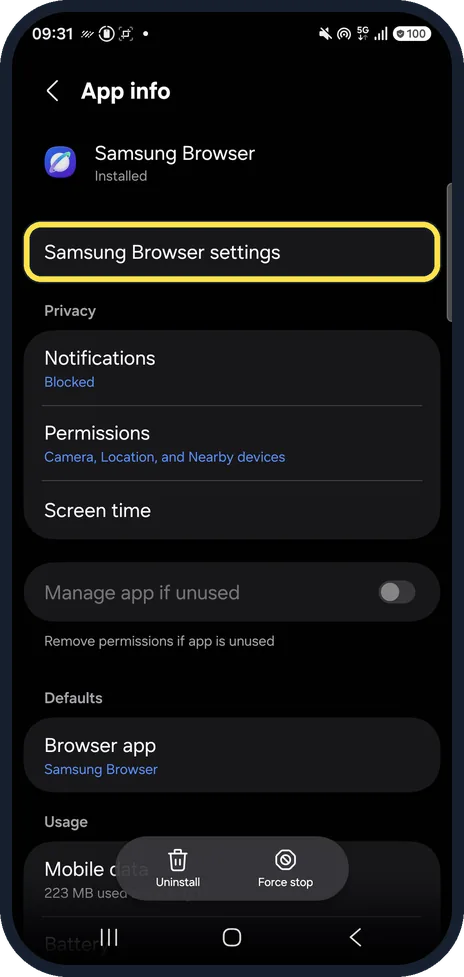
Open the browser's own settings
On the App info page, tap Samsung Browser settings, the first row under the app name. In the browser itself, tap the menu (three lines) and Settings.
On the same App info page ours showed Notifications, Blocked, and under Defaults, Browser app, Samsung Browser.
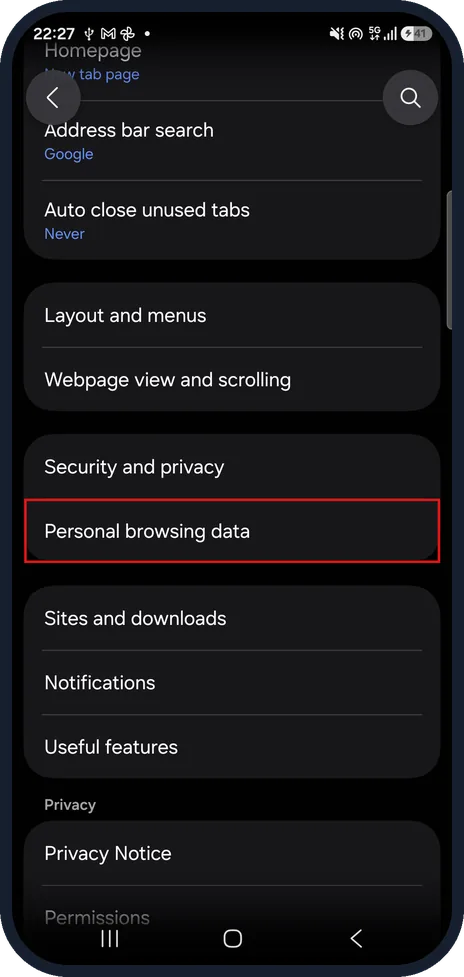
Open Personal browsing data
Scroll down and tap Personal browsing data.
On our Galaxy it sits under Security and privacy, above Sites and downloads.
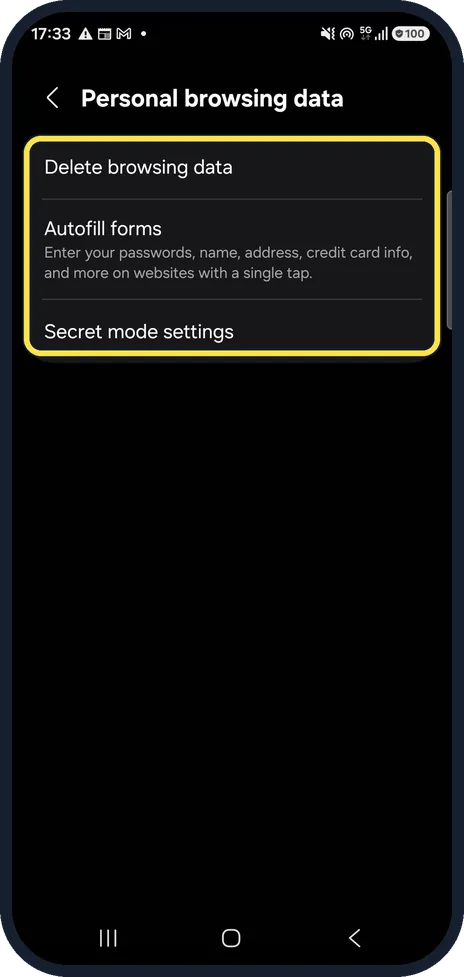
Find Delete browsing data
Delete browsing data is at the top of the page.
On our Galaxy it was followed by Autofill forms and Secret mode settings.
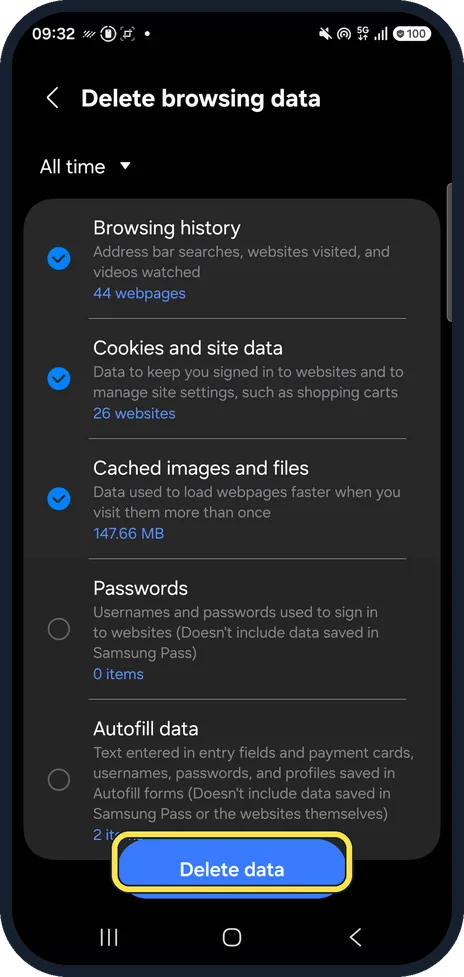
Choose what to delete
Tap Delete browsing data, pick a time range at the top and tick what to delete, then tap Delete data.
On ours the range was All time; Browsing history, Cookies and site data and Cached images and files were ticked, Passwords and Autofill data were not. We did not delete anything.
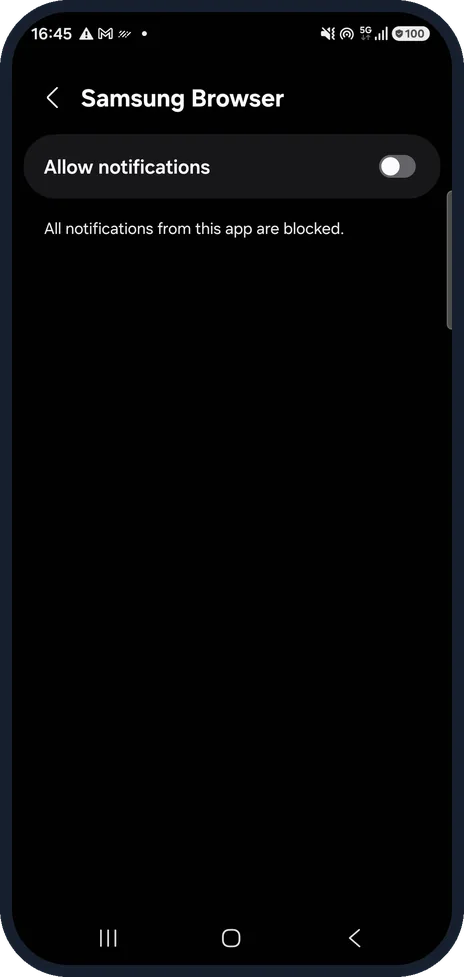
Check its notifications
Go to Settings, Apps, Samsung Browser and tap Notifications.
Our picture shows the page that opens: Allow notifications was off, and the page said All notifications from this app are blocked. On the App info page before it, Notifications showed Blocked.
Watch these steps
If you do not see this option
- You still see Samsung Internet. Your phone runs One UI 8.0 or older, where the app keeps its old name, according to Sammy Fans.
- Personal browsing data is not on screen Scroll down the browser's settings. On our Galaxy it was below Security and privacy, in the same group.
- You cannot find the browser's menu Go to Settings, Apps, Samsung Browser and tap Samsung Browser settings on the App info page. It opens the browser's settings directly. Sources: Samsung Browser by Samsung Electronics, Samsung simplifies its Internet browser name on new Galaxy phones
If this does not work
- The browser sends no notifications On our Galaxy Allow notifications was off. Turn it on in Settings, Apps, Samsung Browser, Notifications. Sources: Samsung Browser by Samsung Electronics, Samsung simplifies its Internet browser name on new Galaxy phones
- Links open in a different browser On our Galaxy the App info page showed Browser app set to Samsung Browser under Defaults. Check this setting on your phone. Sources: Samsung Browser by Samsung Electronics, Samsung simplifies its Internet browser name on new Galaxy phones
- Sync with Samsung Cloud does not sync The setting says to sign in to your Samsung account to sync your Bookmarks, Saved pages, and more. Sources: Samsung Browser by Samsung Electronics, Samsung simplifies its Internet browser name on new Galaxy phones
About this guide
If you cannot find Samsung Internet after the One UI 8.5 update, it has not gone: Samsung renamed it. Samsung's own listing in Google Play now names the app Samsung Browser. Phones on older One UI versions may still show the old name.
On other Galaxy phones or One UI versions, some names and positions may differ. Steps 2 and 5 are from the same phone after its One UI 9 update (Android 17). The app is still called Samsung Browser there.
Good to know
Samsung also offers Samsung Browser for Windows PCs; the browser showed us a banner about it.
Changing which browser opens links: how to change default apps on a Samsung Galaxy phone.
In short: Samsung Internet = Samsung Browser on One UI 8.5. Delete browsing data is under Personal browsing data in the browser's settings.
- Google Play: Samsung Browser by Samsung Electronics
- Sammy Fans: Samsung simplifies its Internet browser name on new Galaxy phones
Links checked in October 2026. Menus and features can change after software updates. These steps match the version named at the top.
📷 See real photos from the Galaxy A57 in our Camera Lab, next to 10 other phones.
Did this guide work for you?
Sorry about that. What happened?