
What changed: added Apple's design figures for battery capacity by charge cycles: 80% at 500 cycles for iPhone 14 and earlier, 80% at 1,000 for iPhone 15 models.
iOS 27 compared with iOS 26: On our iPhone 14 Pro, Battery Health & Charging is in the same place on iOS 26.7.1 and iOS 27.0.1: on the Battery page, below the usage chart.
howtosimply.com/guides/how-to-check-battery-health-on-an-iphone/ · Checked October 2026 · iPhone 17e · iOS 27.0.1
In this guide
Open Settings, tap Battery, then Battery Health. Maximum Capacity shows how much charge the battery holds compared with when it was new. On our iPhone 17e the page describes Maximum Capacity as a measure of battery capacity relative to when it was new.
3 of 3 steps with real screenshots · 4 official sources below
- Device
- iPhone
- Shown on
- iOS 27.0.1 (iPhone 17e)
- App
- Settings
- Path
- Settings › Battery
- Real screenshots
- 3 of 3 steps
- Checked
- October 2026
- Sources
- 4 official, linked below
Step by step
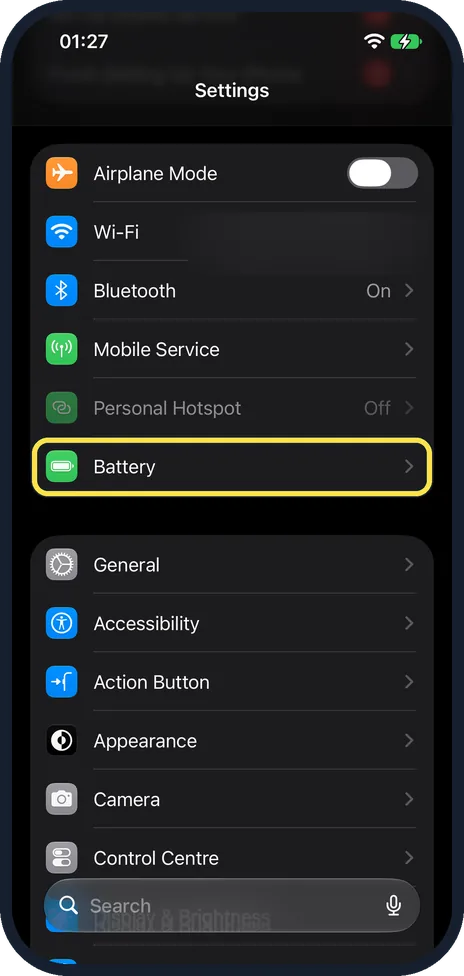
Open Settings and tap Battery
Battery has a green icon in the main list. On our iPhone 17e with iOS 27 it was the last row of the first group, below Personal Hotspot.
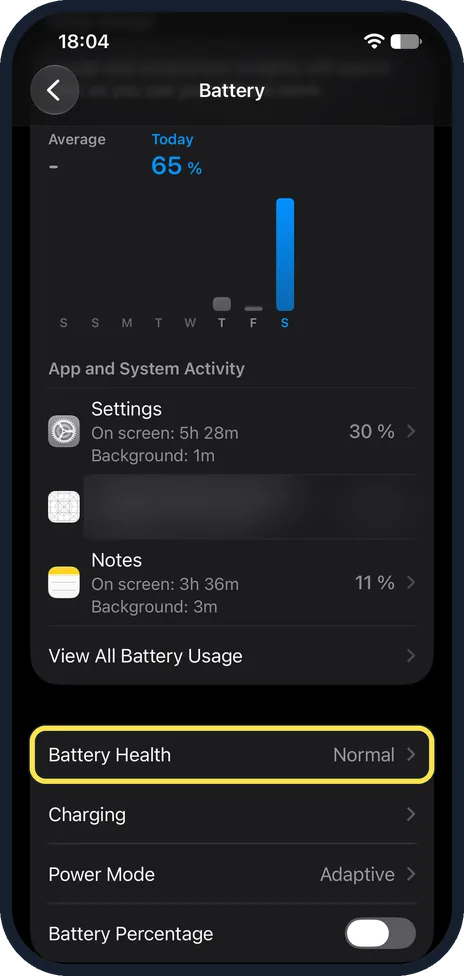
Tap Battery Health
Apple says that on iPhone 14 and earlier the row is called Battery Health & Charging. On iOS 27 it is further down the Battery page, below the usage chart. On our iPhone 17e with iOS 27.0.1 it came just below App and System Activity and View All Battery Usage, and read Normal, above Charging, Power Mode (Adaptive) and Battery Percentage.
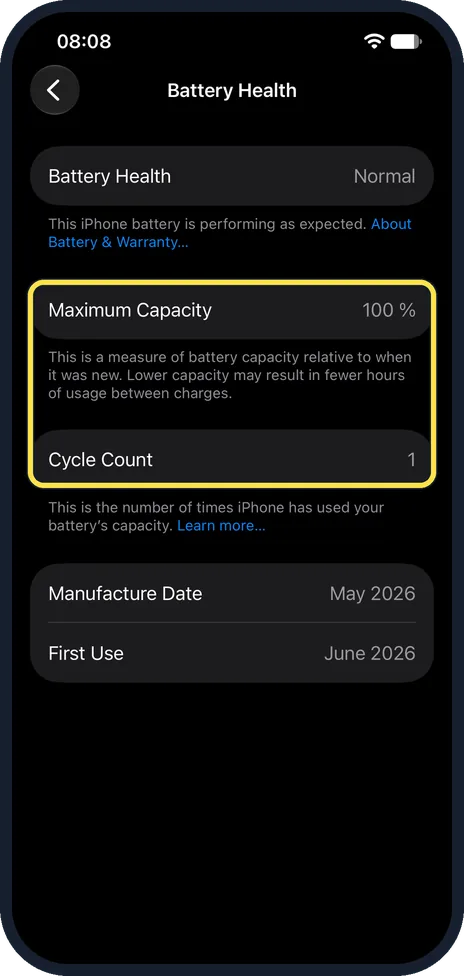
Read Maximum Capacity and Cycle Count
Maximum Capacity compares the battery with when it was new. The note under it on our iPhone 17e reads: This is a measure of battery capacity relative to when it was new. Lower capacity may result in fewer hours of usage between charges. Apple says iPhone 15 models and later also show the cycle count, manufacture date and first use date. On our iPhone 17e with iOS 27, Battery Health said Normal and Maximum Capacity 100 %, with Cycle Count 1, Manufacture Date May 2026 and First Use June 2026.
What changed: added Apple's design figures for battery capacity by charge cycles: 80% at 500 cycles for iPhone 14 and earlier, 80% at 1,000 for iPhone 15 models.
What we saw on our device
- Open Settings and tap Battery: On our iPhone 17e with iOS 27 it was the last row of the first group, below Personal Hotspot.
- Tap Battery Health: On our iPhone 17e with iOS 27.0.1 it came just below App and System Activity and View All Battery Usage, and read Normal, above Charging, Power Mode (Adaptive) and Battery Percentage.
- Read Maximum Capacity and Cycle Count: On our iPhone 17e with iOS 27, Battery Health said Normal and Maximum Capacity 100 %, with Cycle Count 1, Manufacture Date May 2026 and First Use June 2026.
If you do not see this option
- No Battery Health row Apple says that on iPhone 14 or earlier you tap Battery Health & Charging instead. On our iPhone 17e the row was Battery Health, below App and System Activity and View All Battery Usage. Source: Understand your iPhone battery usage and health
- No Cycle Count, Manufacture Date or First Use Apple says these details are shown on iPhone 15 models or later. On our iPhone 17e they were under Maximum Capacity: Cycle Count 1, Manufacture Date May 2026, First Use June 2026. Source: Understand your iPhone battery usage and health
If this does not work
- Battery life is short although the battery says Normal Apple says battery life and charge cycles vary with use and settings. Look at App and System Activity on the Battery page, or tap View All Battery Usage, to see what used the battery. On our iPhone 17e, View All Battery Usage was the last row of App and System Activity, just above Battery Health. Source: Understand your iPhone battery usage and health
- Battery Health does not say Normal On our iPhone 17e it said Normal, with the note This iPhone battery is performing as expected and an About Battery & Warranty link under it. If yours shows another message, tap that link. Apple's iOS 27 guide also offers Step-by-Step Help for troubleshooting battery health, and says the battery should be serviced by Apple or an Apple Authorised Service Provider. Source: Understand your iPhone battery usage and health
About this guide
The iPhone shows how much charge its battery holds compared with when it was new. Checking takes a few seconds. Screenshots: iPhone 17e, iOS 27.0.1, dark mode.
Good to know
Is your figure normal for its cycle count? Apple says batteries of iPhone 14 models and earlier are designed to keep 80% of their original capacity at 500 complete charge cycles, and batteries of iPhone 15 models 80% at 1,000 cycles, under ideal conditions. Compare your Cycle Count with those numbers: reaching about 80% well before 500 cycles (or 1,000 on an iPhone 15 or later) means the battery is wearing faster than that design. Apple adds that real results depend on how the iPhone is used and charged.
Apple says the iPhone battery should be serviced or recycled by Apple or an Apple Authorised Service Provider.
To reduce the time the battery stays fully charged, Apple describes Optimised Battery Charging: it pauses charging at 80%, then finishes closer to when you usually unplug the iPhone. On iPhone 15 or later it is under Battery, Charging. On iPhone 14 or earlier it is under Battery, Battery Health & Charging.
If capacity is fine but the battery still drains quickly, see why your phone battery drains fast.
In short: Settings, Battery, Battery Health (Battery Health & Charging on iPhone 14 and earlier). Read Battery Health and Maximum Capacity.
- Apple Support: iPhone battery and performance
- Apple iPhone User Guide: Understand your iPhone battery usage and health
- Apple iPhone User Guide: Optimize iPhone battery charging
- Apple: Battery Service and Recycling
Links checked in October 2026. Menus and features can change after software updates. These steps match the version named at the top.
Did this guide work for you?
Sorry about that. What happened?