XIAOMI REDMI
How to turn off keyboard and touch sounds on a Xiaomi phone (HyperOS 3)
For system sounds, go to Settings, Sound & vibration, Additional settings and turn off Tap sounds, Dial pad tones or the other System sounds. For the keyboard, open Gboard's Preferences and turn off Sound and Keyboard vibration under Key tap.

4 of 4 steps show a real screenshot from our Redmi Note 15 Pro 5G. Each step was checked against the maker's own instructions, linked at the end.
Steps
- 1
Open Sound additional settings
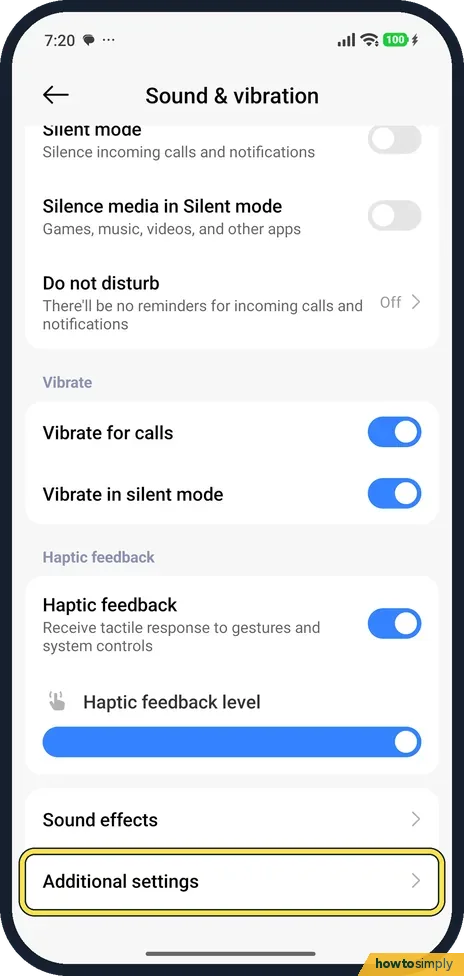
Go to Settings, Sound & vibration, and tap Additional settings at the bottom.
- 2
Turn off system sounds
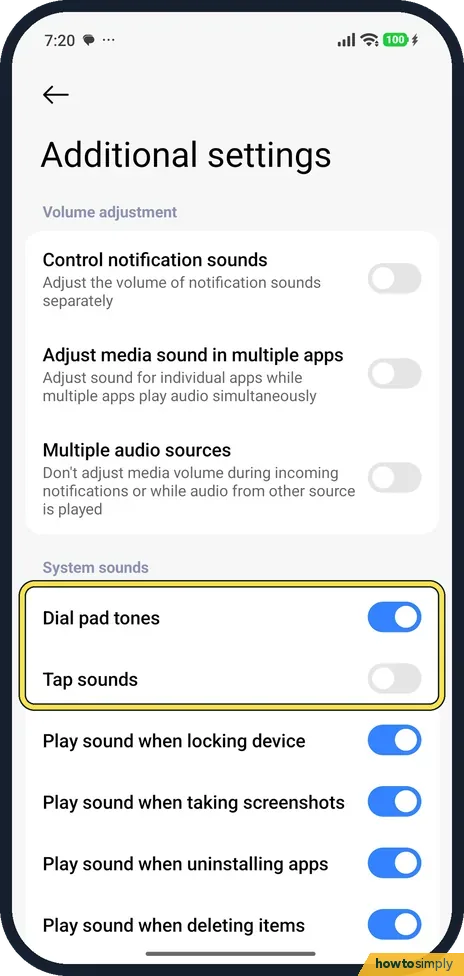
Under System sounds, turn off the ones you don't want. On ours Dial pad tones was on, Tap sounds off, and Play sound when locking device, taking screenshots and uninstalling apps on.
- 3
Find your keyboard
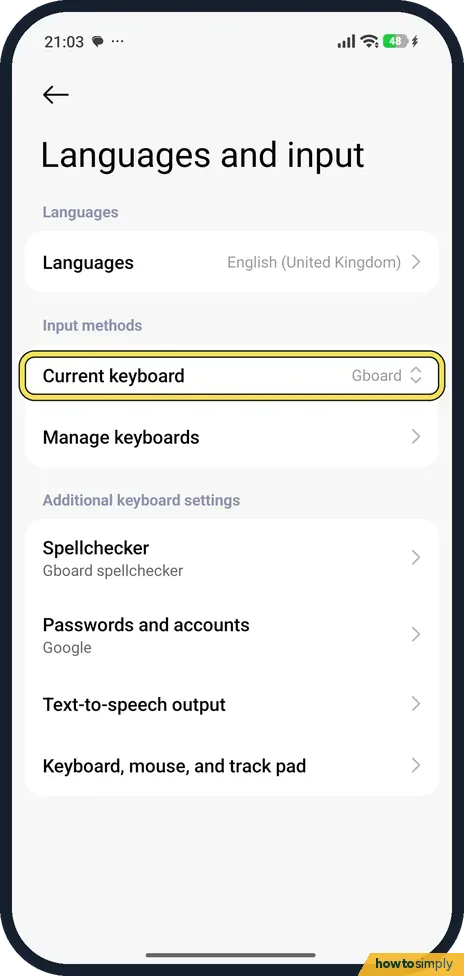
Go to Settings, Additional settings, Languages and input. Current keyboard shows which keyboard you use: Gboard on ours.
- 4
Turn off Gboard key sound and vibration
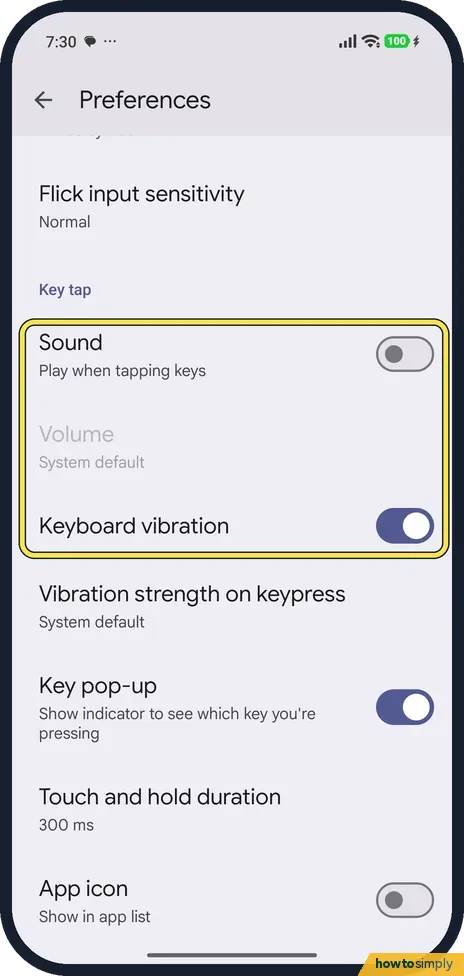
Tap Manage keyboards, then Gboard, then Preferences. (Gboard's settings also open from the gear on the keyboard.) Under Key tap, Sound was off and Keyboard vibration on. Turn off both for a silent keyboard.
If you do not see this option
- Different keyboard? If Current keyboard isn't Gboard, open that keyboard's own settings. We only have Gboard.
- Volume greyed out in Gboard? Volume, below Sound, was greyed out at System default on ours because Sound was off. Turn Sound on first.
If this does not work
- Still hear the dial pad? Dial pad tones is a separate switch under System sounds.
- Phone still buzzes on touch? That is Haptic feedback, in Sound & vibration: Xiaomi ringing and vibration settings.
- Clicks only in one app? Some apps and games play their own button sounds, which the system switches do not control. Look in that app's own settings for a sound or effects option.
- Cannot find Gboard's settings from Languages and input? Open them from the keyboard itself. Google's Gboard Help says to tap a text field, tap Open features menu at the top left of the keyboard, then More and Settings.
- Using two keyboards? Each keyboard keeps its own sound and vibration settings. If you switch keyboards for another language, turn the key sound off in that one too.
Good to know
Turn off the camera shutter sound: how to turn off the camera watermark and shutter sound.
These switches only change feedback sounds. A silent keyboard can make fast typing harder at first because you lose the click that confirms each tap. Xiaomi's user guide notes a slider under Haptic feedback, so you can make touch vibration lighter rather than switching it off completely. Turning sounds and vibration off saves a small amount of battery, though not enough to notice in a day. To bring any of them back, turn the same switch on again. For other Gboard options, such as layout and languages, see how to change Gboard keyboard settings on a Xiaomi phone.
About this guide
- Device
- Android
- Shown on
- Xiaomi Redmi Note 15 Pro 5G (25080RABDG), HyperOS 3.0.308.0, Android 16
- App
- Settings
- Path
- Settings › Sound & vibration › Additional settings › System sounds
- Real screenshots
- 4 of 4 steps
- Checked
- October 2026
- Sources
- 2 official, linked below
Sources
Links checked October 2026. Menus and features can change with updates.Spotted a mistake? Menus change with updates, and we want every step to match your screen. Email us about this page or use the contact form. We read every report, and fixes are listed on What changed.
Liked this guide?
Follow us for new guides and short how-to videos.
Did this guide work for you?
Sorry about that. What happened?