XIAOMI REDMI
How to turn off the camera watermark and shutter sound on a Xiaomi phone (HyperOS 3)
In Camera, open Settings, tap Watermark on the Photo tab and turn off Photo watermark. For the sound, go to the General tab and turn off Shutter sound.

6 of 6 steps show a real screenshot from our Redmi Note 15 Pro 5G. Each step was checked against the maker's own instructions, linked at the end.
Steps
- 1
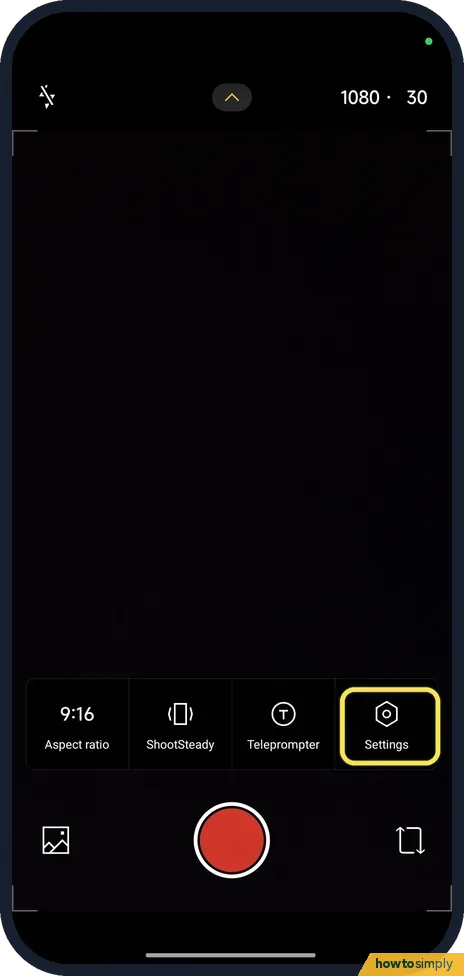
Open the camera settings
Open Camera, tap the small arrow at the top of the viewfinder, then Settings. Our picture was taken in Video mode; Photo has the same arrow.
- 2
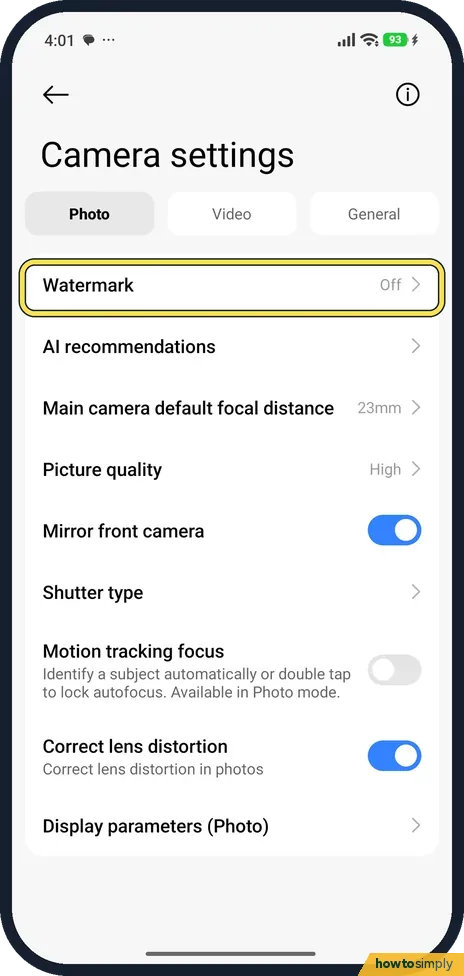
Tap Watermark
On the Photo tab, tap Watermark. It was Off on ours, which is how we found it.
- 3
Turn Photo watermark on or off
Photo watermark adds a style from Regular, Classic or Film frame. Here it is turned on.

- 4
Turn it off
The switch is grey when it is off.

- 5
Check a new photo
With Photo watermark off we took a test photo. It had no watermark in the corner. Our photo is dark because the phone was lying face down.

- 6
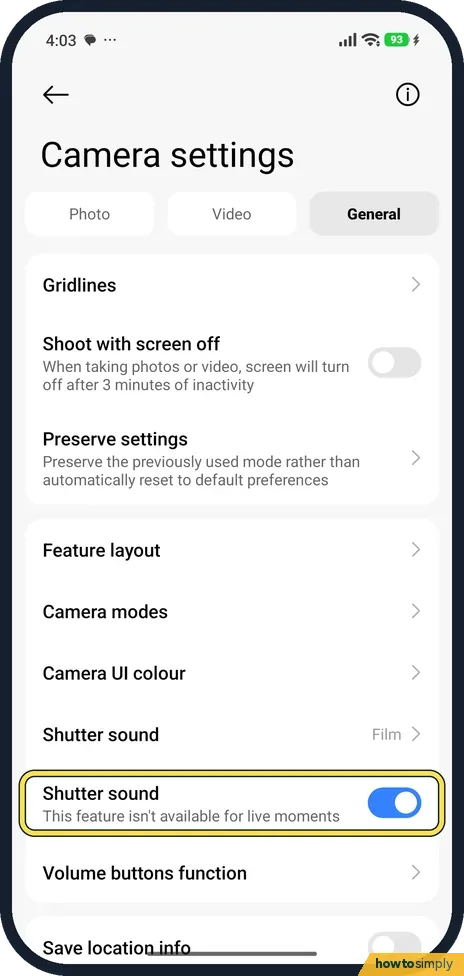
Turn off the shutter sound
Go to the General tab. There are two Shutter sound rows. The first, showing Film on ours, picks the sound. The switch below it turns the sound off; its note says This feature isn't available for live moments. It was on and could be switched on our phone.
If you do not see this option
- No Leica or Holidays style? Xiaomi lists Holidays, Leica, Regular, Classic and Film frame watermarks. Ours offered Regular, Classic and Film frame, so the styles depend on the model. Source: Generic User Guide for HyperOS 3.0
- No Shutter sound switch? Xiaomi says it is usually on by default. On our phone the switch was there and worked; we cannot say it is on every phone. Source: Generic User Guide for HyperOS 3.0
If this does not work
- Old photos still have a watermark? The switch only affects new photos.
- Still hear a sound? The switch's note says it isn't available for live moments, so that mode may still play it.
- Watermark still there in HEIF mode? Xiaomi's user guide notes that you cannot take live photos and remove watermarks in HEIF mode. If you need photos without a watermark, check whether the camera is set to HEIF.
- Want a watermark on one photo only? Leave the camera switch off and add it later. Xiaomi's guide says Gallery's editor has a Watermark option that applies a Leica or classic watermark or a film frame to a picture.
Good to know
Video settings: how to record 4K or 60fps video on a Xiaomi phone.
Turning off the shutter sound only affects the camera; the rest of the phone's sounds stay as they were.
Xiaomi's guide puts Save location info on the General tab of the camera settings. If you also want to stop recording where photos were taken, turn that off there as well.
On our Redmi with HyperOS 3.0.309.0, on 1 November 2026, the General tab listed Gridlines, Shoot with screen off, Preserve settings, Feature layout, Camera modes, Camera UI colour, Shutter sound, Volume buttons function and Save location info. The Video tab had no separate start or stop sound row, so we found no way to silence recording sounds apart from the shutter sound.
About this guide
- Device
- Android
- Shown on
- Xiaomi Redmi Note 15 Pro 5G (25080RABDG), HyperOS 3.0.308.0, Android 16
- App
- Camera
- Path
- Camera › Settings › Photo: Watermark › General: Shutter sound
- Real screenshots
- 6 of 6 steps
- Checked
- October 2026
- Sources
- 1 official, linked below
Sources
Links checked October 2026. Menus and features can change with updates.Spotted a mistake? Menus change with updates, and we want every step to match your screen. Email us about this page or use the contact form. We read every report, and fixes are listed on What changed.
Liked this guide?
Follow us for new guides and short how-to videos.
Did this guide work for you?
Sorry about that. What happened?