XIAOMI REDMI
How to pair a Bluetooth device with a Xiaomi phone (HyperOS 3)
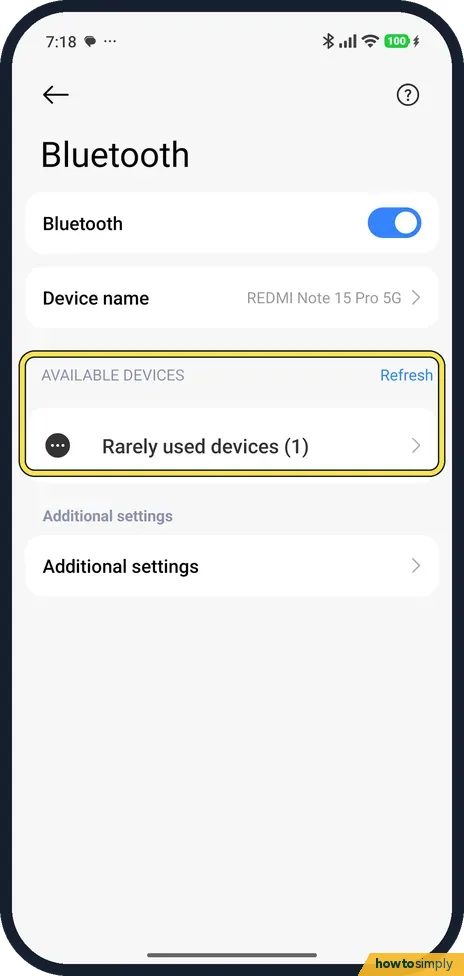
Put your headphones or speaker in pairing mode, then go to Settings, Bluetooth and turn it on. The phone starts looking straight away: tap your device under Available devices. There is no Pair new device button on HyperOS 3; tap Refresh to look again.

3 of 3 steps show a real screenshot from our Redmi Note 15 Pro 5G. Each step was checked against the maker's own instructions, linked at the end.
Steps
- 1
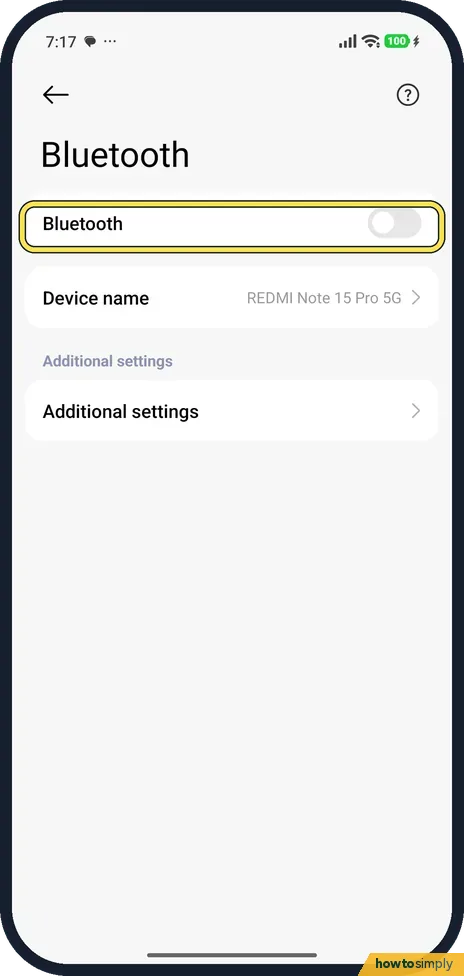
Open Bluetooth
Go to Settings, Bluetooth. It was off on ours.
- 2
Turn it on and pick your device
Turn on Bluetooth. AVAILABLE DEVICES appears with Refresh on the right. Tap your device when it shows up. Tap Refresh if it doesn't.
- 3
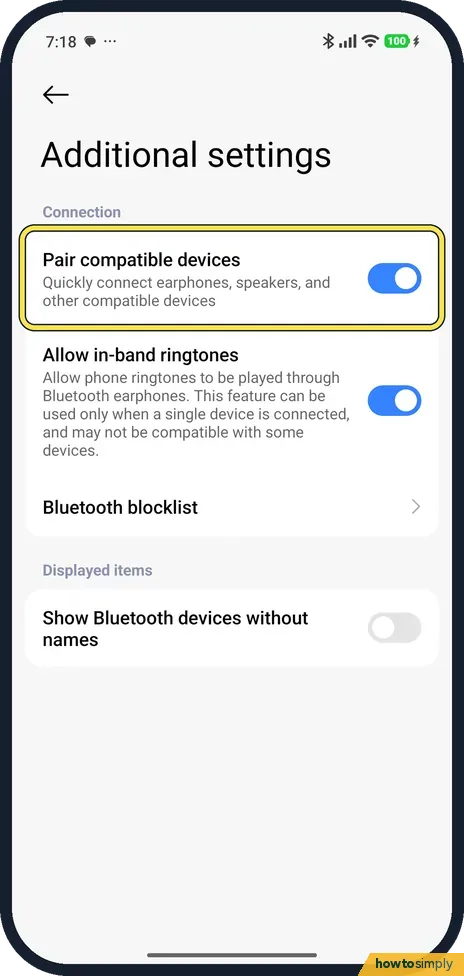
Check Additional settings
Tap Additional settings at the bottom. Pair compatible devices (quick pairing for some earphones) and Allow in-band ringtones were on. Bluetooth blocklist lists devices you blocked.
If you do not see this option
- No Pair new device button? There isn't one on our phone. The scan starts when you turn Bluetooth on; Refresh starts it again.
- Device not listed? Show Bluetooth devices without names, in Additional settings, was off on ours. Turn it on to see devices that don't send a name.
If this does not work
- Device paired before and now missing? Look under Rarely used devices on the Bluetooth page; ours had one there.
- Device blocked by mistake? Open Additional settings, Bluetooth blocklist and remove it.
- Still not found? Put the accessory back in pairing mode, keep it close to the phone and tap Refresh.
- Asked for a passcode you do not have? Check the accessory's manual first. If it gives none, Google suggests trying 0000 or 1234, which many headsets and speakers use.
- Pairing with a car fails? Check the car's manual to see whether pairing starts from the phone or from the car. If from the car, keep the phone's Bluetooth page open, check that the PINs on both screens match and allow access to contacts and call history if you want hands-free calling.
- Connected but no sound? Turn up the volume on both the phone and the accessory. Stop playback on any other device paired with the same headphones, since many accessories only play from one source at a time.
- Still fails after all that? Remove the old pairing and start again: on the Bluetooth page, open the device's details and tap Unpair, then put the accessory back in pairing mode and pair it fresh.
Good to know
Share the phone's internet instead: how to set up a hotspot on a Xiaomi phone.
Once paired, the device is saved and reconnects on its own whenever both have Bluetooth on and are in range, so you only pair once. To connect again quickly later, swipe down from the upper-right corner and tap Bluetooth in the Control centre. Leaving Bluetooth on uses a little battery, so turn it off when you are not using any accessory. Other phones and devices nearby can see your phone's name while Bluetooth is on; you can change it under Device name on the Bluetooth page. To remove a pairing for good, tap the device's details and choose Unpair. See also how to change the device name on a Xiaomi phone.
About this guide
- Device
- Android
- Shown on
- Xiaomi Redmi Note 15 Pro 5G (25080RABDG), HyperOS 3.0.308.0, Android 16
- App
- Settings
- Path
- Settings › Bluetooth
- Real screenshots
- 3 of 3 steps
- Checked
- October 2026
- Sources
- 2 official, linked below
Sources
Links checked October 2026. Menus and features can change with updates.Spotted a mistake? Menus change with updates, and we want every step to match your screen. Email us about this page or use the contact form. We read every report, and fixes are listed on What changed.
Liked this guide?
Follow us for new guides and short how-to videos.
Did this guide work for you?
Sorry about that. What happened?