
howtosimply.com/guides/where-is-customization-service-on-one-ui-8-5/ · Checked October 2026 · Samsung Galaxy A57 5G (SM-A576B), One UI 8.5, Android 16
In this guide
On One UI 8.5, Customization Service is under Settings, General management, near the bottom of the page. Samsung's privacy notice still says Settings, Privacy, but on our One UI 8.5 phone it was no longer listed there. Tap it to see whether it is on and to turn it off.
2 of 4 steps with real screenshots · 1 official source below
- Device
- Android
- Shown on
- Samsung Galaxy A57 5G (SM-A576B), One UI 8.5, Android 16
- App
- Settings
- Path
- Settings › General management › Customization Service
- Real screenshots
- 2 of 4 steps
- What we did
- Observed: looked at each screen, changed nothing
- Our phone
- Shown on Galaxy A57, One UI 8.5
- Checked
- October 2026
- Sources
- 1 official, linked below
Step by step
Open General management
Open Settings and tap General management.
Watch these steps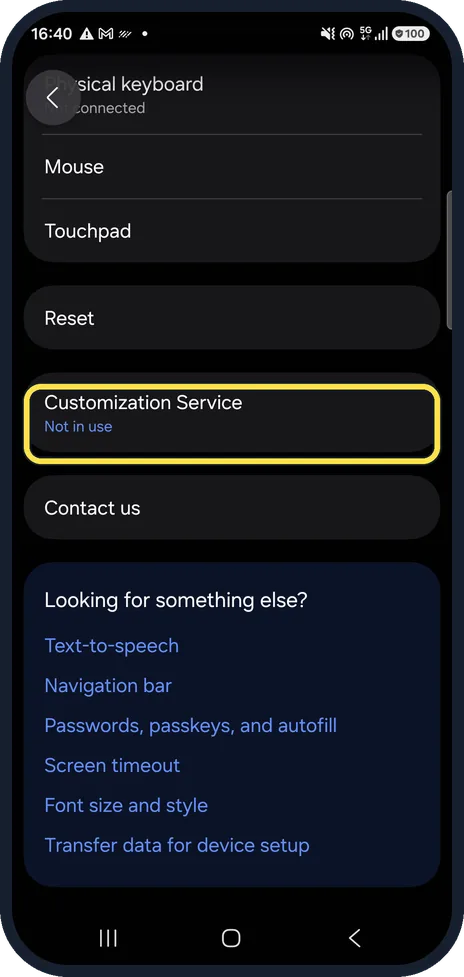
Scroll down to Customization Service
It sits below Reset, above Contact us. The line underneath shows whether it is in use. Ours said Not in use.
It is no longer under privacy
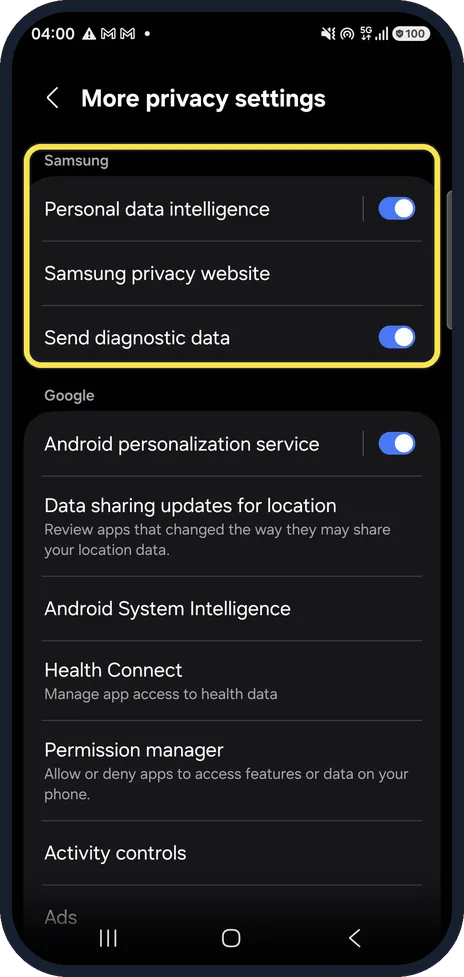
Samsung's notice points to the privacy settings, but on our One UI 8.5 phone Security and privacy, More privacy settings did not list it.
Turn it off
Tap Customization Service and switch it off. Samsung says some personalised features may then stop working. Ours was not in use, so we did not open it.
Watch these steps
If you do not see this option
- Your Galaxy runs an older One UI. Samsung's own privacy notice gives the older place: Settings, Privacy.
- Your phone runs older software Samsung's notice says that on old devices without the latest software, the Customisation Service data settings may not show properly. Update the software first. Source: Customisation Service Privacy Notice (UK)
If this does not work
- You want to stop personalised ads too Samsung's notice says Improve personalised advertising can be switched off in your Samsung account settings, under Security and privacy. Source: Customisation Service Privacy Notice (UK)
About this guide
Customization Service is the Samsung account feature that uses data from your phone to personalise content and ads. On One UI 8.5 it moved, so the path in older guides and in Samsung's own notice leads nowhere.
Good to know
Samsung's privacy notice says the service can use information such as your apps, location and browsing to build a profile for recommendations and, with consent, ads. It runs through your Samsung account.
Fewer personalised ads from Google as well: how to reset or delete the advertising ID on a Samsung Galaxy.
In short: One UI 8.5: Settings, General management, Customization Service. No longer under Privacy.
Links checked in October 2026. Menus and features can change after software updates. These steps match the version named at the top.
📷 See real photos from the Galaxy A57 in our Camera Lab, next to 10 other phones.
Did this guide work for you?
Sorry about that. What happened?