
howtosimply.com/guides/what-changed-in-one-ui-8-5-6-settings-that-moved-or-were-renamed/ · Checked October 2026 · Samsung Galaxy A57 5G (SM-A576B), One UI 8.5, Android 16
In this guide
- Check that you have One UI 8.5
- Samsung Internet is now Samsung Browser
- Lock screen notifications moved
- Customization Service moved to General management
- The battery percentage switch is gone
- The network reset is split in two
- Auto rotate has a switch per screen
- If you do not see this option
- If this does not work
- Good to know
- Sources
On One UI 8.5, Samsung Internet is called Samsung Browser, lock screen notifications are reached from a link at the bottom of Lock screen and AOD, Customization Service sits under General management, the battery percentage switch is gone, the network reset is split in two and Auto rotate has a switch per screen.
7 of 7 steps with real screenshots · 6 official sources below
- Device
- Android
- Shown on
- Samsung Galaxy A57 5G (SM-A576B), One UI 8.5, Android 16
- App
- Settings
- Real screenshots
- 7 of 7 steps
- What we did
- Observed: looked at each screen, changed nothing
- Checked
- October 2026
- Sources
- 6 official, 1 other, linked below
Step by step
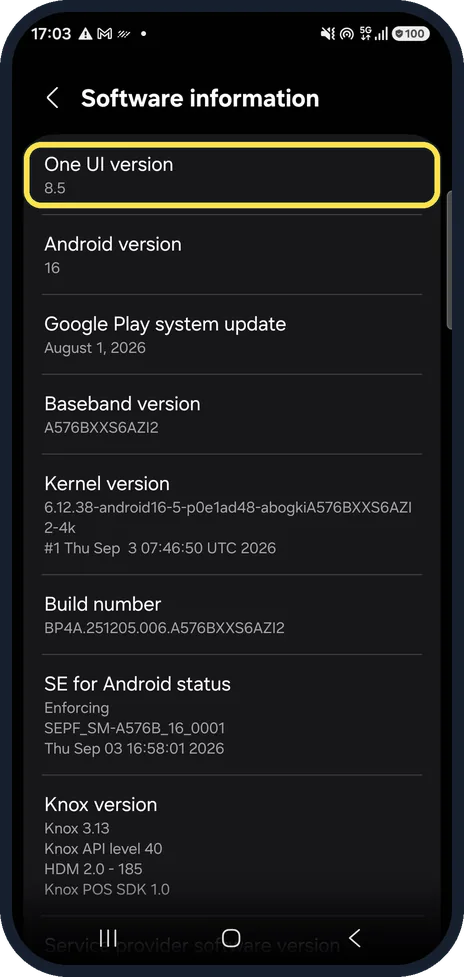
Check that you have One UI 8.5
Settings, About phone, Software information. The first row shows the One UI version; ours said 8.5, with Android 16.
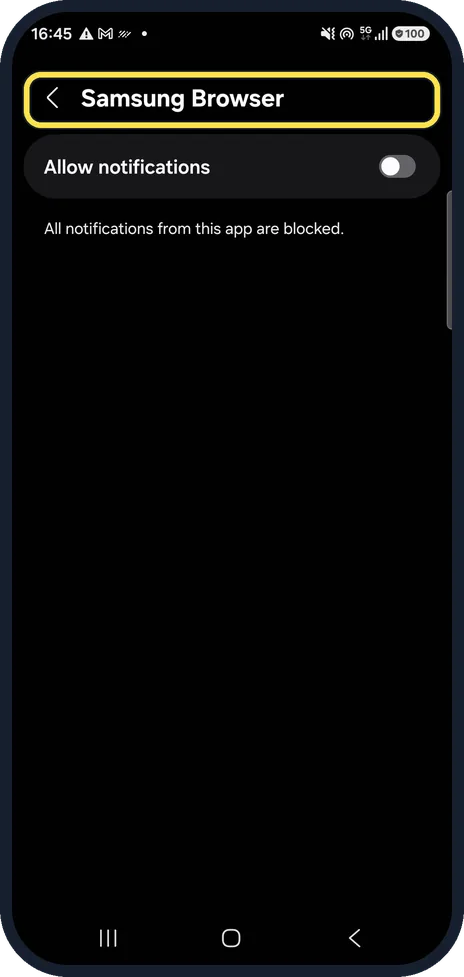
Samsung Internet is now Samsung Browser
Same app, new name. Full guide: Samsung Internet is now Samsung Browser.
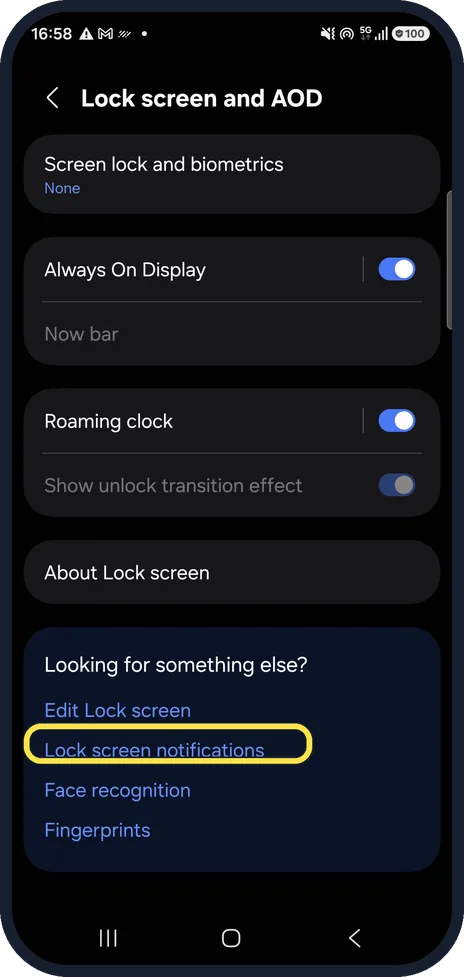
Lock screen notifications moved
The Lock screen and AOD page has no Notifications row. Tap Lock screen notifications under Looking for something else? at the bottom. Full guide: Samsung lock screen notifications gone on One UI 8.5.
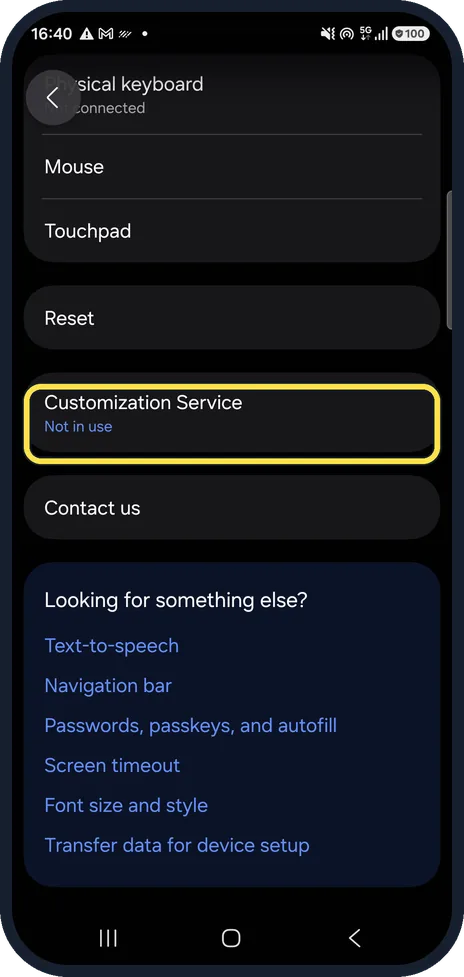
Customization Service moved to General management
Samsung's privacy notice still points to Settings, Privacy, but on our phone it was further down General management, below Reset and above Contact us. Full guide: Where is Customization Service on One UI 8.5?.
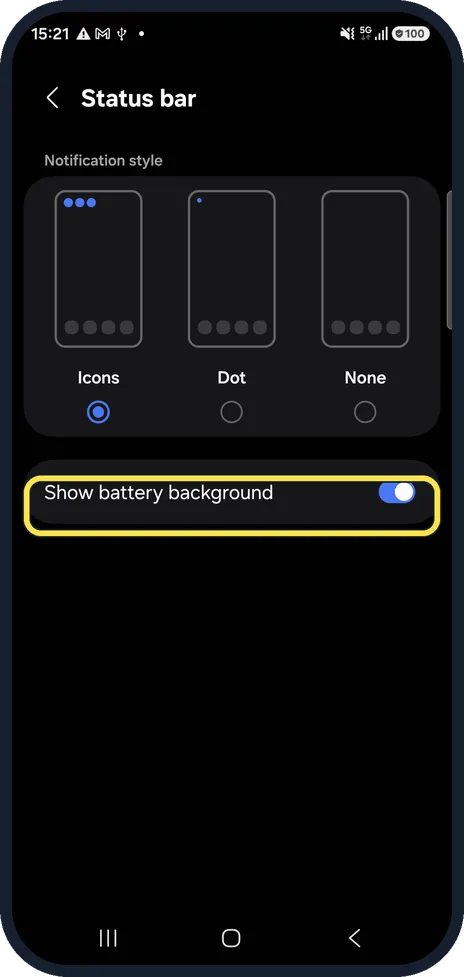
The battery percentage switch is gone
The percentage is always shown as a number inside the battery icon. Settings, Notifications, Status bar now has Show battery background instead. Full guide: How to show battery percentage on a Samsung Galaxy.
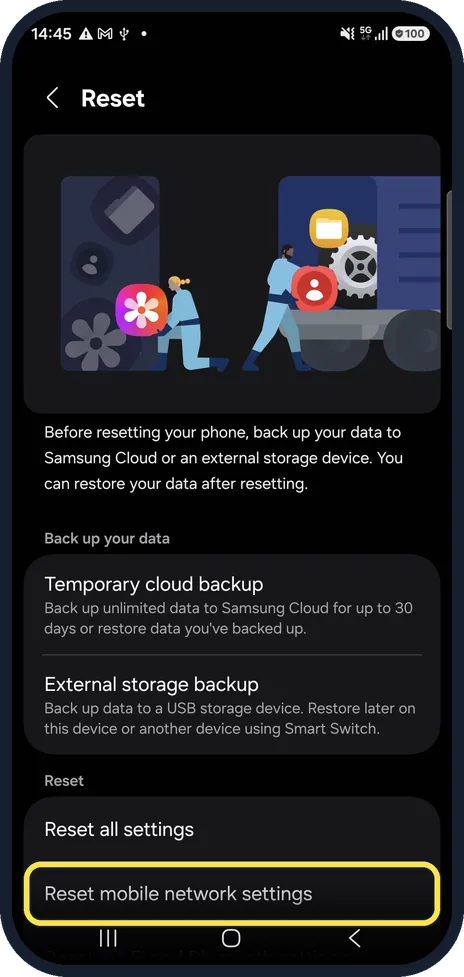
The network reset is split in two
Settings, General management, Reset now has Reset mobile network settings as its own row, below Reset all settings. Full guide: How to reset network settings on a Samsung Galaxy phone.
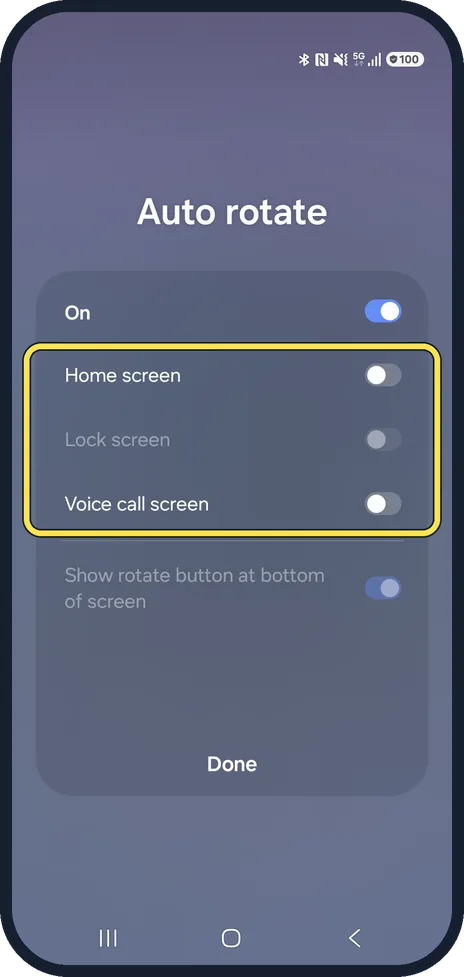
Auto rotate has a switch per screen
Touch and hold Auto rotate in the quick panel: the Home screen, Lock screen and Voice call screen each have their own switch. Full guide: Samsung Galaxy screen won't rotate? 5 fixes.
If you do not see this option
- Your phone does not have One UI 8.5 yet Samsung says the rollout schedule and version number vary by region and carrier. Check Settings, Software update; depending on the carrier the button may say Download and install, Check for system updates or Check for software updates. Source: Status bar issues on your Galaxy phone after the One UI 8.5 update
- You still see Show battery percentage Samsung says the switch was renamed Show battery background from One UI 8.5, so a phone on older software still has the old name. Source: Status bar issues on your Galaxy phone after the One UI 8.5 update
If this does not work
- Notification icons appear twice in the status bar Samsung says this comes from Prioritize notifications: Settings, Notifications, Notification highlights, Prioritize notifications, and turn it off. Source: Status bar issues on your Galaxy phone after the One UI 8.5 update
- The signal icons overlap Samsung says this is the new One UI 8.5 design on phones with two SIMs (a SIM card and an eSIM). The icons separate when you open the quick panel. Source: Status bar issues on your Galaxy phone after the One UI 8.5 update
About this guide
After the update, older instructions, including some of Samsung's own pages, point to rows that are no longer there. These are the changes we found on our own phone, each with the full guide linked.
Good to know
Looking for a setting that is not listed here? Open Settings and use the search at the top; it finds rows by name even after they move.
In short: One UI 8.5: Samsung Browser; Lock screen notifications link at the bottom of Lock screen and AOD; Customization Service under General management; no battery % switch; two network resets; Auto rotate per screen.
- Google Play: Samsung Browser by Samsung Electronics
- Sammy Fans: Samsung simplifies its Internet browser name on new Galaxy phones
- Samsung AE: Where can I find the lock screen notification settings in One UI 7?
- Samsung: Customisation Service Privacy Notice (UK)
- Samsung US: Status bar issues on your Galaxy phone after the One UI 8.5 update
- Samsung CA: How to reset your Samsung Galaxy with 5 different methods
- Samsung CA: Managing screen rotation on your Galaxy phone
Links checked in October 2026. Menus and features can change after software updates. These steps match the version named at the top.
📷 See real photos from the Galaxy A57 in our Camera Lab, next to 10 other phones.
Did this guide work for you?
Sorry about that. What happened?