GOOGLE PIXEL
What's new in Android 17 QPR2 on a Google Pixel 10a (November 2026 update)
In short
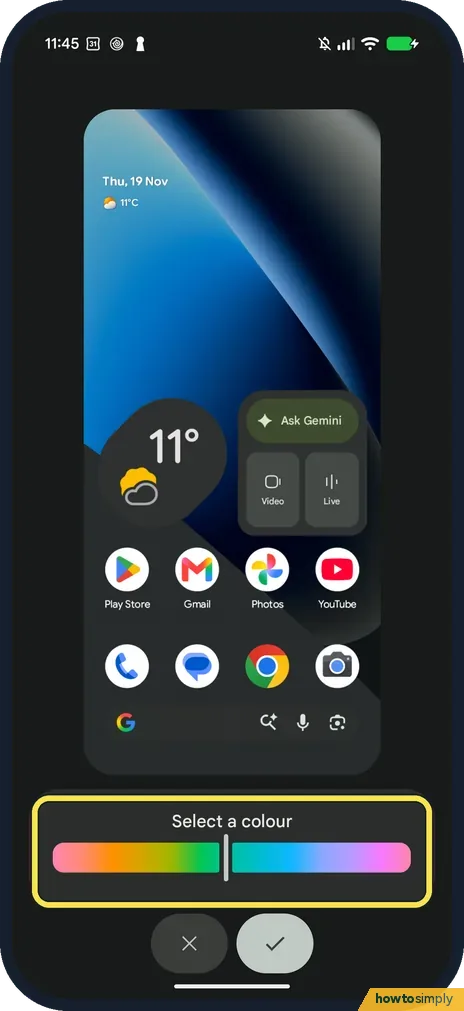
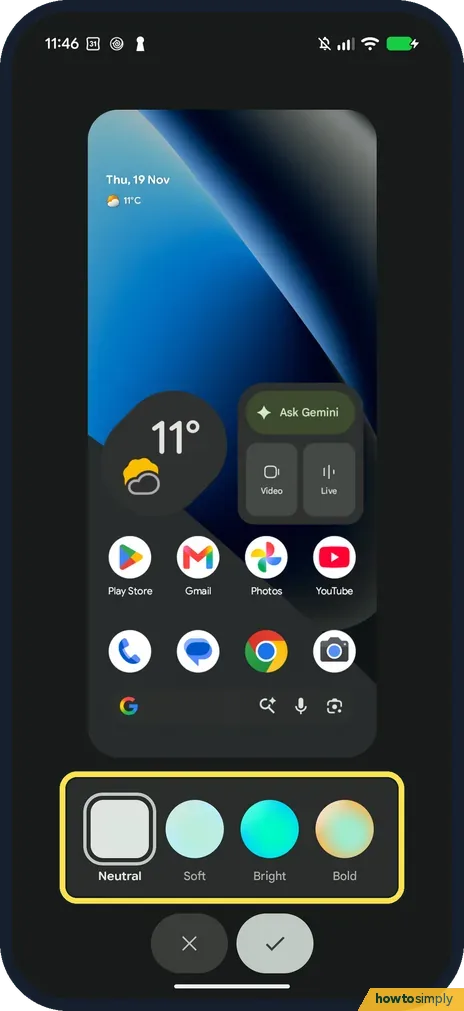
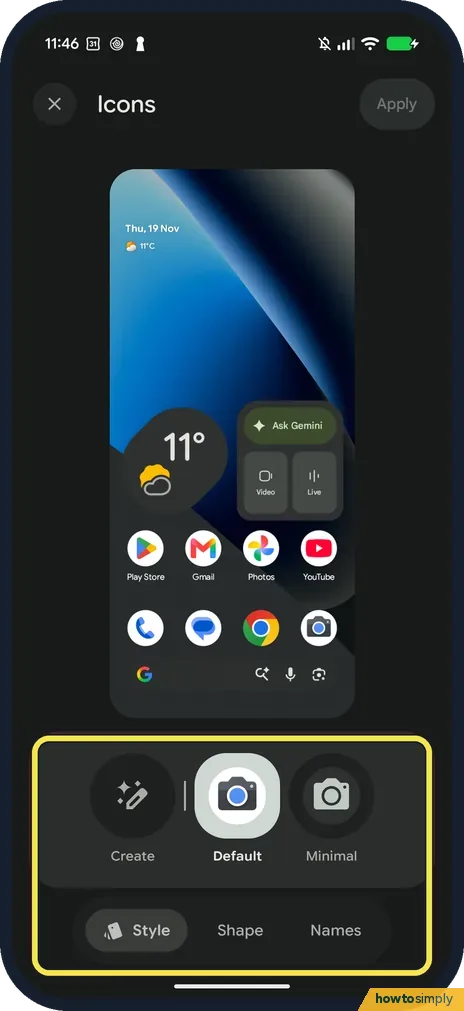
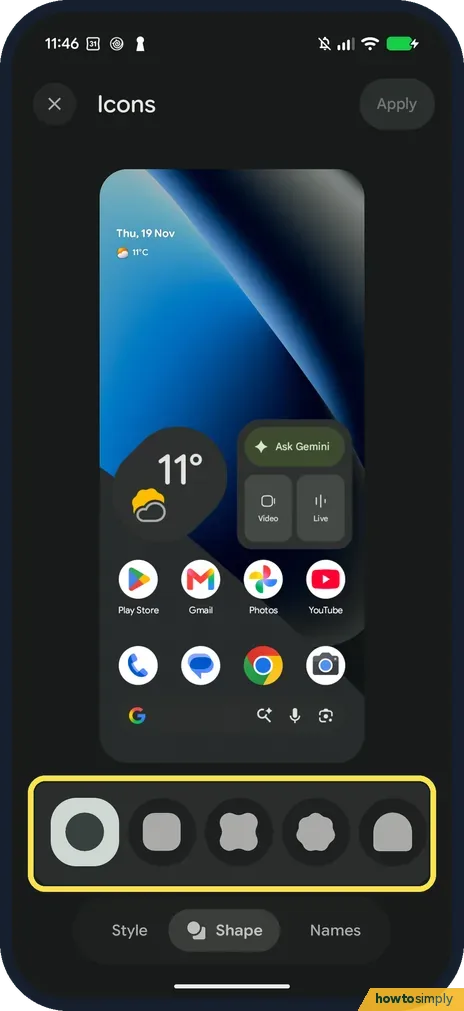
On our Pixel 10a the November 2026 update brought three things you can actually see: a Colours page where you can pick any colour on a slider and choose a style (Neutral, Soft, Bright or Bold), an Icons page with Create, Default and Minimal styles and five shapes, and a new Status bar page under Notifications that decides which icons show at the top. The build moved to CP4A.261105.040.A1 and the security update to 5 November 2026. The home screen, widgets, Layout, sounds, Modes and power button looked the same.
The update reached our Pixel 10a after our 18 November shoot. On 19 November we opened the same screens again and put each one next to how it looked before, then went back to open the three things Google had marked NEW. Both sets are in Dark mode, and we only looked: no colour, icon or switch was changed on the phone.
Google started rolling the November 2026 update out on 10 November, in phases by carrier and device, and lists build CP4A.261105.040.A1 for the Pixel 10a. Tech sites call it Android 17 QPR2.
15 of 15 steps show a real screenshot from our Pixel 10a.
Steps
- 1
Check your build number
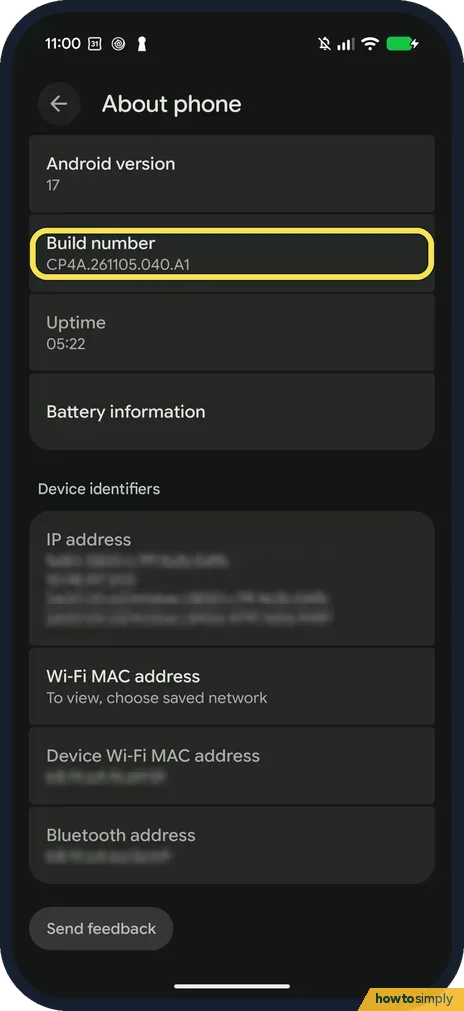
Open Settings, About phone. Ours now shows Android version 17 and build number CP4A.261105.040.A1, the number Google lists for the Pixel 10a.
- 2
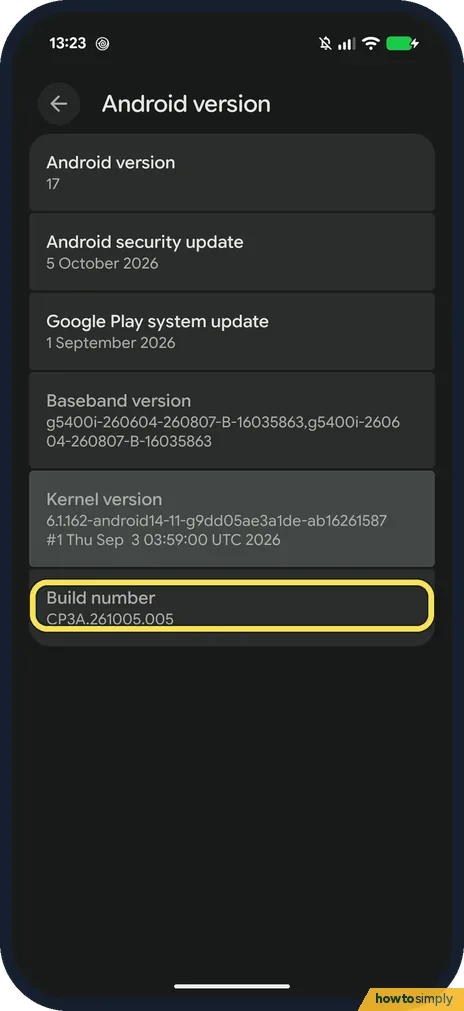
Before: CP3A.261005.005
Before the update, Settings, About phone, Android version showed build CP3A.261005.005 on ours.
- 3
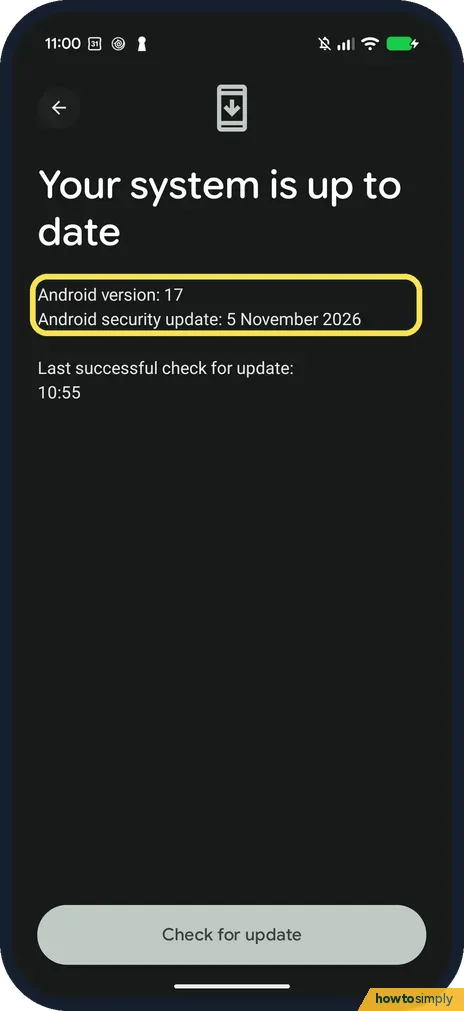
The security update is now 5 November
Settings, System, Software updates, System update said Your system is up to date, Android security update 5 November 2026.
- 4
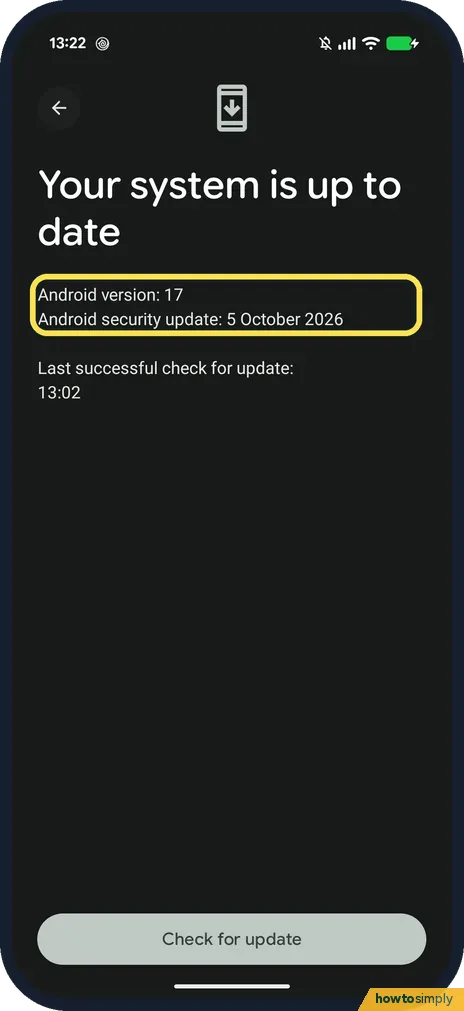
Before: 5 October
The same page before the update said 5 October 2026.
- 5
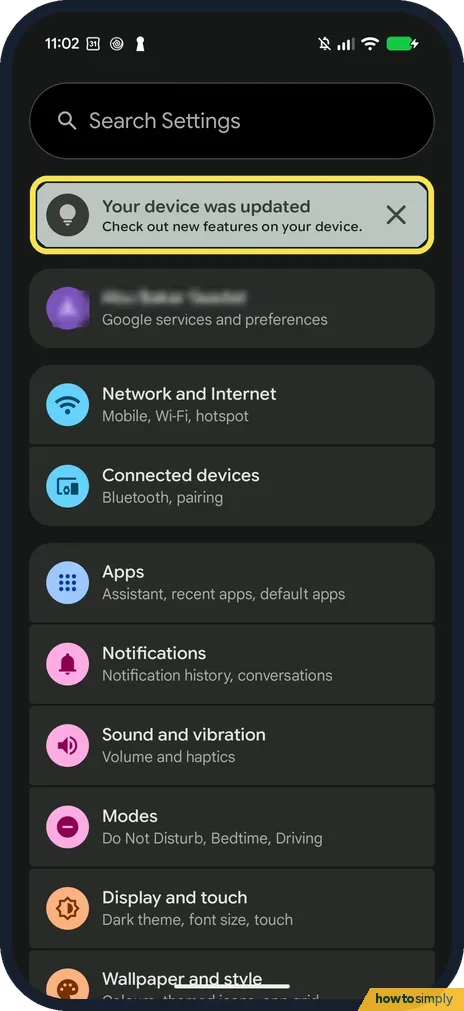
A card at the top of Settings
Settings now opens with a card: Your device was updated. Check out new features on your device. It has a close button on the right. We blurred the account row below it.
- 6
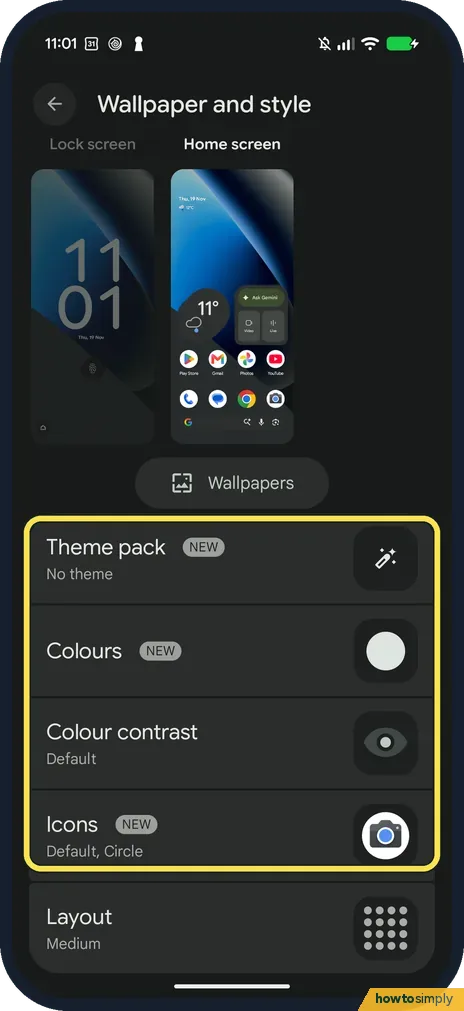
NEW badges in Wallpaper and style
In Wallpaper and style, on the Home screen side, Theme pack, Colours and Icons now carry a NEW badge. Colour contrast and Layout don't. Ours still said No theme, Default, Circle icons and Medium.
- 7
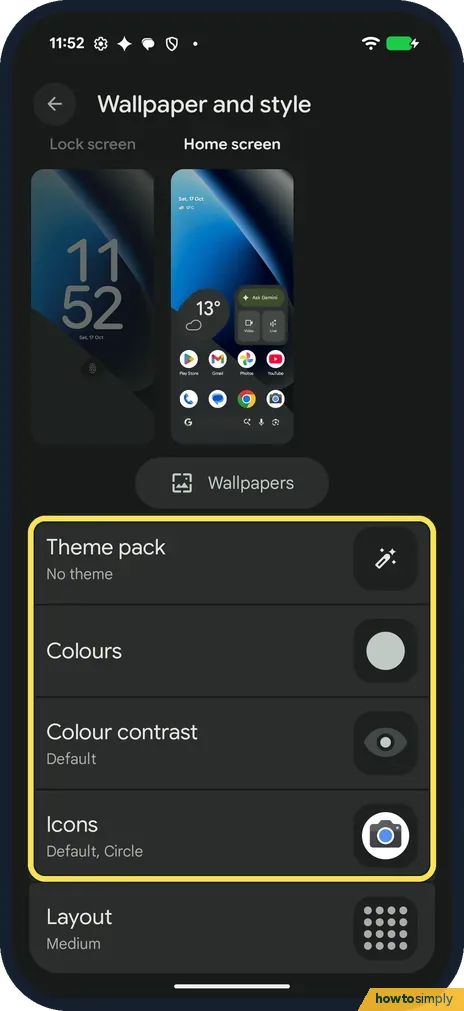
Before: the same rows, no badges
On 17 October the same part of the page had the same five rows with the same values and no NEW badges.
- 8
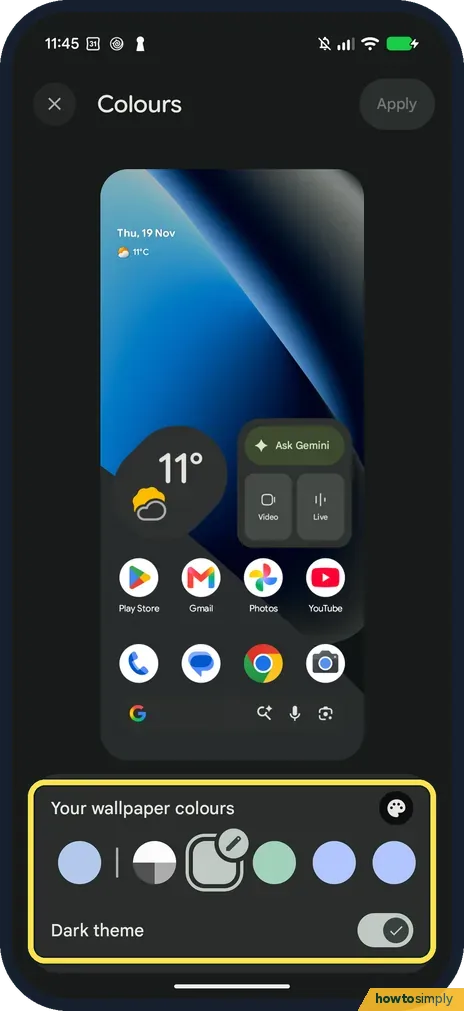
Colours: pick any colour on a slider
Tap Colours. Below the preview, ours showed Your wallpaper colours, a palette button on the right and a Dark theme switch. Swipe the row of circles left for Other colours.
- 9
Tap the palette button
It opens Select a colour: one rainbow bar with a handle you drag to any shade, then the tick to keep it or the cross to leave. We closed it without moving the handle.
- 10
Choose how strong the colour is
Tap the pencil on the circle that is picked. Ours offered four styles: Neutral (picked), Soft, Bright and Bold. We closed it with the cross, and Apply at the top of the page stayed grey.
- 11
Icons: three styles
Back in Wallpaper and style, tap Icons. The Style tab had Create, Default (picked on ours) and Minimal, with Shape and Names tabs underneath.
- 12
Five icon shapes
The Shape tab had five: circle (ours), rounded square, a four-leaf shape, a scalloped one and an arch. Names has a single switch, Show app names.
- 13
A new Status bar page
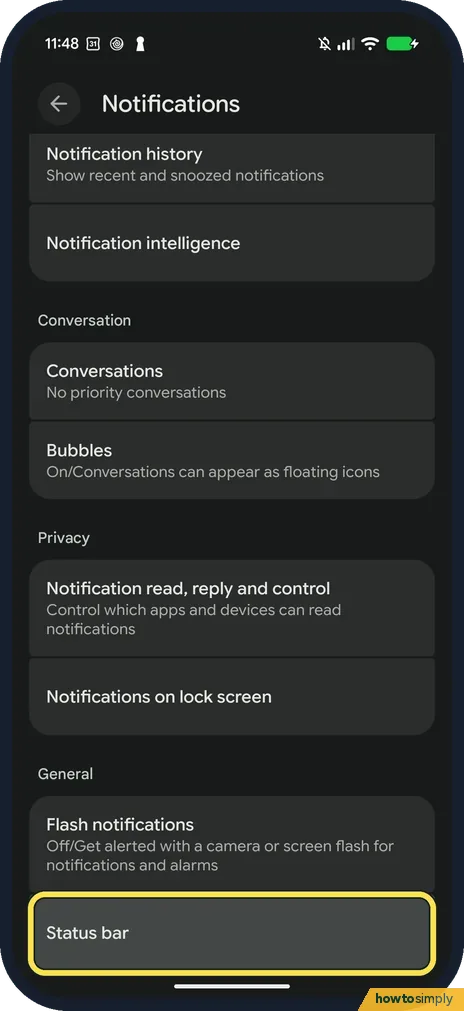
Open Settings, Notifications and scroll to General. Status bar now sits right under Flash notifications. The quickest way in is to search Settings for status bar.
- 14
Before: no Status bar row
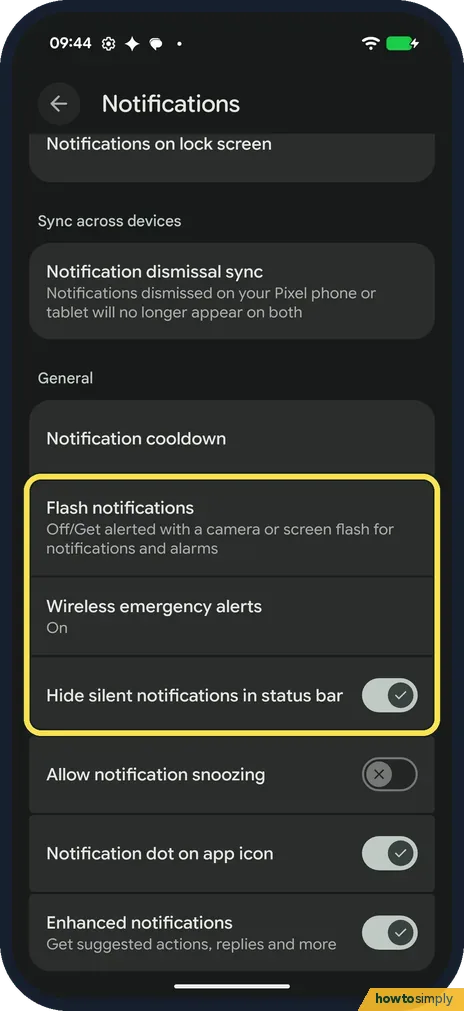
In October the General section on ours had Notification cooldown, Flash notifications, Wireless emergency alerts and a Hide silent notifications in status bar switch, but no Status bar row.
- 15
Pick which icons show at the top
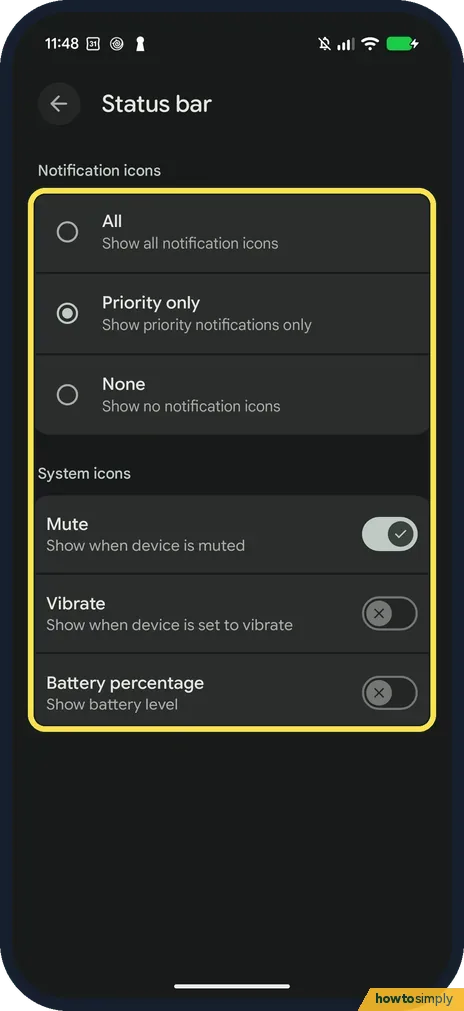
The page has two parts. Notification icons: All, Priority only or None (ours was on Priority only). System icons: switches for Mute, Vibrate and Battery percentage. On ours Mute was on and the other two were off.
If you do not see this option
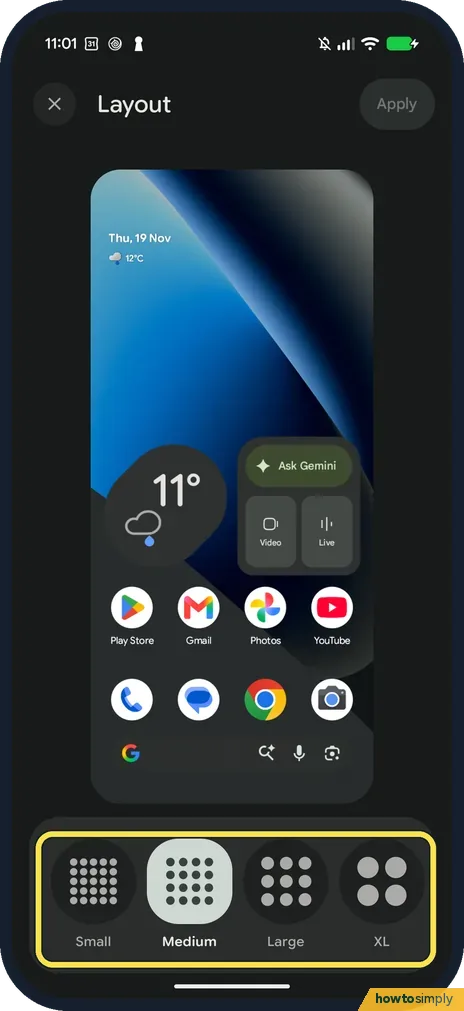
- What looked the same? We opened these again after the update and found them as before: the home screen menu (Wallpaper and style, Widgets, Apps list, Home settings), Layout with Small, Medium, Large and XL, Pixel Sounds with 25 sounds and Kernel ticked, the power button page still on Digital assistant, and Modes with Do Not Disturb, Bedtime, Driving and Transport. So our guides for those still work: home screen grid, widgets, notification sound and turning off Gemini on the power button.
- What do Google's notes say for the 10a? Google's November post lists fixes, not new screens. For the Pixel 10a these include the keyboard sometimes not appearing in search fields, media volume rising with voice commands, a charging icon showing with no charger, the notification shade sometimes not opening with a swipe down, stutter while scrolling, and Wallpaper & style closing after applying lock screen clock styles. Some fixes in the post, such as photos not saving and sensor battery drain, are for the Pixel 11 series only. Source: Google Pixel Update - November 2026
- Where did the NEW badges go? They disappear once you open each item. On ours the badge on Colours was gone as soon as we closed it, and Theme pack and Icons lost theirs the same way, so you won't see them again after a look round.
- Is the colour slider really new? Beebom reports that Android 17 QPR2 adds a hue slider for system colours and a page to choose which status bar icons show, and both are on our Pixel 10a now. We have a before picture of the Notifications page, which had no Status bar row, but none of the old Colours page, so we can't show what the slider replaced. Source: Android 17 QPR2 stable update arrives early on Pixel phones (11 Nov 2026)
If this does not work
- Your Pixel 10a still shows the old build? Google says the rollout runs in phases depending on carrier and device, and you get a notification when it is ready. To check now: how to update a Google Pixel.
- Want to see your security update date? See how to check the security patch level on a Google Pixel.
Good to know
We will add screens here as we find more changes on our Pixel 10a.
About this guide
- Device
- Android
- Shown on
- Google Pixel 10a, Android 17 QPR2 (build CP4A.261105.040.A1), Google Pixel 10a, Android 17 (build CP3A.261005.005)
- App
- Settings
- Real screenshots
- 15 of 15 steps
- Checked
- October 2026
- Sources
- 2 official, linked below
Sources
Links checked October 2026. Menus and features can change with updates.Did this guide work for you?
Sorry about that. What happened?