
What changed: every step re-shot on our own Galaxy S26 (Korean model SM-S942N) on One UI 9, dark mode, with the steps rewritten for the One UI 9 screens.
howtosimply.com/guides/samsung-screen-recording-has-no-sound-how-to-fix-it/ · Checked October 2026 · SM-S942N, Korean model), One UI 9, Android 17 (build S942NKSS4BZIG · Samsung Galaxy S26
In this guide
Open Settings, Advanced features, Screenshots and screen recordings and tap Audio to record, or pick the sound on the Screen recorder start sheet. Choose Media for the phone's own sound, or Media and mic to add your voice. Samsung says calls and some protected apps cannot be recorded with sound.
5 of 5 steps with real screenshots · 2 official sources below
- Device
- Android
- Shown on
- Samsung Galaxy S26 (SM-S942N, Korean model), One UI 9, Android 17 (build S942NKSS4BZIG)
- App
- Settings
- Path
- Settings › Advanced features › Screenshots and screen recordings › Audio to record
- Real screenshots
- 5 of 5 steps
- Checked
- October 2026
- Sources
- 2 official, linked below
Step by step
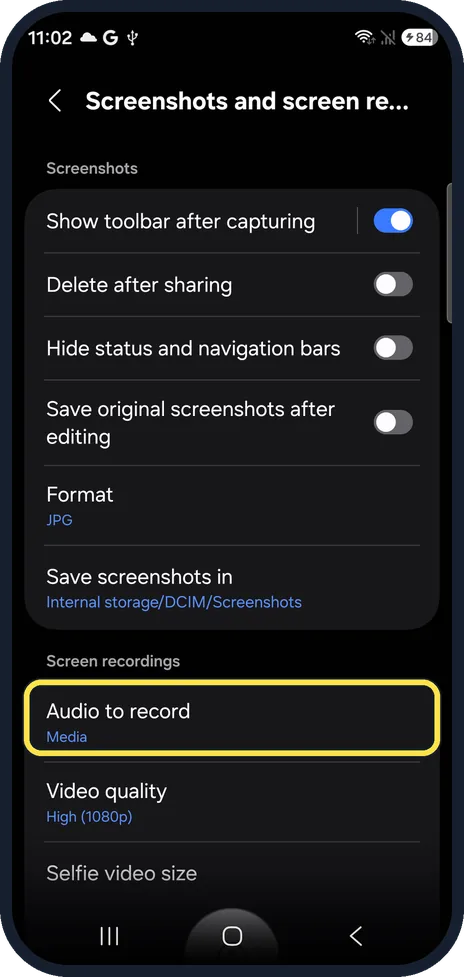
Open the screen recording settings
Open Settings, Advanced features, Screenshots and screen recordings, and scroll to Screen recordings. On ours, Audio to record read Media.
Watch these steps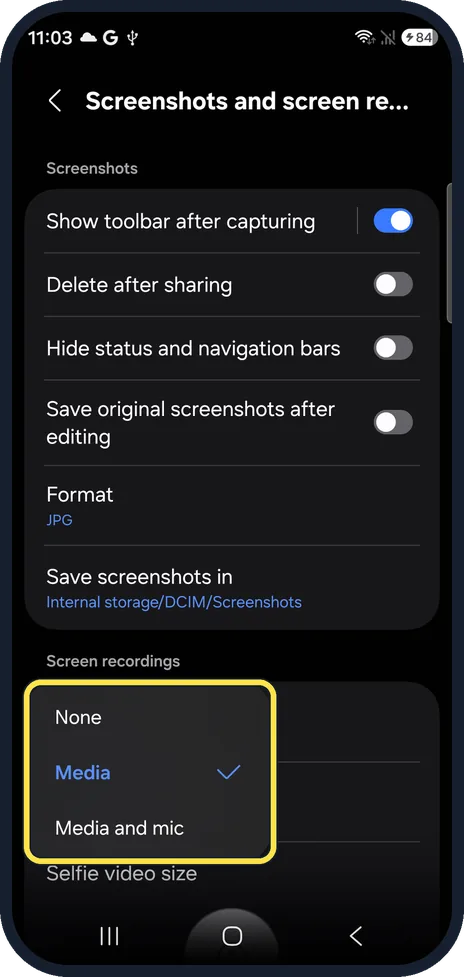
Change Audio to record
Tap Audio to record and choose None, Media for the phone's own sound, or Media and mic to add your voice.
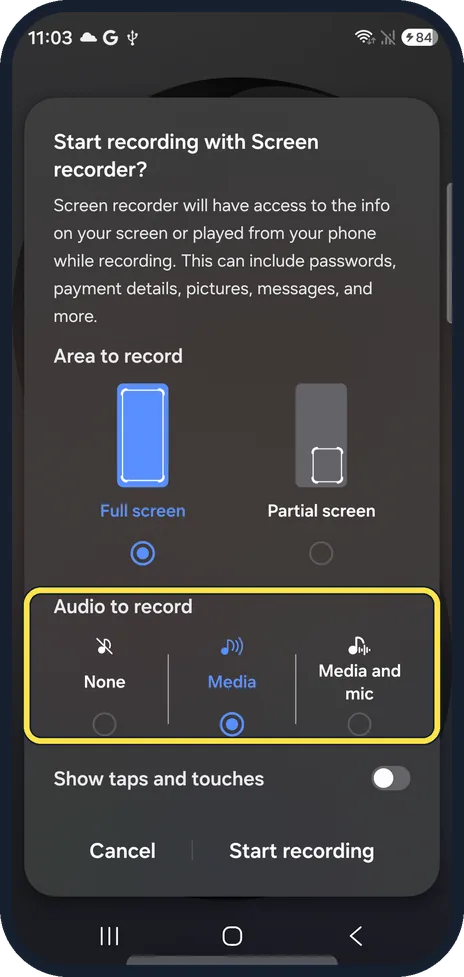
Or choose the sound when you start
Start Screen recorder from the quick panel. The Start recording with Screen recorder? sheet has its own Audio to record choices, with Media selected on ours. Check Area to record, then tap Start recording.
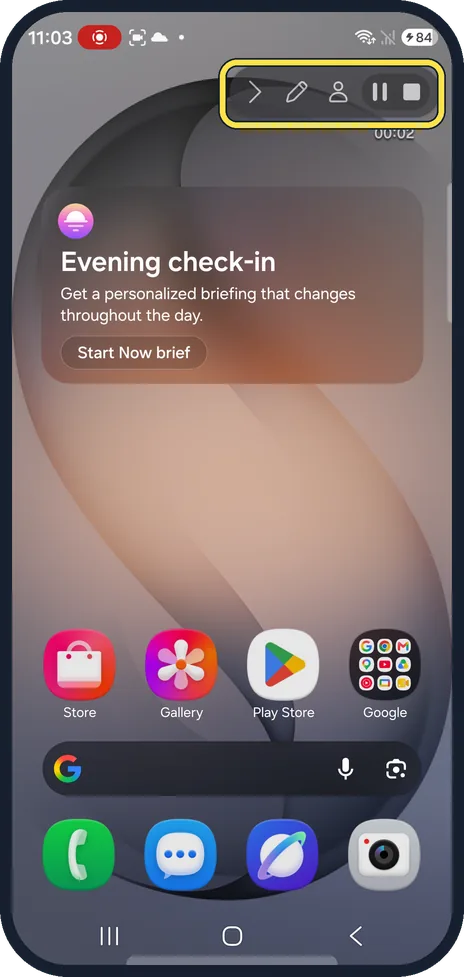
Record and stop
Tap Start recording. The toolbar at the top right shows the time; tap the square to stop.
Check the recording
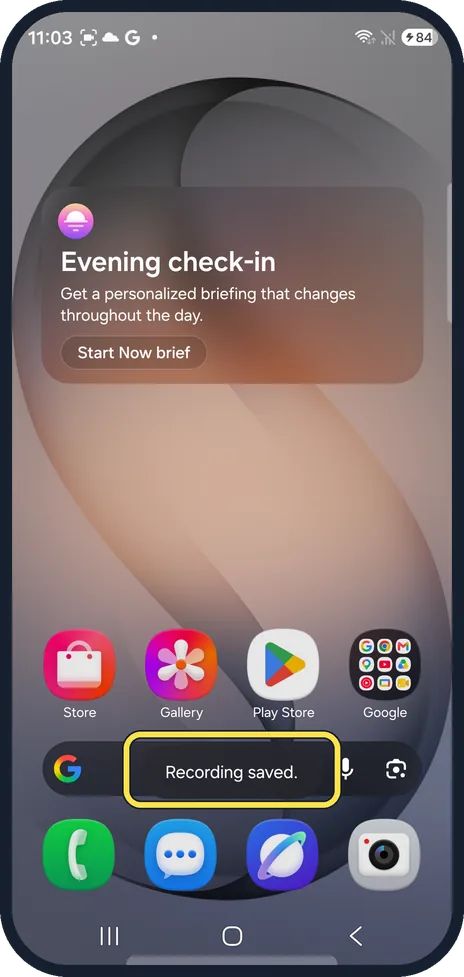
Recording saved. appears at the bottom. Open it in Gallery and play it to hear the sound.
What changed: every step re-shot on our own Galaxy S26 (Korean model SM-S942N) on One UI 9, dark mode, with the steps rewritten for the One UI 9 screens.
Watch these steps
If you do not see this option
- No Screen recordings section in Settings Start Screen recorder from the quick panel instead. Its start sheet has its own Audio to record choices: None, Media and Media and mic.
- No sound choices when you start On our S26 they sit under Audio to record on the Start recording with Screen recorder? sheet, above Show taps and touches.
- Menu names look different On older One UI versions a few names and positions may differ. Use Search in Settings and type Audio to record.
If this does not work
- The whole recording is silent Check that Audio to record is not set to None, in Settings or on the start sheet. Choose Media or Media and mic.
- Your voice is missing Media records only the phone's own sound. Choose Media and mic to add your microphone.
- One app stays silent Samsung says some apps block recording to protect their content, so their sound will not be captured. Sources: Record and capture your Galaxy phone or tablet's screen, How to record your screen on your Samsung Galaxy device
- Calls are silent Samsung's Screen recorder does not record phone calls, internet calls or video calls. Sources: Record and capture your Galaxy phone or tablet's screen, How to record your screen on your Samsung Galaxy device
About this guide
A silent screen recording on a Galaxy is often down to the sound setting, which can be set to None. If the setting is right and one app is still silent, that app blocks recording.
The screenshots are from our Samsung Galaxy S26, the Korean model SM-S942N, with One UI 9 and Android 17 (build S942NKSS4BZIG), in Dark mode. Menus can differ on models sold in other regions. We made one short test recording with Media selected and deleted it.
Good to know
How to record the screen, step by step: how to record your screen on a Samsung Galaxy.
In short: Settings, Advanced features, Screenshots and screen recordings, Audio to record, or the Screen recorder start sheet: Media, or Media and mic.
- Samsung US: Record and capture your Galaxy phone or tablet's screen
- Samsung UK: How to record your screen on your Samsung Galaxy device
Links checked in October 2026. Menus and features can change after software updates. These steps match the version named at the top.
📷 See real photos from the Galaxy S26 in our Camera Lab, next to 10 other phones.
Did this guide work for you?
Sorry about that. What happened?