XIAOMI REDMI
How to turn on VoLTE and 5G on a Xiaomi phone (HyperOS 3)
Go to Settings, Mobile networks, tap your SIM, and turn on Use VoLTE. For 5G, tap Preferred network type and choose Prefer 5G. Both need support from your carrier.

4 of 4 steps show a real screenshot from our Redmi Note 15 Pro 5G. Each step was checked against the maker's own instructions, linked at the end.
Steps
- 1
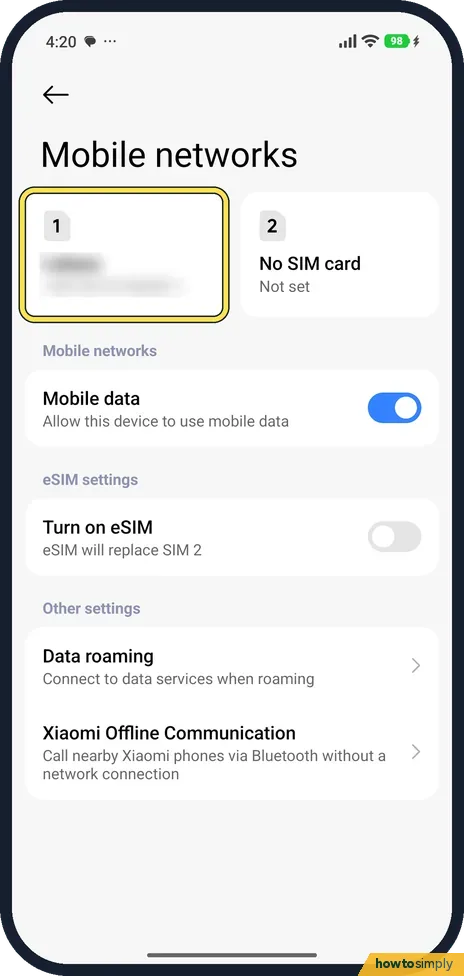
Open Mobile networks
Go to Settings, Mobile networks. Tap the SIM at the top.
- 2
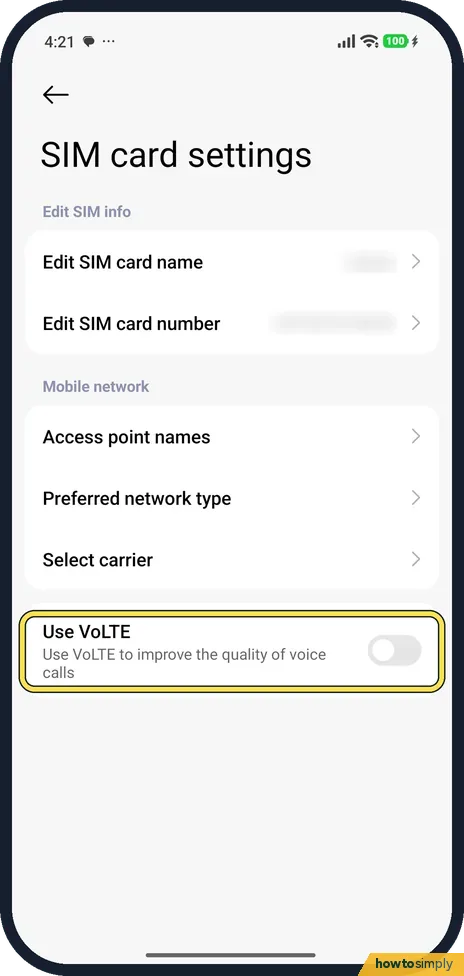
Turn on Use VoLTE
Turn on Use VoLTE: Use VoLTE to improve the quality of voice calls. It was off on ours.
- 3
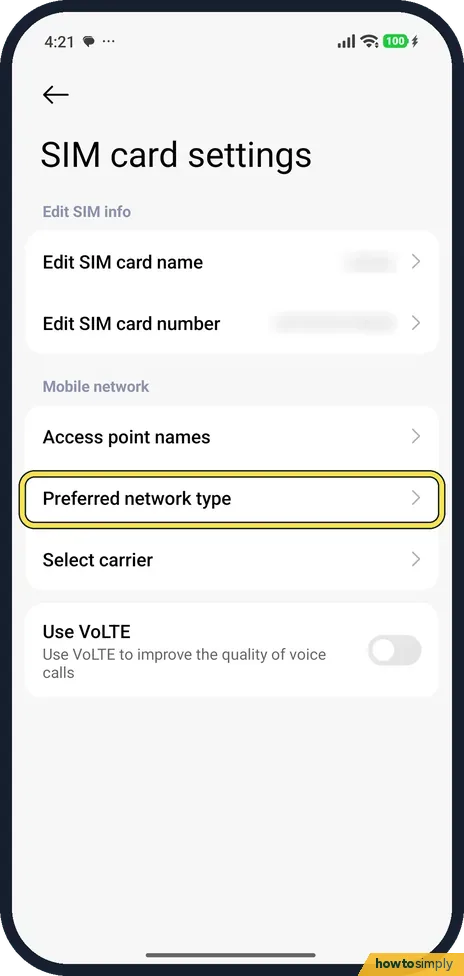
Tap Preferred network type
On the same page, tap Preferred network type.
- 4
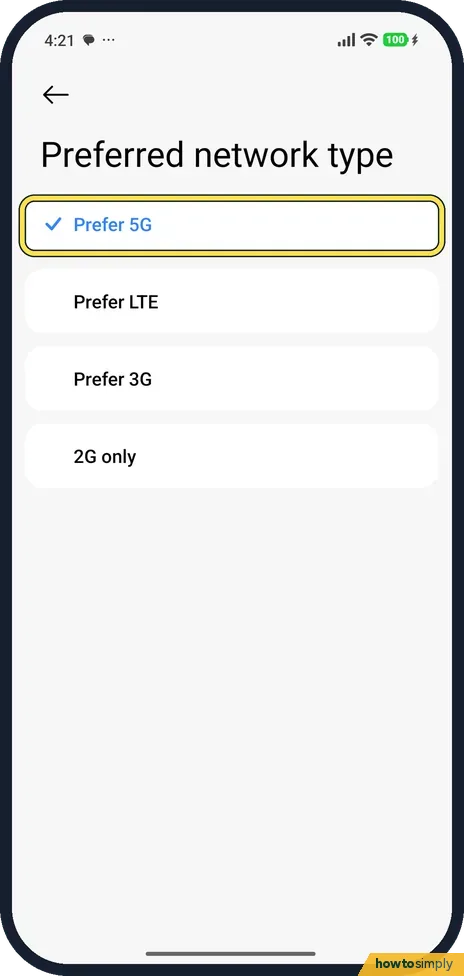
Choose Prefer 5G
Choose Prefer 5G. Ours offered Prefer 5G, Prefer LTE, Prefer 3G and 2G only; Prefer 5G was selected.
If you do not see this option
- No Use VoLTE switch? Xiaomi's Xiaomi 15 page says to dial *#*#86583#*#* in the Phone app first, then turn on Use VoLTE. We did not try the code. Source: Does the Xiaomi 15 support VoLTE?
If this does not work
- No 5G icon? Ours showed no 5G icon while on Wi-Fi. 5G also needs coverage and a plan that includes it.
- VoLTE turns itself off? It needs your carrier's support.
- Still no 5G after choosing Prefer 5G? Turn Wi-Fi off, because an active Wi-Fi connection can hide the mobile data indicator. If no data indicator, such as 4G or 5G, appears next to the signal bars, you may have no coverage where you are. Move somewhere else or go outside, and if it keeps happening, contact your mobile service provider.
- VoLTE is on but the icon is missing? Xiaomi's HyperOS 3 user guide lists a VoLTE enabled icon among the status icons. If it does not appear, turn Aeroplane mode on, wait 10 seconds and turn it off again so the phone registers with the network afresh. A restart does the same job.
- Changes seem to apply to the wrong SIM? With two SIMs, each SIM has its own page under Mobile networks. Tap each one in turn and check Use VoLTE and Preferred network type on both, since setting one does not change the other.
Good to know
Mobile data problems: Xiaomi mobile data not working.
Once both are on, the phone uses 4G for calls where your carrier allows it and picks 5G for data when there is a usable 5G signal. Faster downloads can use your data allowance more quickly, especially for video and app updates. If the signal keeps jumping between 5G and 4G in your area, Prefer LTE can give a steadier connection and is a sensible fallback. To undo either change, return to the SIM's page, turn off Use VoLTE or choose another network type. Nothing else on the phone changes, and your contacts, messages and apps are not affected. If you share your connection with a laptop, see how to set up a hotspot on a Xiaomi phone.
About this guide
- Device
- Android
- Shown on
- Xiaomi Redmi Note 15 Pro 5G (25080RABDG), HyperOS 3.0.308.0, Android 16
- App
- Settings
- Path
- Settings › Mobile networks › SIM
- Real screenshots
- 4 of 4 steps
- Checked
- October 2026
- Sources
- 3 official, linked below
Sources
Links checked October 2026. Menus and features can change with updates.Spotted a mistake? Menus change with updates, and we want every step to match your screen. Email us about this page or use the contact form. We read every report, and fixes are listed on What changed.
Liked this guide?
Follow us for new guides and short how-to videos.
Did this guide work for you?
Sorry about that. What happened?