GOOGLE PIXEL
How to use split screen and bubbles on a Google Pixel (Android 17)
For split screen, open Recents, tap the app's icon above its preview and tap Split screen, then pick a second app. For a bubble, press and hold an app icon and tap Bubble: the app opens in a floating window. Drag the divider to resize, and tap Manage, Dismiss bubble to close a bubble.

5 of 5 steps show a real screenshot from our Pixel 10a. Each step was checked against the maker's own instructions, linked at the end.
Steps
- 1
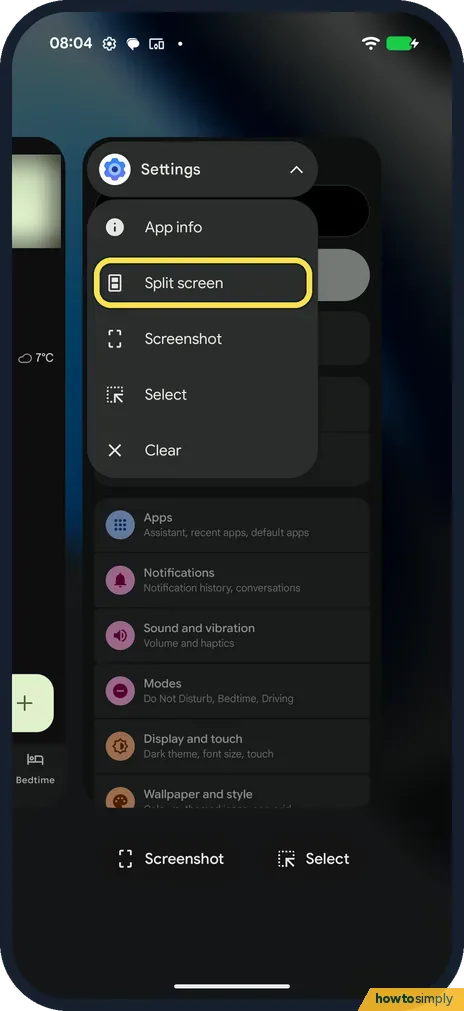
Open the app menu in Recents
Swipe up and hold to open Recents. Tap the app's icon above its preview. The menu has App info, Split screen, Screenshot, Select and Clear.
- 2
Pick the second app
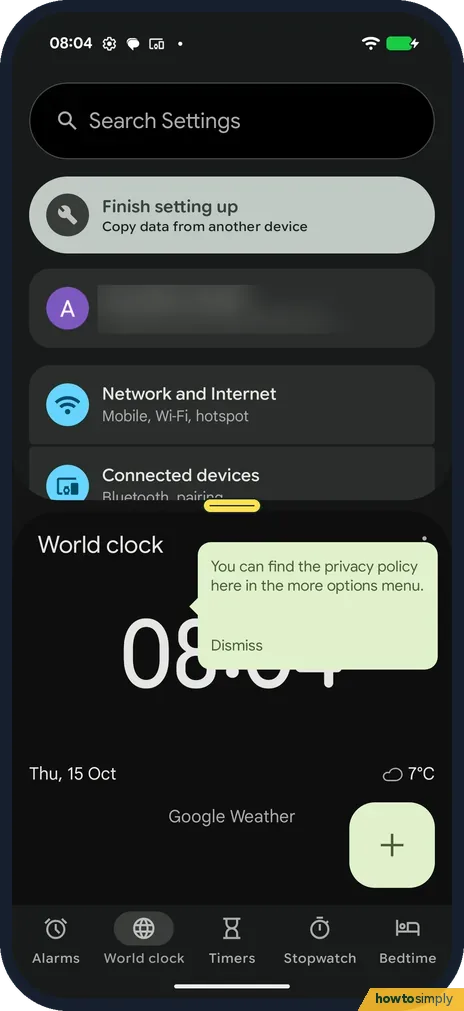
Tap Split screen, then tap a second app. Both show, with a divider between them. Drag the divider to resize, or all the way up or down to close one app.
- 3
Open an app in a bubble
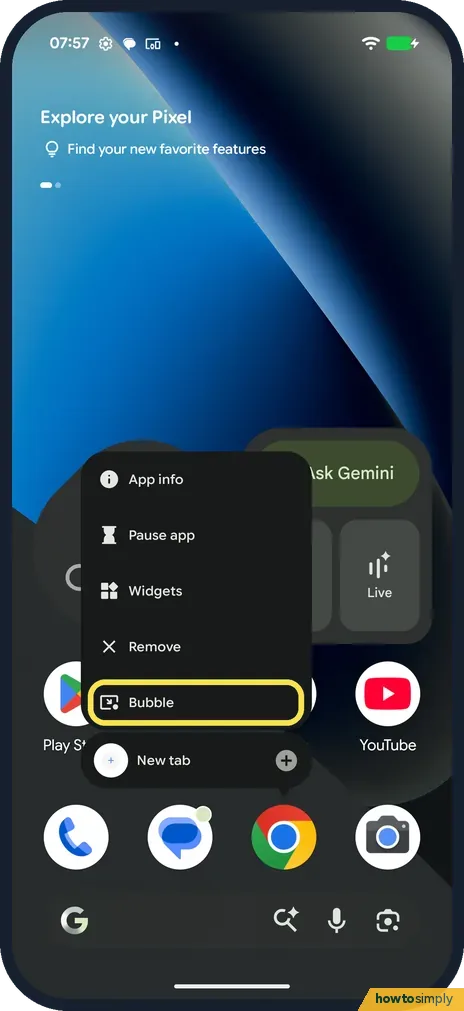
On the home screen, press and hold an app icon. Tap Bubble in the menu.
- 4
Use the bubble
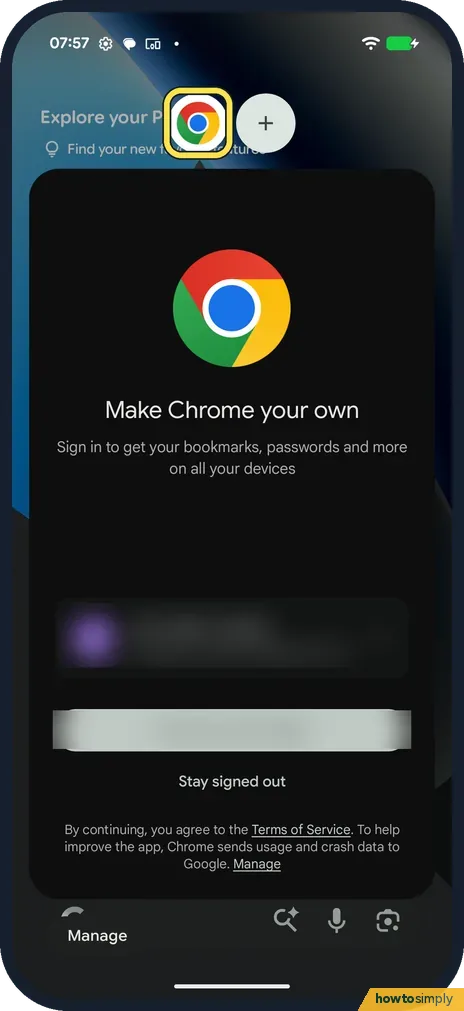
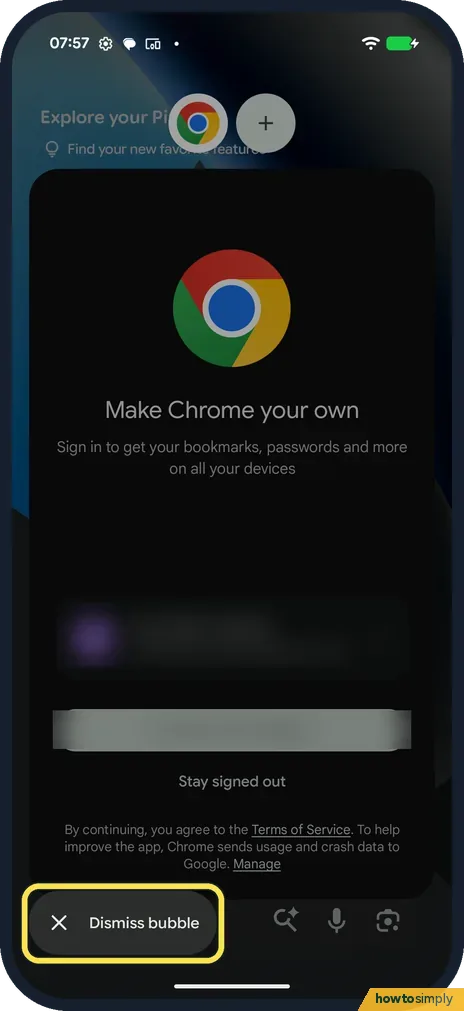
The app opens in a floating window, with its icon at the top. Ours was Chrome, showing its first-run screen. Tap the icon to hide or show it.
- 5
Close the bubble
Tap Manage at the bottom left, then Dismiss bubble.
If you do not see this option
- No Bubble in the menu? Not every app offers it. Chrome did on ours.
- No Split screen in Recents? Google says some apps don't support split screen. Source: Use split screen on your Pixel phone
If this does not work
- Can't get out of split screen? Google says to drag the divider to the top or bottom, or swipe up to go home.
- Bubble keeps coming back? Dismiss bubble closes it; opening Bubble again brings it back.
- Split screen won't start from Recents? Google says to open the first app, then swipe up from the bottom, hold and let go before you tap the app's icon. If Recents shows only one app, open the second app once so it appears there too.
- Want to watch a video while using another app? Google describes picture-in-picture: play the video, then swipe up or tap the picture-in-picture icon. If the app closes or no icon appears, the app doesn't support it.
- Small video window in the way? Google says you can drag the picture-in-picture window anywhere on the screen, or drag it off the bottom to close it.
Good to know
Take a screenshot of what you see: how to take a screenshot on a Pixel.
Split screen and bubbles are only ways of showing apps. They don't change any setting, and each app keeps its data. Two apps on screen at once can use a little more battery than one, so close the second app when you no longer need it.
Split screen is handy for copying text or a link from one app to another, or for following directions while you message someone. A bubble is better for something you check often, such as a page you are reading while you type elsewhere.
To keep one app on screen for someone else to use, see how to use app pinning on a Google Pixel.
About this guide
- Device
- Android
- Shown on
- Google Pixel 10a, Android 17 (build CP3A.260905.009)
- App
- Recents
- Path
- Recents › App icon › Split screen
- Real screenshots
- 5 of 5 steps
- Checked
- October 2026
- Sources
- 1 official, linked below
Sources
Links checked October 2026. Menus and features can change with updates.Spotted a mistake? Menus change with updates, and we want every step to match your screen. Email us about this page or use the contact form. We read every report, and fixes are listed on What changed.
Liked this guide?
Follow us for new guides and short how-to videos.
Did this guide work for you?
Sorry about that. What happened?