
howtosimply.com/guides/how-to-find-and-follow-whatsapp-channels-on-android/ · Checked October 2026 · Google Pixel 10a, Android 17 (build CP3A.261005.005), WhatsApp 2.26.41.77
In this guide
Open the Updates tab and tap Explore next to Channels. The first time, accept the Channels terms with Accept and continue. Then tap Follow next to a channel. Its updates appear under Channels on the Updates tab.
3 of 3 steps with real screenshots · 1 official source below
- Device
- Android
- Shown on
- Google Pixel 10a, Android 17 (build CP3A.261005.005), WhatsApp 2.26.41.77
- App
- Real screenshots
- 3 of 3 steps
- Checked
- October 2026
- Sources
- 1 official, linked below
Step by step
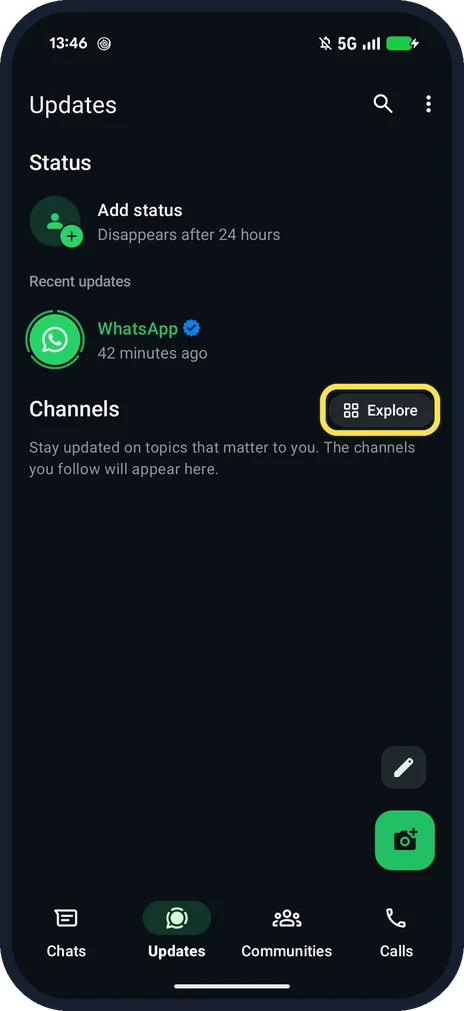
Open Updates and tap Explore
Explore is next to Channels, under Status.
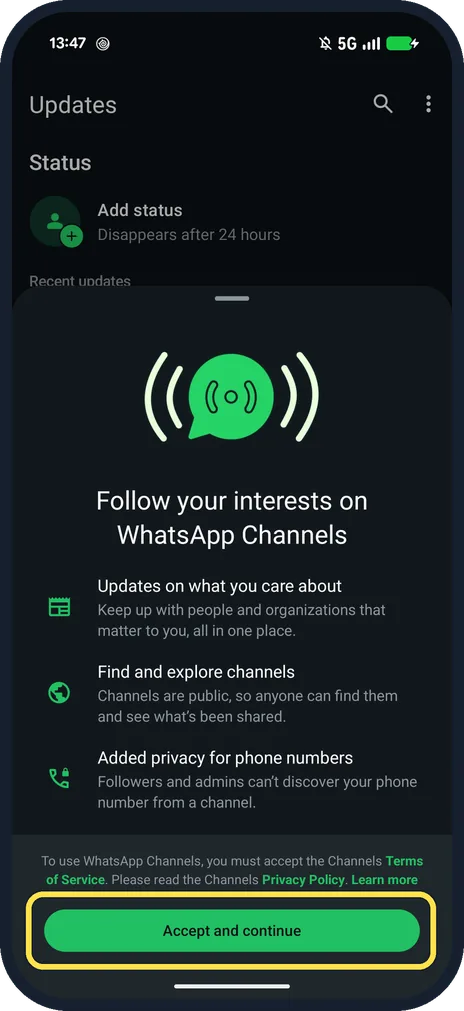
Tap Accept and continue
The first time only. The page says you must accept the Channels Terms of Service, and that followers and admins can't discover your phone number from a channel.
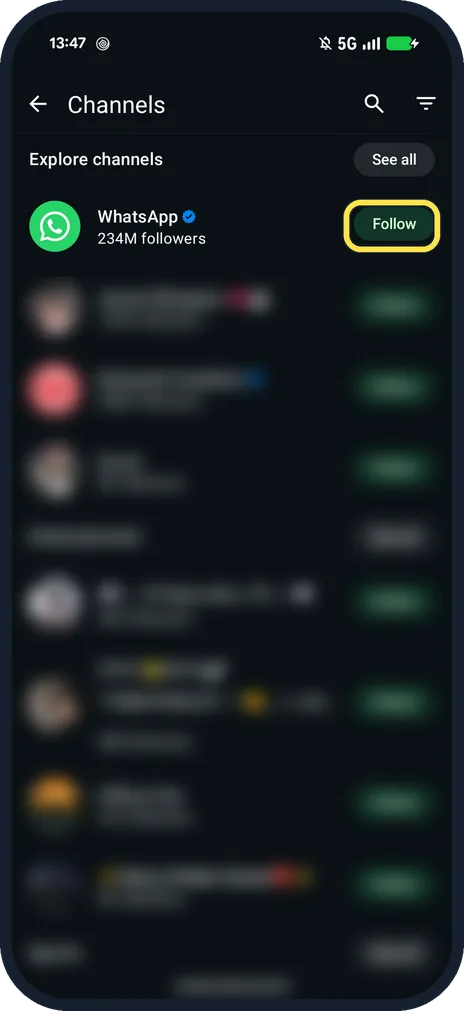
Tap Follow next to a channel
Explore channels lists them with follower counts. The WhatsApp channel had 234M followers on ours.
If you do not see this option
- Can't find a channel? WhatsApp says the list is filtered by country and language. Search by its exact name or ask the admin for a link. Source: How to find and follow WhatsApp Channels
- Want to look before following? WhatsApp says you can tap a channel's name to preview its recent updates. Source: How to find and follow WhatsApp Channels
If this does not work
- Follow does nothing? WhatsApp suggests updating WhatsApp, checking your connection and restarting the app. Source: How to find and follow WhatsApp Channels
- Channel gone? WhatsApp says a deleted or removed channel can no longer be found or followed. Source: How to find and follow WhatsApp Channels
About this guide
Channels are one-way broadcasts from people and organisations. The intro on ours said followers and admins can't discover your phone number from a channel.
The screenshots are from our Google Pixel 10a with Android 17 and WhatsApp 2.26.41.77, in Dark mode, taken on 25 October 2026. We accepted the Channels terms and did not follow any channel. Other channel names are blurred.
Good to know
For the rest of the Updates tab, see choose who sees your WhatsApp Status.
In short: Updates, Explore, Accept and continue, Follow.
Links checked in October 2026. Menus and features can change after software updates. These steps match the version named at the top.
📷 See real photos from the Pixel 10a in our Camera Lab, next to 10 other phones.
Did this guide work for you?
Sorry about that. What happened?