
howtosimply.com/guides/how-to-turn-on-developer-options-on-an-honor-phone/ · Checked October 2026 · BRP-NX1M, EEA), MagicOS 10.0, Android 16 (build 10.0.0.169(C430E7R2P1) · HONOR Magic7 Lite
In this guide
Open Settings, About phone and tap Build number seven times. Developer options then appears in Settings, System & updates.
5 of 5 steps with real screenshots · 2 official sources below
- Device
- Android
- Shown on
- HONOR Magic7 Lite (BRP-NX1M, EEA), MagicOS 10.0, Android 16 (build 10.0.0.169(C430E7R2P1))
- App
- Settings
- Path
- Settings › About phone
- Real screenshots
- 5 of 5 steps
- Checked
- October 2026
- Sources
- 2 official, linked below
Step by step
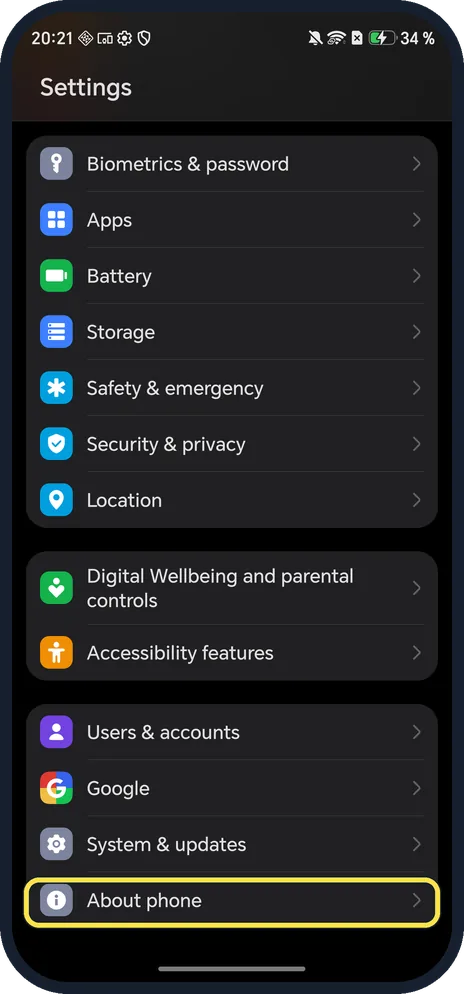
Open About phone
Open Settings and scroll to the bottom.
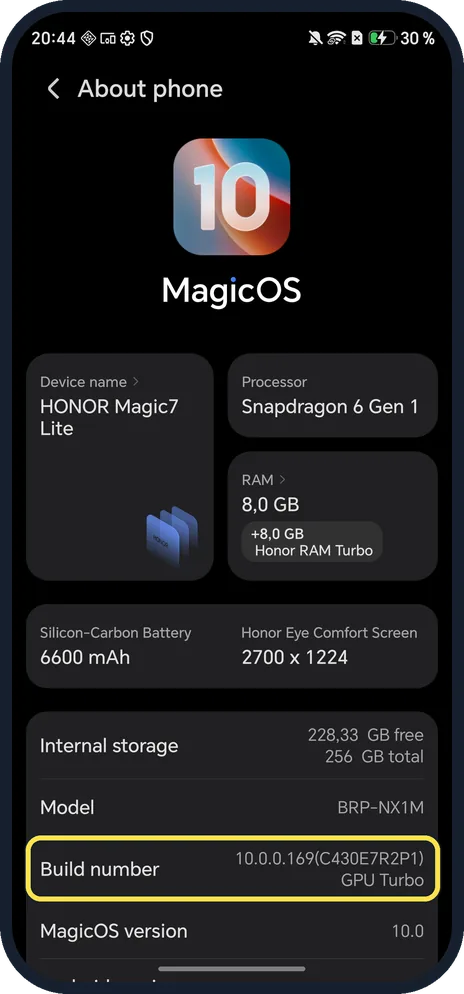
Tap Build number 7 times
Ours showed 10.0.0.169(C430E7R2P1). On Android a countdown message appears as you tap; enter your screen lock if asked.
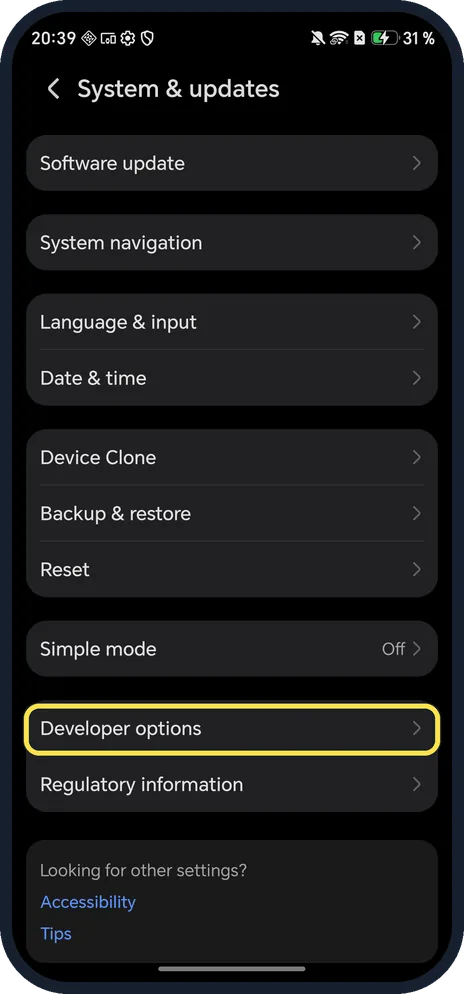
Open System & updates, Developer options
It appears near the bottom, above Regulatory information.
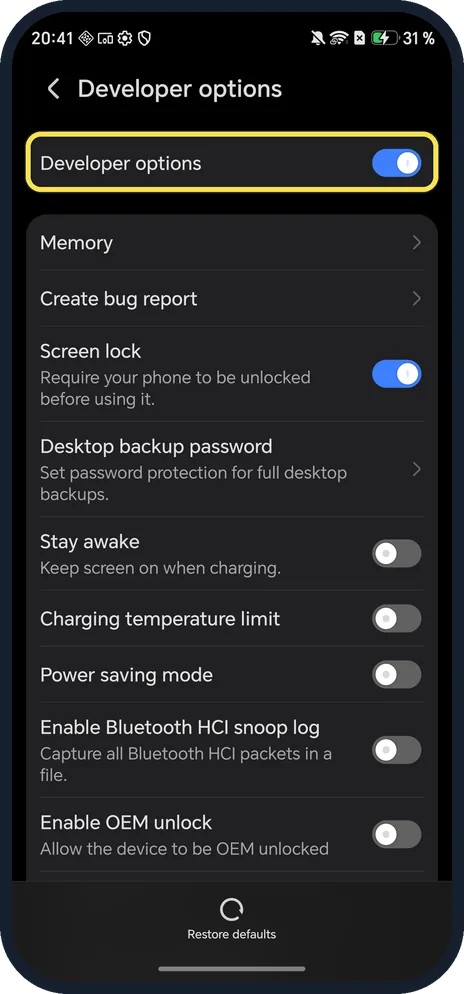
Use the switches you need
The Developer options switch is at the top.
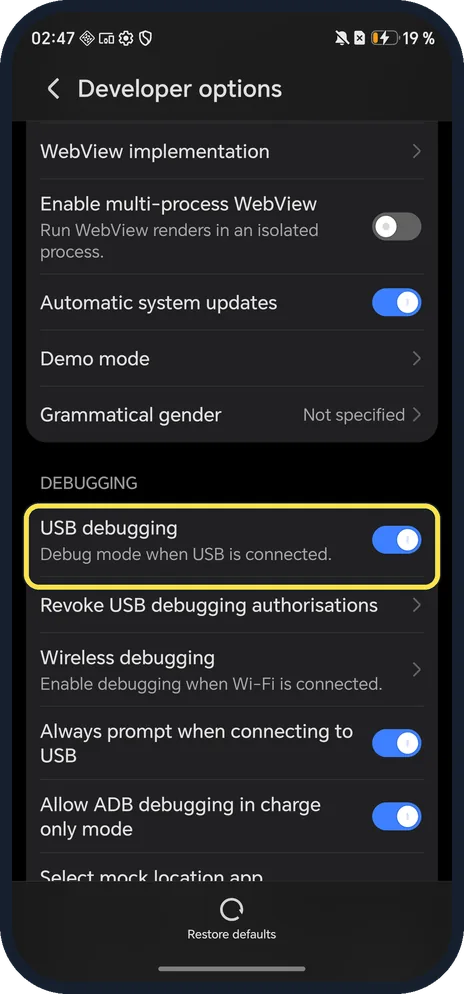
Turn on USB debugging
Scroll down to DEBUGGING. USB debugging was on in ours, with Always prompt when connecting to USB.
If you do not see this option
- No Developer options under System & updates? It only appears after the seven taps. HONOR's steps tap Build number in About phone until you see "You are now a developer!", then find Developer options with the Settings search. Source: The notification panel does not open when I swipe down from the status bar
- No Build number in About phone? Google says where Build number sits varies by maker. On ours it was in About phone, under Model. Source: Configure on-device developer options
- Want it gone again? Turn off the switch at the top of Developer options. Source: Configure on-device developer options
If this does not work
- Asked for a password while tapping? HONOR says to enter the lock screen password if required, then keep going. Source: The notification panel does not open when I swipe down from the status bar
- Computer doesn't see the phone over USB? Unlock the phone and accept the Allow USB debugging prompt; Always prompt when connecting to USB was on in ours. Revoke USB debugging authorisations clears old computers.
- Phone acting strangely? Tap Restore defaults at the bottom of Developer options.
- Unsure about Enable OEM unlock? Leave it off. The row says it allows the device to be OEM unlocked; USB debugging works without it. It was off on ours.
About this guide
You need Developer options for USB debugging, for example to connect the phone to a computer with adb.
The screenshots are from our HONOR Magic7 Lite, the European model BRP-NX1M, with MagicOS 10.0 and Android 16 (build 10.0.0.169(C430E7R2P1)), in Dark mode. Developer options was already on; we changed nothing in it.
Good to know
To check the exact build first, find your HONOR model and MagicOS version.
To keep the phone current, update an HONOR phone.
In short: Settings, About phone, tap Build number 7 times; then System & updates, Developer options.
- HONOR Support: The notification panel does not open when I swipe down from the status bar
- Android Developers: Configure on-device developer options
Links checked in October 2026. Menus and features can change after software updates. These steps match the version named at the top.
Did this guide work for you?
Sorry about that. What happened?