
What changed: steps that look different now show our own iPhone 14 Pro on iOS 27.0.1, with the wording checked against that screen.
howtosimply.com/guides/how-to-turn-off-personalised-ads-from-apple-on-an-iphone/ · Checked October 2026 · iPhone 14 Pro · iOS 27.0.1
In this guide
Open Settings, tap Privacy & Security, scroll down and tap Apple Advertising. Switch off Personalised Ads (Apple's US article spells it Personalized Ads). You still see the same number of ads in the App Store, Apple News and Stocks, but they are no longer chosen from what Apple knows about you.
2 of 4 steps with real screenshots · 1 official source below
- Device
- iPhone
- Shown on
- iOS 27.0.1 (iPhone 14 Pro)
- App
- Settings
- Path
- Settings › Privacy & Security › Apple Advertising
- Real screenshots
- 2 of 4 steps
- Checked
- October 2026
- Sources
- 1 official, linked below
Step by step
Open Settings and tap Privacy & Security
Scroll down in Settings to find it, below Screen Time.
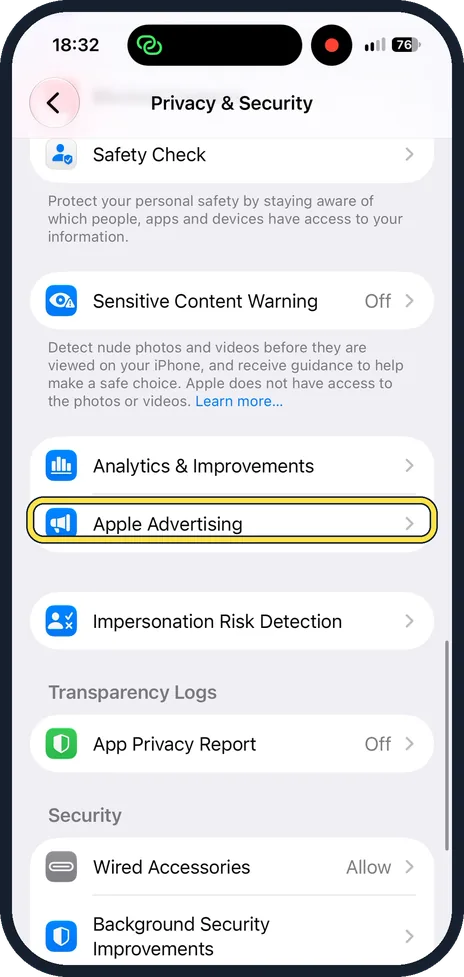
Scroll down and tap Apple Advertising
On iOS 27 it is right below Analytics & Improvements.
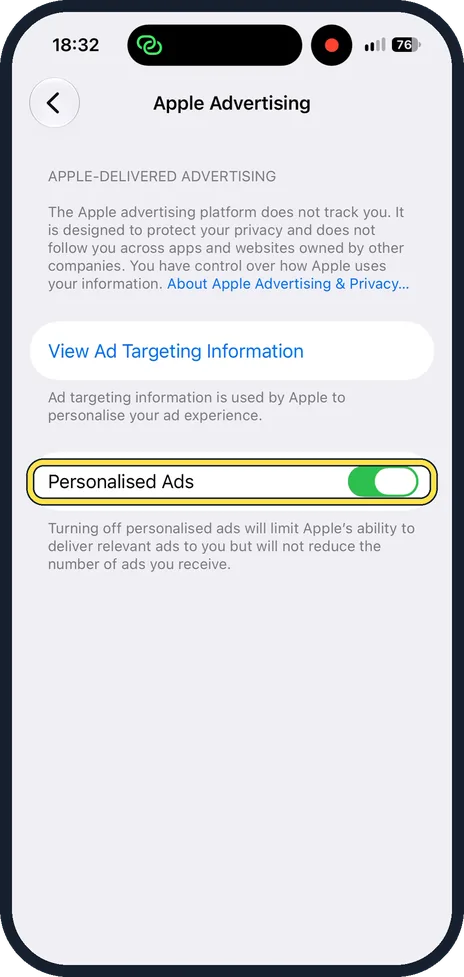
Turn off Personalised Ads
On our iPhone it was on. The note under it reads: "Turning off personalised ads will limit Apple's ability to deliver relevant ads to you but will not reduce the number of ads you receive." Tap it so it turns grey.
See what Apple uses about you
Tap View Ad Targeting Information. It lists the details Apple uses to choose ads for you.
What changed: steps that look different now show our own iPhone 14 Pro on iOS 27.0.1, with the wording checked against that screen.
About this guide
Apple shows its own ads in three places: the App Store, Apple News and Stocks. By default it may choose them from information about your account and what you download. One switch stops that. Apple says turning it off may not reduce the number of ads, only how well they fit you.
Good to know
To stop ads based on where you are: open Settings, Privacy & Security, Location Services, tap App Store or News and choose Never.
This switch covers only Apple's own ads. Tracking by other companies' apps is a separate setting: how to stop apps from tracking you on iPhone.
The analytics that Apple collects about the device are switched off one row above: how to stop sharing analytics with Apple on an iPhone.
In short: Settings, Privacy & Security, Apple Advertising, Personalized Ads off.
Links checked in October 2026. Menus and features can change after software updates. These steps match the version named at the top.
Did this guide work for you?
Sorry about that. What happened?